const chart = new Chart();

chart.addLine("my line", [[0,0], [1,1]])
     .addLine([[0,1], [1,0]], {color: "red"});
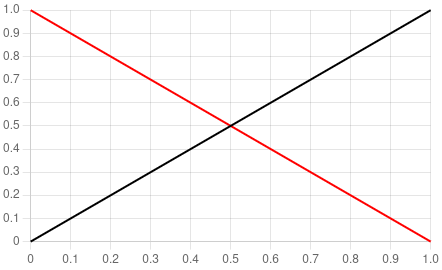
Graphs are aggregations of components (datasets, scales, etc) you can add or remove:
chart.addX(...): add a componentXto the graph.chart.createX(...): idemaddXbut returns the created component.chart.append(c): add the componentcto the graph (will be removed from its previous parent).chart.import(c): add the componentcto the graph (in reality a cloned reference).chart.getComponent(name): returns the component namedname.chart.getComponentNames(): returns the names of the graph's components.
Components are usually created with the following arguments: ([name,][data,...][opts]). They have the following properties:
c.name: the component name.c.parent: the component parent (usually the graph).c.remove(): remove the component from its parent.c.clone(): clone the component.c.cloneRef(): clone the component reference.
Some components has properties you can manipulate:
c.propertiesc.getProperty(name)c.setProperty(name, value)c.setProperties(props)c.resetProperties(name): set the property to its default value.
ChartJS++ is compatible with signals (you may need to use an adapter).
// the component to update
const compo = new HLine();

// a trivial implementation of signals.
const dataSignal = new TrivialSignal<number>();

const hline = updateFromSignals(
  compo,      // the target component.
  dataSignal, // the signal(s) to listen.
  (properties, data) => { // the update function.
    properties.data = data;
  }
);

// use import if you want to use it inside several graphs.
graph.append(hline);

dataSignal.value = 0;
setInterval( () => ++dataSignal.value, 1000);Enables to configure the zoom/pan of the graph:
graph.setZoom(dir): dir is either"x","y","xy",false.graph.resetZoom()
You can add tooltip to your graph thanks to the DefaultTooltipSystem. You'll need to also specify the tooltip label on your datasets.
| Property | Type | Default |
|---|---|---|
direction |
"x"|"y"\"xy" |
xy |
title |
string|null|(items: TooltipItem[]) => string|null |
null |
You can add datalabels to your graph thanks to the DefaultDatalabelSystem. You'll need to also specify the datalabel on your datasets.
Represents data shown in your graph (e.g. line, histogram, etc).
| Property | Type | Default |
|---|---|---|
color |
string |
"black" |
type |
string |
"scatter" |
data |
{x: number, y:number}[]|[number,number][]|number[] |
[] |
x |
string |
"x" |
y |
string |
"y" |
tooltip |
string|null|(item: TooltipItem) => string|null |
null |
datalabel |
string|null|(value, context) => string|null |
null |
monotone |
boolean |
false |
Represents a set of points.
| Property | Type | Default |
|---|---|---|
type |
"scatter" |
"scatter" |
Represents a bar. Works better with a category scale.
| Property | Type | Default |
|---|---|---|
type |
"bar" |
"bar" |
reversed |
boolean |
false |
Represents a curve/line.
| Property | Type | Default |
|---|---|---|
type |
"scatter" |
"scatter" |
showPoints |
boolean |
false |
Represents a vertical/horizontal line.
| Property | Type | Default |
|---|---|---|
data |
number|null |
null |
Represents a scale. If labels are given, behave as a category scale.
| Property | Type | Default |
|---|---|---|
name |
string |
required |
pos |
"auto""|"left"|"right"|"top"|"bottom" |
"auto" |
display |
boolean |
true |
min |
null|number |
null |
max |
null|number |
null |
labels |
null|string[] |
null |
const canvas = document.querySelector("canvas");

const chart = new Chart(canvas);

// configure graph here.const chart = new Chart();
// configure graph here.
// add the graph to the page :
document.body.append( chart.canvas );// use https://github.com/Automattic/node-canvas/
// npm install canvas.
import {Canvas} from "canvas";
const canvas = new Canvas(W,H);
const chart = new Chart(canvas);
// configure graph here.
// In CLI mode (Deno, Node, Bun), changes made after initialization
// requires an explicit call to .update().
chart.update();
// save the graph as a png file.
await Deno.writeFile("chart.png", await canvas.toBuffer());You can very easily create your own components with :
createComponentClass(descriptor).derive(parent, extra_descriptor): create a component from another.override(parent, extra_descriptor): create a component from another with incompatible properties.
⚠ It is not recommended to inherit from a component as it'll very likely won't be respecting Liskov principle.
The component descriptor has the following fields:
name: the component name (used to addcreate${name}()andadd${name}()methods to the graphs).properties: Record<string,any>: the default value for the component properties (also used to get the properties type).onInsert: (chart, internals) => void: add the component to the graph.onRemove: (chart, internals) => void: remove the component from the graph.onUpdate: (properties, internals) => void: update the component when the properties change.createInternalData: () => I: how to create the component internals.
For example:
const MyDataset = createComponentClass({
    name      : "MyDataset",
    properties: {
        data : [] as [number, number][],
    },
    createInternalData() {
        return {
            dataset : {
              type: "scatter"
            } as ChartDataset<"scatter">,
        }
    },
    onInsert(chart, internals) {
        chart.data.datasets.push(internals.dataset);
    },
    onRemove(chart, internals) {
        const datasets = chart.data.datasets;
        const idx = datasets.indexOf(internals.dataset);
        if( idx !== -1) datasets.splice(idx, 1);
    },
    onUpdate(properties, internals) {
        internals.dataset.data = properties.data
    },
});
You can then derive it:
const MyColoredDataset = derive(MyDataset, {
    name      : "MyColoredDataset",
    properties: {
      color: "red"
    },
    onUpdate(properties, internals) {
        internals.dataset.color = properties.color;
        MyDataset.descriptor.onUpdate(properties, internals);
    },
});In reality components are often a reference (ComponentRef) pointing to a shared internal data (ComponentInstance). Then, .cloneRef() clones the component while sharing the same internal data. Whereas .clone() also clones the internal data.
This means that a component and its cloneRef() clone can be viewed as the same component. Any change to one will be applied to the other.
ChartJS++ has an intelligent update strategy to prevent useless computations:
- A
requestUpdate()is triggered (e.g. a property has changed). - If an update has already been triggered, do nothing.
- Else, request an update to each of the chart depending on the component.
- A chart will start updating at some point, and will try to update its components.
- If the component has already been updated, do nothing.
- Else, call the
onUpdate()method.
npm run buildnpm run build-prodnpm run watch
dts-bundle-generator -o ./dist/dev/libs/ChartJS/index.d.ts src/libs/ChartJS/index.ts
https://github.com/timocov/dts-bundle-generator
- npm-dts : not for bundled files.
- npm-dts-webpack-plugin : not for multiple entries.