Editing page properties
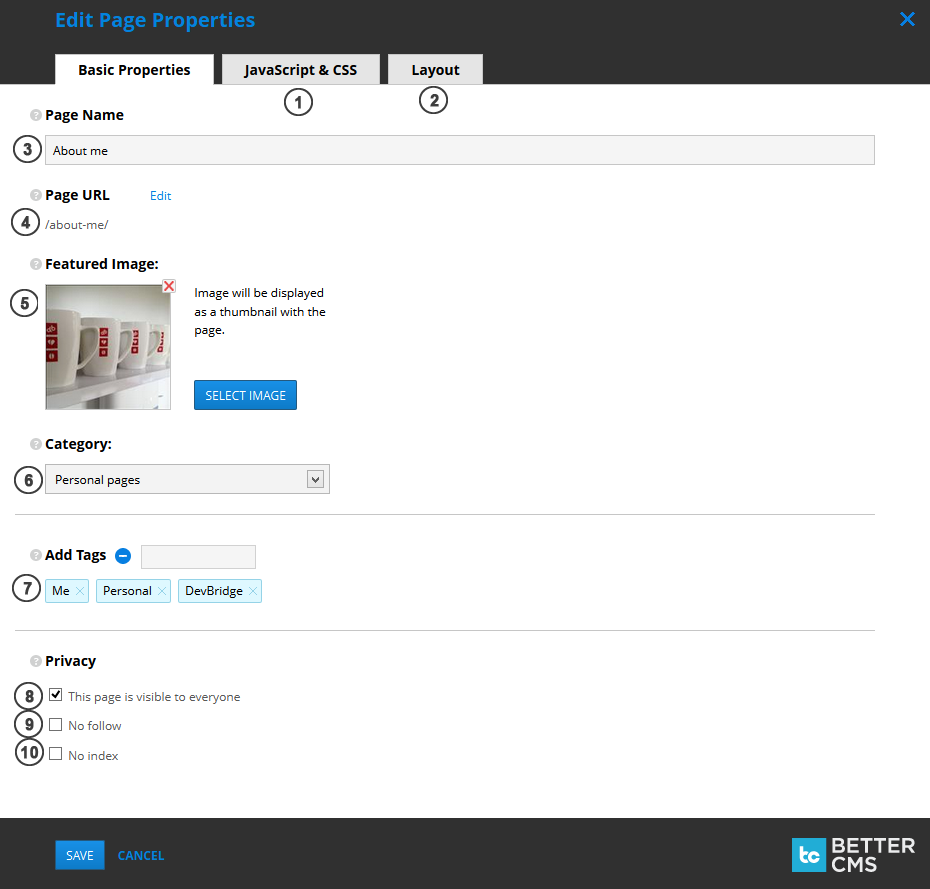
- JavaScript & CSS. Add custom page CSS and custom page JavaScript in the second tab.
- Layout. Select layout from existing layouts list (they can be managed in Site Settings -> Layouts) in the third tab.
- Page name. Page title, describing the page.
-
Page URL. Can be edited by pressing
Editlink. NOTE: cannot contain spaces and special symbols: \ # ? - __ Featured image__. Can be shown as thumbnail, describing a page.
- Category. Choose page category, which best describes your page. Categories can be managed in Site Settings -> Categories.
- Tags. Add / remove tags, to provide accurate and detailed data on your page.
- This page is visible to everyone. If unchecked, page will be private (visible only to authenticated users).
- No follow. If checked, instructs some search engines that a hyperlink should not influence the link target's ranking in the search engine's index.
- No index. If checked, automated internet bots avoid indexing a web page.