Editing page properties
For editing page properties, press Edit Page Properties in side menu. Here you can change main page information, such as title, URL, image, category, tags, custom CSS, custom JavaScript, layout and other:
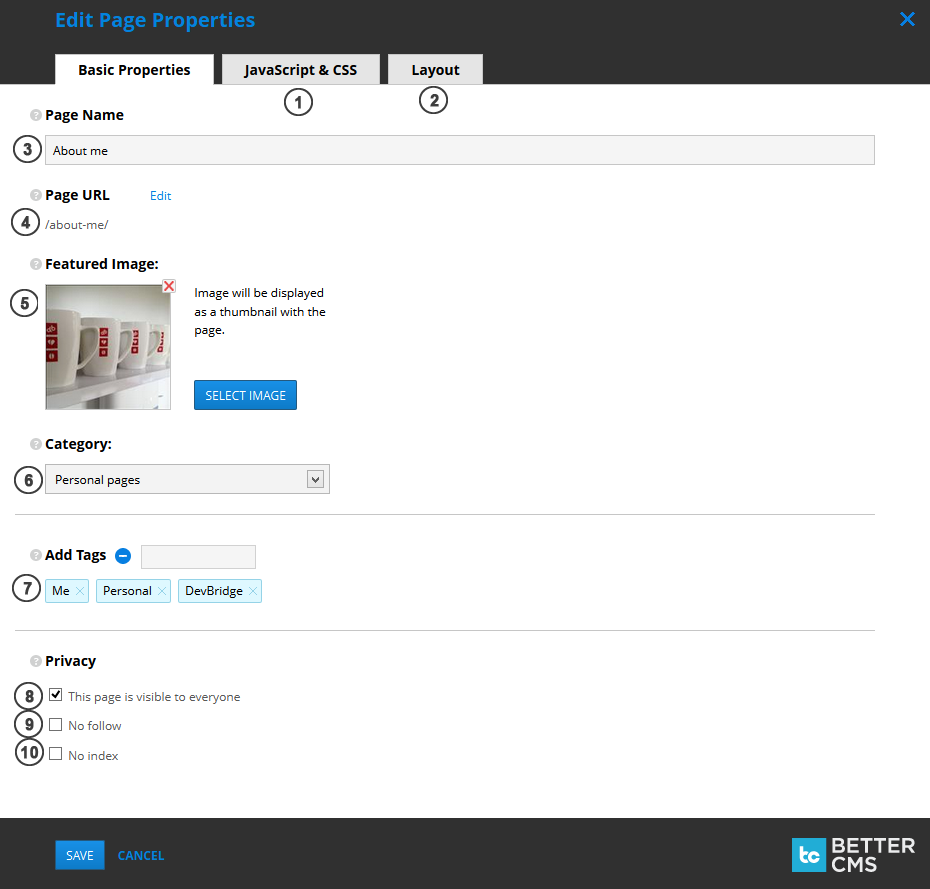
- JavaScript & CSS. Add custom page CSS and custom page JavaScript in the second tab.
- Layout. Select layout from existing layouts list (they can be managed in Site Settings -> Layouts) in the third tab.
- Page name. Page title, describing the page.
-
Page URL. Can be edited by pressing
Editlink. NOTE: cannot contain spaces and special symbols: \ # ? - __ Featured image__. Can be shown as thumbnail, describing a page.
- Category. Choose page category, which best describes your page. Categories can be managed in Site Settings -> Categories.
- Tags. Add / remove tags, to provide accurate and detailed data on your page.
- This page is visible to everyone. If unchecked, page will be private (visible only to authenticated users).
- No follow. If checked, instructs some search engines that a hyperlink should not influence the link target's ranking in the search engine's index.
- No index. If checked, automated internet bots avoid indexing a web page.