1.2.2 (10/23/2018)
LLDebugTool supports component-based now. Now you can integrate only one or more modules into your own Debug debugger. You can directly use the view controller contained in each module, or just call the functions in Function folder and build UI yourself.
How to use components, see WikiUse Components or Adding LLDebugTool to your project.
More changes can be viewed in Version 1.2.2 Project.
- Update
LLWindow.mand make[UIApplication sharedApplication].delegate.windowbecome key window whenLLWindowbecome key window.
1.2.1 (10/10/2018)
LLDebugTool supports component-based now. Now you can integrate only one or more modules into your own Debug debugger. You can directly use the view controller contained in each module, or just call the functions in Function folder and build UI yourself.
How to use components, see WikiUse Components or Adding LLDebugTool to your project.
More changes can be viewed in Version 1.2.1 Project.
- Update
LLFilterEventView.mand add a default averageCount to fix FilterView showing incomplete questions.
1.2.0 (09/22/2018)
LLDebugTool supports component-based now. Now you can integrate only one or more modules into your own Debug debugger. You can directly use the view controller contained in each module, or just call the functions in Function folder and build UI yourself.
How to use components, see WikiUse Components or Adding LLDebugTool to your project.
More changes can be viewed in Version 1.2.0 Project.
- Add
LLRoute, In order to solve mutual reference between components. When the relevant components exist,LLRoutewill call the corresponding method, otherwise it will not do anything.
-
Update folder structure. Now the whole project is classified according to the components, Under each component folder, it is divided into
FunctionandUserInterface. -
Modify files referenced between components instead of
LLRoute. -
Update
NSURLSessionConfiguration.mto hook protocolClasses method.
1.1.7 (09/14/2018)
Support Swift now, More swift usage informations see LLDebugToolSwift.
LLDebugToolSwift is a swift component for LLDebugTool, It provide the LLog swift class that used to log function in swift.
More changes can be viewed in Version 1.1.7 Project.
- Add
LLog.swift, In order to solveLLDebugToolMacroscan't work in swift.
- Update
LLCrashHelper, nowLLDebugToolcan crash signal correct.
1.1.6 (08/31/2018)
If you use versions between 1.1.3 and 1.1.5, you are strongly recommended to upgrade to 1.1.6.
More changes can be viewed in Version 1.1.6 Project.
- Update
LLCrashHelper, save a crash model must be synchronous.
1.1.5 (08/29/2018)
Add a options LLConfigAvailableFeature in LLConfig used to control whether to enable LLDebugTool one of function module, now you can dynamically start/stop a module. More changes can be viewed in Version 1.1.5 Project.
- Add a options
LLConfigAvailableFeatureinLLConfigused to control whether to enableLLDebugToolone of function module, now you can dynamically start/stop a module. - Add enumeration values
LLConfigLogFileFuncDescandLLConfigLogFileDescinLLConfigLogStyle.
- Update
LLAppHelperandLLConfig, Cleaner code. - Update
LLConfig, now you can dynamic changecolorStyleandwindowStylein running, See demo for more effects. - Update
LLSubTitleTableViewCellto fix UITextView bug under ios 8.
- Update demo file, It looks more comfortable now.
1.1.4 (08/27/2018)
Now you can check your network request traffic, although it is not very accurate. Other some known problems have been fixed. More changes can be viewed in Project 1.1.4.
- Add data traffic function, details can see
LLNetworkModel.m.
- Update the constraints in all XIB files, remove constraint warnings from the console.
- Use
UITextViewreplaceUILabelinLLSubTitleTableViewCell, used to solve the problem thatUILabeldoes not show when there is too much data, such as 1000 lines. - Use
MIMETYPEto judge the type of a network response. - Update
LLAppHelper.h, expose more interfaces. - Update
LLStorageManager, rewritten SQL statements.
- Now we can display GIF images.
- Fix some bugs.
1.1.3 (08/16/2018)
Fix some bugs operation in database. It looks more friendlier now, you can watch model's description in Mac software. Someday, LLLogHelper will be separated into an online event-tracking tool used in release environment.
The new version will delete the old version of the table in database, if you need the old data, please upgrade when you don't need it.
- Add UnitTests and UITests, Even now there's nothing.
- Refactory
LLStorageManagerto make sure it will work well in synchronous and asynchronous or main thread and child thread. DEPRECATEDsome method inLLStorageManager,LLToolandLLAppHelper, More infomations please seeLLStorageManager.h,LLTool.handLLAppHelper.h.- Add a enumeration values in
LLConfigto controlLLLogHelper's log style.
1.1.2 (08/09/2018)
Some time suspension ball is too big, so you can put LLDebugTool on power bar or network bar now. It can work like a suspension ball, just can't move.

- Add window style enum. now you can show as suspension ball , power bar or network bar.
- Add some
LLDebugToolevent log, you can close it inLLConfig. - Add
LLNetworkFilterView, now you can filter network with url, header, body or response.
- Update
LLURLProtocolto fix some untrusted HTTP requests that fail. - Update
LLBaseViewControllerto deal some bugs when project use runtime to change default settings. - Update
LLStorageManagerto ensure that database operations are not performed in the main thread. - Rename
LLFilterViewtoLLLogFilterView.
- Remove
LLFilterLevelView, useLLFilterEventViewto replace.
- Adapter iPhone SE
1.1.1 (07/27/2018)
Fix crash when use use_frameworks! in CocoaPods. (Failed resource loading)
- Add
LLLogHelperEventDefine.hto define and record LLDebugTool system event.
- Use method
[UIImage LL_imageNamed:]to replace method[UIImage imageNamed], to solve image resource loading failed. - Use
[LLConfig sharedConfig].XIBBundleto register XIB file, to solve crash when useuse_frameworks!inCocoaPods.
1.1.0 (06/07/2018)
Increases the need to the permissions of the album, but it is not necessary, if the project has the authority, save will be synchronized to photo album, if the project doesn't have the permission, is saved into the sandbox alone, LLDebugTool will not actively apply for album permissions.
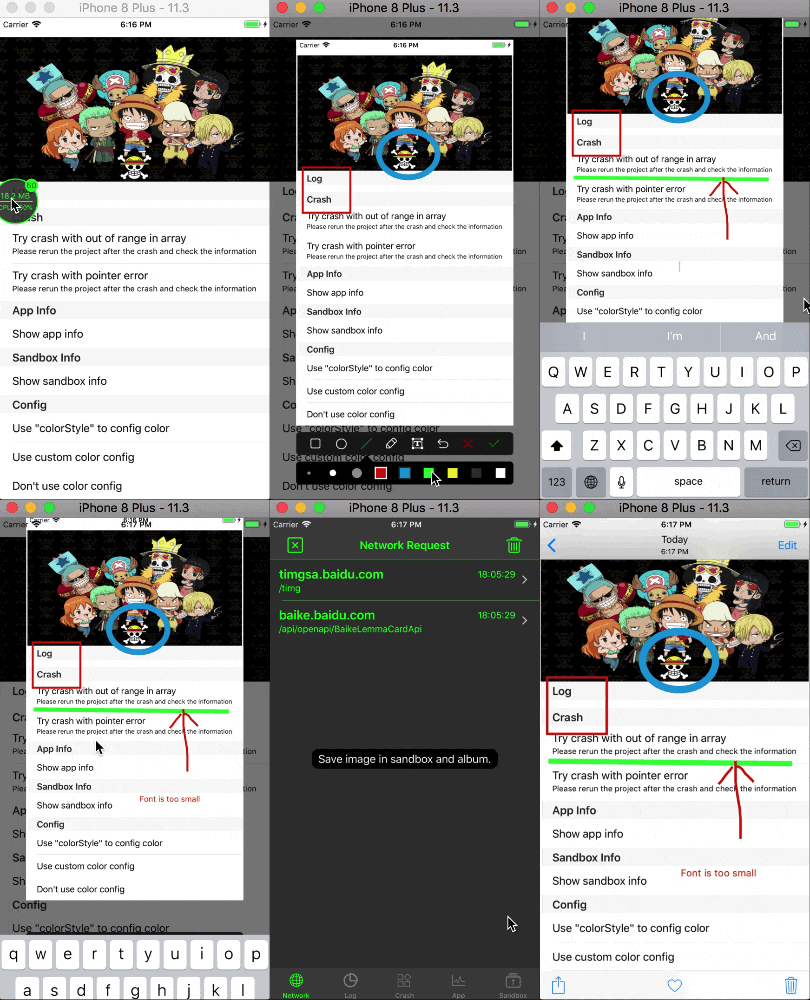
- Add
LLScreenshotHelperinHelperfolder, used to control screenshot. - Add
LLScreenshotViewfolder inUserInterface/Othersfolder, used to show and draw screenshot. - Add
LLDebugToolMacros.h, used to manage public macros.
- Update
LLBaseNavigationControllerandLLBaseViewControllerto repair toolbar's frame is wrong when hiding tabbar. - Update
LLAppHelperto fix iPhone X getting network status error. - Remove
LLogmacros inLLDebugTool.hand moved toLLDebugToolMacros.h
- Update demo for saving screenshots to photo albums when screenshots are taken.
1.0.3 (05/31/2018)
Fix some leaks.
- Call
CFReleaseinLLAppHelper. - Resolve circular references caused by the
NSURLSessionDelegateinLLURLProtocol. - Call
FreeinLLBaseModel. - Fix analyze warning in
LLBaseViewController/LLFilterOtherView. - Uncoupled code in
LLTool/LLNetworkContentVC.
- Add
NetTool(Use URLSession in a singleton.) and updateViewController(Fix a circular reference.)
1.0.2 (05/21/2018)
- Fix the side gesture recognizer bug when pop.
1.0.1 (05/12/2018)
- Support iOS8+.
1.0.0 (05/09/2018)
- Initial release version.
- Contains the following functions: * Monitoring network requests. * Save and view log information. * Crash information collection. * Monitoring app properties. * Operation of sandbox file.