Writing an Action
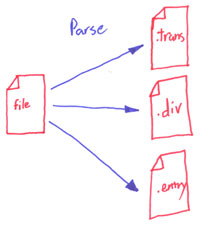
Each parser creates a VidSkim::Transcript object from an input file and sets the @transcript object. After it’s done a VidSkim::Compiler creates an expanded directory with .trans, .div and .entry files.
Each VidSkim::Parser in the Video Skimmer parser/ directory must define a load method that takes an input file and set the @transcript instance variable. For example, here is the load method from the edl parser:
  def load(file)
    list = EDL::Parser.new(fps=30).parse(File.open(file))
    @transcript = VidSkim::Transcript.new({})
    @transcript.title = File.basename(file)
    @transcript.divisions["Transcript"] = VidSkim::Transcript::Division.new("Transcript")

    list.each do |evt|
      entry = VidSkim::Transcript::Entry.new
      entry.title = evt.clip_name
      clip_start = evt.rec_start_tc
      clip_end = evt.rec_end_tc
      entry.range = ["#{clip_start.hours}:#{clip_start.minutes}:#{clip_start.seconds}",
                      "#{clip_end.hours}:#{clip_end.minutes}:#{clip_end.seconds}"]
      @transcript.divisions["Transcript"].entries << entry
    end
  end
The load method first creates a VidSkim::Transcript object and stores it in @transcript:
@transcript = VidSkim::Transcript.new({})
Then it creates a VidSkim::Transcript::Division to hold each entry:
@transcript.divisions["Transcript"] =
       VidSkim::Transcript::Division.new("Transcript")
And finally it creates and pushes each entry, in this case edit, into the @Division@’s entry array:
@transcript.divisions["Transcript"].entries << entry
The key is to not set anything you don’t know ahead of time (e.g. the youtube id), the VidSkim::Compiler will provide clear defaults.
Once your parser is complete, save it in the Video Skimmer parser/ directory and give it a name that matches the class (e.g. class WordParser would be saved in word_parser.rb), and run it with:
>> vidskim ~/video-skimmer -p word_parser -f input_file.doc
and you’ll see a directory under videos/ called vid_skim_title/ containing the expanded files, and you can start in on Production