The following figure shows the workflow of how clients send and receive peer-to-peer messages:
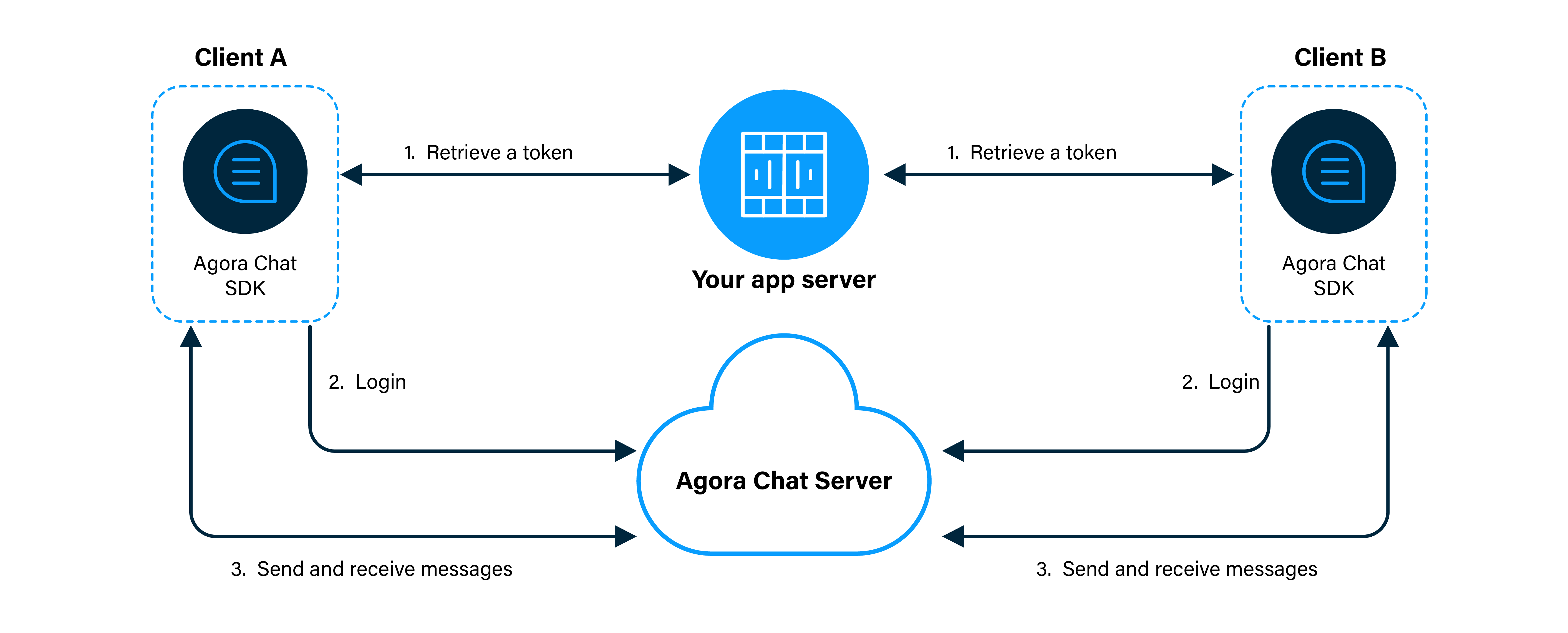
- Clients retrieve a token from your app server.
- Client A and Client B log in to Agora Chat.
- Client A sends a message to Client B. The message is sent to the Agora Chat server and the server delivers the message to Client B. When Client B receives the message, the SDK triggers an event. Client B listens for the event and gets the message.
For the iOS platform, your development environment must meet the following requirements:
- Flutter 2.10 or later
- Dart 2.16 or later
- macOS
- Xcode 12.4 or later with Xcode Command Line Tools
- CocoaPods
- An iOS simulator or a real iOS device running iOS 10.0 or later
For the Android platform, your development environment must meet the following requirements:
- Flutter 2.10 or later
- Dart 2.16 or later
- macOS or Windows
- Android Studio 4.0 or later with JDK 1.8 or later
- An Android simulator or a real Android device running Android SDK API level 21 or later
flutter doctor command to check whether both the development environment and the deployment environment are correct.This section describes how to register a user at Agora Console and generate a temporary token.
To generate a user ID, do the following:
- On the Project Management page, click Config for the project you want to use.
- On the Edit Project page, click Config next to Chat below Features.
- In the left-navigation pane, select Operation Management > User and click Create User.
- In the Create User dialog box, fill in the User ID, Nickname, and Password, and click Save to create a user.
To ensure communication security, Agora recommends using tokens to authenticate users logging in to an Agora Chat system.
For testing purposes, Agora Console supports generating Agora chat tokens. To generate an Agora chat token, do the following:
- On the Project Management page, click Config for the project you want to use.
- On the Edit Project page, click Config next to Chat below Features.
- In the Data Center section of the Application Information page, enter the user ID in the Chat User Temp Token box and click Generate to generate a token with user privileges.
Used to demonstrate agora_chat_uikit, contains chat, session list page.
- Set up ChatConfig, fill in your appkey and login account and agoraToken information.
- Clone this project to local.
- open
example. - run
flutter pub get; - If you want to use your own App Key for the experience, you can edit the
example/lib/main.dartfile.
Replaces appKey, userId, and agoraToken and with your own App Key, user ID, and user token generated in Agora Console.
class ChatConfig {
  static const String appKey = "";
  static const String userId = "";
  static const String agoraToken = '';
}
See Enable and Configure Agora Chat Service to learn how to enable and configure Agora Chat Service.
Refer to the source code Chat App Server to learn how to quickly build an App Server.
- Make the project and run the app in the simulator or connected physical Android or iOS device.
You are all set! Feel free to play with this sample project and explore features of the Agora Chat UIKit.
The sample projects are under the MIT license.