IBus candidate window is not present #2529

Description

What Happened?
When choosing "Chinese (Intelligent Pinyin)" under System Settings - Keyboard - Input Method, I see Chinese characters appear when writing in pinyin.
However, the candidate box that allows me to choose a specific character or character combination does not show up at any point (something similar to this is expected but does not appear: https://jorelle.fi/img/pinyin_input.webp ; the image and website are not by me. They shall only serve as an illustration)
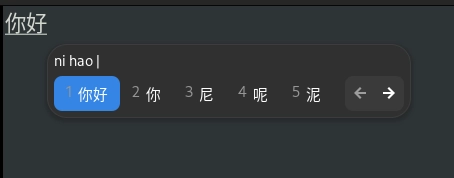
Additionally, the property panel does not always show, despite the selection of "Always show" under Input Method.
All above issues remain the same regardless of entering im-config and choosing either "default", "ibus" or "none", including reboot after setting a new configuration.
Sometimes I also get the notification "IBus should be called from the desktop session in Wayland. ...". Resetting/Restarting IBus does not change anything.
With some of the other Chinese input options, not a single Chinese character appears when writing something.
No difference in Classic and Secure Sessions.
I had no trouble writing Chinese under ElementaryOS 7.X. As far as I remember, my main input method was Chinese (Intelligent Pinyin).
Thank you already for any assistance!
Steps to Reproduce
- System Settings - Keyboard - Input Method - Add Engine - Chinese (Intelligent Pinyin)
- Select Chinese (Intelligent Pinyin) as active keyboard layout
- Start writing (Chinese characters appear but no candidate box to select alternatives fitting the pinyin spelling)
Expected Behavior
As explained above.
OS Version
8.x (Circe)
OS Architecture
amd64 (on most hardwares)
Session Type
Secure Session (Wayland)
Software Version
Latest release (I have run all updates)
Log Output
Hardware Info
All my Starlabs laptops. No unconvential setups as far as I am aware.