- Identity & Access Management
- For granting fine-grained access control to resources within a project
- Gives ability to grant fine-grained access control to resources within a project
- Allows compartmentalize access based on workgroups and to manage sensitive resources around individual access needs
- Simplicity
- Enterprise-grade ACL
- Unified view into security policy across entire organization
- Enterprise Identity made easy
- Easily create or sync user accouns across application and Projects
- Easy to provision and manage users and group,set up single sign-on (SSO) and configure Multi-factor authentication directly form your googel admin console
- Right roles
- RR to manage resource permission with minimum fuss and high automation.
- Map job function within ur compaany to group and role
- Granular resource control
- Context aware access
- more Granular ACL to resources based on attributes like device security status, IP address, resource type and date/time.
- Built-in audit trail
- Access control your way
- control permission using a variety of options: graphically from the cloud platform console,programatically via cloud IAM, or using the gcloud CLI
- GCP offers Cloud IAM , let you manage access control by defining WHO (identity) has WHAT access (role) for WHICH resource
- lets user adopt the security principle of least priviledge, so user grant only the necessary access to user resouce.
- This model for access management has three main parts
- Member
- Role
- Policy

user grant access to members
- Google account
- For developer, admins or any person with google ID
- Service account
- That belongs to your application instead of an individual end user
- Google Group
- Collection of Google accounts ands service accounts
- Every group has unique email address
- G Suite Domain
- Represent a virtual group of all google account that have been created in an organization’s account
- Cloud Identity domain
- Its like G suite account but dont have access of G Suite application & features
- all AuthenticatedUsers
- Special identifier that represents anyone who is authenticated with a Google account or a service account
- Un-auth users are not not included
- allUsers
- Anyone who is on the internet including auth & un-auth users
When an authenticated user attempted to access resource, cloud IAM checks Resource’s IAM policy to determine whether action is allowed.
- Resources
- User can grant access to user for GCP resource.
- Compute Engine Instance, storage
- Permisision
- Determine what operations are allowed on resource.
- Represented as ..
- pubsub.subscriptions.consume
- A role is collections of permission.
- Cant be assigned to user directly
-
Primitive roles
- Roles historically available in GCP console
- Like Owner, editor , Browser and viewer
-
**Predefined **
- Give fine-grained access control than primitive roles.
- Pub/sub publisher (roles/pubsub.publisher) provides access to only publish message to cloud pub/sub topic
-
Custom role
- Roles that you create to tailor permission to the needs of your organization
- Grant roles to users by creating a cloud IAM policy(collection of statements taht define who has what type of access)
- A policy is attached to a resource and is used to enforce access control whenever that resource is accessed .
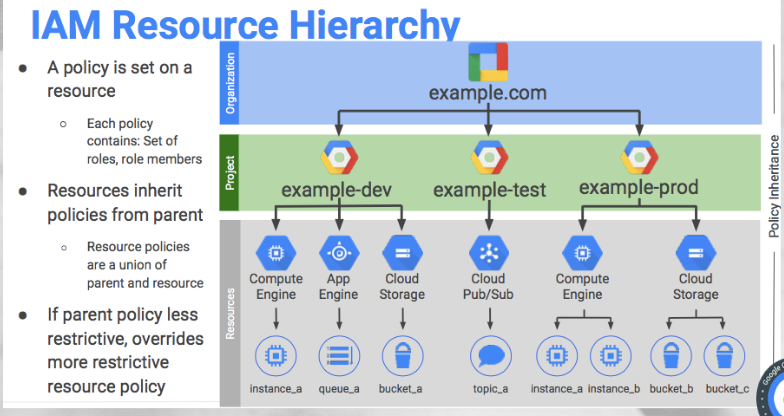
- GCP resources are organized hierarchically, where the organization node is the root node
- Projects are the children of the organization

- The policy is set on a resource
- Each policy contains, set of roles, role member
- Resource inherit policies from parents
- Resource policies are a union of parent and resource
- If parent policy less restrictive, it overrides more restrictive resource policy