<TabItems> Renders Anything But Text as a Code Block? #5500


-
|
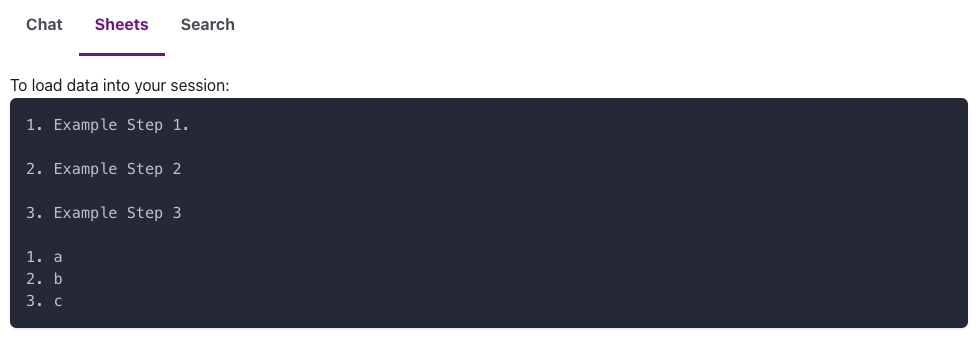
Hi, Do Here is the MDX: <Tabs groupId="views">
<TabItem value="chat" label="Chat" default>
You can load data from a file you've uploaded by entering Load data from the file file name.
</TabItem>
<TabItem value="sheets" label="Sheets">
To load data into your session:
1. Example Step 1.
2. Example Step 2
3. Example Step 3
1. a
2. b
3. c
</TabItem>
<TabItem value="search" label="Search">
This is a banana
</TabItem>
</Tabs>Is there a way to have the Markdown render as it does outside of the |
Beta Was this translation helpful? Give feedback.
Replies: 1 comment 2 replies

-
|
You shouldn't have indented your text. Per Markdown spec, any indented text blocks become code blocks, and JSX-interleaved syntax is not exempted from this. <Tabs groupId="views">
<TabItem value="chat" label="Chat" default>
You can load data from a file you've uploaded by entering Load data from the file file name.
</TabItem>
<TabItem value="sheets" label="Sheets">
To load data into your session:
1. Example Step 1.
2. Example Step 2
3. Example Step 3
1. a
2. b
3. c
</TabItem>
<TabItem value="search" label="Search">
This is a banana
</TabItem>
</Tabs>It looks ugly, I know, but it's the only correct way. Maybe we should document this better? |
Beta Was this translation helpful? Give feedback.

-
|
Thanks, but this fails to compile: |

Beta Was this translation helpful? Give feedback.

-
|
Wow, wasn't expecting that, but it turns out you need one extra line break: <Tabs groupId="views">
<TabItem value="chat" label="Chat" default>
You can load data from a file you've uploaded by entering Load data from the file file name.
</TabItem>
<TabItem value="sheets" label="Sheets">
To load data into your session:
1. Example Step 1.
2. Example Step 2
3. Example Step 3
1. a
2. b
3. c
</TabItem>
<TabItem value="search" label="Search">
This is a banana
</TabItem>
</Tabs> |
Beta Was this translation helpful? Give feedback.


You shouldn't have indented your text. Per Markdown spec, any indented text blocks become code blocks, and JSX-interleaved syntax is not exempted from this.
It looks ugly, I know, but it's the only correct way. Maybe we should document this better?