Developer Guide
If you want to use Eclipse for the development of Context Explorer 2 you need to install m2eclipse and import the project as an "Existing Maven Project". Create the following run configuration in order to make it easy to run the project from within eclipse:
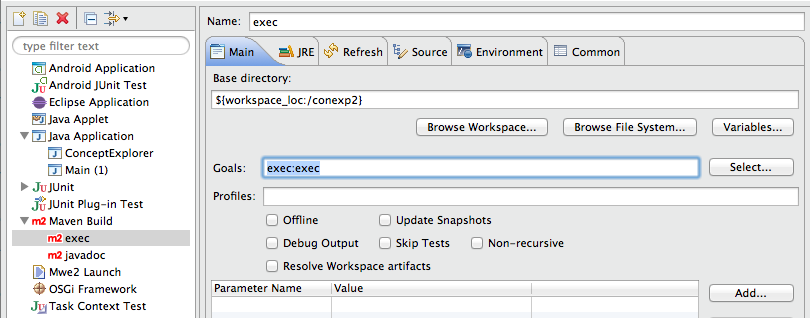
The following Maven commands are available:
-
mvn exec:java: run the project -
mvn javadoc:javadoc: create JavaDocs
- If you encounter the following annoying error "Failed to load class org.slf4j.impl.StaticLoggerBinder" then take a look at this Stackoverflow suggestion (be sure to read stefan.at.wpf's comments).
- In general, you should not use m2eclipse's embedded maven, but your external
- Take a look at http://blog.dub.podval.org/2010/01/maven-in-project-repository.html & http://stackoverflow.com/questions/8223689/maven-project-defined-repository-not-works to learn how to add local jars as dependencies to maven
- Alternative way to import: http://stackoverflow.com/a/8379242
- Java 1.7 is required
TODO
TODO: Link to JavaDocs
TODO
TODO
- Please only spaces no tabs