Developer Guide
This page should provide enough information to get you quickly started with developing for ConExp-NG.
The following Maven commands are available:
-
mvn exec:exec: run the project -
mvn package: create an executable jar intarget -
mvn javadoc:javadoc: create JavaDocs intarget/site/apidocs
- The JavaDocs can currently be found at http://fcatools.github.io/conexp-ng/apidocs.
TODO
TODO
TODO: tut on how to build website, e.g. cloning gh-pages and putting javadocs into /javadocs etc.
- Clone the
gh-pagesbranch:git clone -b gh-pages https://github.com/fcatools/conexp-ng.git conexp-ng.site - The website content is now in the folder
conexp-ng.site. - To update the JavaDocs remove the folder
conexp-ng.site/apidocsand replace it with the folderconexp-ng/target/site/apidocsafter you have runmvn javadoc:javadocinconexp-ng, commit & push.
TODO
- Either fork ConExp-NG and send a pull request or, if you want to work for a longer period of time on ConExp-NG, ask rjoberon if he could make you a collaborator for ConExp-NG
- Please, feel free to contribute. Changes & improvements are welcome.
- Please only spaces no tabs
You need to install m2eclipse and import the project as an "Existing Maven Project". Create the following run configuration in order to make it easy to run the project from within eclipse:
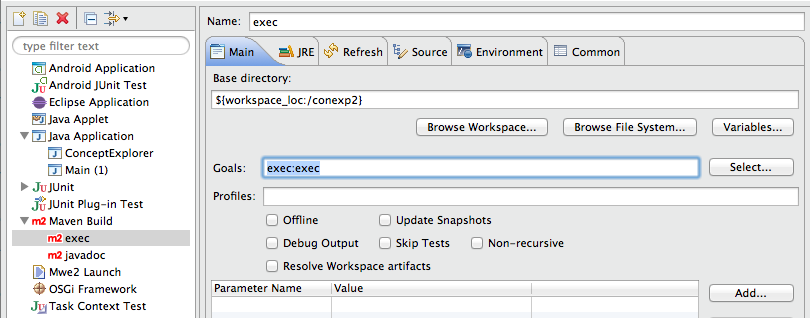
If you encounter the following annoying error "Failed to load class org.slf4j.impl.StaticLoggerBinder" then take a look at this Stackoverflow suggestion (be sure to read stefan.at.wpf's comments). In general, you should not use m2eclipse's embedded maven. Instead, you should use your normal Maven installation.
You can also use IntelliJ IDEA as an alternative which has built-in Maven support.
- Take a look at http://blog.dub.podval.org/2010/01/maven-in-project-repository.html & http://stackoverflow.com/questions/8223689/maven-project-defined-repository-not-works to learn how to add local jars as dependencies to maven
- Alternative way to import: http://stackoverflow.com/a/8379242
- Java 1.7 is required