Implement Windows 11 style context menu #6346

Description

What's the Problem?
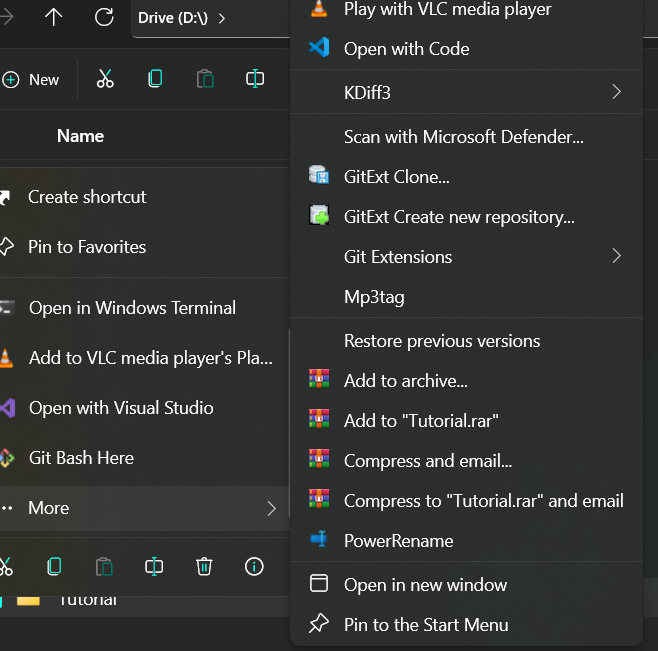
Currently all the App related shortcuts are listed under the main context menu which makes the Context UI menu very cluttered.
Solution/Idea
Multiple applications register shortcuts to the context menu. Any application can add one or multiple shortcuts to the context menu.
For Windows 11, Microsoft recommends clubbing all the shortcuts under a submenu, and in the main context menu, the application name is displayed. Currently, OneDrive is the only application that supports this kind of behavior and is listed under the main context menu.

in #3 and #4 what I mean is if we can have a context menu that can intelligently club all the shortcuts into a submenu would be better. Instead of having to click on More and then accessing the shortcuts, what can be done is just have one Context menu and list all the applications which register context menu shortcut(s). And then hovering/clicking the Application name in the context menu should give us all the related shortcuts for that application.
For example, KDiff supports multiple context menu shortcuts, it lists them inside a submenu, which is what we want so we will put it into the main context menu. But then Git Extensions doesn't do that so the Files app will intelligently group them, and in the main context menu, we shall have Git Extensions with a submenu with all the shortcuts just like KDiff or OneDrive.
This is a sample context menu for the same:
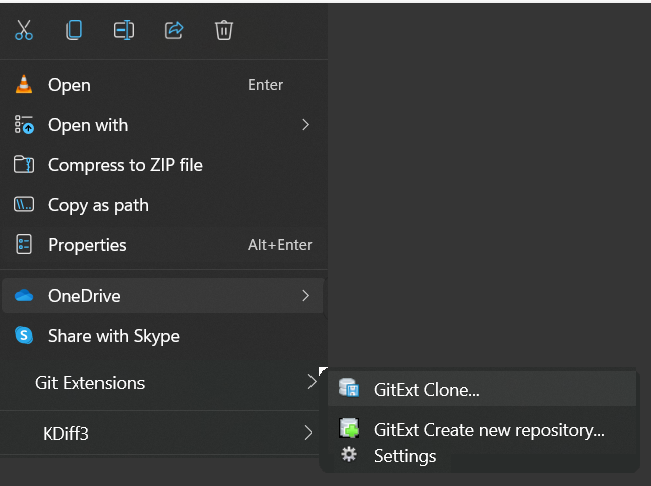
In the end, we would have a very simple yet powerful context menu.
Alternatives
Alternatively, we can keep using the Cluttered Version
Priorities
| Capability | Priority |
|---|---|
| App which adds file related context menus, those app names should be listed | Must |
| App-specific context menus should be listed under the app name | Should |
Files Version
2.0.13.0
Windows Version
Windows 11 21H2 10.0.22000.194
Additional comment
No response