This repository provides a simple template for a Spring REST API that includes user authentication using JWT, a pre-configured local database, and an OpenAPI documentation. The template is based on the repository from user bezkoder.
- Appropriate Flow for User Login and Registration with JWT
- Spring Boot Rest Api Architecture with Spring Security
- How to configure Spring Security to work with JWT
- How to define Data Models and association for Authentication and Authorization
- Way to use Spring Data JPA to interact with MySQL Database
- Springdoc JWT configuration for the OpenAPI documentation

Can be visited via: http://localhost:8080/swagger-ui/index.html in your browser.

Can be visited via: http://localhost:8080/h2-console in your browser.
- Saved Settings: Generic H2 (Embedded)
- Setting Name: Generic H2 (Embedded)
- Driver Class: org.h2.Driver
- JDBC URL: jdbc:h2:mem:testdb
- Username: sa
- Password:
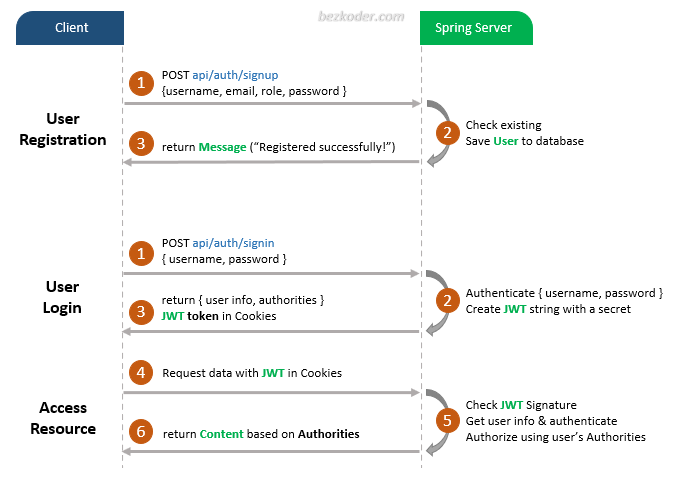
You can have an overview of our Spring Boot Server with the diagram below:
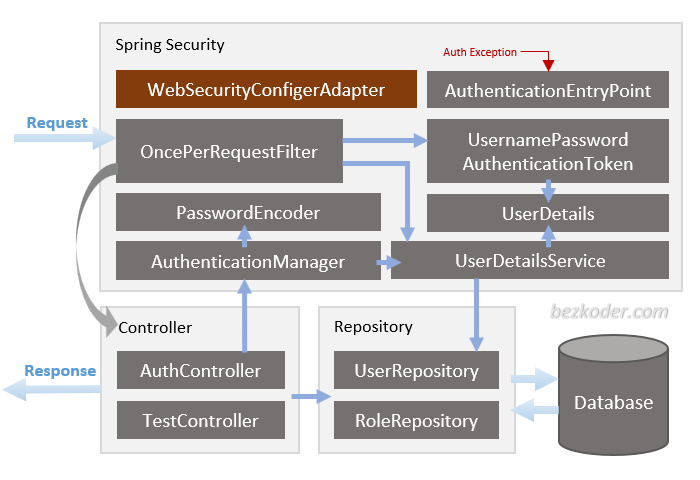
For more detail, please visit:
– If you want to use PostgreSQL:
<dependency>
  <groupId>org.postgresql</groupId>
  <artifactId>postgresql</artifactId>
  <scope>runtime</scope>
</dependency>
– or MySQL:
<dependency>
  <groupId>mysql</groupId>
  <artifactId>mysql-connector-java</artifactId>
  <scope>runtime</scope>
</dependency>Open src/main/resources/application.properties
- For PostgreSQL:
spring.datasource.url= jdbc:postgresql://localhost:5432/testdb
spring.datasource.username= postgres
spring.datasource.password= 123

spring.jpa.properties.hibernate.jdbc.lob.non_contextual_creation= true
spring.jpa.properties.hibernate.dialect= org.hibernate.dialect.PostgreSQLDialect

# Hibernate ddl auto (create, create-drop, validate, update)
spring.jpa.hibernate.ddl-auto= update

# App Properties
bezkoder.app.jwtSecret= bezKoderSecretKey
bezkoder.app.jwtExpirationMs= 86400000
- For MySQL
spring.datasource.url= jdbc:mysql://localhost:3306/testdb?useSSL=false
spring.datasource.username= root
spring.datasource.password= 123456

spring.jpa.properties.hibernate.dialect= org.hibernate.dialect.MySQL5InnoDBDialect
spring.jpa.hibernate.ddl-auto= update

# App Properties
bezkoder.app.jwtSecret= bezKoderSecretKey
bezkoder.app.jwtExpirationMs= 86400000
mvn spring-boot:run
These will be automatically run if you are using h2. See the init script data.sql
INSERT INTO roles(name) VALUES('ROLE_USER');
INSERT INTO roles(name) VALUES('ROLE_MODERATOR');
INSERT INTO roles(name) VALUES('ROLE_ADMIN');
Spring Boot Refresh Token with JWT example
Exception handling: @RestControllerAdvice example in Spring Boot
Associations:
Deployment:
Run both Back-end & Front-end in one place: