forked from FIWARE/tutorials.Big-Data-Flink
-
Notifications
You must be signed in to change notification settings - Fork 1
Expand file tree
/
Copy pathFIWARE Real-time Processing (Flink).postman_collection.json
More file actions
273 lines (273 loc) · 32.7 KB
/
FIWARE Real-time Processing (Flink).postman_collection.json
File metadata and controls
273 lines (273 loc) · 32.7 KB
1
2
3
4
5
6
7
8
9
10
11
12
13
14
15
16
17
18
19
20
21
22
23
24
25
26
27
28
29
30
31
32
33
34
35
36
37
38
39
40
41
42
43
44
45
46
47
48
49
50
51
52
53
54
55
56
57
58
59
60
61
62
63
64
65
66
67
68
69
70
71
72
73
74
75
76
77
78
79
80
81
82
83
84
85
86
87
88
89
90
91
92
93
94
95
96
97
98
99
100
101
102
103
104
105
106
107
108
109
110
111
112
113
114
115
116
117
118
119
120
121
122
123
124
125
126
127
128
129
130
131
132
133
134
135
136
137
138
139
140
141
142
143
144
145
146
147
148
149
150
151
152
153
154
155
156
157
158
159
160
161
162
163
164
165
166
167
168
169
170
171
172
173
174
175
176
177
178
179
180
181
182
183
184
185
186
187
188
189
190
191
192
193
194
195
196
197
198
199
200
201
202
203
204
205
206
207
208
209
210
211
212
213
214
215
216
217
218
219
220
221
222
223
224
225
226
227
228
229
230
231
232
233
234
235
236
237
238
239
240
241
242
243
244
245
246
247
248
249
250
251
252
253
254
255
256
257
258
259
260
261
262
263
264
265
266
267
268
269
270
271
272
273
{
"info": {
"_postman_id": "97dd54fb-6a22-436d-9f28-95e1e9fdb7e4",
"name": "FIWARE Real-time Processing (Flink)",
"description": "[](https://github.com/FIWARE/catalogue/blob/master/processing/README.md)\n\nThis tutorial is an introduction to the [FIWARE Cosmos Orion Flink Connector](http://fiware-cosmos-flink.rtfd.io), which\nfacilitates Big Data analysis of context data, through an integration with [Apache Flink](https://flink.apache.org/),\none of the most popular Big Data platforms. Apache Flink is a framework and distributed processing engine for stateful\ncomputations both over unbounded and bounded data streams. Flink has been designed to run in all common cluster\nenvironments, perform computations at in-memory speed and at any scale.\n\nThe tutorial uses [cUrl](https://ec.haxx.se/) commands throughout, but is also available as\n[Postman documentation](https://fiware.github.io/tutorials.Big-Data-Flink/)\n\nThe `docker-compose` files for this tutorial can be found on GitHub: \n\n [https://github.com/FIWARE/tutorials.Big-Data-Flink](https://github.com/FIWARE/tutorials.Big-Data-Flink)\n\n\n# Real-time Processing and Big Data Analysis\n\n> \"Who controls the past controls the future: who controls the present controls the past.\"\n>\n> — George Orwell. \"1984\" (1949)\n\nSmart solutions based on FIWARE are architecturally designed around microservices. They are therefore are designed to\nscale-up from simple applications (such as the Supermarket tutorial) through to city-wide installations base on a large\narray of IoT sensors and other context data providers.\n\nThe massive amount of data involved enventually becomes too much for a single machine to analyse, process and store, and\ntherefore the work must be delegated to additional distributed services. These distributed systems form the basis of\nso-called **Big Data Analysis**. The distribution of tasks allows developers to be able to extract insights\nfrom huge data sets which would be too complex to be dealt with using traditional methods. and uncover hidden patterns\nand correlations.\n\nAs we have seen, context data is core to any Smart Solution, and the Context Broker is able to monitor changes of state\nand raise [subscription events](https://github.com/Fiware/tutorials.Subscriptions) as the context changes. For smaller\ninstallations, each subscription event can be processed one-by-one by a single receiving endpoint, however as the system\ngrows, another technique will be required to avoid overwhelming the listener, potentially blocking resources and missing\nupdates.\n\n**Apache Flink** is a Java/Scala based stream-processing framework which enables the delegation of data-flow processes.\nTherefore additional computational resources can be called upon to deal with data as events arrive. The **Cosmos Flink**\nconnector allows developers write custom business logic to listen for context data subscription events and then process\nthe flow of the context data. Flink is able to delegate these actions to other workers where they will be acted upon\neither in sequentiallly or in parallel as required. The data flow processing itself can be arbitrarily complex.\n\nObviously in reality our existing Supermarket scenario is far too small to require the use of a Big Data solution, but\nwill serve as a basis for demonstrating the type of real-time processing which may be required in a larger solution\nwhich is processing a continous stream of context-data events.\n\n# Architecture\n\nThis application builds on the components and dummy IoT devices created in\n[previous tutorials](https://github.com/FIWARE/tutorials.IoT-Agent/). It will make use of three FIWARE components - the\n[Orion Context Broker](https://fiware-orion.readthedocs.io/en/latest/), the\n[IoT Agent for Ultralight 2.0](https://fiware-iotagent-ul.readthedocs.io/en/latest/), and the\n[Cosmos Orion Flink Connector](https://fiware-cosmos-flink.readthedocs.io/en/latest/) for connecting Orion to an\n[Apache Flink cluster](https://ci.apache.org/projects/flink/flink-docs-stable/concepts/runtime.html). The Flink cluster\nitself will consist of a single **JobManager** _master_ to coordinate execution and a single **TaskManager** _worker_ to\nexecute the tasks.\n\nBoth the Orion Context Broker and the IoT Agent rely on open source [MongoDB](https://www.mongodb.com/) technology to\nkeep persistence of the information they hold. We will also be using the dummy IoT devices created in the\n[previous tutorial](https://github.com/FIWARE/tutorials.IoT-Agent/).\n\nTherefore the overall architecture will consist of the following elements:\n\n- Two **FIWARE Generic Enablers** as independent microservices:\n - The FIWARE [Orion Context Broker](https://fiware-orion.readthedocs.io/en/latest/) which will receive requests\n using [NGSI](https://fiware.github.io/specifications/OpenAPI/ngsiv2)\n - The FIWARE [IoT Agent for Ultralight 2.0](https://fiware-iotagent-ul.readthedocs.io/en/latest/) which will\n receive northbound measurements from the dummy IoT devices in\n [Ultralight 2.0](https://fiware-iotagent-ul.readthedocs.io/en/latest/usermanual/index.html#user-programmers-manual)\n format and convert them to [NGSI](https://fiware.github.io/specifications/OpenAPI/ngsiv2) requests for the\n context broker to alter the state of the context entities\n- An [Apache Flink cluster](https://ci.apache.org/projects/flink/flink-docs-stable/concepts/runtime.html) consisting of a single **JobManager** and a single **TaskManager**\n - The FIWARE [Cosmos Orion Flink Connector](https://fiware-cosmos-flink.readthedocs.io/en/latest/) will be deployed as part of the dataflow which will\n subscribe to context changes and make operations on them in real-time\n- One [MongoDB](https://www.mongodb.com/) **database** :\n - Used by the **Orion Context Broker** to hold context data information such as data entities, subscriptions\n and registrations\n - Used by the **IoT Agent** to hold device information such as device URLs and Keys\n- Three **Context Providers**:\n - A webserver acting as set of [dummy IoT devices](https://github.com/FIWARE/tutorials.IoT-Sensors) using the\n [Ultralight 2.0](https://fiware-iotagent-ul.readthedocs.io/en/latest/usermanual/index.html#user-programmers-manual)\n protocol running over HTTP.\n - The **Stock Management Frontend** is not used in this tutorial. It does the following:\n - Display store information and allow users to interact with the dummy IoT devices\n - Show which products can be bought at each store\n - Allow users to \"buy\" products and reduce the stock count.\n - The **Context Provider NGSI** proxy is not used in this tutorial. It does the following:\n - receive requests using [NGSI](https://fiware.github.io/specifications/OpenAPI/ngsiv2)\n - makes requests to publicly available data sources using their own APIs in a proprietary format\n - returns context data back to the Orion Context Broker in\n [NGSI](https://fiware.github.io/specifications/OpenAPI/ngsiv2) format.\n\nThe overall architecture can be seen below:\n\n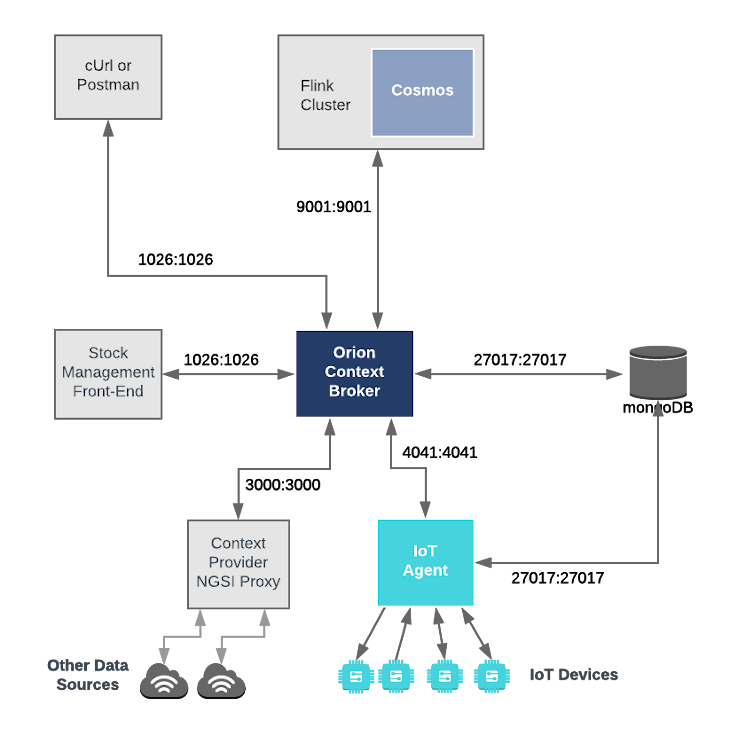\n\nSince all interactions between the elements are initiated by HTTP requests, the entities can be containerized and run\nfrom exposed ports.\n\nThe configuration information of the Apache Flink cluster can be seen in the `jobmanager` and `taskmanager` sections of\nthe associated `docker-compose.yml` file:\n\n## Flink Cluster Configuration\n\n```yaml\njobmanager:\n image: flink:1.9.0-scala_2.11\n hostname: jobmanager\n container_name: flink-jobmanager\n expose:\n - \"8081\"\n - \"9001\"\n ports:\n - \"6123:6123\"\n - \"8081:8081\"\n - \"9001:9001\"\n command: jobmanager\n environment:\n - JOB_MANAGER_RPC_ADDRESS=jobmanager\n```\n\n```yaml\ntaskmanager:\n image: flink:1.9.0-scala_2.11\n hostname: taskmanager\n container_name: flink-taskmanager\n ports:\n - \"6121:6121\"\n - \"6122:6122\"\n depends_on:\n - jobmanager\n command: taskmanager\n links:\n - \"jobmanager:jobmanager\"\n environment:\n - JOB_MANAGER_RPC_ADDRESS=jobmanager\n```\n\nThe `jobmanager` container is listening on three ports:\n\n- Port `8081` is exposed so we can see the web front-end of the Apache Flink Dashobard\n- Port `9001` is exposed so that the installation can recieve context data subscriptions\n- Port `6123` is the standard **JobManager** RPC port, used for internal communications\n\nThe `taskmanager` container is listening on two ports:\n\n- Ports `6121` and `6122` are used and RPC ports by the **TaskManager**, used for internal communications\n\nThe containers within the flink cluster are driven by a single environment variable as shown:\n\n| Key | Value | Description |\n| ----------------------- | ------------ | --------------------------------------------------------------------- |\n| JOB_MANAGER_RPC_ADDRESS | `jobmanager` | URL of the _master_ Job Manager which coordinates the task processing |\n\n# Prerequisites\n\n## Docker and Docker Compose\n\nTo keep things simple, all components will be run using [Docker](https://www.docker.com). **Docker** is a container\ntechnology which allows to different components isolated into their respective environments.\n\n- To install Docker on Windows follow the instructions [here](https://docs.docker.com/docker-for-windows/)\n- To install Docker on Mac follow the instructions [here](https://docs.docker.com/docker-for-mac/)\n- To install Docker on Linux follow the instructions [here](https://docs.docker.com/install/)\n\n**Docker Compose** is a tool for defining and running multi-container Docker applications. A series of\n[YAML files](https://github.com/FIWARE/tutorials.Big-Data-Flink/tree/master/docker-compose) are used to configure the\nrequired services for the application. This means all container services can be brought up in a single command. Docker\nCompose is installed by default as part of Docker for Windows and Docker for Mac, however Linux users will need to\nfollow the instructions found [here](https://docs.docker.com/compose/install/)\n\nYou can check your current **Docker** and **Docker Compose** versions using the following commands:\n\n```console\ndocker-compose -v\ndocker version\n```\n\nPlease ensure that you are using Docker version 18.03 or higher and Docker Compose 1.21 or higher and upgrade if\nnecessary.\n\n## Maven\n\n[Apache Maven](https://maven.apache.org/download.cgi) is a software project management and comprehension tool. Based on\nthe concept of a project object model (POM), Maven can manage a project's build, reporting and documentation from a\ncentral piece of information. We will use Maven to define and download our dependencies and to build and package our\ncode into a JAR file.\n\n## Cygwin for Windows\n\nWe will start up our services using a simple Bash script. Windows users should download [cygwin](http://www.cygwin.com/)\nto provide a command-line functionality similar to a Linux distribution on Windows.\n\n# Start Up\n\nBefore you start, you should ensure that you have obtained or built the necessary Docker images locally. Please clone\nthe repository and create the necessary images by running the commands shown below. Note that you might need to run some\nof the commands as a privileged user:\n\n```console\ngit clone https://github.com/FIWARE/tutorials.Big-Data-Flink.git\ncd tutorials.Big-Data-Flink\n./services create\n```\n\nThis command will also import seed data from the previous tutorials and provision the dummy IoT sensors on startup.\n\nTo start the system, run the following command:\n\n```console\n./services start\n```\n\n> **Note:** If you want to clean up and start over again you can do so with the following command:\n>\n> ```\n> ./services stop\n> ```\n\n# Real-time Processing Operations\n\nDataflow within **Apache Flink** is defined within the\n[Flink documentation](https://ci.apache.org/projects/flink/flink-docs-release-1.9/concepts/programming-model.html) as\nfollows:\n\n> \"The basic building blocks of Flink programs are streams and transformations. Conceptually a stream is a (potentially\n> never-ending) flow of data records, and a transformation is an operation that takes one or more streams as input, and\n> produces one or more output streams as a result.\n>\n> When executed, Flink programs are mapped to streaming dataflows, consisting of streams and transformation operators.\n> Each dataflow starts with one or more sources and ends in one or more sinks. The dataflows resemble arbitrary directed\n> acyclic graphs (DAGs). Although special forms of cycles are permitted via iteration constructs, for the most part this\n> can be glossed over this for simplicity.\"\n\n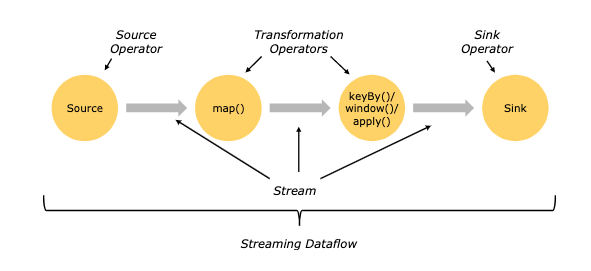\n\nThis means that to create a streaming data flow we must supply the following:\n\n- A mechanism for reading Context data as a **Source Operator**\n- Business logic to define the transform operations\n- A mechanism for pushing Context data back to the context broker as a **Sink Operator**\n\nThe `orion-flink.connect.jar` offers both **Source** and **Sink** operations. It therefore only remains to write the\nnecessary Scala code to connect the streaming dataflow pipeline operations together. The processing code can be complied\ninto a JAR file which can be uploaded to the flink cluster. Two examples will be detailed below, all the source code for\nthis tutorial can be found within the\n[cosmos-examples](https://github.com/FIWARE/tutorials.Big-Data-Flink/tree/master/cosmos-examples) directory.\n\nFurther Flink processing examples can be found on the\n[Apache Flink website](https://ci.apache.org/projects/flink/flink-docs-release-1.9/getting-started)\n\n### Compiling a JAR file for Flink\n\nAn existing `pom.xml` file has been created which holds the necessary prerequisites to build the examples JAR file\n\nIn order to use the Orion Flink Connector we first need to manually install the connector JAR as an artifact using\nMaven:\n\n```console\ncd cosmos-examples\nmvn install:install-file \\\n -Dfile=./orion.flink.connector-1.2.1.jar \\\n -DgroupId=org.fiware.cosmos \\\n -DartifactId=orion.flink.connector \\\n -Dversion=1.2.1 \\\n -Dpackaging=jar\n```\n\nThereafter the source code can be compiled by running the `mvn package` command within the same directory:\n\n```console\ncd cosmos-examples\nmvn package\n```\n\nA new JAR file called `cosmos-examples-1.0.jar` will be created within the `cosmos-examples/target` directory.\n\n### Generating a stream of Context Data\n\nFor the purpose of this tutorial, we must be monitoring a system in which the context is periodically being updated. The\ndummy IoT Sensors can be used to do this. Open the device monitor page at `http://localhost:3000/device/monitor` and\nunlock a **Smart Door** and switch on a **Smart Lamp**. This can be done by selecting an appropriate the command from\nthe drop down list and pressing the `send` button. The stream of measurements coming from the devices can then be seen\non the same page:\n\n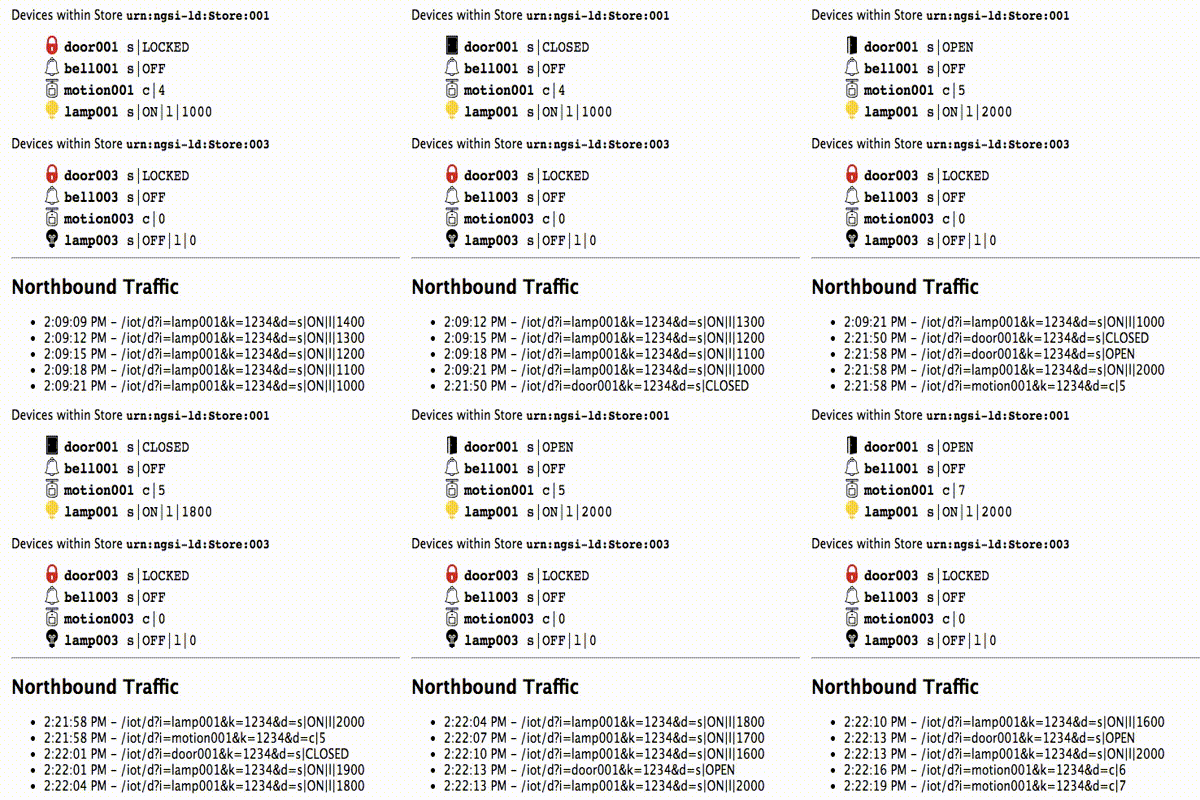",
"schema": "https://schema.getpostman.com/json/collection/v2.1.0/collection.json"
},
"item": [
{
"name": "Receiving context data and performing operations",
"item": [
{
"name": "Orion - Subscribe to Context Changes",
"request": {
"method": "POST",
"header": [
{
"key": "Content-Type",
"value": "application/json"
},
{
"key": "fiware-service",
"value": "openiot"
},
{
"key": "fiware-servicepath",
"value": "/"
}
],
"body": {
"mode": "raw",
"raw": "{\n \"description\": \"Notify Flink of all context changes\",\n \"subject\": {\n \"entities\": [\n {\n \"idPattern\": \".*\"\n }\n ]\n },\n \"notification\": {\n \"http\": {\n \"url\": \"http://taskmanager:9001\"\n }\n }\n}"
},
"url": {
"raw": "http://{{orion}}/v2/subscriptions/",
"protocol": "http",
"host": [
"{{orion}}"
],
"path": [
"v2",
"subscriptions",
""
]
},
"description": "Once a dynamic context system is up and running (execute Example1), we need to inform **Flink** of changes in context.\n\nThis is done by making a POST request to the `/v2/subscription` endpoint of the Orion Context Broker.\n\n- The `fiware-service` and `fiware-servicepath` headers are used to filter the subscription to only listen to\n measurements from the attached IoT Sensors, since they had been provisioned using these settings\n\n- The notification `url` must match the one our Flink program is listening to. Substitute ${MY_IP} for your machine's\n IP address in the docker0 network (must be accessible from the docker container). You can get this IP like so (maybe\n you need to use sudo):\n\n```console\ndocker network inspect bridge --format='{{(index .IPAM.Config 0).Gateway}}'\n```\n\n- The `throttling` value defines the rate that changes are sampled."
},
"response": []
},
{
"name": "Orion - Check Subscription is working",
"request": {
"method": "GET",
"header": [
{
"key": "fiware-service",
"value": "openiot"
},
{
"key": "fiware-servicepath",
"value": "/"
}
],
"url": {
"raw": "http://{{orion}}/v2/subscriptions/",
"protocol": "http",
"host": [
"{{orion}}"
],
"path": [
"v2",
"subscriptions",
""
]
},
"description": "If a subscription has been created, you can check to see if it is firing by making a GET \nrequest to the `/v2/subscriptions` endpoint.\n\nWithin the `notification` section of the response, you can see several additional `attributes` which describe the health of the subscription\n\nIf the criteria of the subscription have been met, `timesSent` should be greater than `0`.\nA zero value would indicate that the `subject` of the subscription is incorrect or the subscription \nhas created with the wrong `fiware-service-path` or `fiware-service` header\n\nThe `lastNotification` should be a recent timestamp - if this is not the case, then the devices\nare not regularly sending data. Remember to unlock the **Smart Door** and switch on the **Smart Lamp**\n\nThe `lastSuccess` should match the `lastNotification` date - if this is not the case \nthen **Draco** is not receiving the subscription properly. Check that the host name\nand port are correct. \n\nFinally, check that the `status` of the subscription is `active` - an expired subscription\nwill not fire."
},
"response": []
}
],
"description": "The first example makes use of the `OrionSource` operator in order to receive notifications from the Orion Context\nBroker. Specifically, the example counts the number notifications that each type of device sends in one minute. You can\nfind the source code of the example in\n[org/fiware/cosmos/tutorial/Logger.scala](https://github.com/FIWARE/tutorials.Big-Data-Analysis/blob/master/cosmos-examples/src/main/scala/org/fiware/cosmos/tutorial/Logger.scala)\n\n### Logger - Installing the JAR\n\nGoto `http://localhost:8081/#/submit`\n\n\n\nSubmit new job\n\n- **Filename:** `cosmos-examples-1.0.jar`\n- **Entry Class:** `org.fiware.cosmos.tutorial.Logger`\n\n### Logger - Checking the Output\n\nLeave the subscription running for **one minute**, then run the following:\n\n```console\ndocker logs flink-taskmanager -f --until=60s > stdout.log 2>stderr.log\ncat stderr.log\n```\n\nAfter creating the subscription, the output on the console will be like the following:\n\n```text\nSensor(Bell,3)\nSensor(Door,4)\nSensor(Lamp,7)\nSensor(Motion,6)\n```\n\n### Logger - Analyzing the Code\n\n```scala\npackage org.fiware.cosmos.tutorial\n\nimport org.apache.flink.streaming.api.scala.{StreamExecutionEnvironment, _}\nimport org.apache.flink.streaming.api.windowing.time.Time\nimport org.fiware.cosmos.orion.flink.connector.{OrionSource}\n\n\nobject Logger{\n\n def main(args: Array[String]): Unit = {\n\n val env = StreamExecutionEnvironment.getExecutionEnvironment\n // Create Orion Source. Receive notifications on port 9001\n val eventStream = env.addSource(new OrionSource(9001))\n\n // Process event stream\n val processedDataStream = eventStream\n .flatMap(event => event.entities)\n .map(entity => new Sensor(entity.`type`,1))\n .keyBy(\"device\")\n .timeWindow(Time.seconds(60))\n .sum(1)\n\n // print the results with a single thread, rather than in parallel\n processedDataStream.print().setParallelism(1)\n env.execute(\"Socket Window NgsiEvent\")\n }\n case class Sensor(device: String, sum: Int)\n}\n```\n\nThe first lines of the program are aimed at importing the necessary dependencies, including the connector. The next step\nis to create an instance of the `OrionSource` using the class provided by the connector and to add it to the environment\nprovided by Flink.\n\nThe `OrionSource` constructor accepts a port number (`9001`) as a parameter. This port is used to listen to the\nsubscription notifications coming from Orion and converted to a `DataStream` of `NgsiEvent` objects. The definition of\nthese objects can be found within the\n[Orion-Flink Connector documentation](https://github.com/ging/fiware-cosmos-orion-flink-connector/blob/master/README.md#orionsource).\n\nThe stream processing consists of five separate steps. The first step (`flatMap()`) is performed in order to put\ntogether the entity objects of all the NGSI Events received in a period of time. Thereafter the code iterates over them\n(with the `map()` operation) and extracts the desired attributes. In this case, we are interested in the sensor `type`\n(`Door`, `Motion`, `Bell` or `Lamp`).\n\nWithin each iteration, we create a custom object with the properties we need: the sensor `type` and the increment of\neach notification. For this purpose, we can define a case class as shown:\n\n```scala\ncase class Sensor(device: String, sum: Int)\n```\n\nTherefter can group the created objects by the type of device (`keyBy(\"device\")`) and perform operations such as\n`timeWindow()` and `sum()` on them.\n\nAfter the processing, the results are output to the console:\n\n```scala\nprocessedDataStream.print().setParallelism(1)\n```",
"event": [
{
"listen": "prerequest",
"script": {
"id": "340df590-5f9d-404d-9309-de603ceda7bd",
"type": "text/javascript",
"exec": [
""
]
}
},
{
"listen": "test",
"script": {
"id": "7c113134-6883-49bc-8d5e-7df243d1da60",
"type": "text/javascript",
"exec": [
""
]
}
}
],
"protocolProfileBehavior": {}
},
{
"name": "Receiving context data, performing operations and persisting context data",
"item": [
{
"name": "Orion - Subscribe to Context Changes",
"request": {
"method": "POST",
"header": [
{
"key": "Content-Type",
"value": "application/json"
},
{
"key": "fiware-service",
"value": "openiot"
},
{
"key": "fiware-servicepath",
"value": "/"
}
],
"body": {
"mode": "raw",
"raw": "{\n \"description\": \"Notify Flink of all motion sensor\",\n \"subject\": {\n \"entities\": [\n {\n \"idPattern\": \"Motion.*\"\n }\n ]\n },\n \"notification\": {\n \"http\": {\n \"url\": \"http://taskmanager:9001\"\n }\n }\n}"
},
"url": {
"raw": "http://{{orion}}/v2/subscriptions/",
"protocol": "http",
"host": [
"{{orion}}"
],
"path": [
"v2",
"subscriptions",
""
]
},
"description": "First we need to delete the subscription we created before (if necesssary):\n\n```console\ncurl -X DELETE 'http://localhost:1026/v2/subscriptions/$subscriptionId' -H 'fiware-service: openiot' -H 'fiware-servicepath: /'\n```\n\nYou can obtain the ID of your subscription by performing a GET request to the `/v2/subscriptions` endpoint.\n\n```console\ncurl -X GET 'http://localhost:1026/v2/subscriptions/' -H 'fiware-service: openiot' -H 'fiware-servicepath: /'\n```\n\nNow we create another subscription that will only trigger a notification when a motion sensor detects movement. Do not\nforget to change $MY_IP to your machine's IP address in the docker0 network as indicated earlier."
},
"response": []
},
{
"name": "Orion - Check Subscription is working",
"request": {
"method": "GET",
"header": [
{
"key": "fiware-service",
"value": "openiot"
},
{
"key": "fiware-servicepath",
"value": "/"
}
],
"url": {
"raw": "http://{{orion}}/v2/subscriptions/",
"protocol": "http",
"host": [
"{{orion}}"
],
"path": [
"v2",
"subscriptions",
""
]
},
"description": "If a subscription has been created, you can check to see if it is firing by making a GET \nrequest to the `/v2/subscriptions` endpoint.\n\nWithin the `notification` section of the response, you can see several additional `attributes` which describe the health of the subscription\n\nIf the criteria of the subscription have been met, `timesSent` should be greater than `0`.\nA zero value would indicate that the `subject` of the subscription is incorrect or the subscription \nhas created with the wrong `fiware-service-path` or `fiware-service` header\n\nThe `lastNotification` should be a recent timestamp - if this is not the case, then the devices\nare not regularly sending data. Remember to unlock the **Smart Door** and switch on the **Smart Lamp**\n\nThe `lastSuccess` should match the `lastNotification` date - if this is not the case \nthen **Draco** is not receiving the subscription properly. Check that the host name\nand port are correct. \n\nFinally, check that the `status` of the subscription is `active` - an expired subscription\nwill not fire."
},
"response": []
},
{
"name": "Orion - Delete Subscription",
"request": {
"method": "DELETE",
"header": [
{
"key": "fiware-service",
"value": "openiot"
},
{
"key": "fiware-servicepath",
"value": "/"
}
],
"body": {
"mode": "raw",
"raw": ""
},
"url": {
"raw": "http://{{orion}}/v2/subscriptions/{{subscriptionId}}",
"protocol": "http",
"host": [
"{{orion}}"
],
"path": [
"v2",
"subscriptions",
"{{subscriptionId}}"
]
},
"description": "If a subscription has been created, you can check to see if it is firing by making a GET \nrequest to the `/v2/subscriptions` endpoint.\n\nWithin the `notification` section of the response, you can see several additional `attributes` which describe the health of the subscription\n\nIf the criteria of the subscription have been met, `timesSent` should be greater than `0`.\nA zero value would indicate that the `subject` of the subscription is incorrect or the subscription \nhas created with the wrong `fiware-service-path` or `fiware-service` header\n\nThe `lastNotification` should be a recent timestamp - if this is not the case, then the devices\nare not regularly sending data. Remember to unlock the **Smart Door** and switch on the **Smart Lamp**\n\nThe `lastSuccess` should match the `lastNotification` date - if this is not the case \nthen **Draco** is not receiving the subscription properly. Check that the host name\nand port are correct. \n\nFinally, check that the `status` of the subscription is `active` - an expired subscription\nwill not fire."
},
"response": []
}
],
"description": "The second example switches on a lamp when its motion sensor detects movement.\n\nThe dataflow stream uses the `OrionSource` operator in order to receive notifications and filters the input to only\nrespond to motion senseors and then uses the `OrionSink` to push processed context back to the Context Broker. You can\nfind the source code of the example in\n[org/fiware/cosmos/tutorial/Feedback.scala](https://github.com/FIWARE/tutorials.Big-Data-Analysis/blob/master/cosmos-examples/src/main/scala/org/fiware/cosmos/tutorial/Feedback.scala)\n\n### Feedback Loop - Installing the JAR\n\nGoto `http://localhost:8081/#/job/running`\n\n\n\nSelect the running job (if any) and click on **Cancel Job**\n\nThereafter goto `http://localhost:8081/#/submit`\n\n\n\nSubmit new job\n\n- **Filename:** `cosmos-examples-1.0.jar`\n- **Entry Class:** `org.fiware.cosmos.tutorial.Feedback`\n\n\n### Feedback Loop - Checking the Output\n\nGo to `http://localhost:3000/device/monitor`\n\nWithin any Store, unlock the door and wait. Once the door opens and the Motion sensor is triggered, the lamp will switch\non directly\n\n### Feedback Loop - Analyzing the Code\n\n```scala\npackage org.fiware.cosmos.tutorial\n\n\nimport org.apache.flink.streaming.api.scala.{StreamExecutionEnvironment, _}\nimport org.apache.flink.streaming.api.windowing.time.Time\nimport org.fiware.cosmos.orion.flink.connector._\n\n\nobject Feedback{\n final val CONTENT_TYPE = ContentType.Plain\n final val METHOD = HTTPMethod.POST\n final val CONTENT = \"{ \\\"on\\\": { \\\"type\\\" : \\\"command\\\", \\\"value\\\" : \\\"\\\" }}\"\n final val HEADERS = Map(\"fiware-service\" -> \"openiot\",\"fiware-servicepath\" -> \"/\",\"Accept\" -> \"*/*\")\n\n def main(args: Array[String]): Unit = {\n val env = StreamExecutionEnvironment.getExecutionEnvironment\n // Create Orion Source. Receive notifications on port 9001\n val eventStream = env.addSource(new OrionSource(9001))\n\n // Process event stream\n val processedDataStream = eventStream\n .flatMap(event => event.entities)\n .filter(entity=>(entity.attrs(\"count\").value == \"1\"))\n .map(entity => new Sensor(entity.id))\n .keyBy(\"id\")\n .timeWindow(Time.seconds(5),Time.seconds(2))\n .min(\"id\")\n\n // print the results with a single thread, rather than in parallel\n processedDataStream.printToErr().setParallelism(1)\n\n val sinkStream = processedDataStream.map(node => {\n new OrionSinkObject(\"urn:ngsi-ld:Lamp\"+ node.id.takeRight(3)+ \"@on\",\"http://${IP}:3001/iot/lamp\"+ node.id.takeRight(3),CONTENT_TYPE,METHOD)\n })\n OrionSink.addSink(sinkStream)\n env.execute(\"Socket Window NgsiEvent\")\n }\n\n case class Sensor(id: String)\n}\n```\n\nAs you can see, the code is similar to the previous example. The main difference is that it writes the processed data\nback in the Context Broker through the **`OrionSink`**.\n\nThe arguments of the **`OrionSinkObject`** are as follows:\n\n- **Message**: `\"{ \\\"on\\\": { \\\"type\\\" : \\\"command\\\", \\\"value\\\" : \\\"\\\" }}\"`. We send 'on' command\n- **URL**: `\"http://localhost:1026/v2/entities/Lamp:\"+node.id.takeRight(3)+\"/attrs\"`. TakeRight(3) gets the number of\n the room, for example '001')\n- **Content Type**: `ContentType.Plain`.\n- **HTTP Method**: `HTTPMethod.POST`.\n- **Headers**: `Map(\"fiware-service\" -> \"openiot\",\"fiware-servicepath\" -> \"/\",\"Accept\" -> \"*/*\")`. Optional parameter.\n We add the headers we need in the HTTP Request. \n",
"event": [
{
"listen": "prerequest",
"script": {
"id": "093c8bac-5e67-4852-a214-dacd0578033c",
"type": "text/javascript",
"exec": [
""
]
}
},
{
"listen": "test",
"script": {
"id": "8a3942e9-594e-4623-8d61-f4439b5b0de0",
"type": "text/javascript",
"exec": [
""
]
}
}
],
"protocolProfileBehavior": {}
}
],
"event": [
{
"listen": "prerequest",
"script": {
"id": "aa3ebb0d-a1ad-46e3-aaa1-ae23e9d10750",
"type": "text/javascript",
"exec": [
""
]
}
},
{
"listen": "test",
"script": {
"id": "79a12b20-92c5-46fc-9020-9497b0a40350",
"type": "text/javascript",
"exec": [
""
]
}
}
],
"variable": [
{
"id": "11956fc8-74cc-4d11-b96f-1937adbd401d",
"key": "orion",
"value": "localhost:1026"
},
{
"id": "b3e20dd0-541e-4c86-8465-0c293b11be53",
"key": "subscriptionId",
"value": "5e134a0c924f6d7d27b63844"
}
],
"protocolProfileBehavior": {}
}