Key Concepts
This page describes user-visible concepts presented throughout Ground. Implementation details are out of the scope of this page; diagrams and definitions are conceptual, and may exclude details present in actual designs and code.
In Ground, all data and configuration is associated with a project. Projects consists of one or more layers, which in turn contain features visible on a map. Depending on each layer's configuration, contributors may be tasked with providing observations about each feature by completing a custom form defined by a project manager.
In a nutshell, the main hierarchy of entities or "things" is as follows:
See diagram below for a more detailed representation.
A ludicrously oversimplified example
Project: "Local area survey"
  Layer 1: "Households"
    Form Layout: [Year: Number, Income: Number]
    Feature 1: "Jane Doe's house", 39.585,-70.155
      Observation 1: [Year: 2010, Income: 123456]
      Observation 2: [Year: 2016, Income: 234567]
    Feature 2: "Bill Smith's house", 39.584,-70.156
      Observation 1: [Year: 2011, Income: 223311]
  Layer 2: "Local businesses"
    Form Layout: [Year: Number, Revenue: Number, Corp: C|S]
    Feature 1: "Acme Hardware Store", 39.562,-70.156
      Observation 1: [Year: 2011, Revenue: 9223119, Corp: "C"]
    Feature 2: "Foobar Widgets, Inc.", 39.581,-70.216
      Observation 1: [Year: 2012, Revenue: 82820000, Corp: "S"]
      Observation 2: [Year: 2013, Revenue: 85910000, Corp: "S"]
A data collection project, consisting of a map with a title, description, sharing options, configuration, and the other entities described here.
A layer is a collection of vector map features (points, lines, and polygons) shown on the map. They are created and managed by managers of the project. Managers may perform the following operations with a layer:
- Import a set of "predefined" features bulk when setting up the project.
- Specify whether contributors may also add points, lines, and/or polygons.
- Define the default style (marker and color) to be used when features are added by contributors or imported by managers.
Layers were previously referred to as feature types and may still appear as such in code and older prototype database instances. In practice, the two are still synonymous, but their usage is expected diverge over time due to their slightly different definitions and scopes.
For each layer, managers may also design a form to be used by contributors for providing observations about features in the associated layer. For example, a manager could create a layer called "Trees", in which case each point feature in that layer would represent a tree. If data collectors are also expected to collect data about trees, the manager could define a custom form to collect biophysical data (tree species, width, height, age, etc.). Contributors would then use that form to collect data about those trees. For each tree (i.e., feature in the "Trees" layer), the form can be completed any number times (multiple observations added to each feature), as would be the case for periodic remeasurement or crowd-sourcing, for example.
Point, lines, or polygons in a layer, e.g. “Household @ location X,Y”, “Forest plot 145-876”. Each includes a geometry (location, shape) and zero or more observations. Features may be added to a layer by contributors collecting data and/or imported in advance by project managers depending on the type of project.
Data about a particular feature, gathered by contributors using the form provided by the project manager.
Observations were previously referred to as Records. This may still exist in some code and documentation; the two are synonymous.
The following roles are defined per project unless otherwise stated.
The original creator of a project. Project owners are automatically also considered managers.
Note: Features and observations are also assigned an owner upon creation. Omitting here for simplicity.
Managers can access all project configuration and sharing options for a specific project, as well contribute data to a project like contributors.
Depending on the layer configuration specified by project managers, contributors may add features to existing map layers, and/or they may add observations to existing features.
Contributors are not allowed to see or edit the project configuration (layers, forms, sharing, etc.). Only managers can determine whether contributors may add new features and/or observations.
Contributors may modify features and observations they own (i.e., ones they themselves added), but not those of others.
Users with read-only access to the entire project. If the manager sets the project as public, anyone (including anonymous users) may act as viewers.
Putting it all together, we end up with the following (simplified) hierarchy:
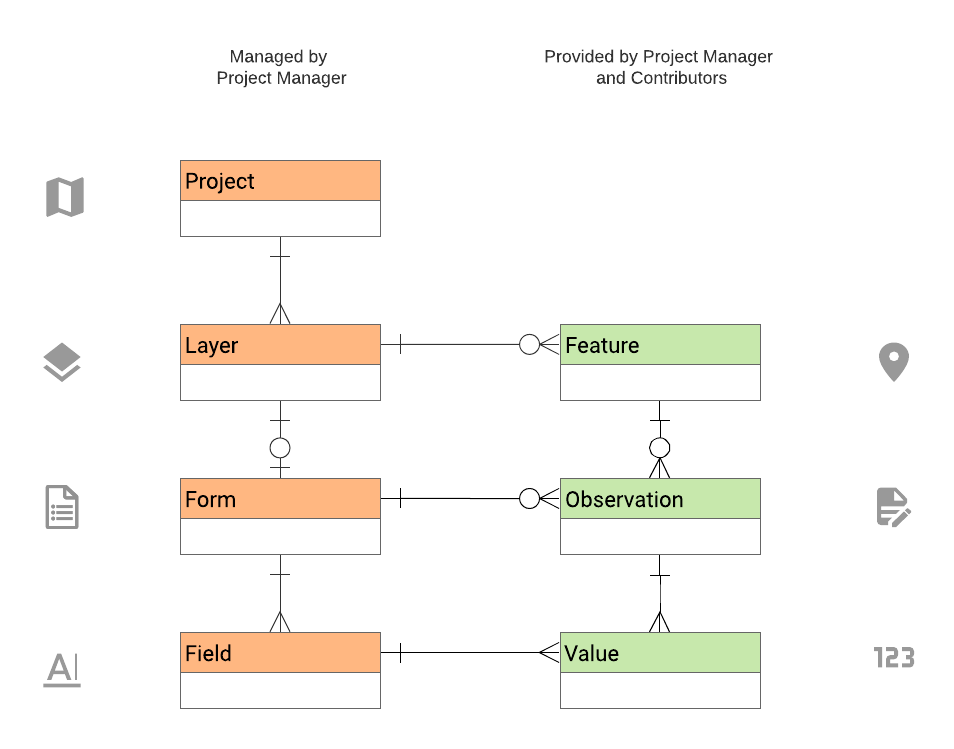
For a key to cardinalities pictured here (one-to-many, many-to-many, etc.), see Crow's Foot Notation on Wikipedia.