The matrix filtering switch
With HTTP Switchboard version 0.8.7.0, the master switch (which used was the left-most button in the matrix toolbar) is gone, and has been replaced with a new scope-based master switch. There are many advantages for having a master switch which applies only to the current scope.
It may happen a user give up in trying to figure the proper set of matrix rules in order to make a web site work properly. Sometimes, ubiquitously blacklisted hostnames must unfortunately be un-blacklisted for a web page to work properly. It may quickly become bothersome, to the point where a user was simply switching off HTTPSB completely just because of one specific web page.
So it is now possible to turn off matrix filtering for a specific scope, which will leave all other scopes unaffected. Here is a comparison of three matrix states, block-all/allow-exceptionally, allow-all/block-exceptionally, and matrix filtering off:
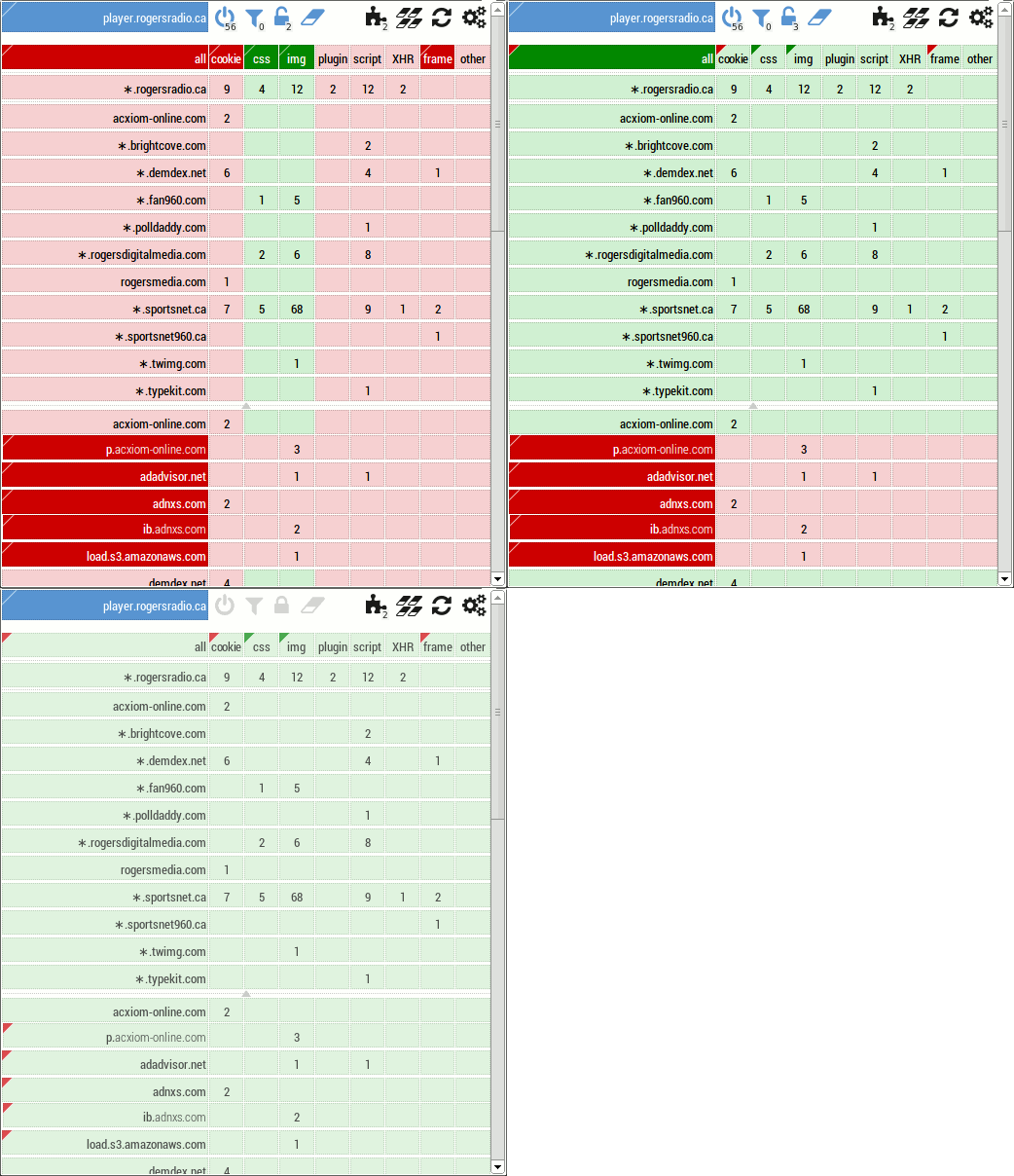
With the addition of the matrix filtering switch, I took the opportunity to make these other changes in order to increase consistency:
- The new matrix filtering switch is independent from the ABP filtering switch: one can disable matrix filtering and still benefit from ABP filtering.
- The new matrix filtering button shows the number of requests blocked in a badge, just like the ABP filtering button.