How to use the Homebox API #417


-
First Check
Homebox VersionVersion: v0.9.1 ~ Build: d3b6c93 What is the issue you are experiencing?I’m trying to work out the API, using the guide on https://redocly.github.io/redoc/?url=https://hay-kot.github.io/homebox/api/openapi-2.0.json A couple of immediate things came up, which make me think I must be missing something obvious.
How can the maintainer reproduce the issue?I expect this is working fine for the maintainer, it’s more an issue with me.. What would help immensely would be to share some real world/specific examples, such as a curl command to obtain my bearer ID, and then another curl command to GET an item and to POST an item. DeploymentOther Deployment DetailsDocker QNAP |

Beta Was this translation helpful? Give feedback.
Replies: 8 comments 4 replies

-
|
On the swagger docs, click "try this out" for the login call, and then input your username and password. It will return both the curl call and an active bearer token. You can then put this in the authentication token box at the top of the swagger UI and continue to use the UI to get the API calls etc. |
Beta Was this translation helpful? Give feedback.
-
|
Hi @proffalken , sorry where do I find the |
Beta Was this translation helpful? Give feedback.
-
|
@nodecentral if you're already running homebox, then you can find them locally at http://yourhomeboxURL/swagger/index.html |
Beta Was this translation helpful? Give feedback.
-
|
Thanks @proffalken , that help, and i’,m able to GET a few things back, where i’m struggling is with the login, to get my token. I’ve tried various ways, but can’t get the swagger Login api call to work? Example below.. Which returns the following.. |
Beta Was this translation helpful? Give feedback.

-
Just copy pasted this straight from the login section of the swagger. It's URL encoded, so things like symbols will use these values. |
Beta Was this translation helpful? Give feedback.
-
|
@nodecentral - as @icsy7867 has demonstrated, the data needs to be in query-string format, not JSON. Here's an example in python of how you might log in: # Get the username/password from the environment
username = os.getenv("INVENTORY_USER")
password = os.getenv("INVENTORY_PASSWORD")
auth_uri = "api/v1/users/login"
inventory_host = "https://myhomeboxinstall/"
asset_search_uri = api/v1/items
# Setup the default headers that will be used for all API calls
headers = {}
headers["accept"] = "application/json"
headers["Content-Type"] = "application/x-www-form-urlencoded"
# Get the bearer Token we will need
print(f"Obtaining bearer token from {inventory_host}/{auth_uri}")
# Set the parameters
params = {}
params["username"] = username
params["password"] = password
# Make the request using the headers and params
bearer_request = requests.post(f"{inventory_host}/{auth_uri}", data=params, headers=headers)
# Get the token from the field
bearer_token = bearer_request.json()["token"]
# Add it to the common headers
headers["Authorization"] = f"{bearer_token}"
# Remove the username and password from the parameters
params.pop("username")
params.pop("password")
# Create a function that calls the API and returns the results
def search(item_name):
items = []
params["q"] = item_name
with tracer.start_as_current_span("search_items") as search_span:
item_results = requests.get(f"{inventory_host}/{asset_search_uri}", params=params, headers=headers)
item_json = item_results.json() |
Beta Was this translation helpful? Give feedback.
-
|
Hi, I’m not proficient in python, all I’m doing is following the swagger ‘login’ guidance, but it always fails , yet my username/password are correct ?
Does the curl example work for you ? |

Beta Was this translation helpful? Give feedback.

-
|
Yes, the current CURL example works for me, and it's what I used to construct the python code above. I note that your screenshot says "500 Internal Server Error" rather than the expected "401 Unauthorized" that you'd usually get if the username/password was incorrect. What do the logs say? |
Beta Was this translation helpful? Give feedback.

-
|
looking in the logs I get the same sort of message.. But from what i can tell, I’m using the correct details ? |
Beta Was this translation helpful? Give feedback.

-
FYI, the authentication endpoint will return 500 on any error case which is a common security practice. Are you sure your username and password are correct? I've tried the swagger documentation on the demo site and it works correctly
The Login endpoint accepts both JSON and Form Data and parses based on the Content-Type provided in the request. Both of these example should work curl -X 'POST' \
'https://homebox.fly.dev/api/v1/users/login' \
-H 'accept: application/json' \
-H 'Content-Type: application/x-www-form-urlencoded' \
-d 'username=demo%40example.com&password=demo'curl -X 'POST' \
'https://homebox.fly.dev/api/v1/users/login' \
-H 'accept: application/json' \
-H 'Content-Type: application/json' \
-d '{
"password": "demo",
"stayLoggedIn": true,
"username": "demo@example.com"
}' |
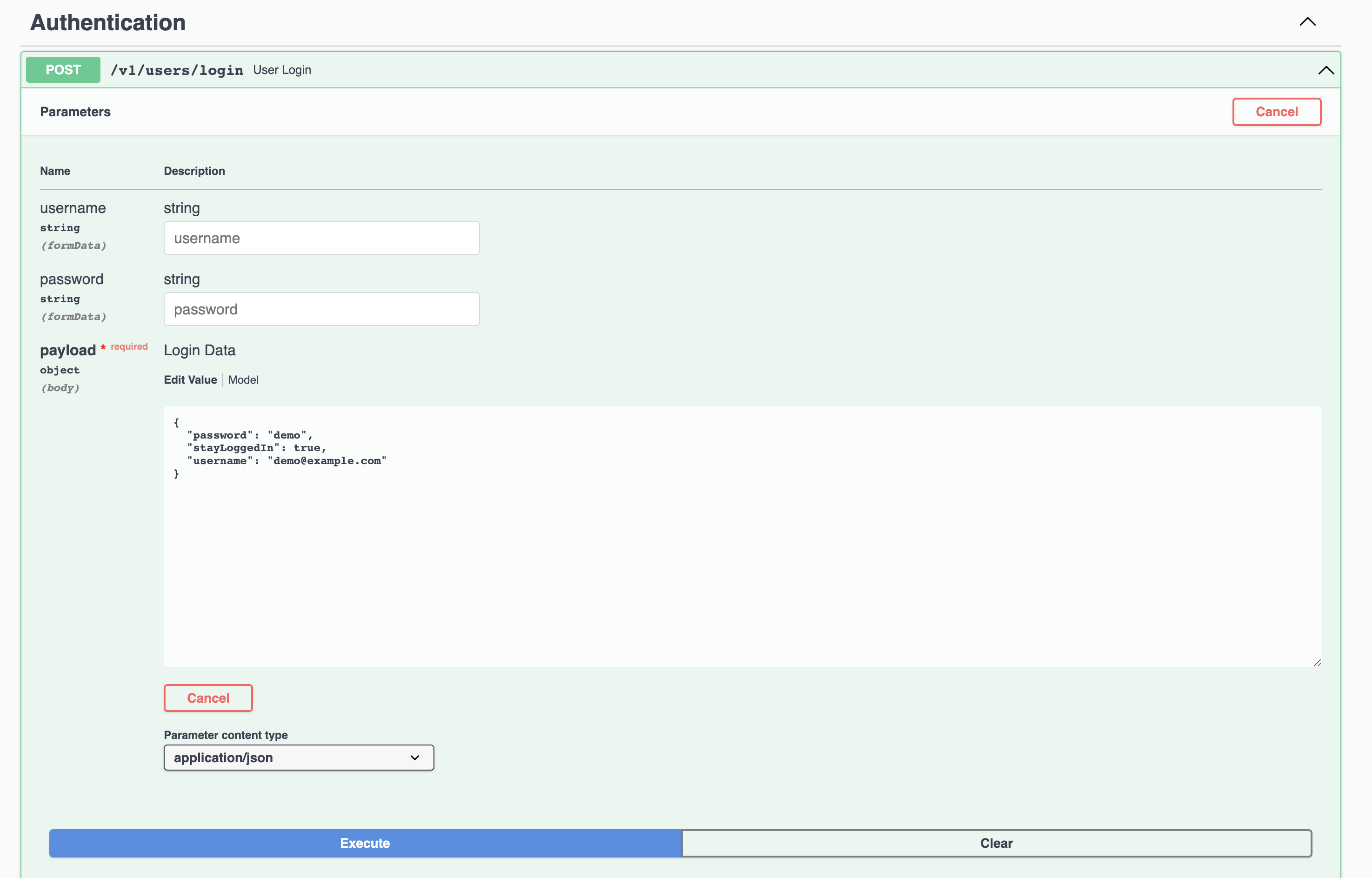
Beta Was this translation helpful? Give feedback.
-
|
Thanks @hay-kot , I noticed you have used an email address for your username, I had tried that initially and it didn’t work, and then I tried my registered (user) name. Will try email again and report back |
Beta Was this translation helpful? Give feedback.
-
|
Ok, I think I can see where I was going wrong now. Initially I was taking the curl command example exactly as swagger was providing as its example..
.. and then updating that with my username and password, shared in earlier post, but added below too. Which did not work, and was giving me the following error. It was then from there, where I started to freestyle a bit trying to work out what I was doing wrong, hence the post :-) So to sum up, the examples @hay-kot provided both work - but they do differ from the swagger example above (or at least my interpretation of them) - in that for their first example - swagger has All this is likely down to how i was treating Swagger, and not reading between the lines/interpreting the command requirements correctly, but I’ve got there in the end - thanks again .. 👍 |

Beta Was this translation helpful? Give feedback.


FYI, the authentication endpoint will return 500 on any error case which is a common security practice.
Are you sure your username and password are correct?
I've tried the swagger documentation on the demo site and it works correctly
The Login endpoint accepts both JSON and Form Data and parses based on the Content-Type provided in the request. Both of these example should work