第273期 《使用puppeteer做UI自动化测试》 by 大鱼 #269

Description

最近用了下 jest-puppeteer 来做UI自动化测试,还是比较方便的。
安装一个npm package,然后配置一下就能接到jest中。
yarn add jest-puppeteerjest配置:
{
  "preset": "jest-puppeteer"
}
(要翻墙才能安装下来)
PS: 比较适合在单独的UI自动化项目中引入,不适合在开发的项目中引入,开发的项目只需要做单元测试。
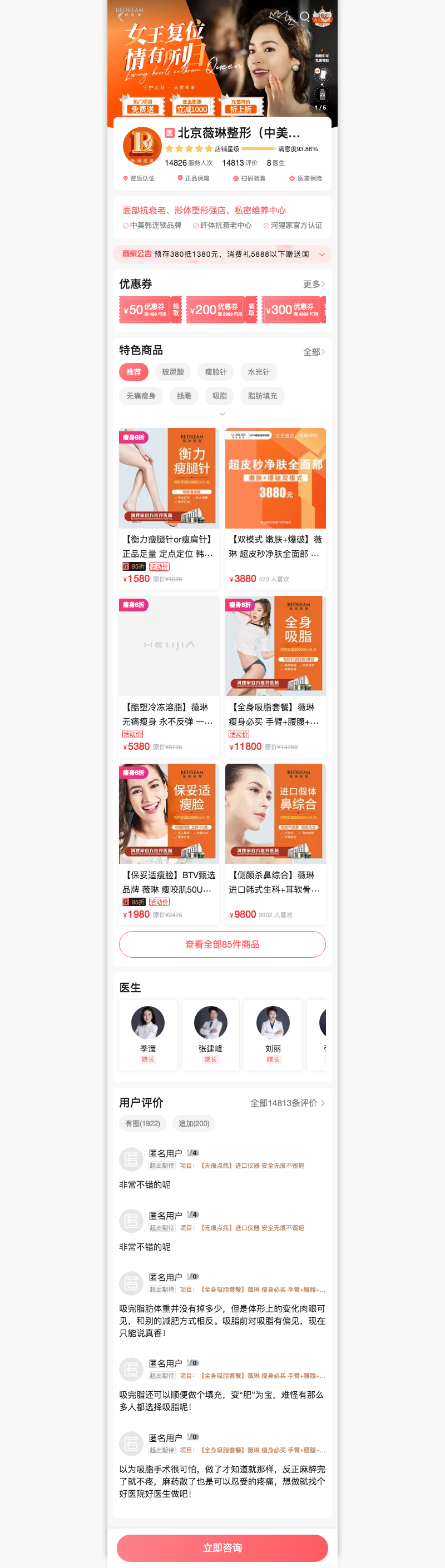
我这边简单地对店铺首页做了自动化测试,摘出部分代码,就可以知道大概怎么用:
describe('店铺-https://m.helijia.com/stuff/shop/index.html', () => {
  it('首页', async() => {
    // 访问这个页面
    const url = 'https://m.helijia.com/stuff/shop/index.html?id=ba789ab37f4f4f4babc72aceaa352847';
    await page.goto(url);

    // 判断页面标题
    // expect 是jest提供的
    // page.title() 是 puppeteer 提供的
    await expect(page.title()).resolves.toMatch('河狸家');

    // 等待页面渲染完
    // 这里的实现是等某个节点出来后,表示加载完成,前端异步渲染出来的场景。
    await page.waitFor('div.x-widget-YimeiBrand');

    // 接下来就是我的测试逻辑了,
    // 我是看看所有重要的模块是不是都在。
    const mods = [
      'TopNav',
      'Carousel',
      ...
    ];

    for (const name of mods) {
      const selector = `div.x-widget-${name}`;
      await expect(page).toMatchElement(selector);
    }

    // 然后再看一些比较重要的模块
    const recSel = 'div.x-widget-RecommendProducts';
    const tags = await page.$$(`${recSel} div.catagory-tags dl dd`);
    expect(tags.length > 0).toBe(true);

    // 等待推荐作品加载完
    await page.waitFor(`${recSel} .products-component`);
    const list = await page.$$(`${recSel} div.product-item`);
    expect(list.length > 0).toBe(true);

    // 可以看看渲染出来的 html是否正确
    // 这个html是运行react结束的哦。
    // const html = await page.content();
    // console.log(html);

    // 过程中可以截图看真实效果
    // 这个载图效果很不错,所以可以使用 puppeteer 这个能力做一些功能:
    // 根据web导出pdf或图片,就不用后台语言来编写了,可以省很多事。
    await page.screenshot({ path: 'shop.png', fullPage: true });
  });
});
jest 提供的API主要是用来帮助测试的, 在用的过程中,如果需要交互操作,
就会用到 puppeteer 提供的API。 puppeteer doc
最常见的是 Page的操作
可以它做个爬虫也挺方便的,毕竟现在前后端分离后,直接请求html的方式拿不到需要的结果了。
最后帖一个截出来的效果图: