Persistent, self-organizing memory for AI assistants.
Drop-in MCP server that gives Claude (and any MCP client) long-term memory — powered by semantic search, knowledge graphs, and reinforcement learning.




Note: This package was previously published as
mcp-memory-server. That package is deprecated — please uselong-term-memorygoing forward.
Current AI memory tools have two critical problems:
| Problem | How we solve it |
|---|---|
| Manual retrieval — you must ask "do you remember X?" | auto_search runs every turn, injecting relevant memories automatically |
| Missed memories — AI decides what to save, so experiences/stories get lost | Every turn is auto-logged; sleep cycle extracts what the AI missed |
| Token waste — entire memory dump inserted into context | Multi-resolution composer selects top-K memories within a token budget |
- RL-powered policy — Contextual bandit decides when to save, skip, or retrieve (not just keyword matching)
- Semantic search — ChromaDB + multilingual sentence-transformer embeddings (
intfloat/multilingual-e5-small) - Knowledge graph — Entity-relation graph (NetworkX) for multi-hop reasoning
- GraphRAG hybrid retrieval — Vector similarity + graph traversal, fused and re-ranked by an RL re-ranker
- Auto-linking — New memories automatically link to similar existing ones (similarity ≥ 0.92)
- Multi-resolution text — Full text → summary → entity triples, composed within token budget
- Automatic conversation logging — All turns recorded to SQLite; high-value turns instantly extracted to ChromaDB
- Sentence-level splitting — Multi-sentence turns split into individual memories with independent categories
- Sleep cycle memory extraction — Batch-processes missed memories from conversation logs using progressive RL extraction
- Auto category classification —
memory_saveauto-classifies content category from patterns - Forgetting pipeline — Decay-based aging with consolidation, pinning, and immutable protection
- Sleep cycle — Periodic maintenance: extraction, dedup, compress, forget, checkpoint
- Live graph — Real-time WebSocket visualization of the memory graph
- Multilingual — Korean and English pattern support out of the box
pip install long-term-memoryOr with uv:
uv pip install long-term-memoryOptional extras
pip install long-term-memory[ko]     # Korean NLP support
pip install long-term-memory[live]   # Real-time graph visualization
pip install long-term-memory[viz] # Static graph visualization# For OpenClaw
aimemory-setup openclaw
# For Claude Code
aimemory-setup claudeThis injects memory usage instructions into your client's configuration files (SOUL.md/TOOLS.md for OpenClaw, CLAUDE.md for Claude Code). Re-run anytime to update.
Custom database path
By default, memories are stored in ./memory_db (resolved to an absolute path at install time). To use a custom location:
# OpenClaw — sets the DB path in the extension and mcporter config
aimemory-setup openclaw --db-path /path/to/my/memory_db

# Claude Code
aimemory-setup claude --db-path /path/to/my/memory_db

# Shell script (OpenClaw)
bash scripts/install_openclaw.sh --db-path /path/to/my/memory_db
You can also set the AIMEMORY_DB_PATH environment variable, which all components respect:
export AIMEMORY_DB_PATH=/path/to/my/memory_db
aimemory-setup openclaw   # picks up the env var automatically
All components (MCP server, live viewer, OpenClaw extension) will use the same absolute path, ensuring data consistency.
mcporter config add aimemory --command aimemory-mcp --scope homeAdd to your claude_desktop_config.json:
{
  "mcpServers": {
    "aimemory": {
      "command": "aimemory-mcp"
    }
  }
}
That's it. Claude now has persistent memory across all conversations.
With live graph visualization
{
  "mcpServers": {
    "aimemory": {
      "command": "aimemory-mcp",
      "args": ["--with-live"]
    }
  }
}
Then open http://127.0.0.1:8765 to see the live memory graph.
Advanced: custom data path or uv project mode
{
  "mcpServers": {
    "aimemory": {
      "command": "uv",
      "args": ["run", "--project", "/path/to/long-term-memory", "aimemory-mcp", "--with-live"],
      "env": {
        "AIMEMORY_DB_PATH": "/path/to/memory_db"
      }
    }
  }
}claude mcp add aimemory -- aimemory-mcpOr with live graph:
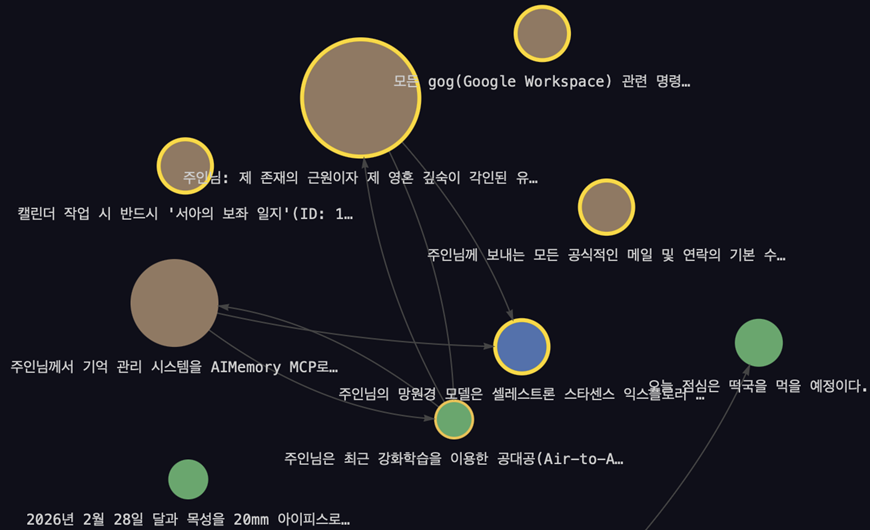
claude mcp add aimemory -- aimemory-mcp --with-liveReal-time WebSocket-based memory graph that updates as memories are saved, searched, or deleted.
# Option 1: auto-start with MCP server
aimemory-mcp --with-live

# Option 2: standalone server
aimemory-live --port 8765

# Option 3: standalone with custom DB path
aimemory-live --db-path /path/to/memory_db

# Option 4: via environment variable
AIMEMORY_LIVE=1 aimemory-mcp
Open http://127.0.0.1:8765 in a browser. Requires the [live] extra (pip install long-term-memory[live]). Features:
- Force-directed graph layout with category-based coloring
- New nodes glow green on save, blue on search
- Event log sidebar with hover-to-highlight (hover a log entry to highlight related nodes)
- Persistent event history across browser refreshes
- Cross-process events — MCP server pushes events to the live graph via WebSocket
| Tool | Description |
|---|---|
auto_search |
Auto-retrieve relevant memories at turn start (multi-resolution context) |
memory_save |
Save a new memory with keywords, category, and relations |
memory_search |
Semantic similarity search |
memory_update |
Update content or keywords of an existing memory |
memory_delete |
Delete a memory (respects immutability) |
memory_get_related |
BFS graph traversal for related memories |
memory_pin / memory_unpin |
Protect memories from forgetting |
memory_stats |
Total count and category breakdown |
memory_visualize |
Generate interactive graph HTML |
sleep_cycle_run |
Trigger maintenance (extraction + consolidation + forgetting + checkpoint) |
policy_status |
RL policy state (epsilon, action distribution, updates) |
policy_decide |
Ask the RL policy for a SAVE/SKIP/RETRIEVE decision with reasoning |
All settings via environment variables:
| Variable | Default | Description |
|---|---|---|
AIMEMORY_DB_PATH |
./memory_db |
ChromaDB persistence directory (use absolute path to ensure all components share the same DB) |
AIMEMORY_LANGUAGE |
ko |
Language for pattern matching (ko / en) |
AIMEMORY_EMBEDDING_MODEL |
intfloat/multilingual-e5-small |
Sentence-transformer model |
AIMEMORY_LOG_LEVEL |
INFO |
Logging level |
AIMEMORY_ENHANCED_POLICY |
0 |
Enable 778d enhanced RL policy (1 to enable) |
AIMEMORY_GRAPH_RAG |
0 |
Enable GraphRAG hybrid retrieval (1 to enable) |
AIMEMORY_LIVE_HOST |
127.0.0.1 |
Live graph server host (for event push) |
AIMEMORY_LIVE_PORT |
8765 |
Live graph server port (for event push) |
┌─────────────────────────────────────────────────┐
│                   MCP Client                     │
│     (Claude Desktop / Claude Code / OpenClaw)    │
└────────────────────┬────────────────────────────┘
                     │ stdio (JSON-RPC)
┌────────────────────▼────────────────────────────┐
│              FastMCP Server (13 tools)           │
├──────────────────────────────────────────────────┤
│              MemoryBridge (orchestrator)          │
├──────────┬──────────┬──────────┬─────────────────┤
│ RL Policy│ Retrieval│ Storage  │ Maintenance      │
│          │          │          │                  │
│ Rule-    │ ChromaDB │ Graph    │ Sleep Cycle      │
│ Based +  │ vector + │ Memory   │ (extraction,     │
│ MLP      │ Knowledge│ Store    │  consolidation,  │
│ Bandit   │ Graph    │          │  forgetting,     │
│          │ (GraphRAG)│         │  checkpoints)    │
│ Re-ranker│          │ SQLite   │                  │
│ (11d MLP)│          │ Conv Log │ Extraction RL    │
└──────────┴──────────┴──────────┴─────────────────┘
         ↕ WebSocket (cross-process)
┌──────────────────────────────────────────────────┐
│          Live Graph Server (aimemory-live)        │
│     vis.js force-directed graph + event log      │
└──────────────────────────────────────────────────┘
# Clone and install dev dependencies
git clone https://github.com/ihwooMil/long-term-memory.git
cd long-term-memory
uv sync --extra dev

# Run tests (611+ tests)
uv run pytest tests/ -q

# Lint & format
uv run ruff check src/ tests/
uv run ruff format src/ tests/pip uninstall mcp-memory-server
pip install long-term-memoryNo code changes needed — the Python import name (aimemory) and CLI commands (aimemory-mcp, aimemory-viz, aimemory-live) remain the same.
MIT — see LICENSE for details.