npm install butterfly-dag butterfly-plugins-panel
import {panelPlugins} from 'butterfly-dag/plugins';
import 'butterfly-dag/plugins/dist/index.css';

import pika from '../img/pikatest.jpg';

panelPlugins.register(
  [
    {
      root: document.getElementById('dnd'),
      canvas: this.canvas,
      type: 'uml',
      width: 40,
      height: 40,
      data: [
        {
          id: 'user-1',
          type: 'png',
          content: pika,
          with: 40,
          height: 40,
        },
        {
          id: 'user-baidu-1',
          type: 'png',
          content: 'https://www.baidu.com/img/PCtm_d9c8750bed0b3c7d089fa7d55720d6cf.png',
          with: 100,
          height: 40,
        }
      ]
    },
  ],() => {
    console.log('finish')
  }
);import panelPlugins from 'butterfly-dag/plugins';
import {Canvas} from 'butterfly-dag';
import pika from '../img/pikatest.jpg';
let PanelNode = panelPlugins.PanelNode;
let root = document.getElementById('dag-canvas');
this.canvas = new BaseCanvas({
root: root,
disLinkable: true, // 可删除连线
linkable: true, // 可连线
draggable: true, // 可拖动
zoomable: true, // 可放大
moveable: true, // 可平移
});
panelPlugins.register(
[
{
root: document.getElementById('dnd'),
canvas: this.canvas,
type: 'uml',
width: 40,
height: 40,
data: [
{
id: 'user-1',
type: 'png',
content: pika,
with: 40,
height: 40,
},
{
id: 'user-baidu-1',
type: 'png',
content: 'https://www.baidu.com/img/PCtm_d9c8750bed0b3c7d089fa7d55720d6cf.png',
with: 100,
height: 40,
}
]
},
],() => {
console.log('finish')
}
);
this.canvas.draw(
{
nodes: [{
id: '1',
top: 10,
left: 100,
width: 40,
height: 40,
rotate: 45,
content: 'System-Uml-ClassDiagram-1',
Class: PanelNode,
},{
id: '2',
top: 10,
left: 20,
width: 40,
height: 40,
rotate: 30,
content: 'user-baidu-1',
Class: PanelNode,
}]
},
() => {
console.log(this.canvas.getDataMap());
});// 使用内置UML图(内置`UML`图片`ID`)
this.canvas.draw(
{
nodes: [{
id: '1',
top: 10,
left: 20,
content: 'System-Uml-ClassDiagram-1',
Class: PanelNode,
}]
}
);
// 方式一(推荐): 使用自定义
// 此处的初始化可以使用前面注册过的id作为content传入
panelPlugins.register(
[
{
root: document.getElementById('dnd'),
canvas: this.canvas,
type: 'uml',
width: 40,
height: 40,
data: [
{
id: 'user-1',
type: 'png',
content: pika,
with: 40,
height: 40,
}
]
},
],() => {
console.log('finish')
}
);
this.canvas.draw(
{
nodes: [{
id: '1',
top: 10,
left: 20,
content: 'user-1',
Class: PanelNode,
}]
}
);
// 方式二: 使用自定义
this.canvas.draw(
{
nodes: [{
id: '1',
top: 10,
left: 20,
content: 'https://www.baidu.com/img/PCtm_d9c8750bed0b3c7d089fa7d55720d6cf.png',
Class: PanelNode,
}]
}
);
// 方式三: 使用自定义
import pika from '../img/pikatest.jpg';
this.canvas.draw(
{
nodes: [{
id: '1',
top: 10,
left: 20,
content: pika,
Class: PanelNode,
}]
}
);
文件名即为id:如: System-Uml-ClassDiagram-1
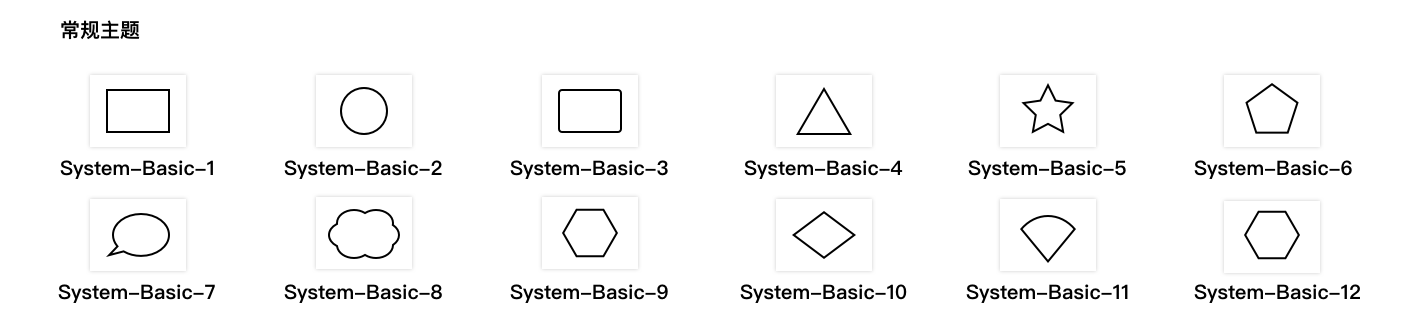
文件名即为id:如: System-Basic-1
panel渲染dom的容器
butterfly-dag的canvas实例
内置的panel库类型: uml or basic
在root容器中渲染元素的宽度,默认36
在root容器中渲染元素的高度,默认36
自定义的panel,会追加在最后:自定义panel配置主要为:
-
id
<String>(必填) 用于添加进画布是的id前缀、唯一标识(注意: 不要和系统自带的重复) -
content
<String>(必填)PanelNode中填充的图片(<img src="content" />| 内置主题图片ID) -
type
<String>(选填) 后续内容,用于标示图片的类型 -
width
<Number>(选填) 在root中渲染的自定义panel的宽度,默认36 -
height
<Number>(选填) 在root中渲染的自定义panel的高度,默认36
作用:注册panel到root中
参数
{Array} data里面包含panel数据{function} calllback(可选) 注册完毕后的回调
// 使用系统内置UML主题
panelPlugins.register(
  [
    {
      root: document.getElementById('dnd'),
      canvas: this.canvas,
      type: 'uml',
    }
  ],()=>{
    console.log('finish');
  }
);

// 自定义
panelPlugins.register(
  [
    {
      root: document.getElementById('dnd'),
      canvas: this.canvas,
      type: 'uml',
      data: [
        {
          id: 'user-1',
          type: 'png',
          content: pika,
          with: 40,
          height: 40,
        }
      ]
    }
  ]
);

// 多组

panelPlugins.register(
  [
    {
      root: document.getElementById('dnd'),
      canvas: this.canvas,
      type: 'uml',
    },
    {
      root: document.getElementById('dnd1'),
      canvas: this.canvas,
      type: 'uml',
      data: [
        {
          id: 'user-1',
          type: 'png',
          content: pika,
          with: 40,
          height: 40,
        }
      ]
    }
  ]
);- 继承自
butterfly-dag的Node
控制是否激活状态(激活显示node的控制点)
当前节点的旋转角度
作用: 节点变为选中状态
panelNode.focus();作用: 节点变为未选中状态
panelNode.unfocus();作用: 节点旋转
参数
angle<Number>设置节点的旋转角度(顺时针)
panelNode.rotate(45);