microsoft windows Notes
- General Windows 10 Notes
- Working with Chocolately
- Working with PowerShell on Windows 10
- Working with Cmder
- Working with Firefox
- Working with Networking on Windows 10
- Useful Links
General Windows 10 Notes Unsorted 🔝
my particular use case
I installed Windows 10 on a HDD then upgraded the system to a SSD, then used GParted to copy the partitions to the SSD, however the system would not boot, and the automatic repair Wizard provided by the Windows 10 install media, could not resolve the issue.
Once in the repair console / command prompt issue the below commands to resolve 🤞 boot issues.
BOOTREC /FIXMBR
BOOTREC /FIXBOOT
BOOTREC /RebuildBcd
🚨 It is imperative to use a Windows install media that is not 1809 due to issues with the above mentioned commands. I was able to resolve the boot issues on the Gateway EC14 using Windows 10 1703 ISO. see for more details
When using rufus to create a bootable Windows 10 install media, rufus has an option of pressing alt + e to allow one to select creating a dual UEFI / BIOS install media if required, but it's discouraged because one should more than likely select either BIOS or UEFI but not both.
To find the PID of a process using a command prompt in Windows 10
sc queryex [SERVICE_NAME]
echo "example"
sc queryex wuauserv
To kill a PID using the number ID of the PID
taskkill /PID 4242 /FTo run a powershell script, ie. a file with a .ps1 extension launch / run the script from within a powershell terminal.
I had issues attempting to run a powershell script from a command prompt or even using Cmder
🚨 Pressing control + shift at the same time causes the keyboard to enter alternate chars, ie. É instead of /
To launch an elevated command prompt from the run dialog box windows™️ + r input cmd and while pressing enter hold down the shift and control keys while pressing enter, and Windows should launch an elevated command prompt.
To launch the Microsoft Edge web browser from the command prompt
microsoft-edge:
To open a dialog displaying the current version of Windows
winverThe above command should work in cmd.exe, PowerShell, and Cmder.exe
To check and see if there are Windows 10 updates available via a CLI
explorer ms-settings:windowsupdateThe above command will launch a explorer window where windows updates can be downloaded and installed.
❗️ As of Windows 10 1809 I have not been able to figure out how to download and install updates via a CLI.
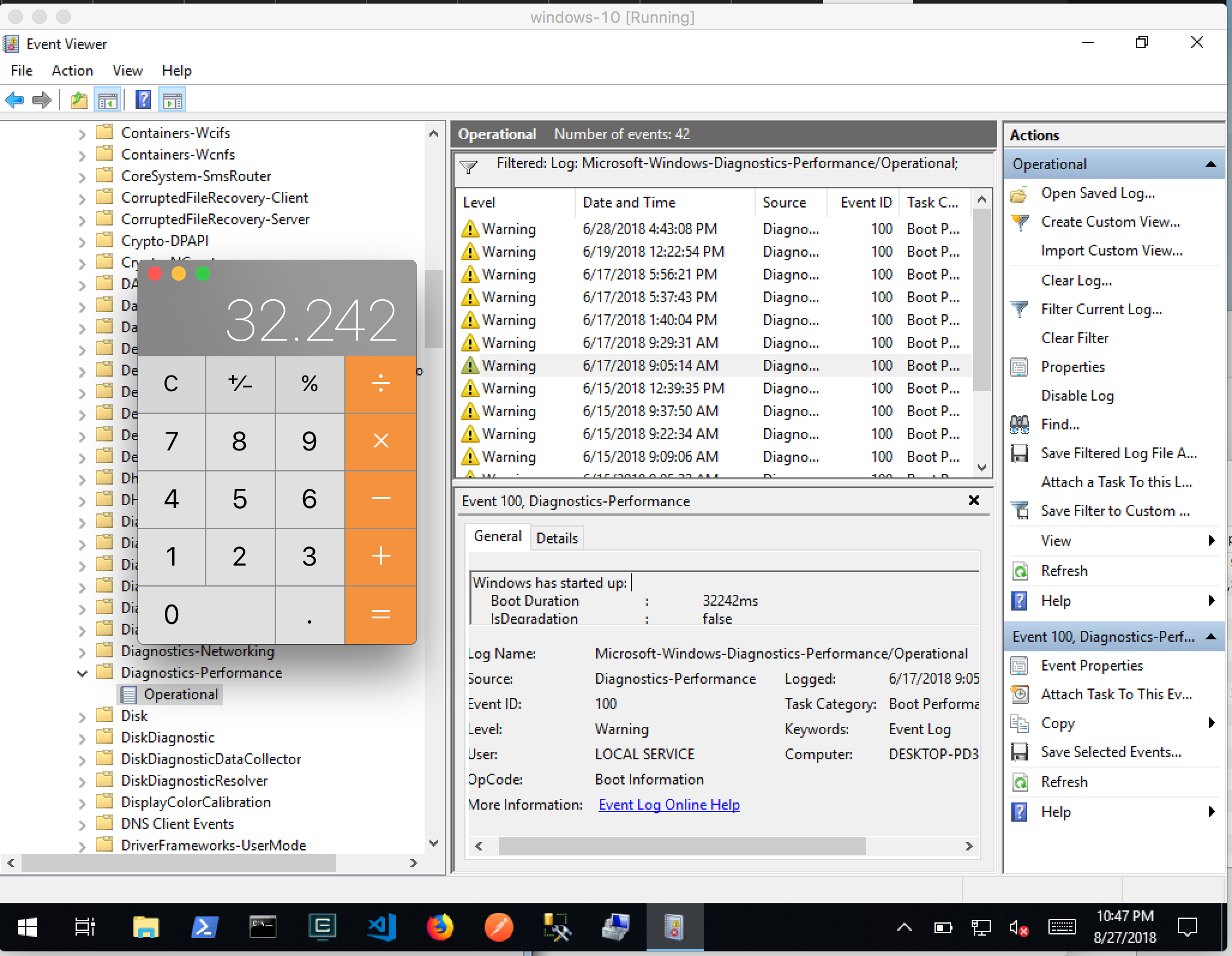
To see how long it took for a Windows 10 system to boot, open Event Viewer
📸 Event Viewer
To access the emoji context menu
Win™+.
™️ is a reference to the Windows key.
To get a diagnostic report, a la System Inoformation on macOS on Windows™️
- Open a run dialog box ™️+r
- Input msinfo32 into the box, press enter and a diagnostic report of the system should display within a window.
To enable password less login on Windows 7 see
To set an environment variable for a running terminal session and then have it clear when the session finishes in Windows 10
set code=C:\opt\codeTo set the value of an environment variable permanently
setx code "C:\opt\code"To print the value of an environment variable
echo %HOME%For a sane mouse scrolling experience within a Windows 10 virtual machine, select the standard PS/2 Mouse
- Machine Settings → System → Motherboard → Pointing Device: PS/2 Mouse
From my experience running Windows 10 in VirtualBox on a MacBook with a Retina display, ie. HiDPI, it's useful to set the resolution to 1600x1200 and scale the display to 150% so that my eyes don't pop out of my head. 🧟♂️. Those settings are applied in Windows 10 itself and are unrelated to VirtualBox settings on macOS.
To use Linux subsystem on Windows 10, Developer Mode needs to enabled, and Windows should be a Professional version, and NOT a Home version.
To enable Developer Mode
Search for Use developer features after clicking the Win™️ key. Within the Settings window look for a radio button / toggle to enable Developer mode.
After Developer mode has been enabled then Windows Subsystem for Linux can be installed via the Control Panel > Add / Remove Apps > Windows Apps, or via a PowerShell.
After the Distro has been installed, it will require initialization, see
To manually install a version of Linux on Windows 10 see the following microsoft doc
To print a list of filesystems that can be mounted on a GNU+Linux or even a WSL
cat /proc/filesystemsTo mount an already mapped network share that has been mapped to a local drive letter, ie. Z
sudo mkdir /mnt/z
sudo mount -t drvfs 'Z:' /mnt/z
To install chocolately on Windows 10 see the chocolately website.
chocolately can be installed via
cmd.exeor powershell.exe just make sure thecmd.exeis run with elevated priviliges.
@"%SystemRoot%\System32\WindowsPowerShell\v1.0\powershell.exe" -NoProfile -InputFormat None -ExecutionPolicy Bypass -Command "iex ((New-Object System.Net.WebClient).DownloadString('https://chocolatey.org/install.ps1'))" && SET "PATH=%PATH%;%ALLUSERSPROFILE%\chocolatey\bin"The above command is for cmd.exe
To paste the above command into either powershell or cmd.exe
alt + ␣ + e + p
A decent window size for command prompt, ie. cmd.exe is
Width 90 Height 30
A decent window size for power shell is
Width 100 Height 30
To avoid the ** mr-fancy-script.ps1 is not digitally signed.**
Set-ExecutionPolicy -Scope CurrentUser BypassCannot figure out how to use
gitto clone git repositories using the git protocol, however https appears to be working. 👍
To show the settings in a user derived git configuration file
git config --listWorking with Cmder
To set an alias for git status
alias gs=git status $*To set an alias for git push
alias gp=git push $*To refresh "shell" / environment using cmder
refreshenvThe above command is useful when changes to such things as
PATHhave been made, and the terminal does not need to closed and reopened.
To access a locally running app, ie. a Node.js / Express app on a local port on Windows 10
- about:config
- search for
ports - add the below setting
network.security.ports.banned.override- Add a list of ports, ie. 4242,3000
For more information see
To be able to ping a Windows host on a LAN
Open the firewall settings, and make sure firewall settings are disabled for private networks.
To access a SMB share on a local network in Windows 10
- Open the run dialog box, ie. ™+.
- Insert the IP address of the SMB server you would like to connect to
\\[192.168.1.42]The IP address of the SMB server can be specified or the local discoverable name can be used, which is preferred. ie. mr-fancy-42-computer.local
Ex
\\mr-fancy-computer.localInputting
\\is imperative to being able to connect to the share. 👍
- A dialog box should appear, prompting for credentials.
Useful Links 🔝
- access network locations via command prompt and powershell
- mounting network locations using bash in WSL
- docs.microsoft.com Setup SSH server
- gallery.technet.microsoft.com | powershell script for resetting a stalled windows update process
- microsoft.com | working with various SMB{1,2,3} protocols
- cmder.net - An alternative to command prompt
- chocolatey.org - Package Manager
- microsoft.com - Windows 10 download