Cassie is an open source web tool that performs analysis and mapping of coastal regions, focusing on the variation of the coastline. To perform these procedures cassie uses the tools and images provided by the Google Earth Engine platform.

| Collection | Mission | Product | Period | Cycle (days) | Resolution (m) | Fallback |
|---|---|---|---|---|---|---|
| Landsat | Landsat 5 (TM) | SR | 1984-2013 | 15 | 30 | - |
| Landsat | Landsat 7 (ETM+) | SR | 1999-present | 15 | 30 | Landsat 7 T2 |
| Landsat | Landsat 8 (OLI) | SR | 2013-present | 15 | 30 | Landsat 8 T2 |
| Sentinel | Sentinel 2 (MSI) | TOA | 2015-present | 5 | 10 | - |
First navigate to http://cassiengine.com/ then click on Access the tool button.
Cassie uses Google authentication to identify their user and allow the use of the Earth Engine. Before starting make sure that your account is registered on the GEE platform. If you are not registered on Earth Engine, Sign Up
After sign in with your Google account, follow the Acquisition steps at detailed User Guide
CASSIE uses GEE to perform all of its heavy computation, thus, if you're going to run locally, you need to create a Google Cloud Project to provide CASSIE the required API Keys it needs.
If you're experienced with Google Cloud, you can follow the instructions bellow, otherwise, you can follow the detailed user guide on how to Setup a Google Cloud Project for Earth Engine Usage in Google Developers Reference.
- Create a Cloud project
- Enable the Earth engine API
- Enable the MAPS API
- Create credentials in your Cloud project
Besides that, CASSIE runs on node.js, so make sure you have it installed.
Clone this project and go to root:
  $ git clone https://github.com/lia-univali/cassie.git
  $ cd cassie
Now, you must create a file named .env (in root) with the following parameters that you can get from the Credentials Page in your Cloud project (read the notes above about the Google Cloud):
REACT_APP_CLIENT_ID = xxxxxxxxxxxxxxx
REACT_APP_MAPS_KEY = xxxxxxxxxxxxxxxxxxxx
Install dependencies and start the application
with npm (automatically installed with node):
  $ npm install
  $ npm start
or (if you have yarn installed):
  $ yarn install
$ yarn start- Fork the repository
- Clone the forked repository
- Make changes
- Create a
Pull Request
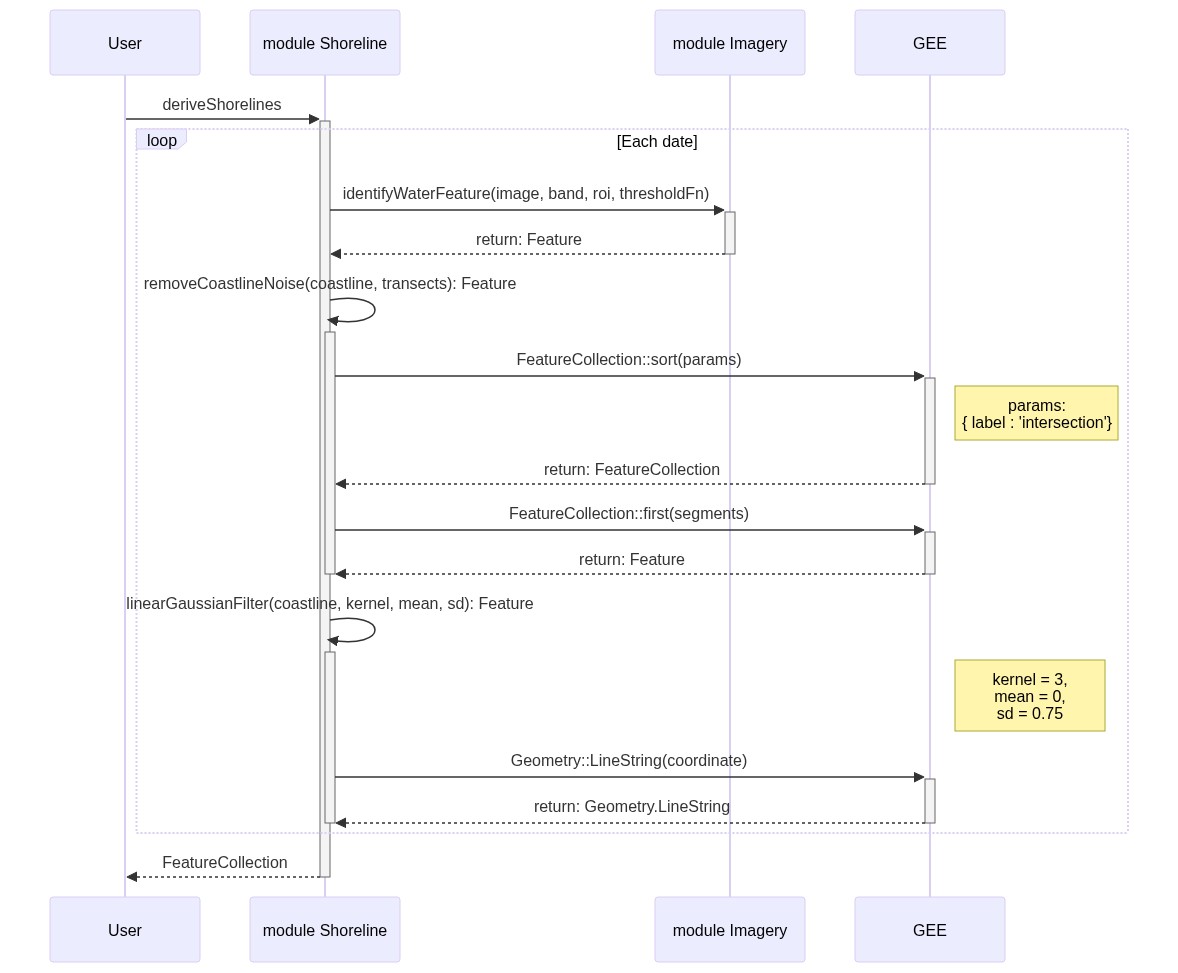
- @material-ui/core: React components that implement Google's Material Design.
- @material-ui/icons: Material Design Svg Icons converted to Material-UI React components.
- async: Higher-order functions and common patterns for asynchronous code
- autoprefixer: Parse CSS and add vendor prefixes to CSS rules using values from the Can I Use website
- axios: Promise based HTTP client for the browser and node.js
- babel-core: Babel compiler core.
- babel-eslint: Custom parser for ESLint
- babel-jest: Jest plugin to use babel for transformation.
- babel-loader: babel module loader for webpack
- babel-preset-react-app: Babel preset used by Create React App
- babel-runtime: babel selfContained runtime
- bootstrap: The most popular front-end framework for developing responsive, mobile first projects on the web.
- case-sensitive-paths-webpack-plugin: Enforces module path case sensitivity in Webpack
- chalk: Terminal string styling done right. Much color.
- chart.js: Simple HTML5 charts using the canvas element.
- color-convert: Plain color conversion functions
- css-loader: css loader module for webpack
- dotenv: Loads environment variables from .env file
- eslint: An AST-based pattern checker for JavaScript.
- eslint-config-react-app: ESLint configuration used by Create React App
- eslint-loader: eslint loader (for webpack)
- eslint-plugin-flowtype: Flowtype linting rules for ESLint.
- eslint-plugin-import: Import with sanity.
- eslint-plugin-jsx-a11y: Static AST checker for accessibility rules on JSX elements.
- eslint-plugin-react: React specific linting rules for ESLint
- extract-text-webpack-plugin: Extract text from bundle into a file.
- file-loader: file loader module for webpack
- fs-extra: fs-extra contains methods that aren't included in the vanilla Node.js fs package. Such as mkdir -p, cp -r, and rm -rf.
- history: Manage session history with JavaScript
- html-webpack-plugin: Simplifies creation of HTML files to serve your webpack bundles
- immutability-helper: mutate a copy of data without changing the original source
- jest: Delightful JavaScript Testing.
- jszip: Create, read and edit .zip files with JavaScript http://stuartk.com/jszip
- lodash: Lodash modular utilities.
- mathjs: Math.js is an extensive math library for JavaScript and Node.js. It features a flexible expression parser with support for symbolic computation, comes with a large set of built-in functions and constants, and offers an integrated solution to work with different data types like numbers, big numbers, complex numbers, fractions, units, and matrices.
- moment: Parse, validate, manipulate, and display dates
- node-sass: Wrapper around libsass
- node-sass-chokidar: A thin wrapper around node-sass to replicate the --watch --recursive but with chokidar instead of Gaze
- npm-run-all: A CLI tool to run multiple npm-scripts in parallel or sequential.
- object-assign: ES2015
Object.assign()ponyfill - postcss-flexbugs-fixes: PostCSS plugin This project tries to fix all of flexbug's issues
- postcss-loader: PostCSS loader for webpack
- promise: Bare bones Promises/A+ implementation
- rc-slider: Slider UI component for React
- react: React is a JavaScript library for building user interfaces.
- react-bootstrap: Bootstrap 3 components built with React
- react-chartjs-2: react-chartjs-2
- react-collapse: Component-wrapper for collapse animation with react-motion for elements with variable (and dynamic) height
- react-custom-scrollbars: React scrollbars component
- react-dev-utils: Webpack utilities used by Create React App
- react-dom: React package for working with the DOM.
- react-hot-loader: Tweak React components in real time.
- react-json-view: Interactive react component for displaying javascript arrays and JSON objects.
- react-motion: A spring that solves your animation problems.
- react-rangeslider: A lightweight react component that acts as a HTML5 input range slider polyfill
- react-redux: Official React bindings for Redux
- react-resize-detector: React resize detector
- react-router: Declarative routing for React
- react-router-dom: DOM bindings for React Router
- react-router-redux: Redux bindings for React Router
- react-select: A Select control built with and for ReactJS
- react-smooth: react animation library
- react-spinkit: A collection of loading indicators animated with CSS for React
- react-transition-group: A react component toolset for managing animations
- recharts: React charts
- redux: Predictable state container for JavaScript apps
- redux-devtools-extension: Wrappers for Redux DevTools Extension.
- redux-logger: Logger for Redux
- redux-saga: Saga middleware for Redux to handle Side Effects
- redux-thunk: Thunk middleware for Redux.
- shapefile: An implementation of the shapefile (.shp) spatial data format.
- shortid: Amazingly short non-sequential url-friendly unique id generator.
- shp-write: write shapefiles from pure javascript
- style-loader: style loader module for webpack
- sw-precache-webpack-plugin: Webpack plugin for using service workers
- terraformer: A Geo-toolkit built in Javascript.
- terraformer-arcgis-parser: ArcGIS JSON format parser and converter
- url-loader: url loader module for webpack
- webpack: Packs CommonJs/AMD modules for the browser. Allows to split your codebase into multiple bundles, which can be loaded on demand. Support loaders to preprocess files, i.e. json, jsx, es7, css, less, ... and your custom stuff.
- webpack-dev-server: Serves a webpack app. Updates the browser on changes.
- webpack-manifest-plugin: webpack plugin for generating asset manifests
- whatwg-fetch: A window.fetch polyfill.
None