My Install Failed. What Should I Do? #1052

Replies: 7 comments 16 replies

-
|
Tested this on Manjaro and it worked perfectly, in the end. I just needed to cleanup all the directories that the AppImage attempted to create on install (not sure which one caused the issue though) and then re-run the Thanks for the solution! 🙂 |
Beta Was this translation helpful? Give feedback.

-
|
@markgaze Can you tell me where the AppImage attempted to create the directories? (it's supported to be doing the same dir creation as the |
Beta Was this translation helpful? Give feedback.

-
|
They were in the correct place but something wasn't happy inside them as running the |
Beta Was this translation helpful? Give feedback.
-
|
For reference, I had the exact same error in #1027 when running the AppImage from a fresh install |
Beta Was this translation helpful? Give feedback.

-
|
it worked on Fedora 37 without problems. I can run |
Beta Was this translation helpful? Give feedback.
-
|
@brpaz The default shortcut is ctrl+; Unfortunately, the menubar doesn't seem to work on Linux (it works on Windows and Mac), and that is the secondary way of opening the prompt |
Beta Was this translation helpful? Give feedback.

-
|
Thanks. Can I change the keyboard shortcut, via the command line or in some config file? I don´t have a separate |
Beta Was this translation helpful? Give feedback.
-
|
Yeah, in ~/.kit/db/shortcuts.json |
Beta Was this translation helpful? Give feedback.
-
|
My The app complains about it as well: |
Beta Was this translation helpful? Give feedback.

-
|
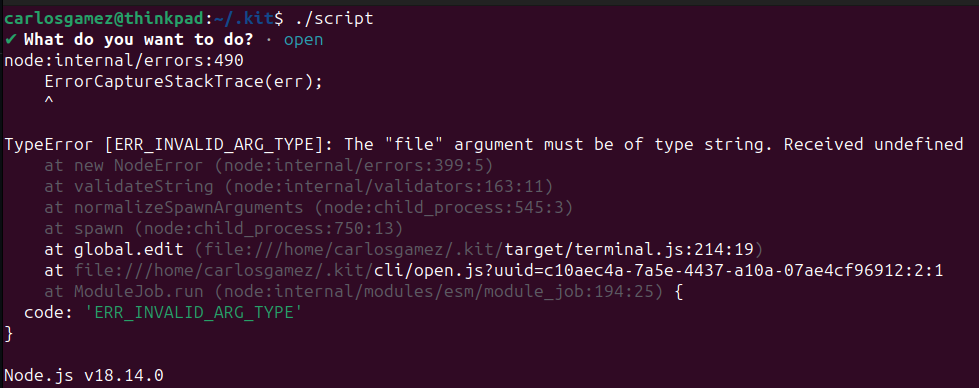
Installation with this package worked on Ubuntu 22.10. No errors. The The only command that works its the I get the error below. |
Beta Was this translation helpful? Give feedback.

-
|
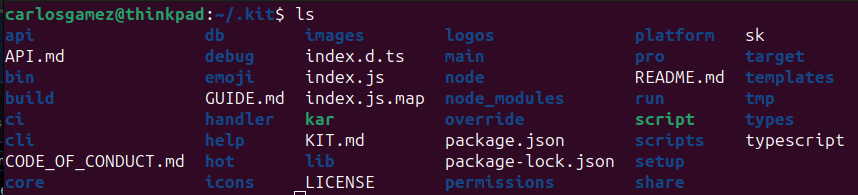
Thanks for your reply. I couldn't find a
Here's |
Beta Was this translation helpful? Give feedback.
-
|
@CarlosGamez-Nova Can you:
It should set up the |
Beta Was this translation helpful? Give feedback.
-
|
Hi @johnlindquist, |
Beta Was this translation helpful? Give feedback.
-
|
@CarlosGamez-Nova Oh, did you install the AppImage from scriptkit.com? Or just the npm package? I meant quit the AppImage |
Beta Was this translation helpful? Give feedback.
-
|
Hi @johnlindquist. Apologies for the confusion. I installed it using the |
Beta Was this translation helpful? Give feedback.

-
|
After kit seemingly failed to install (All UI just a black box, opening devtools showed errors @johnlindquist/install-kit log outputChecking the content of |
Beta Was this translation helpful? Give feedback.

-
|
I'm getting an error on setup using Ubuntu 22.04 x64 |
Beta Was this translation helpful? Give feedback.

-
|
This is what I'm getting when I run the npx script: `Need to install the following packages: ---- Installing Node ---- ---- Installing Kit ---- ---- Installing Kenv ---- ---- Installing esbuild ---- Home detected as /Users/mpont ---- Installing esbuild into /Users/mpont/.kit ---- added 347 packages, changed 1 package, and audited 1099 packages in 10s 159 packages are looking for funding 3 moderate severity vulnerabilities Some issues need review, and may require choosing Run ---- Setup Scripts ---- ---- Creating /Users/mpont/.kenv/.env ---- |
Beta Was this translation helpful? Give feedback.

-
Got this loooooooooooong error while running the npx cmdcode: 'ERR_BAD_REQUEST', \r\n' + \r\n' +' Whoa there!\r\n' +' You have sent an invalid request. ' \r\n' + ' ' \r\n' + '\r\n' } } Node.js v18.12.1 |
Beta Was this translation helpful? Give feedback.

-
|
Hello. I am using NodeJS 22 version. And i cannot setup script kit. I have got this error
|

Beta Was this translation helpful? Give feedback.
-
|
Please send me these logs from this directory to help me debug %USERPROFILE%\AppData\Roaming\ScriptKit\logs\ To fix right away, try:
Then try opening the app? This repo hosts the SDK and should manually build out the correct version. |
Beta Was this translation helpful? Give feedback.

-
|
It worked. thanks for your response |
Beta Was this translation helpful? Give feedback.


Uh oh!
There was an error while loading. Please reload this page.
Uh oh!
There was an error while loading. Please reload this page.
-
My Install Failed. What Should I Do?
99.9% errors come from the SDK failing to install. To manually installed the SDK:
GitHub CLI
or Git
This builds the SDK to ~/.kit
Then open the app
More Details on the Install Process
The 3 Required Directories
1.
~/.kitThis is the Kit SDK. You should be able to download the SDK and extract it here. (This is also what
npm run buildtries to build)https://github.com/johnlindquist/kitapp/releases/latest
You should extract it so the package.json resides here:
~/.kit/package.json2.
~/.kenvThis is the Kit Environent where scripts are stored. It's simply a way to organize scripts, logs, tmp, etc. You can clone it from:
https://github.com/johnlindquist/kenv
You should clone it so the package.json resides here:
~/.kenv/package.json3.
~/.knodeThis is a version of node (v18.15.0) that matches the current version of the app.
https://nodejs.org/download/release/v18.15.0/
nodeshould be accessible as~/.knode/bin/nodeFinal Configuration Setups
Intall
esbuildfor TypeScript supportUse the .knode version of node to install esbuild into the ~/.kit dir:
Run the setup scripts
Thoughts on the Setup Process
esbuildis a different binary per-platform. It's been a challenge to get the CI process bundling the correct version and fighting against code-signing of unsign binaries. I an not an expert in this area.~/.kitand~/.knodeSDK outside of the app makes it possible to run scripts from the terminal and allows users to play with the SDK code before submitting PRs. It would be much easier to package it in the app, but we'd lose features.Beta Was this translation helpful? Give feedback.
All reactions