We will be spending the first hour to learn about software testings, and next 2 hours creating tests for simple JavaScript applications.
Note for instructors
- Run all
.jsfiles withnodein the Terminal.- While running JS code, use debugging terminal to visually guide learners how codes are executed.

Source: https://www.javatpoint.com/software-engineering-software-development-life-cycle
- Requirement Analysis - Gathering the business and technical requirements.
- Defining - Defining the functional and non-functional requirements.
- Designing - Translating the functional requirements into workable tasks.
- Coding - Writing code a.k.a. development phase.
- Testing - Ensuring the outcome of development aligns with the defined requirements.
- Deployment - Going live into production.
- Maintenance - Monitoring systems health and fix errors when arises.

- Unit Test - An isolation testing targeting at the smallest piece of logic in the software.
- Integration Test - Testing multiple software modules together as a group.
- Acceptance Test - Testing the functionality of the software by end users before launch.
- Performance Test - A non functional test to determine the stability, speed, responsiveness and resilience of the system.
- Load Test - Simulate an increasing amount of traffics/requests sent to the system.
- Stress Test - Determine the peak load and/or how much requests the system can receive.
- Endurance Test - Determine the behaviour of the system at the peak load over time.
- Security Test -
- Dependency Vulnerabilities - Scanning for vulnerabilities introduced by dependencies.
- Secrets & Data Storage Strategy - Determine how secure are secrets and sensitive data being stored.
Different industries apply the stages of the Software Development Life Cycle (SDLC) in various ways, depending on their specific needs and requirements. Here is an example of how an industry approaches the SDLC stages:
- Planning: Rigorous planning is crucial due to strict regulatory compliance and security requirements. Detailed documentation and approvals are necessary.
- Requirements Gathering: Close collaboration with business stakeholders and legal teams to capture complex financial rules and regulations.
- Design: Emphasis on secure system architecture, data encryption, and access controls.
- Development: Adherence to coding standards and best practices for financial applications, such as OWASP guidelines.
- Testing: Extensive testing, including security testing, penetration testing, and stress testing, to ensure system robustness and data integrity.
- Deployment: Careful planning for data migration, user training, and compliance with regulatory bodies.
- Maintenance: Continuous monitoring for security vulnerabilities, regulatory changes, and system performance.
Understanding Part 1 and Part 2, learners will be grouped in a team of 3 or 4 to research (google), discuss how an industry approaches the SDLC stages. Learners may simple use google docs for this.
Here are the industries per group:
- Group 1 - eCommerce
- Group 2 - Healthcare
- Group 3 - eLearning
- Group 4 - Social Media
In order for us to test out our codes, we can use a testing package and write our own tests. In JavaScript, we can use jest as our test package. To install Jest in our local machines, we use the command npm install -g jest, this installs Jest globally so that other projects can use it.
Jest can be used to write tests for JS applications. To write a test, the file must end with the .test.js extension.
A test suite is a collection of tests that can be done for the specific test file.
To create a test suite, the describe keyword is used.
describe("description of the test suite", () => {
    //tests to be written
})
Let's create a test file called simple_test.test.js.
//simple_test.test.js
const {addFunc, isDivisbleBy5} = require("./sample");

describe("Test Suite for sample.js functions", ()=>{

})
The require allows the test file to use the addFunc and isDivisbleBy5 functions that we exported from our sample.js file. You can take a look at the sample.js file to see how the functions were exported.
After the test suite has been created, individual tests are written using the it keyword.
it("test description", () => {
    //test itself
})
Tests typically are done wherein a function is called with necessary parameters and then compared with a specific result.
In order to achieve this, the expect keyword is the value to be tested and toBe the expected value.
//simple_test.test.js
const {addFunc, isDivisbleBy5} = require("./sample");

describe("Test Suite for sample.js functions", ()=>{

    it("should add 3 numbers", ()=>{
        const result = addFunc(1, 3, 4);
        expect(result).toBe(7);
    })

    it("should check divisibility by 5", ()=>{
        const result = isDivisbleBy5(1283);
        expect(result).toBe(false);
    })
})
There are other keywords that can be used to test such as toBeCalledTimes for loops. The documentation is very helpful for us to check how to compare values.
To run tests, go to the folder where the test is located and run the command: npm run test.
After the test is run, the result would show which test would pass or fail.


Rewrite the test that failed and run the test command again and see how the tests pass this time.
One of the Agile methodologies is Test Driven Development. The concept behind it is that tests are written for all the functionalities of the application first before any actual coding will take place.
After the tests have been written, code now will be written to pass the tests.
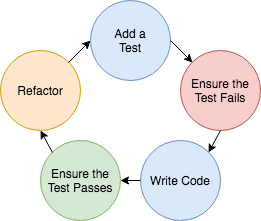
This way, developers know that the functionality works before pushing the code into repositories.
In the assignment folder, a sample test file called demo.test.js has been created that would test the code for q2-arrays-loops.js and q3-objects.js. This would simulate the part of TDD where the test have been written and it would fail when run.
For the assignment, the students will have to write the code to make the tests pass in demo.test.js to complete the TDD cycle.