Testing setup on WSL using Chrome browser installation in Windows #76

Replies: 29 comments 2 replies

-
|
@doantranthanh Can you also attach the logs from the Also, are you able to successfully run the tests directly from the command line in WSL, without VS Code? |
Beta Was this translation helpful? Give feedback.

-
|
yeah sure here is the log file |
Beta Was this translation helpful? Give feedback.
-
|
yeah I can run directly from the command line with the following steps:
wget https://dl.google.com/linux/direct/google-chrome-stable_current_amd64.deb
alias chrome='/c/Program Files/Google/Chrome/Application/chrome.exe'
it is working but I want to run individual tests so I installed the extension. However, it does not work. I have no idea why. Thank you |
Beta Was this translation helpful? Give feedback.
-
|
The log you attached is the one for the extension, not for Karma. To get the Karma log, first set the
|

Beta Was this translation helpful? Give feedback.
-
|
Sorry, here is the log. Thank you |
Beta Was this translation helpful? Give feedback.
-
|
I enabled 'karmaTestExplorer.enableExtension' but I found another error here It looks like Chrome cannot start. |
Beta Was this translation helpful? Give feedback.
-
|
I see you're installing Chrome in WSL, but then aliasing chrome and You can try one of the following:
|
Beta Was this translation helpful? Give feedback.
-
|
I tried the following setting but it does not work. Here is the log But I got another log which is said that And What do you think? |
Beta Was this translation helpful? Give feedback.
-
Try those options only one at a time, not all together. |
Beta Was this translation helpful? Give feedback.
-
|
also, as you can see in my karma.config.js. I have a custom launch browser which is I tried to use that but it does not work The issue is |
Beta Was this translation helpful? Give feedback.
-
yeah I tried each option at a time but it does not work |
Beta Was this translation helpful? Give feedback.
-
|
Without setting the |
Beta Was this translation helpful? Give feedback.
-
|
I got this error
|

Beta Was this translation helpful? Give feedback.
-
|
let me try to update puppeteer. Here is the current versions |
Beta Was this translation helpful? Give feedback.
-
|
I tried to run with new puppeteer but i have same issue |
Beta Was this translation helpful? Give feedback.
-
|
Ah if I run Then I can run successfully |
Beta Was this translation helpful? Give feedback.
-
|
YaY It is working now with the following settings. I can see the unit tests in my VS Code So I am going to remove CHROME_BIN from my bashrc, and try to use the extension and will let you know if there are any issues
Thank you so much for your support |

Beta Was this translation helpful? Give feedback.
-
|
I tried to run and debug a test but it does not work due to
Sorry running |
Beta Was this translation helpful? Give feedback.
-
|
I think I can load the tests with the extension which is good.
However, I dont know what the grey icons mean. Can you explain? Also, when I tried to run a single test it returns the following log And when I tried to run the second time, I got the above issues. What do you think? thanks |

Beta Was this translation helpful? Give feedback.
-
If you are running into the same issue while running from the command line, then the issue is with your setup and not with the extension. I suspect if you do not alias chrome / |
Beta Was this translation helpful? Give feedback.
-
|
I actually can run it with docker-compose command line. So basically, we build and start the frontend container and run Thank you for your supports |
Beta Was this translation helpful? Give feedback.

-
|
Not sure if this is related, but I'm getting multiple errors and erratic behaviour in vscode after updating to the latest release (1.77.3), and I'm on Ubuntu 22.04.2 LTS. CPU goes to 100% and when I kill vscode and run This is what I have about vscode: |
Beta Was this translation helpful? Give feedback.
-
|
let me try. My problem is that atm test is running well either inside container (I have a shell script to start a container and run ng test inside container) or run with Chrome browser with setup in .bashrc an alias which is point to chrome.exe in C drive, for example
wget https://dl.google.com/linux/direct/google-chrome-stable_current_amd64.deb
Now I can run outside the container with above steps. But I dont know how to integrate with karma extension so I can run individual test in VScode. |
Beta Was this translation helpful? Give feedback.
-
|
@digeomel Open a separate issue and provide all the relevant details. Be sure to provide a minimal reproduction project that shows the issue. |
Beta Was this translation helpful? Give feedback.
-
|
@doantranthanh converting this to a discussion as it seems to be difficulties with your particular setup rather than an issue with the extension. |
Beta Was this translation helpful? Give feedback.
-
|
@doantranthanh if you can successfully run your tests from the command line in WSL using this command: Then the easiest way to reproduce that in the extension is with (only) this single extension setting: "karmaTestExplorer.browser": "Chrome"Also make sure you're running VSCode in WSL, not Windows. |
Beta Was this translation helpful? Give feedback.
-
|
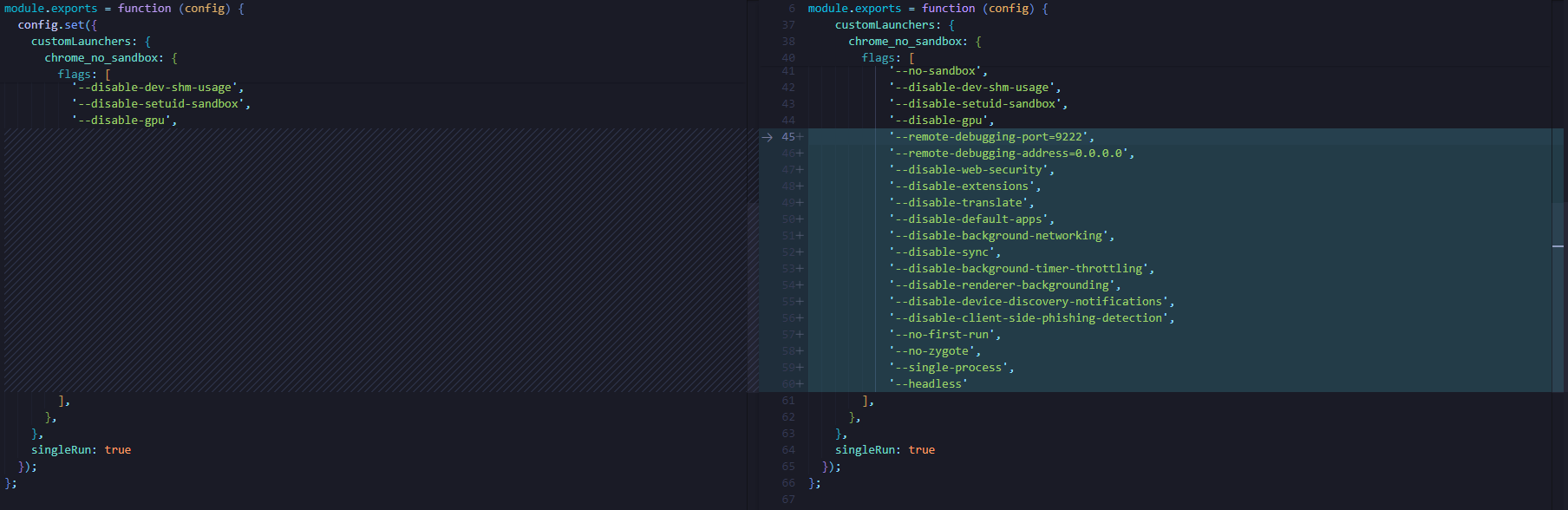
It is working now. What I changed
It is working like charm. I will try to ask my colleague to test with Chrome so I dont need to change the karma.config.js Thank you for your supports |
Beta Was this translation helpful? Give feedback.
-
|
I am having multiple karma.config.js. How can I use the local one (karma.config.local.js)? thanks |
Beta Was this translation helpful? Give feedback.
-
|
You can use |
Beta Was this translation helpful? Give feedback.

-
|
For some reason, it still reads the here is my settings
|
Beta Was this translation helpful? Give feedback.

-
|
@doantranthanh That would be a bug. Please open a bug issue and include a minimal project that reproduces the issue. |
Beta Was this translation helpful? Give feedback.


Uh oh!
There was an error while loading. Please reload this page.
Uh oh!
There was an error while loading. Please reload this page.
-
Describe the Bug
hi,
I am using Windows Linux Subsystem for develop.
I am having an Angular project with tests. I want to use the extension but the tests are not loaded due to the following issues
Here is my karma.config
Here is the log
Here is the details environment:
I am new to the Karma as well as Angular so could you support me?
Thank you
Beta Was this translation helpful? Give feedback.
All reactions