There will be two types of users:
- Viewers: One who consumes the content.
- Content Creators: One who creates the content.
| Requirement | Description |
|---|---|
| Streaming | User can stream any TV show or movie. |
| Device Compatibility | The application should be supported on all devices. |
| Requirement | Description |
|---|---|
| Upload Content | Content Creators should be able to upload movies/TV shows. After successful upload, they should get a notification. |
| Requirement | Description |
|---|---|
| Low Latency | When a user watches a movie or TV show, the experience should be smooth. Any buffering or lagging will spoil the experience. |
| Scalability | The platform should be able to handle a large number of users streaming many movies/TV shows simultaneously. |
| User Experience | Users should get the best possible quality while streaming. For example, if a user's internet is strong, they shouldn't receive poor quality (240p) streaming. |
| Availability | The system should be highly available with 99.9999% uptime. |
| Requirement | Description |
|---|---|
| Scalability | The platform should be able to handle many content creators uploading numerous movies/TV shows at the same time. |
| Security | The platform should ensure the security of the content uploaded by creators to prevent unauthorized access or piracy. |
| Storage Reliability | The platform should provide reliable storage to ensure the uploaded content is safely stored and remains available without disappearing. |
- Daily Active Users (DAU): 100 million
- Monthly Active Users (MAU): 2.5 billion
Uploading videos is the only way to write (add data) to the system.
Most users are viewers rather than creators. We assume that 1 out of 250 users uploads a video daily.
-
Total Daily Active Users (DAU): 100 million
-
Fraction of Users Uploading Videos: (1/250)
-
Write Requests per Day:
(1/250)times 100,000,000 = 0.4 million write requests per day
Watching videos is the primary way to read data from the system.
An average user watches 10 videos per day.
-
Total Daily Active Users (DAU): 100 million
-
Videos Watched per User: 10
-
Read Requests per Day:
100,000,000 * 10 = 1billion read requests per day
| Operation | Calculation | Result |
|---|---|---|
| Writes | (1/250) × 100 million | 0.4 million requests/day |
| Reads | 100 million × 10 | 1 billion requests/day |
- Average Size of a Video: 600 MB
- Daily Uploads (from throughput estimation): 0.4 million requests per day
-
Daily Storage Requirement:
600 MB × 0.4 million requests/day = 240 TB/day -
10-Year Storage Requirement:
240 TB/day × 365 days × 10 years = 876 PB
| Metric | Calculation | Result |
|---|---|---|
| Daily Storage | 600 MB × 0.4 million requests/day | 240 TB |
| 10-Year Storage | 240 TB/day × 365 days × 10 years | 876 PB |
By memory, we refer to the cache memory size required for faster data access.
Accessing data directly from the database takes time. To speed up data retrieval, cache memory is used.
- Daily Storage Requirement: 240 TB/day
- Cache Requirement (1% of Daily Storage):
0.01 × 240 TB = 2.4 TB/day
The memory size should scale as the system grows to accommodate increasing storage and data access demands.
Network/Bandwidth estimation helps us determine the amount of data flowing in and out of the system per second.
-
Data Stored per Day: 240 TB/day
-
Calculation:
240 TB ÷ (24 × 60 × 60) = 2.7 GB/s -
Result: Incoming Data Flow = 2.7 GB/s
-
Total Read Requests per Day: 1 billion
-
Average Video Size: 600 MB
-
Daily Outgoing Data:
1 billion × 600 MB = 600 PB/day -
Calculation:
600 PB ÷ (24 × 60 × 60) = 7 TB/s -
Result: Outgoing Data Flow = 7 TB/s
| Type | Calculation | Result |
|---|---|---|
| Ingress (Data Flow In) | 240 TB ÷ (24 × 60 × 60) | 2.7 GB/s |
| Egress (Data Flow Out) | 600 PB ÷ (24 × 60 × 60) | 7 TB/s |
Let's understand how a client (content creator) uploads content to YouTube and what APIs are involved.
Since videos can be very large (could be 10 minutes or even 2 hours), it's not feasible to upload a video in a single request. Multiple requests are sent to upload small chunks of the video.
Additionally, there is video metadata associated with the video, such as the video title, creator ID, format, etc.
When we press the upload button, initially a request is sent to add the metadata associated with the video to the server. Here are the details of the initial request.

This tells the server what action to perform. Since we want to create something new on the server (metadata for the new video), we use the POST action.
This tells the server where to perform that action. Since we are creating video metadata, we use the /v1/videos endpoint of the server.
Since we also need to upload the actual video after the metadata, we include uploadType=resumable in our endpoint. This indicates that we are uploading a large media file chunk by chunk. It is useful because if the connection drops while uploading this large file, we should be able to resume the upload from that point. In summary, uploadType=resumable tells the server to provide a "resumable" URL back that we can use to upload as well as resume the upload, if needed.
We tell the server to create metadata for the video, but we haven't provided the details of the metadata yet. This information is sent in the request body.
{
  "title": "Your video title",
  "format": "The format of your video"
  // ...
}
In response to this request, YouTube's server provides us with a resumable URL. We can use this URL to upload the video, and if the connection drops, we can resume the upload from that point. This resumable URL is called a session.
When we upload the actual video, we use this same session URL. Here are the details of the actual upload request:

This tells the server what action to perform. We use the PUT action to upload the actual video data to the given session URL.
This tells the server where to perform that action. We use the session URI provided by the server in the response to the first request. The uploadId in the URI helps the server identify which video's session it is, even when resuming the upload.
The body of the PUT request contains the binary data of the video file.
Let's understand how a client streams content on YouTube and what APIs are involved.
Since videos can be very large (could be 10 minutes or even 2 hours), it's not feasible to get the whole video in a single request. Multiple requests are sent to get small chunks of the video. These chunks are stored at different locations on the server.
To stream the entire video, the client needs to know these locations. All these locations are saved in a file called a manifest file. So when the client first requests to watch a video, the server sends the manifest file. Once the client gets the manifest file, it uses it to fetch the different chunks from the server (this is streaming).
Here's how the flow looks:
-
Watch Request
When we open a video, the first request that goes to the server is a watch request, telling the server that the client wants to watch the video. -
Server Response (Manifest File)
The server responds with the manifest file. -
Fetching Chunks
The client uses the manifest file to fetch different chunks from the server to stream the video.

When we open a video, the first request that goes to the server is a watch request, telling the server that the client wants to watch the video. The server responds with the manifest file. Here are the details about the request.
This tells the server what action to perform. Since we want to watch (get) a video, we use the GET action.
This tells the server where to perform that action. We use the /v1/watch endpoint to tell the server we want to watch a video. The server sends the manifest file back.
Now the client has the manifest file which contains the locations of the video chunks. The client uses these locations to start streaming the video chunk by chunk. This is how the overall flow looks with the streaming request.

The locations in the manifest file are actually the CDN server locations where the chunks are stored. Simply put, a CDN is a server that makes it easy to load large assets (like videos and media).
This tells the server what action to perform. Since we are getting video chunks, we use the GET action.
This tells the server where to perform that action. Since we are getting the video chunks from respective locations, we use the locations (provided in the manifest) as the endpoi
We are using something called the HLS Protocol for getting video chunks from the CDN. HLS (HTTP Live Streaming) is a very popular protocol used for streaming.
- Adaptive Streaming: The quality of the video can adjust based on the user's internet speed.
- Fast internet: High-quality video chunks are streamed.
- Slow internet: Video quality drops to prevent buffering, ensuring uninterrupted playback.

As we saw in the API design, the video upload process involves two main steps. The first request uploads the video metadata, and the server responds with a session URL.

Let’s understand this with a high-level diagram. Refer to the steps in the diagram.
-
When the client clicks the upload button, the first request goes to the API Gateway.
-
The API Gateway handles incoming requests and routes them to the Content Upload Service via the Load Balancer.
-
The Content Upload Service adds video metadata (title, format, etc.) to the Videos DB.
-
The client receives a successful confirmation along with a session URL.

This session URL is then used to upload the actual video data in chunks. Let's see how that happens next.
Once we have the session URL, we start uploading the video using that URL. Here's how the flow works (refer to the steps in the diagram):
-
The client uses the session URL as an endpoint and sends a
PUTrequest. This request contains the actual video content. -
The API Gateway handles incoming requests and routes them to the Content Upload Service via the Load Balancer.
-
The Content Upload Service stores the video content in Object Storage.
-
When the entire video is uploaded to Object Storage, the Content Upload Service adds an event to the Message Queue. This event contains the video ID.
-
The Content Processor, also known as the Workflow Engine, pulls this event from the Message Queue for further processing. It's called a Workflow Engine because it runs a series of steps one after the other.
-
Workflow Operation
-
Step 1: The Content Processor uses the event to retrieve the video from Object Storage.
-
Step 2: Then, it breaks the large video file into smaller chunks.
-
Step 3: Each chunk is converted into different formats and different qualities/resolutions. For example, a 1-minute video is broken into 10 chunks (6 seconds each). Each chunk is then converted into various formats (e.g., MP4, MOV) and resolutions (e.g., 4K, 720P, 240P).
This process ensures the video can be accessed in different formats and qualities. We will discuss this workflow in detail in the next part.

-
The Content Processor uploads these smaller chunks (in different formats and qualities) to the CDN. Uploading to the CDN allows clients to access the videos faster.
-
Each chunk uploaded to the CDN has a location URL. The Content Processor saves these locations in the Videos DB.
-
Since the video processing is complete, the Content Processor adds an event to the Message Queue to signal that the video processing is done.
-
The Notification Service pulls this event from the Message Queue for further processing.
-
Finally, the Notification Service sends a notification to the client saying the video upload process is complete.

As we discussed during the API design, video streaming involves three main steps:
-
The client sends a request to the server indicating that it wants to play a specific video.
-
The server responds with a manifest file. This file contains the locations of the small video chunks.
-
The client streams these small video chunks from the CDN using the HLS protocol.

When the client sends a request to the server indicating that it wants to play a specific video, the server returns back the manifest file. Additionally, it returns other necessary video metadata like the title, creator ID, description, etc.
The manifest file from the server looks something like this. It lists the locations of video chunks in different formats and qualities for that video. The client then uses this file to request the video chunks.

When the client requests video chunks from the CDN, the CDN delivers these chunks to the client via the HLS protocol.
Different devices support different video formats:
- When a client requests MP4 format, it receives MP4 chunks.
- When a client requests MOV format, it receives MOV chunks.
- Weak Connection: The client requests lower-quality chunks (e.g., 240P).
- Strong Connection: The client requests higher-quality chunks (e.g., 4K).

A common scenario occurs when the internet connection fluctuates between strong and weak:
- When the connection is strong, the client requests high-quality chunks.
- When the connection weakens, the client requests lower-quality chunks.
This adaptive behavior ensures a smooth viewing experience. This process is known as Adaptive streaming, and the HLS protocol supports it very well. This is why HLS is widely used during video streaming.

Let's dive deeper into the Content Processor (Workflow Engine). As mentioned, this is a workflow engine that runs a series of steps. Here are the steps:
- Content Chunker Service
- Format Converter Service
- Quality Converter Service
- CDN Uploader Service
As we saw earlier, in the 4th step, an event is added to the Message Queue with the video ID. The Content Chunker Service grabs this video using the ID and breaks it into smaller chunks. This is necessary because it breaks the video into smaller chunks that can be processed in parallel. Also, it will make streaming efficient.
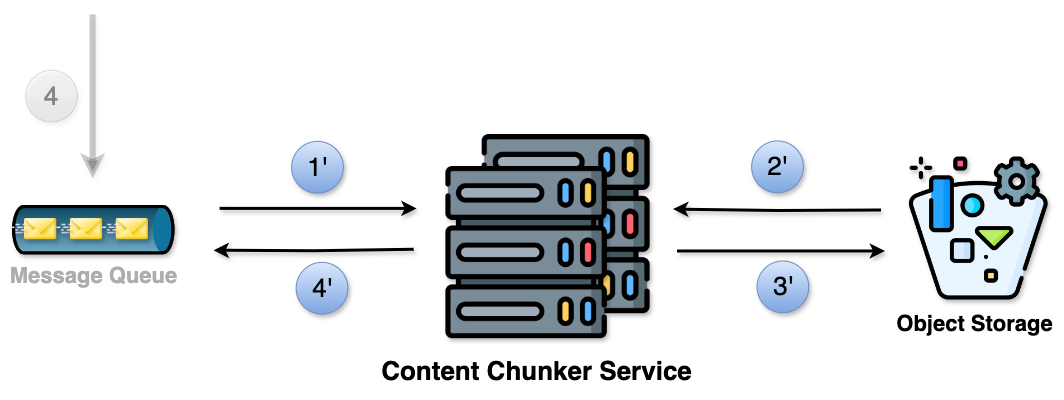
- Retrieve the event from the Message Queue.
- Use the video ID from the event to get the video from Object Storage and break it into smaller chunks.
- Upload the chunks to Object Storage.
- For each uploaded chunk, create an event with the chunk ID and add it to the Message Queue.
After chunking, the Format Converter Service converts these chunks into different formats. This is necessary because converting the chunks into different formats ensures compatibility with various devices and platforms.

-
Retrieve the event from the Message Queue.
-
Use the chunk ID from the event to get that chunk from Object Storage.
Then it converts the chunk into different formats (e.g., MP4, MOV). -
Upload the converted chunks to Object Storage.
-
For each uploaded chunk, create an event with the chunk ID and add it to the Message Queue.
After converting to different formats, the Quality Converter Service converts these chunks into different quality levels. This is necessary because converting the chunks into different quality levels provides a smooth viewing experience as per the user's internet speed.
Example:
- If the connection is weak, they see 240P.
- If the connection is strong, they see 4K.

-
Retrieve the event from the Message Queue.
-
Use the chunk ID from the event to get the chunk from Object Storage.
It then converts the chunk into different qualities/resolutions (e.g., 4K, 720P). -
Upload the converted chunks to Object Storage.
-
Create an event for each uploaded chunk and add it to the Message Queue.
The event should include the chunk ID.
The steps above, when visualized, look like this:

Finally, the CDN Uploader Service comes into play.
Note: The numbers 6, 7, 8, and 9 correspond to the high-level design diagram covered in the previous part.
The CDN Uploader Service retrieves these resulting chunks (in different formats and qualities) from Object Storage and uploads them to the CDN. This is necessary because accessing videos from CDN is much faster.

Each chunk uploaded to the CDN has a location. The CDN Uploader Service also saves these locations in the Videos DB.
Ultimately, since the video processing is complete, the CDN Uploader Service adds an event to the Message Queue to signal that the video processing is done.
This is how the overall flow looks like:

In order to decide the DB type, here are some general guidelines that you can follow. However, it’s not always black and white — a lot depends on the project needs.
| Guideline | Recommendation |
|---|---|
| When you need fast data access | Prefer NoSQL |
| When the scale is too large | NoSQL performs better |
| When the data fits into a fixed structure | Prefer SQL |
| When the data doesn’t fit into a fixed structure | Choose NoSQL |
| If you have complex queries to execute on your data | Use SQL |
| If you have simpler queries | NoSQL works well |
| If your data changes frequently or will evolve over time | NoSQL supports flexible structure |
| Database | Deciding Factors | Decision |
|---|---|---|
| VideosDB |
- High Scale: Millions of YouTube videos are uploaded and watched every day. Handling such a scale of writes and reads makes NoSQL preferable. - Fast Access: Low latency is required due to non-functional requirements. NoSQL suits better for high-scale, low-latency systems. - Simple Query Pattern: When a user clicks on a video, the server returns video metadata along with the manifest file. Reading video metadata by video ID is well-handled by NoSQL. |
NoSQL |

| Attribute | Details |
|---|---|
| Database Type | NoSQL |
| Common Queries | Reading video metadata by videoId. This occurs when the user clicks on a video to watch the content, and the server returns back the video metadata along with the manifest file. |
| Indexing | videoId |
Because we have this common query to grab video metadata by videoId, we create an index on the videoId field. This sets a shortcut to quickly find the data by videoId. |
Workflow Engine Steps: Our Content Processor consists of four main steps:
- Content Chunking
- Format Conversion
- Quality Conversion
- CDN Upload

We also learned about HLS and how it enables adaptive streaming, which allows streaming different formats for different devices and different qualities based on internet speed.
Another thing to know about HLS: whenever we are streaming videos with HLS, the video chunks need to be encoded in a certain way.
Encoding simply means turning the video into a stream of 0s and 1s. There are different ways to do this, and each way creates a different version (version = different representation of 0s and 1s) of the same video.
For HLS to work, the video needs to be encoded using specific standards like H.264 or H.265.
But have we ever included encoding in our process? Our current workflow doesn't have an encoding step. So, how should we tackle this problem?
By introducing the encoding step in the workflow engine. Here’s how we can do it:
-
Content Chunking
-
Encoding: Encode each chunk in
H.264/H.265standard. -
Format Conversion: Convert each encoded chunk into different formats (e.g.,
MP4,MOV). -
Quality Conversion: Convert each format into different qualities (e.g.,
4K,720P). -
CDN Upload: Upload the final chunks to the CDN.

The introduction of the encoding step ensures that our workflow aligns with what HLS needs, enabling adaptive streaming.