This repository was archived by the owner on Nov 22, 2025. It is now read-only.
Workarounds
Go to Repository > Repository settings and open the section Git Extensions > Scripts. There you can add 3 scripts like this:
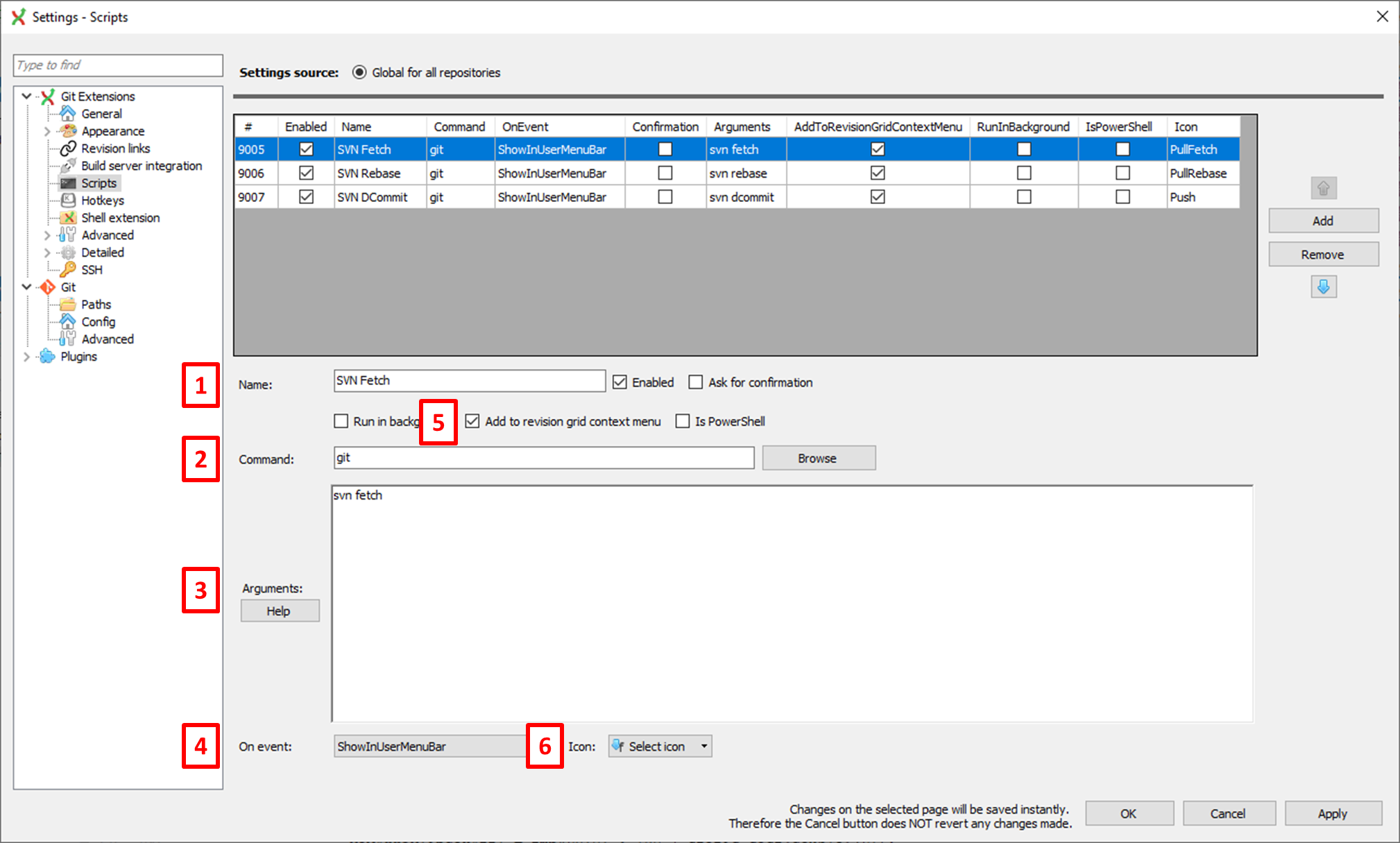
-
Name: You can pick any name you like, p.e.
SVN Fetch,SVN RebaseandSVN DCommit. -
Command:
gitfor all 3 cases. -
Arguments:
svn fetch,svn rebaseandsvn dcommit, respectively. -
On event: Ok,
ShowInUserMenubaris not really an event. But it will make the scripts accessible from the menu bar. - Add to revision grid context menu: Check this to have the scripts accessible from the context menu (right clicking on revision graph).
-
Icon: Optional. Pick the icons you like, p.e.
PullFetch,PullRebaseandPush.
Now you will see this:

You can use either Git Extensions' integrated console or the normal Windows command line, both work the same way.
For SVN Fetch, SVN Rebase and SVN DCommit, respectively type:
git svn fetch
git svn rebase
git svn dcommit
Note: The revision graph is not automatically refreshed after these commands. You need to do it manually.
For SVN Clone type:
cd C:\local\dir
git svn clone --stdlayout http://example.com/svn/repository local_repo
These commands correspond to the old Git Extensions dialog.
