Back to Projects List
- Mónica García-Sevilla (Universidad Las Palmas de Gran Canaria, Las Palmas de Gran Canaria, Spain)
- David García-Mato (Ebatinca S.L., Las Palmas de Gran Canaria, Spain)
- Abián Hernández-Guedes (Universidad Las Palmas de Gran Canaria, Las Palmas de Gran Canaria, Spain)
- Nayra Pumar (Ebatinca S.L., Las Palmas de Gran Canaria, Spain)
- Juan Ruiz Alzola (Universidad Las Palmas de Gran Canaria, Las Palmas de Gran Canaria, Spain)
- Javier Pascau (Universidad Carlos III de Madrid, Madrid, Spain)
- Csaba Pinter (Ebatinca S.L., Las Palmas de Gran Canaria, Spain)
The World Health Organization recommends a rate of cesareans inferior than 15%. However, the actual rates in the US double this value, while the use of obstetrical instruments, a recommended alternative to cesareans but which requires high skill and experience, has significantly decreased in the latest years. In this context there is a clear demand for simulators, with special interest in learning the correct use of Kielland’s forceps.
In 2018, we developed a training software in 3D Slicer for the correct use of forceps. We used anatomical simulators of the mother and fetus, a forceps 3D printed in non-ferromagnetic material, and an electromagnetic tracking system to track the movements of the forceps relative to the simulators. Further details can be found in (https://link.springer.com/chapter/10.1007%2F978-3-030-01201-4_9).
The goal of this project is to translate this software into a Virtual Reality (VR) application using the SlicerVR extension. This way, only the VR device is required for training.
- Visualize the simulators and forceps models in the VR scene.
- Interact with the models using the controllers.
- Select the step of the procedure.
- Check whether the maneuver for the step is correct or not.
- Enable a collaborative mode.
- Visualize the simulators and forceps models in the VR scene.
- Define a correct starting viewpoint.
- Decide how to move the forceps with the VR controllers.
- Learn how to access buttons from the controllers.
- Define a way of selecting the step for the procedure (assembly, presentation, initial placement, final placement). A panel could be a good idea.
- For each step, check whether the placement was correct or not (at an instant or in real time).
- Connect to the same scene from other device.
- Describe specific steps you have actually done.
- ...
- ...
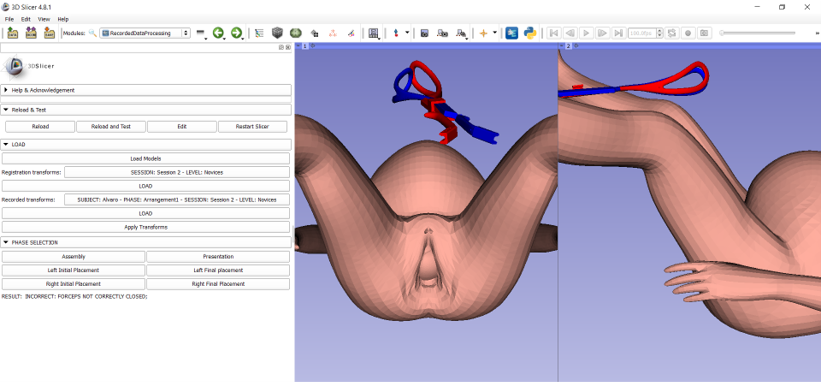
Publication of non-VR training system: (https://link.springer.com/chapter/10.1007%2F978-3-030-01201-4_9)
Video of non-VR training system: (https://www.youtube.com/watch?v=EEasWbH1jZI)