tag-gettingstarted:
The miniapps/electromagnetics directory contains a collection of
electromagnetic miniapps based on MFEM.
Compared to the example codes, the miniapps are more complex, demonstrating more advanced usage of the library. They are intended to be more representative of MFEM-based application codes. We recommend that new users start with the example codes before moving to the miniapps.
The current electromagnetic miniapps are described below.
The equations describing electromagnetic phenomena are known collectively as the Maxwell Equations. They are usually given as:
Where equation \eqref{ampere} can be referred to as Ampère's Law, equation \eqref{faraday} is called Faraday's Law, equation \eqref{gauss} is Gauss's Law, and equation \eqref{divb} doesn't generally have a name but is related to the nonexistence of magnetic monopoles. The various fields in these equations are:
| Symbol | Name | SI Units |
|---|---|---|
| magnetic field | Ampere/meter | |
| magnetic flux density | Tesla | |
| electric field | Volt/meter | |
| electric displacement | Coulomb/meter$^2$ | |
| current density | Ampere/meter$^2$ | |
| charge density | Coulomb/meter$^3$ |
In the literature these names do vary, particularly those for
Generally we also need constitutive relations between
Where
The nature of magnetization is more complicated but we will take a very
simplified view which is valid in many situations. Specifically, we will assume
that either
Finally we should note that equations \eqref{ampere} and \eqref{gauss} can be
combined to yield the equation of charge continuity
Electrostatic problems come in a variety of subtypes but they all derive from
Gauss's Law and Faraday's Law (equations \eqref{gauss} and \eqref{faraday}).
When we assume no time variation, Faraday's Law becomes simply
where
which is Poisson's equation for the electric potential, where we have assumed
a linear constitutive relation between
The solutions to equation \eqref{poisson} are non unique because they can be
shifted by any additive constant. This means that we must apply a Dirichlet
boundary condition at least at one point in the problem domain in order to
obtain a solution. Typically this point will be on the boundary but it need not
be so. Such a Dirichlet value is equivalent to fixing the voltage (a.k.a.
potential) at one or more locations. Additionally, this equation admits a normal
derivative boundary condition. This corresponds to setting
The electrostatics mini application, named volta after the inventor of the
voltaic pile, is intended to
demonstrate how to solve standard electrostatics problems in MFEM. Its source
terms and boundary conditions are simple but they should indicate how more
specialized sources or boundary conditions could be implemented.

Note that this application assumes the mesh coordinates are given in meters.
Permittivity: The permittivity, -ds can be used to set the
parameters for this dielectric sphere. For example, to produce a sphere at the
origin with a radius of 0.5 and a relative permittivity of 3 the user would
specify: -ds '0 0 0 0.5 3'.
Charge Density: The charge density, -cs which follows the same pattern as
the dielectric sphere. Note that the last entry is the total charge of the
sphere and not its charge density.
Polarization: A polarization vector function, -vp creates a
polarization due to a simple voltaic pile, i.e., a cylinder which is
electrically polarized along its axis. The user should specify the two end
points of the cylinder axis, its radius and the magnitude of the polarization
vector.
Dirichlet BC: Dirichlet boundary conditions can either specify piecewise
constant voltages on a collection of surfaces or they can specify a gradient
field which approximates a uniform applied electric field. In either case the
user specifies the surfaces where the Dirichlet boundary condition should be
applied using the -dbcs option followed by a list of boundary attributes.
For example to select surfaces 2, 3, and 4 the user would use the following:
-dbcs '2 3 4'.
To apply a gradient field on these surfaces the user would also use the
-dbcg option. This defaults to the uniform field -uebc
followed by the desired vector, e.g., to apply -uebc '1 2 3'.
To specify piecewise constant potential values the user would list the
desired values after -dbcv as follows: -dbcv '0.0 1.0 -1.0'.
Neumann BC: Neumann boundary conditions set the normal component of the
electric displacement on portions of the boundary. This normal component is
equivalent to the surface charge density on the surface. This is rarely used
because surface charge densities are rarely known unless they are known to be
zero. However, if the surface charge density is zero then the Neumann BCs are
not needed because this is the natural boundary condition. Only piecewise
constant Neumann boundary conditions are supported. They can be set
analogously to piecewise Dirichlet boundary conditions but using options
-nbcs and -nbcv.
Magnetostatic problems arise when we assume no time variation in Ampère's Law \eqref{ampere} which leads to:
We will again assume a somewhat more general constitutive relation between
Where the magnetization is split into two portions; one which is proportional
to
Which, when combined with equation \eqref{divb}, becomes:
If
Currently only the vector potential equation is used so we will focus on that for the remainder of this document.
The vector potential is again non unique so we must apply additional
constraints in order to arrive at a solution for
Dirichlet boundary conditions for the vector potential on a surface provide a
means to specify the component of
The magnetostatics mini application, named tesla after the unit of magnetic
field strength (and of course the man Nikola Tesla), is intended to demonstrate
how to solve standard magnetostatics problems in MFEM. Its source terms and
boundary conditions are simple but they should indicate how more specialized
sources of boundary conditions could be implemented. A detailed overview of
the equations being solved and their discretization can be found here:
Tesla Theory Notes.

Note that this application assumes the mesh coordinates are given in meters.
Permeability: The permeability, -ms can be used to
set the parameters for this shell.
For example, to produce a shell at the origin with inner and outer radii of
0.4 and 0.5 respectively and a relative permeability of 3 the user would
specify: -ms '0 0 0 0.4 0.5 3'.
Current Density: The current density, -cr which requires two points giving the end
points of the ring's axis, inner and outer radii, and a constant total
current.
For example, to specify a ring centered at the origin and laying in the XY
plane with a thickness of 0.2 and radii 0.4 and 0.5, and a current of 2 amps
the user would give: -cr 0 0 -0.1 0 0 0.1 0.4 0.5 2.
Magnetization: A permanent magnetization, -bm which indicates a 'bar magnet'. The option requires the two
end points of the cylinder's axis, its radius, and the magnitude of the
magnetization.
Surface Current Density: A surface current can be imposed indirectly by
specifying separate surface patches with different voltages as well as a
collection of surface patches connecting the voltages through which the
current will flow. The voltage surfaces and their voltages can be specified
using -vbcs followed by the indices of the surfaces and -vbcv followed by
their voltages. The path for the surface current (-kbcs followed by a set of surface indices.
For example, applying voltages 1 and -1 to surfaces 2 and 3 with a current
path along surfaces 4 and 6 would be specified as:
-vbcs '2 3' -vbcv '1 -1' -kbcs '4 6'.
Any surfaces not listed as voltage or current surfaces will be assigned as homogeneous Dirichlet boundaries. Note that when this option is selected an auxiliary electrostatic problem will be solved on the surface of the geometry to compute the surface current.
Dirichlet BC: Dirichlet boundary conditions are required if a surface
current density is not defined. For this reason the user need not specify
boundary surfaces by number since the boundary condition must be applied on
all of them. The default boundary condition is a homogeneous Dirichlet
boundary condition on all outer surfaces. This means that the normal
component of -ubbc command line option followed by the
desired
Transient electromagnetics problems are governed by the time-dependent Maxwell equations \eqref{ampere} and \eqref{faraday} when combined using the constitutive relations \eqref{const_d} and \eqref{const_b}. When combined these equations can describe the evolution and propagation of electromagnetic waves.
The term
Solving these equations requires initial conditions for both the
electric and magnetic fields
These equations can be used to evolve their initial conditions or they can be driven by either a current source or through time-varying boundary conditions. It is also possible to combine all three of these sources in a single simulation.
The electrodynamics mini application, named maxwell after James Clerk Maxwell
who first formulated the classical theory of electromagnetic radiation, is
intended to demonstrate how to solve transient wave problems in MFEM. Its source
terms and boundary conditions are simple but they should indicate how more
specialized sources or boundary conditions could be implemented. A detailed
overview of the equations being solved and their discretization can be found here:
Maxwell Theory Notes.
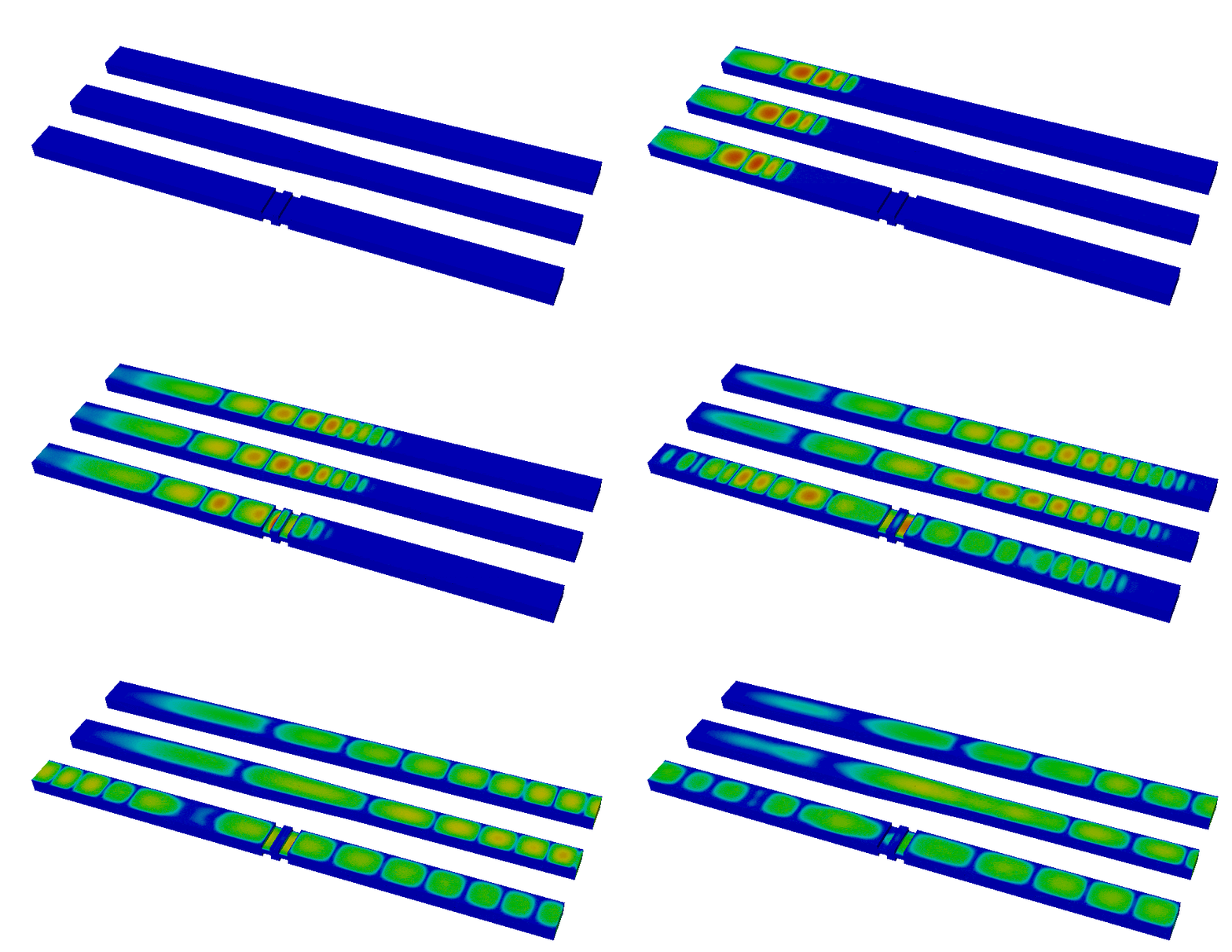
An example simulation is depicted below (click to animate the wave propagation).
Time integration is handled by a variable order symplectic time integration algorithm. This algorithm is designed for systems of equations which are derived from a Hamiltonian and it helps to ensure energy conservation within some tolerance. The time step used during integration is automatically chosen based on the largest stable time step as computed from the largest eigenvalue of the update equations. This determination involves a user-adjustable factor which creates a safety margin. By default the actual time step is less than 95% of the estimate for the largest stable time step.
Note that this application assumes the mesh coordinates are given in meters. Internally the code assumes time is in seconds but the command line options use nanoseconds for convenience.
Time Evolution: The initial and final times for the simulation can be
specified, in nanoseconds, with the -ti and -tf options. Visualization
snapshots of data will be written out after time intervals specified by -ts
which again given in nanoseconds. The order of the time integration can be
specified, from 1 to 4, using the -to option.
Permittivity: The permittivity, -ds can be used to set the
parameters for this dielectric sphere. For example, to produce a sphere at the
origin with a radius of 0.5 and a relative permittivity of 3 the user would
specify: -ds '0 0 0 0.5 3'.
Permeability: The permeability, -ms can be used to
set the parameters for this shell.
For example, to produce a shell at the origin with inner and outer radii of
0.4 and 0.5 respectively and a relative permeability of 3 the user would
specify: -ms '0 0 0 0.4 0.5 3'.
Conductivity: The conductivity, -cs can be used to set the parameters for this
conductive sphere. For example, to produce a sphere at the origin with a
radius of 0.5 and a conductivity of 3,000,000 S/m the user would specify: -cs '0 0 0 0.5 3e6'.
Current Density: The current density, -dp, short for 'dipole pulse', which
requires two points giving the end points of the cylinder's axis, radius,
amplitude (
Dirichlet BC: Homogeneous Dirichlet boundary conditions, which constrain the
tangential components of -dbcs '4 8'. For convenience a boundary attribute of
'-1' can be used to specify all boundary surfaces. Non-Homogeneous,
time-dependent Dirichlet boundary conditions are supported by the Maxwell
solver so a user can edit maxwell.cpp and supply their own function if
desired.
Absorbing BC: A first order Sommerfeld absorbing boundary condition can be
applied to a portion of the boundary using the -abcs option along with a
list of boundary attributes such as -abcs '4 18'. Again, the special
purpose boundary attribute '-1' can be used to specify all boundary surfaces.
This boundary condition depends on a coefficient,
etaInvCoef_ with a more appropriate function.
The transient magnetics mini application, named joule after the SI unit of energy (and the
scientist James Prescott Joule, who was also a brewer), is intended to demonstrate how to solve
transient implicit diffusion problems. The equations of low-frequency electromagnetics are coupled
with the equations of heat transfer. The coupling is one way, electromagnetics generates Joule
heating, but the heating does not affect the electromagnetics. The thermal problem
is solved using an
- Poisson's equation for the scalar electric potential is solved using the AMG preconditioner,
- the electric diffusion equation is solved using the AMS preconditioner, and
- the thermal diffusion equation is solved using the ADS preconditioner.
Two example meshes are provided, one is a straight circular metal rod in vacuum, the other is a helical coil in vacuum (the latter is 21MB and can be downloaded from here). The idea is that a voltage is applied to the ends of the rod/coil, the electric field diffuses into the metal, the metal is heated by Joule heating, the heat diffuses out.
The equations are:
The equations are integrated in time using implicit time integration, either midpoint or higher order SDIRK.
Since there are three solves, three sets of boundary conditions must be specified. The
essential BC's are the scalar potential, the electric field, and the thermal flux. These are not
set via command line arguments, you have to edit the code to change these. To change these,
search the code for ess_bdr.
There are conducting and non-conducting material regions, and the mesh must have integer attributes
to specify these regions. To change these, search the code for std::map<int, double> this maps the
integer attribute to the floating-point material value.
Note that this application assumes the mesh coordinates are given in meters.

The above picture shows Joule heating of a cylinder using the mesh cylinder-hex.mesh. The cylinder is
surrounded by vacuum. The black arrows show the magnetic field
Boundary Conditions: Since there are three solves, three sets of boundary conditions must be specified. The
essential BC's are the voltage for the scalar potential, the tangential electric field, and the normal thermal flux.
These are not
set via command line arguments, you have to edit the code to change these. To change these,
search the code for ess_bdr. Note that the essential BC's can be time varying.
Material Properties: There are conducting and non-conducting material regions, and the mesh must have integer attributes
to specify these regions. To change these, search the code for std::map<int, double> this maps the
integer attribute to the floating-point material value.