Sort visual by
| ℹ️ This wiki has been deprecated |
|---|
| All our Client APIs documentation and references can be found in the new Power BI embedded analytics Client APIs documentation set. For the content of this article see Sort a visual by a target data field. |
Use sortBy API to sort the target visual by one of its data fields
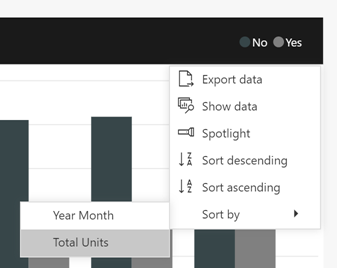
By using sort visual by API you can sort a single visual by one of its data fields, and control the direction of the sort. The data fields that the visual can be sorted by, can be found in the visual’s option menu under sort by menu command.
export enum SortDirection {
  Ascending = 1,
  Descending = 2,
}
SortDirection enum defines the sort direction - ascending/descending.
export interface ISortByVisualRequest {
  orderBy: ITarget;
  direction: SortDirection;
}
ISortByVisualRequest interface defines a sort request for the target visual.
- orderBy: the target data field of the sort, learn more about constructing data fields.
- direction: the direction of the sort ascending/descending.
Sort a visual by request which includes target data field and direction.
visual.sortBy(request).catch(errors => {
    ...
});report.getPages()
.then(function (pages) {
// Retrieve active page.
var activePage = pages.find(function (page) {
return page.isActive
});
activePage.getVisuals()
.then(function (visuals) {
// Retrieve the target visual. (replace "VisualContainer1" with the requested visual name)
var visual = visuals.find(function (visual) {
return visual.name == "VisualContainer1";
});
const request = {
// The target data field of the sort
orderBy: {
table: "SalesFact",
measure: "Total Category Volume"
},
// Sort direction
direction: 2 // models.SortDirection.Descending
};
visual.sortBy(request)
.catch(errors => {
// Handle error
console.log(errors);
});
});
});