A modern web interface for managing and interacting with vLLM servers (www.github.com/vllm-project/vllm). Supports GPU and CPU modes, with special optimizations for macOS Apple Silicon and enterprise deployment on OpenShift/Kubernetes.
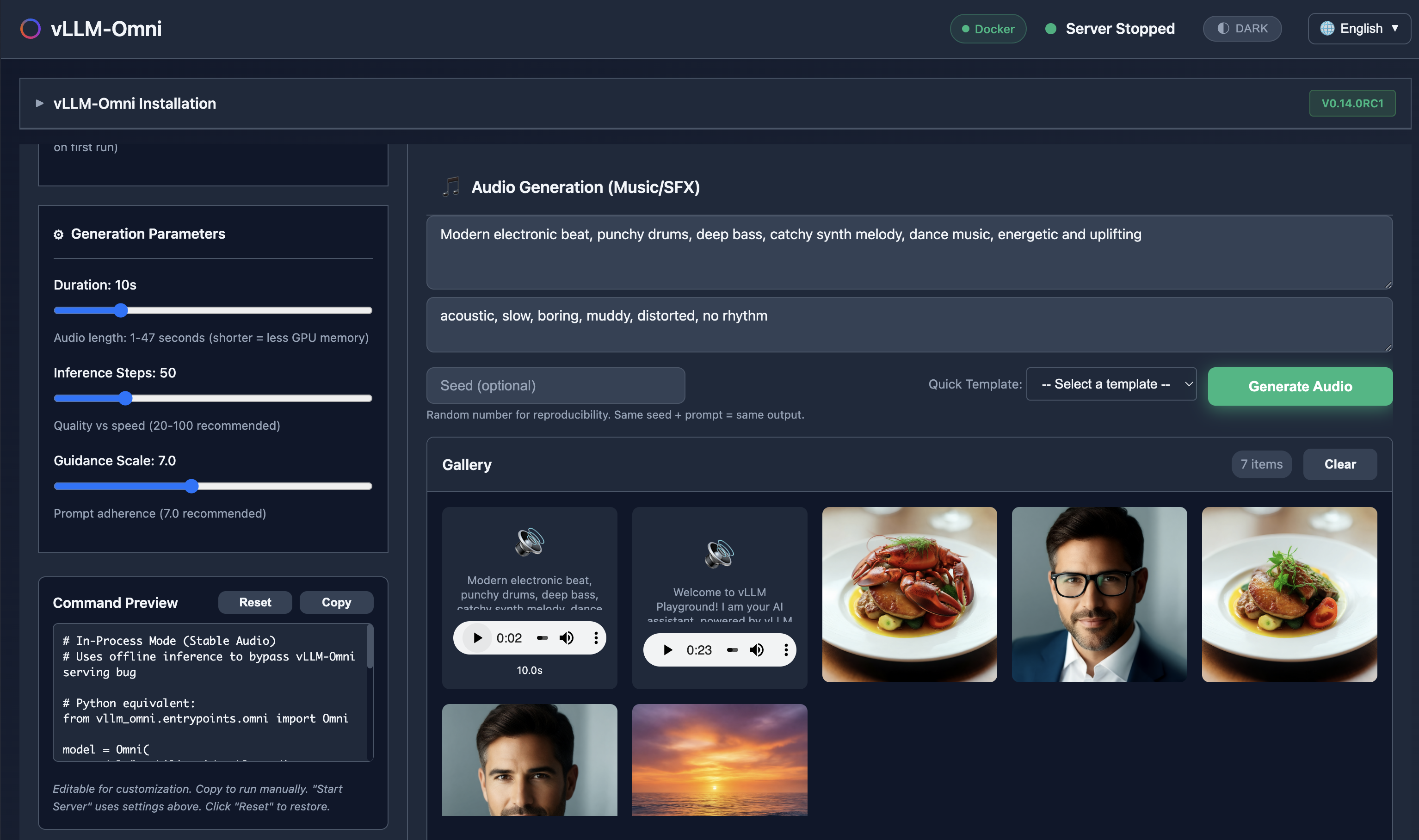
Generate images, edit photos, create speech, and produce music - all with vLLM-Omni integration.
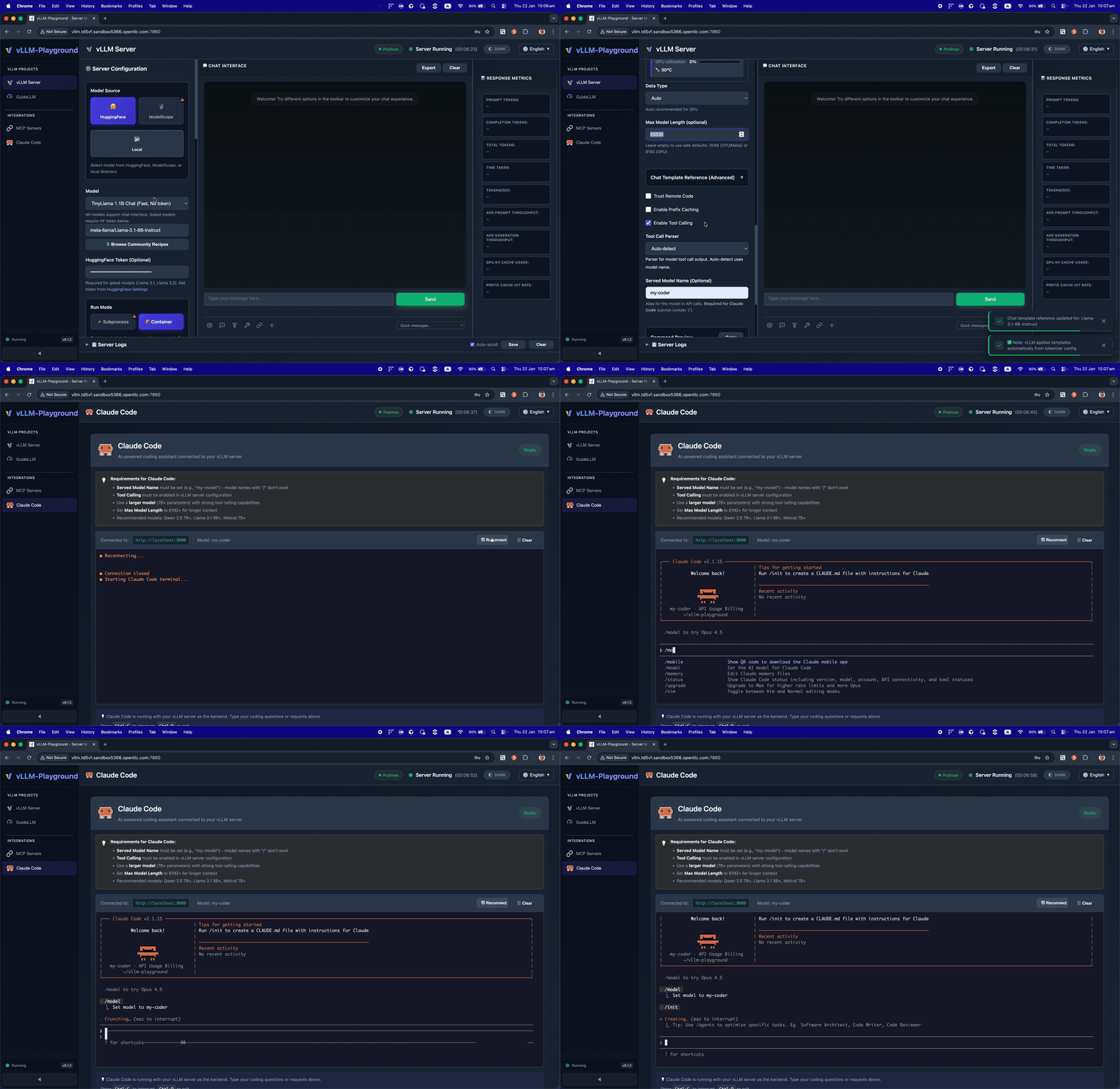
Run Claude Code with open-source models served by vLLM - your private, local coding assistant.
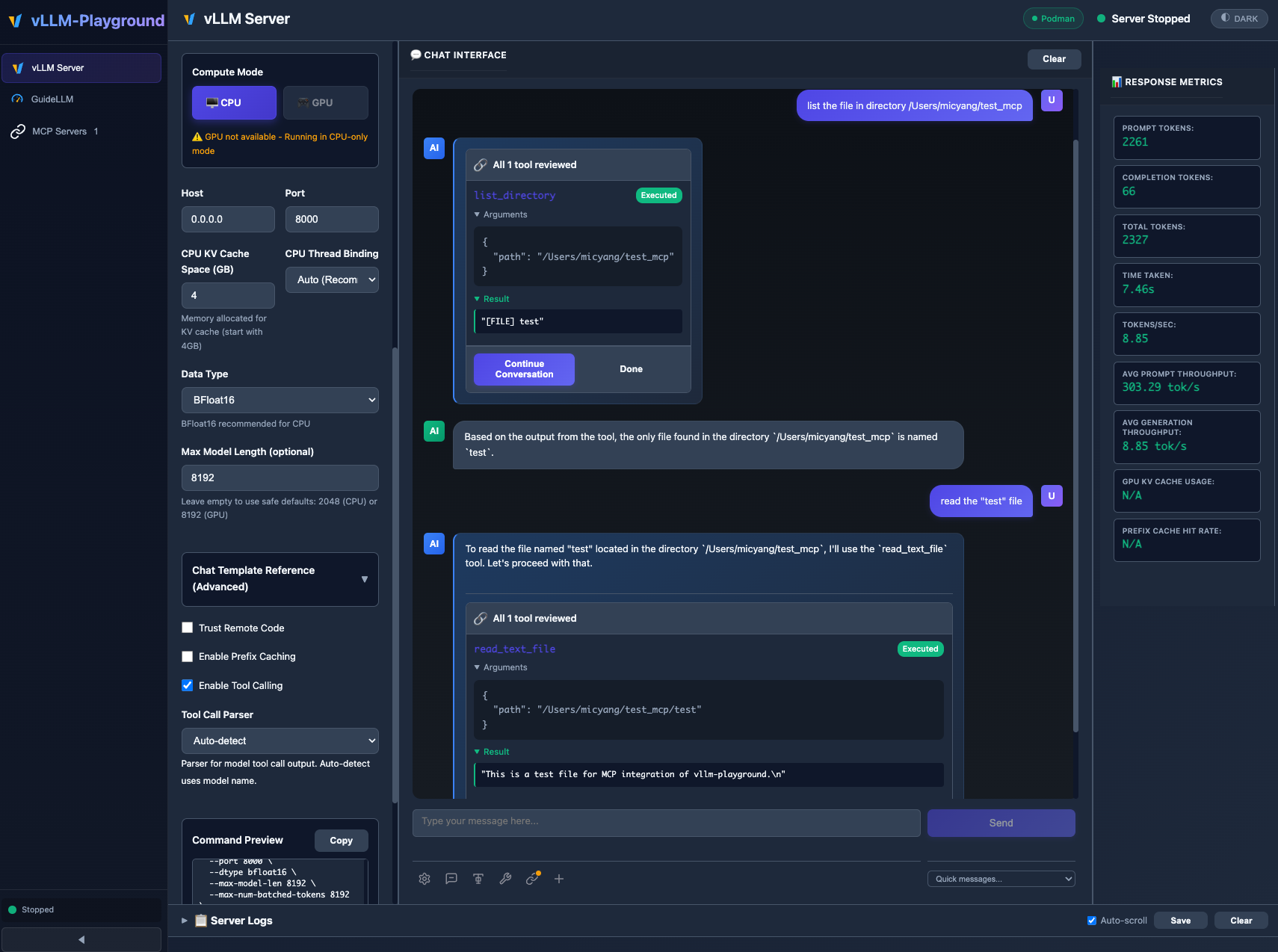
MCP (Model Context Protocol) integration enables models to use external tools with human-in-the-loop approval.
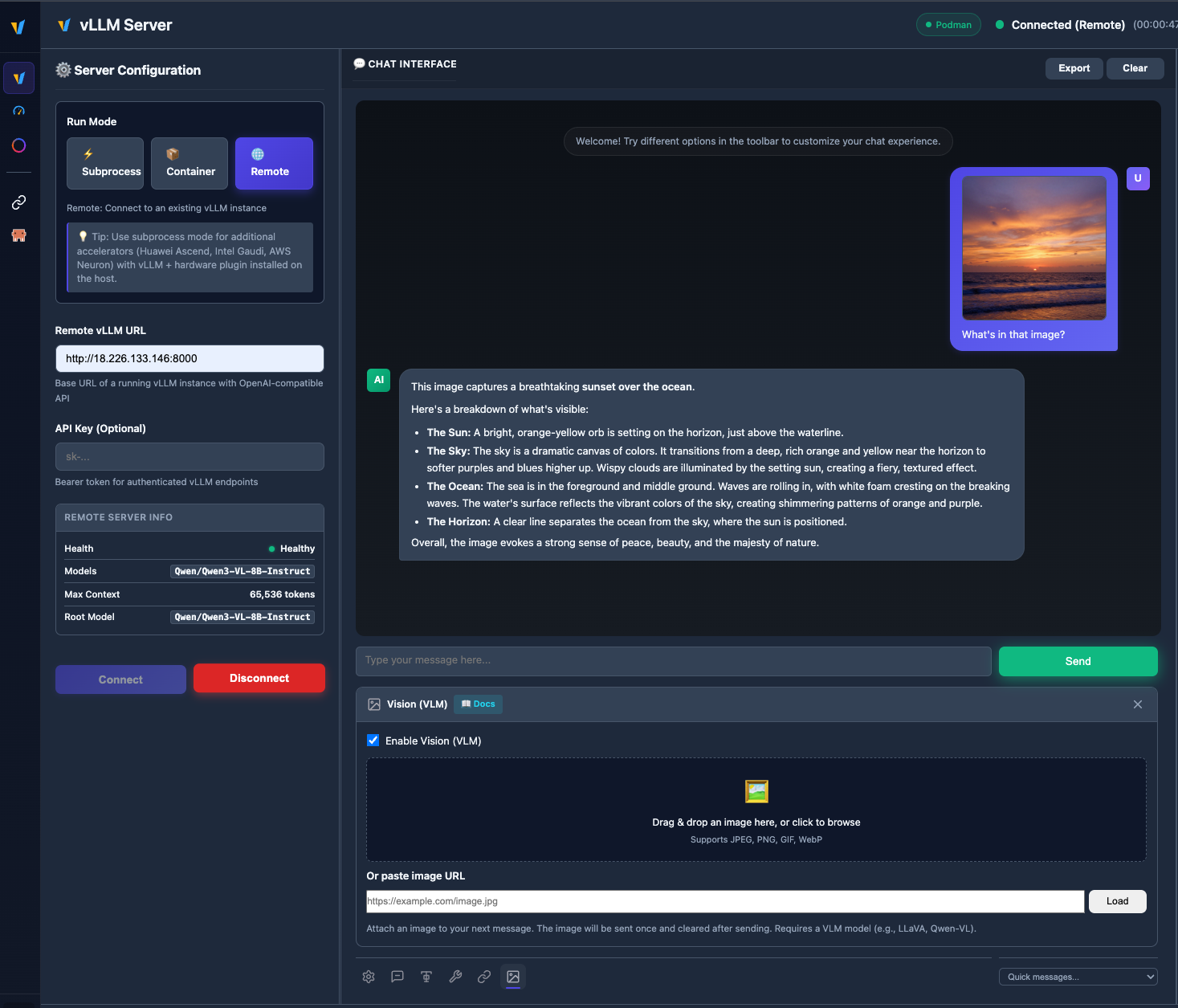
Upload images and chat with vision models like Qwen2.5-VL, LLaVA, and more.
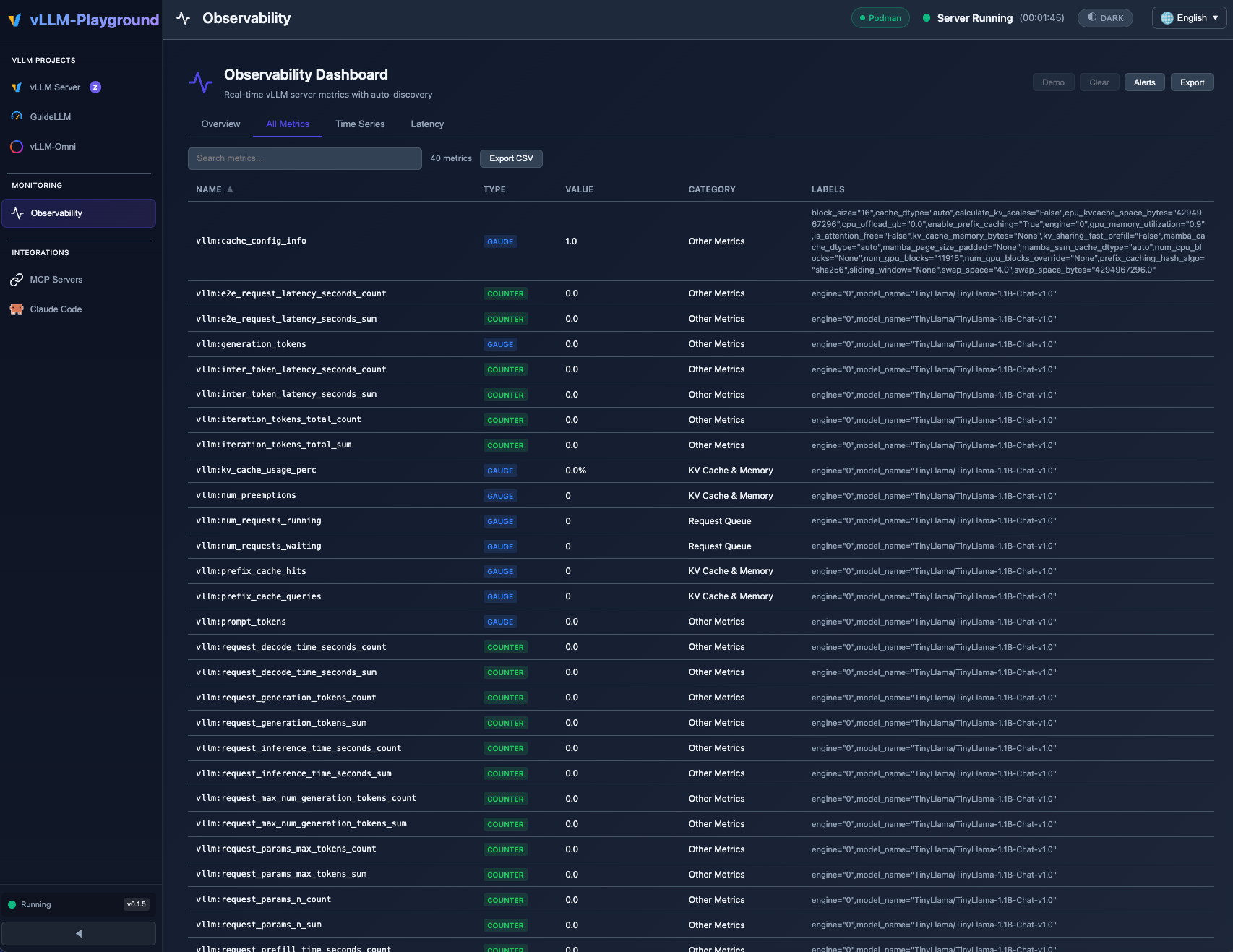
Real-time Observability Dashboard with auto-discovered vLLM metrics, category filtering, and threshold alerts.
- 📊 Observability Dashboard - Full-page metrics dashboard with time-series charts, threshold alerts, and auto-discovery
- 🔍 PagedAttention Visualizer - Real-time KV cache utilization heatmap with eviction alerts
- 🔢 Token Counter & Logprobs - Live token estimation and per-token probability heatmap
- ⚡ Speculative Decoding Dashboard - Acceptance rate, speedup factor, and method configuration
See Changelog for full details.
# Install from PyPI
pip install vllm-playground

# Pre-download container image (~10GB for GPU)
vllm-playground pull

# Start the playground
vllm-playground
Open http://localhost:7860 and click "Start Server" - that's it! 🎉
vllm-playground pull                # Pre-download GPU image (NVIDIA)
vllm-playground pull --nvidia       # Pre-download NVIDIA GPU image
vllm-playground pull --amd          # Pre-download AMD ROCm image
vllm-playground pull --tpu          # Pre-download Google TPU image
vllm-playground pull --cpu          # Pre-download CPU image
vllm-playground pull --all          # Pre-download all images
vllm-playground --port 8080         # Custom port
vllm-playground stop                # Stop running instance
vllm-playground status # Check status| Feature | Description |
|---|---|
| 🌐 Remote Server | Connect to any remote vLLM instance via URL + API key |
| 🖼️ VLM Support | Upload images and chat with vision models (Qwen2.5-VL, LLaVA) |
| 🤖 Claude Code | Use open-source models as Claude Code backend via vLLM |
| 💬 Modern Chat UI | Markdown-rendered chat with streaming responses |
| 🔧 Tool Calling | Function calling with Llama, Mistral, Qwen, and more |
| 🔗 MCP Integration | Connect to MCP servers for agentic capabilities |
| 🏗️ Structured Outputs | Constrain responses to JSON Schema, Regex, or Grammar |
| 🐳 Container Mode | Zero-setup vLLM via automatic container management |
| ☸️ OpenShift/K8s | Enterprise deployment with dynamic pod creation |
| 📊 Benchmarking | GuideLLM integration for load testing |
| 📚 Recipes | One-click configs from vLLM community recipes |
| Method | Command | Best For |
|---|---|---|
| PyPI | pip install vllm-playground |
Most users |
| With Benchmarking | pip install vllm-playground[benchmark] |
Load testing |
| From Source | git clone + python run.py |
Development |
| OpenShift/K8s | ./openshift/deploy.sh |
Enterprise |
📖 See Installation Guide for detailed instructions.
Enable in Server Configuration before starting:
- Check "Enable Tool Calling"
- Select parser (or "Auto-detect")
- Start server
- Define tools in the 🔧 toolbar panel
Supported Models:
- Llama 3.x (
llama3_json) - Mistral (
mistral) - Qwen (
hermes) - Hermes (
hermes)
Use vLLM to serve open-source models as a backend for Claude Code:
- Go to Claude Code in the sidebar
- Start vLLM with a recommended model (see tips on the page)
- The embedded terminal connects automatically
Requirements:
- vLLM v0.12.0+ (for Anthropic Messages API)
- Model with native 65K+ context and tool calling support
- ttyd installed for web terminal
Recommended Model for most GPUs:
meta-llama/Llama-3.1-8B-Instruct
--max-model-len 65536 --enable-auto-tool-choice --tool-call-parser llama3_json
Note: This integration demonstrates using vLLM as a backend for Claude Code. Claude Code is a separate product by Anthropic - users must install it independently and comply with Anthropic's Commercial Terms of Service. vLLM Playground provides the terminal interface only.
Connect to external tools via Model Context Protocol:
- Go to MCP Servers in the sidebar
- Add a server (presets available: Filesystem, Git, Fetch, Time)
- Connect and enable in chat panel
Edit config/vllm_cpu.env:
export VLLM_CPU_KVCACHE_SPACE=40
export VLLM_CPU_OMP_THREADS_BIND=autovLLM Playground supports Apple Silicon GPU acceleration:
- Install vllm-metal following official instructions
- Configure playground to use Metal:
- Run Mode: Subprocess
- Compute Mode: Metal
- Venv Path:
~/.venv-vllm-metal(or your installation path)
See macOS Metal Guide for details.
Use specific vLLM versions or custom builds:
- Install vLLM in a virtual environment
- Configure playground:
- Run Mode: Subprocess
- Venv Path:
/path/to/your/venv
See Custom venv Guide for details.
- Installation Guide - All installation methods
- Quick Start - Get running in minutes
- macOS CPU Guide - Apple Silicon CPU setup
- macOS Metal Guide - Apple Silicon GPU acceleration
- Custom venv Guide - Using custom vLLM installations
- Features Overview - Complete feature list
- Gated Models Guide - Access Llama, Gemma, etc.
- OpenShift/K8s Deployment - Enterprise deployment
- Architecture Overview - System design
- Container Variants - Container options
- Troubleshooting - Common issues
- Performance Metrics - Benchmarking
- Command Reference - CLI cheat sheet
- Changelog - Version history and changes
- v0.1.6 - Observability dashboard, PagedAttention visualizer, token counter, logprobs
- v0.1.5 - Remote server, VLM vision support, markdown rendering
- v0.1.4 - vLLM-Omni multimodal, Studio UI
- v0.1.3 - Multi-accelerators, Claude Code, vLLM-Metal
- v0.1.2 - ModelScope integration, i18n improvements
- v0.1.1 - MCP integration, runtime detection
- v0.1.0 - First release, modern UI, tool calling
┌──────────────────┐
│   User Browser   │
└────────┬─────────┘
         │ http://localhost:7860
         ↓
┌──────────────────┐
│   Web UI (Host)  │  ← FastAPI + JavaScript
└────────┬─────────┘
         │
    ┌────┴────┐
    ↓         ↓
┌───────-─┐ ┌────────┐
│ vLLM    │ │  MCP   │  ← Containers / External Servers
│Container│ │Servers │
└────────-┘ └────────┘
📖 See Architecture Overview for details.
| Issue | Solution |
|---|---|
| Port in use | vllm-playground stop |
| Container won't start | podman logs vllm-service |
| Tool calling fails | Restart with "Enable Tool Calling" checked |
| Image pull errors | vllm-playground pull --all |
📖 See Troubleshooting Guide for more.
- vLLM - High-throughput LLM serving
- Claude Code - Anthropic's agentic coding tool
- LLMCompressor Playground - Model compression & quantization
- GuideLLM - Performance benchmarking
- MCP Servers - Official MCP servers
Apache 2.0 License - See LICENSE file for details.
Contributions welcome! Please see CONTRIBUTING.md for setup instructions and guidelines.
Made with ❤️ for the vLLM community