Tutorial Small Model Titus
Download and install Titus. This article was tested with Titus 0.7.1; newer versions should work with no modification. Python >= 2.6 and < 3.0 is required.
Launch a Python prompt and import PFAEngine to verify the installation:
Python 2.7.6
Type "help", "copyright", "credits" or "license" for more information.
>>> from titus.genpy import PFAEngine
To get started, let's assume you have some extremely simple model to convert to PFA. Usually, models are built algorithmically, but building one manually will help us focus on the core functionality. Model building algorithms are diverse and specialized.
Suppose, for instance, that you want to convert this decision tree to PFA:
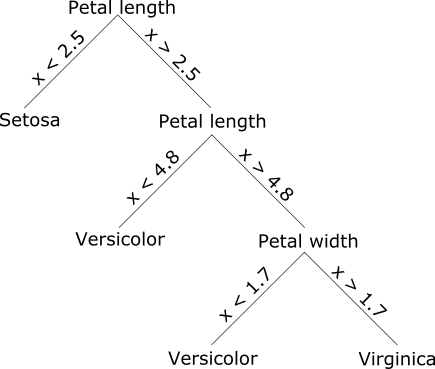
and score it with iris.csv. There are several ways we can do this:
- express the decision tree splits as PFA code (if-statements);
- express the decision tree splits as model data and write PFA code to walk over that model data;
- express the decision tree splits as a PFA tree, such that the tree-walking library functions recognize them and know how to walk over them.
Usually, we would only consider the third option, but the progression illustrates some basic facts about PFA.
This method is like hard-coding a model in a traditional programming language: we'll be writing code like the following.
if (petal_length_cm < 2.5)
    return "setosa";
else if (petal_length_cm < 4.8)
    return "versicolor";
else if (petal_width_cm < 1.7)
    return "versicolor";
else
    return "virginica";
Unlike the C syntax above, PFA is entirely expressed in JSON. Below is an example of how to do that with Titus on a Python prompt. The if-statements are in the "action" section; the "input" and "output" define the form of the data that this scoring engine expects and produces. (The format for declaring PFA data types is exactly the same as Avro, a well-known serialization library that declares schemas in JSON.)
pfaDocument = {
    "input": {"type": "record",
              "name": "Iris",
              "fields": [
                  {"name": "sepal_length_cm", "type": "double"},
                  {"name": "sepal_width_cm", "type": "double"},
                  {"name": "petal_length_cm", "type": "double"},
                  {"name": "petal_width_cm", "type": "double"},
                  {"name": "class", "type": "string"}
              ]},
    "output": "string",
    "action": [
        {"if": {"<": ["input.petal_length_cm", 2.5]},
         "then": {"string": "Iris-setosa"},
         "else":
             {"if": {"<": ["input.petal_length_cm", 4.8]},
              "then": {"string": "Iris-versicolor"},
              "else":
                  {"if": {"<": ["input.petal_width_cm", 1.7]},
                  "then": {"string": "Iris-versicolor"},
                  "else": {"string": "Iris-virginica"}}
             }
        }
    ]}
engine, = PFAEngine.fromJson(pfaDocument)
Be careful to include a comma (,) after the word engine. This is to unpack the list of scoring engines that PFAEngine.fromJson returns: you may ask for a collection of scoring engines with multiplicity=N and the function always returns a list for consistency. The comma is a convenient way of unpacking a singleton list in Python.
If this function returns without error, then the PFA is valid and the engine was built. You can execute the engine like this:
engine.action({"sepal_length_cm": 5.1, "sepal_width_cm": 3.5,
               "petal_length_cm": 1.4, "petal_width_cm": 0.2,
               "class": "Iris-setosa"})
and like this:
import csv

dataset = csv.reader(open("iris.csv"))
fields = dataset.next()

numCorrect = 0.0
numTotal = 0.0
for datum in dataset:
    asRecord = dict(zip(fields, datum))
    if engine.action(asRecord) == asRecord["class"]:
        numCorrect += 1.0
    numTotal += 1.0

print "accuracy", numCorrect/numTotal
A JSON-based syntax is not particularly easy to write by hand, but it is more convenient to generate automatically. This is important because most data mining models are built by programs, not by hand. Below is an example of randomly generating an if-statement tree:
import random

classes = ["Iris-setosa", "Iris-versicolor", "Iris-virginica"]
fields = ["sepal_length_cm", "sepal_width_cm", "petal_length_cm", "petal_width_cm"]

def makeTree(depth):
    if depth == 0:
        return {"string": random.choice(classes)}
    else:
        field = random.choice(fields)
        split = abs(random.gauss(3.46, 1.97))
        return {"if": {"<": ["input." + field, split]},
                "then": makeTree(depth - 1),
                "else": makeTree(depth - 1)}

pfaDocument["action"] = makeTree(5)
engine, = PFAEngine.fromJson(pfaDocument)
Most of the above code is choosing the fields and split points; the PFA is built by making a Python dictionary with three keys: "if", "then", and "else". If you were generating C code, you'd have to worry about generating parentheses, curly brackets, and semicolons, and the script would be easily broken by future changes.
But not everything is built algorithmically; some parts of a PFA document, such as pre- and post-processing, are usually written by hand. For these parts, there are compilers that turn human-readable code into PFA. The most useful have been R-to-PFA (in Aurelius) and PrettyPFA (in Titus). Below is an example of building the small model in PrettyPFA.
import titus.prettypfa

pfaDocument = titus.prettypfa.jsonNode('''
input: record(sepal_length_cm: double,
              sepal_width_cm: double,
              petal_length_cm: double,
              petal_width_cm: double)
output: string
action:
  if (input.petal_length_cm < 2.5)
    "Iris-setosa"
  else if (input.petal_length_cm < 4.8)
    "Iris-versicolor"
  else if (input.petal_width_cm < 1.7)
    "Iris-versicolor"
  else
    "Iris-virginica"
''')
engine, = PFAEngine.fromJson(pfaDocument)
It still has the main "input," "output," "action" structure of a PFA document, but the data types are more simply expressed and the code looks like C. Fairly complex PFA models have been built this way, combining human-readable programming with automated metaprogramming to gain from the advantages of each.
However, there's still one thing wrong with our example: the model is expressed as code, which mixes procedural algorithms ("if not this, then that, or that...") and declarative model parameters ("cut petal length at 2.5, petal width at 1.7..."). In real cases, we move model parameters to their own section for flexibility and scalability.
Imagine trying to express a large decision tree as if-statements, or worse yet, a random forest: the code section would become very large. That's not a problem for code generation because we can use our makeTree function to generate arbitrarily large trees, but it is a problem for compiling it as bytecode. Some compilers would take too long or use too much memory to compile a huge code block; others (like Java) have built-in limitations on the size of the code block (64 kilobytes). Adding pre- or post-processing code around the large block would be cumbersome. And finally, the model would be immutable because PFA code is not allowed to modify itself (for security reasons).
The solution to this is to put the declarative model data in a non-code section of the PFA. In practice, this section is usually the largest: a typical PFA file has one or two lines of code and gigabytes of model data. Below is an example for our small model.
pfaDocument = titus.prettypfa.jsonNode('''
input: record(sepal_length_cm: double,
              sepal_width_cm: double,
              petal_length_cm: double,
              petal_width_cm: double)
output: string
cells:
  rules(array(record(field: string,
                     cut: double,
                     result: string))) = [
    {field: "petal_length_cm", cut: 2.5, result: "Iris-setosa"},
    {field: "petal_length_cm", cut: 4.8, result: "Iris-versicolor"},
    {field: "petal_width_cm", cut: 1.7, result: "Iris-versicolor"},
    {field: "none", cut: -1, result: "Iris-virginica"}
  ]

action:
  var result = "";

  for (index = 0; result == ""; index = index + 1) {
    var rule = rules[index];

    var fieldValue =
      if (rule.field == "sepal_length_cm") input.sepal_length_cm
      else if (rule.field == "sepal_width_cm") input.sepal_width_cm
      else if (rule.field == "petal_length_cm") input.petal_length_cm
      else if (rule.field == "petal_width_cm") input.petal_width_cm
      else -1.0;

    if (rule.field == "none"  ||  fieldValue < rule.cut)
      result = rule.result;
  };

  result
''')
engine, = PFAEngine.fromJson(pfaDocument)
asdfasdf
better
pfaDocument = titus.prettypfa.jsonNode('''
types:
  Input = record(sepal_length_cm: double,
                 sepal_width_cm: double,
                 petal_length_cm: double,
                 petal_width_cm: double);

  Output = string;

  Rule = union(record(Decision,
                      field: enum([slen, swid, plen, pwid], Fields),
                      cut: double,
                      result: Output),
               Output);

input: Input
output: Output
cells:
  rules(array(Rule)) = [
    {Decision: {field: plen, cut: 2.5, result: "Iris-setosa"}},
    {Decision: {field: plen, cut: 4.8, result: "Iris-versicolor"}},
    {Decision: {field: pwid, cut: 1.7, result: "Iris-versicolor"}},
    {string: "Iris-virginica"}
  ]

action:
  var result = "";

  for (index = 0; result == ""; index = index + 1)
    cast(rules[index]) {
      as(decision: Decision) {
        var fieldValue =
          if (decision.field == Fields@slen) input.sepal_length_cm
          else if (decision.field == Fields@swid) input.sepal_width_cm
          else if (decision.field == Fields@plen) input.petal_length_cm
          else input.petal_width_cm;

        if (fieldValue < decision.cut)
          result = decision.result;
      }

      as(output: Output) {
        result = output;
      }
    };

  result
''')
engine, = PFAEngine.fromJson(pfaDocument)