Tutorial Small Model Titus
Download and install Titus. This article was tested with Titus 0.7.1; newer versions should work with no modification. Python >= 2.6 and < 3.0 is required.
Launch a Python prompt and import titus.prettypfa and PFAEngine:
Python 2.7.6
Type "help", "copyright", "credits" or "license" for more information.
>>> import titus.prettypfa as prettypfa
>>> from titus.genpy import PFAEngine
To get started, let's assume you have some extremely simple model to convert to PFA. Usually, models are built algorithmically, but building one manually will help us focus on the core functionality. Model building algorithms are diverse and specialized.
Suppose, for instance, that you want to convert this decision tree to PFA:
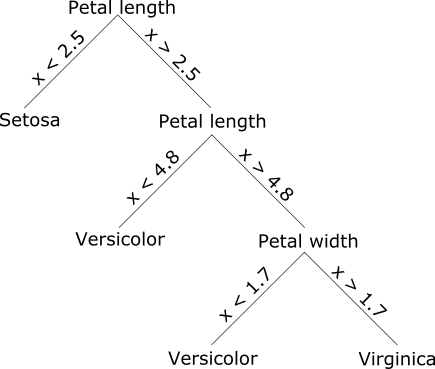
and score it with iris.csv.