onepw protocol
This document describes the protocol used by FxA clients (including FF Sync clients) and the key-server implemented in https://github.com/mozilla/fxa-auth-server . Clients use this protocol to prove their knowledge of the account password, for which they receive a sessionToken, which can be used to obtain a signed Persona certificate (which can be used to convince subsequent relying parties that they control the account). This protocol is also used to retrieve a pair of encryption keys (kA and kB) which will be used to encrypt Sync data.
The protocol is designed to protect the user's data as best as possible given the design constraints (including the use of a single user password, and CPU+memory limitations of slow mobile clients). Other protocols will be introduced later, in environments that can handle them, to improve data protection further.
Note that all messages are delivered over an HTTPS connection. The client browser may also implement cert-pinning to improve on the certificate validation process. The protections described below are in addition to those provided by TLS.
Clients have an email address and a password (which is never sent directly to the fxa-auth-server). A fairly simple protocol is used to prove knowledge of the password, which gives the client a session token that they can use later.
A slightly more complex protocol is used to obtain the sync encryption keys.
The server remembers several secrets per client. The main one is the "verifier hash", which is used to test the client's knowledge of the account password. The other two secrets are kA and wrap(kB): kA is the class-A sync key (for data which can be recovered through an email challenge link), and wrap(kB) is unwrapped by the client to get kB (for data which can only be recovered by knowledge of the password).
"Key Stretching" is the practice of running a password through a computationally-expensive one-way function before using it for encryption or authentication. The goal is to make brute-force dictionary attacks more expensive, by raising the cost of testing each guess.
To protect the user's class-B data against a TLS-breaking eavesdropper or active compromise of our keyserver (so the attacker gets to see authPW as it is sent to the server), we perform some key stretching on the client. This makes it more difficult to brute-force the original password from authPW. To further improve protection against static compromise (where the attacker sees the stored verify-hash and wrap(kB) in the server's database), we do additional stretching on the server.
On the server, we use the memory-hard "scrypt" function (pronounced "ess-crypt") for this purpose, as motivated by the attacker-cost studies in Identity/CryptoIdeas/01-PBKDF-scrypt.
The goal is to ensure all values in the server's long-term storage will require at least the hard scrypt-based stretch to test each password guess. All values sent over the wire or temporarily held in server memory should require at least the weaker PBKDF stretch for each guess.
The first act performed by a user is to create the account. They enter email+password into their browser, which then does the following steps:
- runs 1000 rounds of PBKDF2, using the email address as a salt, to produce "quickStretchedPW"
- feed quickStretchedPW into HKDF to obtain "authPW"
- deliver (email, authPW) to the keyserver's "POST /account/create" API

The server creates a random 32-byte authSalt, and uses it to stretch authPW further, using scrypt (64k/8/1), to derive bigStretchedPW and verifyHash. It then stores authSalt and verifyHash in the database.
In addition, the server creates both kA and wrap(kB) as randomly-generated 256-bit (32-byte) strings. It stores these, along with all the remaining values, indexed by email, in the account table where they can be retrieved later.
To prevent fixation attacks, we require new accounts to verify their configured recovery email address before letting them learn the generated keys or obtain a signed certificate. Nevertheless, we wish clients to forget the user's password while they wait for email verification to complete. To achieve this, clients can obtain a sessionToken before verification, but most APIs that require it will raise errors until verification is finished.
The server will send email with a URL that contains a long random "verification code" in the "fragment" hash. This URL points to a static page with some javascript that submits the code to the "POST /account/recovery_methods/verify_code" API. The URL can be clicked by any browser (it is not bound to anything), and when the API is hit, the account is marked as verified.
After the client submits /account/create, it performs the "/auth/password login sequence below to obtain a sessionToken. It then polls the "GET /account/recovery_methods" (which requires a sessionToken but not account verification) until the user clicks the email link and the API reports verification is complete. Then the client uses "GET /account/keys" and "POST /certificate/sign", described below, to obtain kA, kB, and a signed certificate to talk to the storage server.
To connect a browser to an existing account, we use the following login protocol to transform an email+password pair into a sessionToken. The sessionToken will be used in the next section to obtain signed certificates.
This protocol starts by feeding the password and email address into 1000 rounds of PBKDF2 to obtain "quickStretchedPW", feeding quickStretchedPW into HKDF to get "authPW", then delivering email+authPW to the server's /auth/password endpoint.
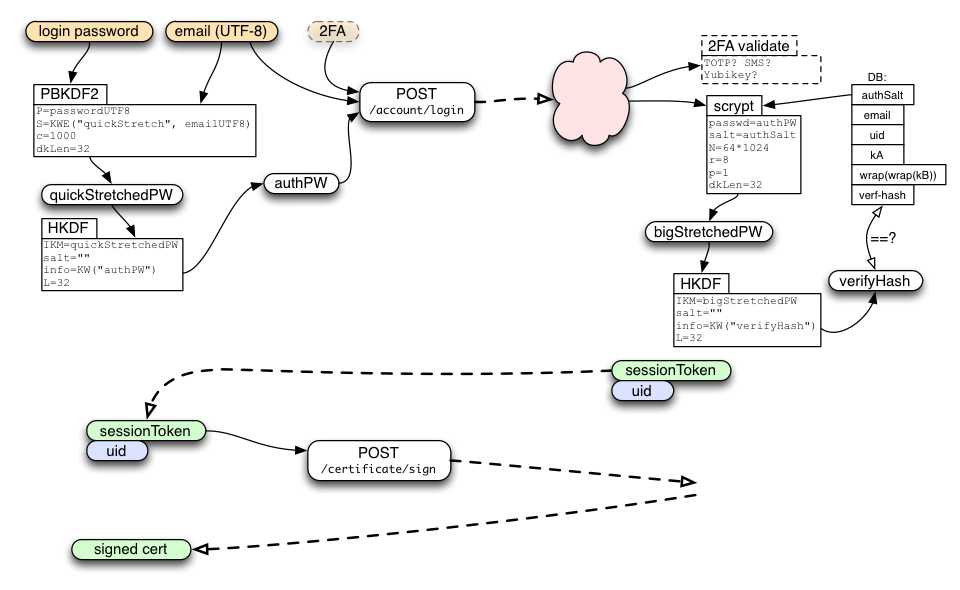
The server uses the email address to look up the database row, extracts authSalt, performs the same stretching as during account creation to obtain "bigStretchedPW" and then "verifyHash", then compares verifyHash against the stored value. If they match, the client has proved knowledge of the password, and the server creates a new session. The server returns the newly-generated sessionToken to the client, along with its account identifier (uid).
In the future, the /auth/password endpoint may also accept two-factor authentication data. If so, it is likely to return a "2FA-required" error to the first request, with information on what additional UI should be displayed to solicit the additional data.
The /auth/password call should also include information about the client device, such as a host name, profile name, model number, etc. This will be used to describe the session to the user later, when they enumerate their active sessions (for review and possible revocation).
Each successful /auth/password call results in a new session (with a unique+unguessable sessionToken). The server can support multiple sessions per account (typically one per client device, plus perhaps others for account-management portals). The sessionToken lasts forever (until revoked by a password change or explicit revocation command), and can be used an unlimited number of times.
Many keyserver APIs require a HAWK-protected request that uses the sessionToken. Some of them require that the account be in the "verified" state:
- GET /account/devices
- POST /session/destroy
- GET /recovery_email/status
- POST /recovery_email/resend_code
- POST /certificate/sign (requires "verified" account)
Clients who have a active sessionToken, for an account on which the email address has been verified, can use the /certificate/sign endpoint to obtain a signed BrowserID/Persona certificate. This certificate can then be used to produce signed Persona assertions for delivery to RPs.
The sessionToken is used to derive two values:
- tokenID
- request HMAC key
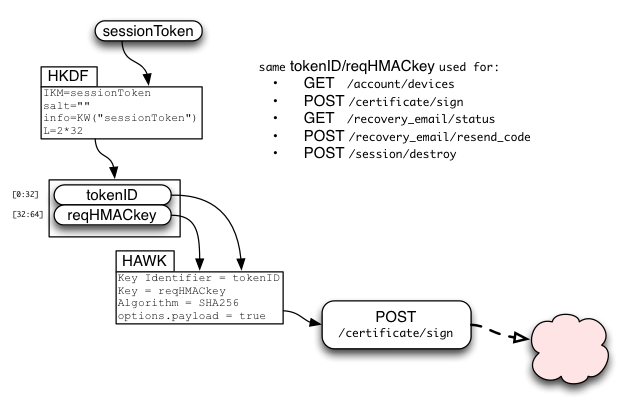
The requestHMACkey is used in a HAWK request to provide integrity over many APIs, including /certificate/sign. requestHMACkey is used as credentials.key, while tokenID is used as credentials.id . HAWK includes the URL and the HTTP method ("POST") in the HMAC-protected data, and will optionally include the HTTP request body (payload) if requested.
For /certificate/sign, it is critical to enable payload verification by setting options.payload=true (on both client and server). Otherwise a man-in-the-middle could submit their own public key, get it signed, and control the user's account when speaking to other relying parties (including deleting the user's data on the Sync storage servers).
If the client also wants kA/kB for Sync, it adds ?service=sync to the endpoint URL during initial login (thus /auth/password?service=sync). When the server sees this, in addition to creating a sessionToken, it also creates a keyFetchToken and extracts a second value from its HKDF call named stretchWrap. It then returns sessionToken, keyFetchToken, and stretchWrap to the client.
The client will use keyFetchToken below to obtain kA and wrap(kB). It will then combine another derivative of quickStretchedPW with stretchWrap to derive unwrapBKey, from which is can obtain the unwrapped kB.

The keyFetchToken is used to derive tokenID and reqHMACkey, which are used in a HAWK request to the "GET /account/keys" API. It is also used to derive keyRequestKey, from which respHMACkey and respXORkey are derived.
The server pulls kA and wrap(kB) from the account table, concatenates them, encrypts the pair by XORing it with the derived respXORkey, and attaches a MAC generated with respHMACkey.
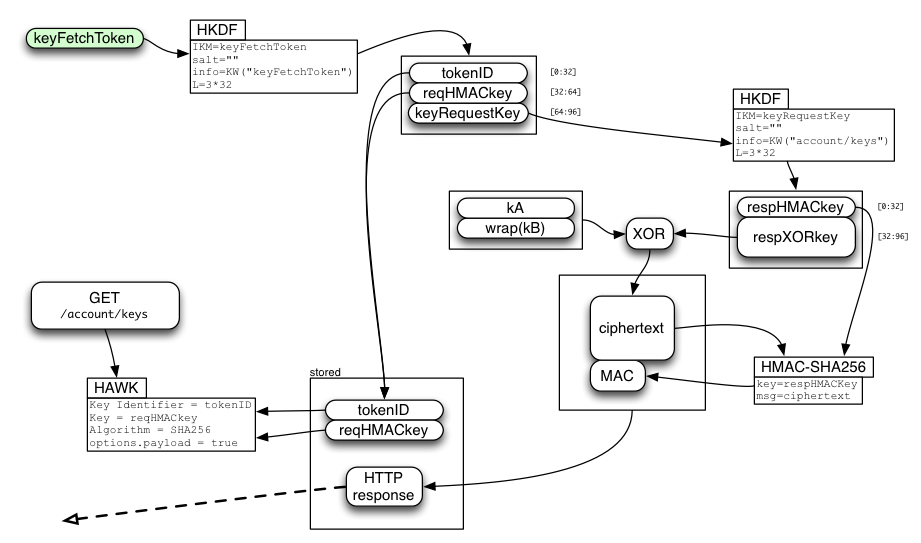
The client recomputes the MAC, compares it (throwing an error if it doesn't match), extracts the ciphertext, XORs it with the derived respXORkey, then splits it into the separate kA and wrap(kB) values.

Finally, the server-provided wrap(kB) value is simply XORed with the password-derived unwrapBKey (both are 32-byte strings) to obtain kB. There is no MAC on wrap(kB).

"kA" and "kB" enable the browser to encrypt/decrypt synchronized data records. They will be used to derive separate encryption and HMAC keys for each data collection (bookmarks, form-fill data, saved-password, open-tabs, etc). This will allow the user to share some data, but not everything, with a third party. The client may intentionally forget kA and kB (only retaining the derived keys) to reduce the power available to someone who steals their device.
Note that /account/keys will not succeed until the account's email address has been verified. Also note that each keyFetchToken is single-use and short-lived. The token is consumed even if the request fails (e.g. the MAC does not match).
Crypto note: while the two returned keys are encrypted with (a derivative of) keyFetchToken, the keyFetchToken itself is sent over the (TLS-protected) wire without additional protection. This superfluous encryption will be useful in a future protocol, in which SRP is used to protect the delivery of keyFetchToken. We retain this encryption step to minimize the changes to our existing (SRP-based) code.
The account may be reset in two circumstances: when the user changes their password, or when the user forgets their password.
To change the password, the client uses a two-phase API. They start with a message to the /password/change/start endpoint. This accepts the same email and old-authPW that /auth/password takes, plus the new authPW value (generated from the new password with the same stretching mechanism). The API creates a new random authSalt, then generates verifyHash and stretchWrap for both the old and new values. If the old verifyHash matches, the server allocates a passwordChangeToken and stores the new values in a database associated with it.
Clients should then use the keyFetchToken to obtain and unwrap kB, then re-wrap it with the new stretchWrap value. This allows the password-changing client to retain their class-B data.
Finally, the client sends the new wrap(kB) to the /password/change/finish endpoint, which is HAWK-authenticated by the passwordChangeToken. If accepted, the server looks up the new verifyHash and authSalt from the password-change table, then commits them (along with the new wrap(kB)) to the account database.

The passwordChangeToken is single-use and expires quickly, within 10 minutes.
When the account is reset, all active sessions and tokens will be cancelled (disconnecting all devices from the account). The client should immediately establish a new session as described above.
This API is only used when the user knows their old password: if they have forgotten the password, use the "/password/forgot" APIs below.
When the user has forgotten their password, they can use one of their "recovery methods" to obtain an accountResetToken. For now, this means we send a random code to the email address associated with their account. The user must copy this code from the email into their client, whereupon the client will get an accountResetToken that can be delivered to the API below.
Note that, since the forgotten-password client never learns kB, any class-B data will be lost. This is necessary to protect class-B data from attackers who can read the users's email but do not know the account password (including those who compromise the IdP and the keyserver itself). When using /account/reset below, the server generates a new random wrap(kB) (just as it does during account creation).
The /password/forgot/send_code API is used to ask the server to send a recovery code. This takes a recovery method, which for now is just an email address. This API is unauthenticated (after all, the user who has forgotten their password knows nothing but their email address). The server marks the corresponding account as "pending recovery", allocates a random forgotPasswordToken for the account, creates a recovery code, and sends the code (with instructions) via email. The API returns forgotPasswordToken to the client.
The user must copy the recovery code into the same browser where they started the process. The client then submits the code to /password/forgot/verify_code along with the forgotPasswordToken they received. If they match, the server allocates a accountResetToken and returns it to the client. If they do not match, the server increments a counter (which is used to decide if an online guessing attack is happening).
forgotPasswordToken can be used three times before it is exhausted. If the user guesses incorrectly this often, the client must call send_code again to get a new token and code. Each account has at most one token+code active at a time.
The recovery code is initially a random 8-digit decimal number. If an attacker tries to sign in as someone else, hits the "forgot my password" button, then submits a guess to /password/forgot/verify_code, they will have a 1-in-100-million chance of success. If the server detects too many wrong guesses, it should increase the length of new codes. Another defensive technique is to require that users click an email link before being given the code: the server is told when the link is clicked, so the code will not be enabled until the email has been read. It remains to be seen whether this will be sufficient.
The exact thresholds are TBD, but a nominal goal is to keep the chances of any attack succeeding to below 1-in-a-million per year. To achieve this, we can tolerate 100 verify_code failures in a single year (cumulative, totaled across all accounts) before we must increase the length of the code.
The client puts their new password through the same stretching procedure as described in the new-account section above, resulting in a new authPW. The client then uses the accountResetToken to HAWK-authenticate a request to the /account/reset API, including the new authPW.
If the request is accepted, the server generates a new random authSalt, computes a new verifyHash, and stores verifyHash in the database. It also creates a new random wrap(kB) value, cancels all active sessions and tokens (disconnecting all devices from the account), and sends a "your password has been changed" email to the user (perhaps including the IP address of the client which used the API).
All class-B data will be lost. The /account/reset API is just like the /account/create API, except that it is HAWK-authenticated by an accountResetToken, and requires that the email already be in the database (as opposed to forbidding that).

accountResetToken is used to derive tokenID and requestHMACkey as usual, then the request data is delivered in the body of a HAWK request that uses tokenID as credentials.id and requestHMACkey as credentials.key . Note: it is critical to include the request body in the HAWK integrity check (options.payload=true, on both client and server), otherwise a man-in-the-middle could substitute their own authPW, giving them control over the account.
After using /account/reset, clients should immediately perform the login protocol from above: a new sessionToken is required, since old sessions and tokens are revoked by /account/reset. Clients can retain the new authPW value during this process to avoid needing to run the key-stretching routine a second time.
When the user wishes to completely delete their account, the browser needs to perform two actions:
- contact the storage servers and delete all records and collections
- contact the keyserver and delete the account information
The user should be prompted for their password as confirmation (i.e. a browser in the normal attached-and-synchronizing state should not be able to erase the account information: it must prove recent knowledge of the password).
The device submits authPW to the /account/destroy endpoint. This request contains no body and returns only a success code.
- POST /account/create (email,authPW) -> ok (server sends verification email)
- creates a user account
- GET /account/devices {sessionToken} () -> list of devices
- GET /account/keys {keyFetchToken,needs-verf} () -> kA/wrap(kB)
- single-use, only if email is verified
- POST /account/reset {accountResetToken} (newAuthPW) -> ok
- single-use, does not require email to be verified, revoke all tokens for account, send notification email to user
- POST /account/delete (authPW) -> ok, account deleted
- POST /auth/password (email, authPW) -> sessionToken
- POST /auth/password?service=sync (authPW) -> sessionToken, stretchWrap, keyFetchToken
- POST /session/destroy {sessionToken} () -> ok
- for detaching a device, destroy all tokens
- POST /recovery_email/status {sessionToken} () -> "verified" status of email
- use "Accept: text/event-stream" header for server-sent-events; server will send "update" event with the new content of the resource any time it changes.
- POST /recovery_email/resend_code {sessionToken} () -> re-send verification email
- POST /recovery_email/verify_code (code) -> set "verified" flag
- this code will come from a clickable link and is an unauthenticated endpoint
- this could maybe take the recovery method if that would be helpful
- sets verified flag on recovery method
- POST /certificate/sign {sessionToken,needs-verf} (pubkey) -> cert
- only if recovery email is verified
- POST /password/change/start {needs-verf} (email, authPW, newAuthPW) -> oldStretchWrap, newStretchWrap, keyFetchToken, passwordChangeToken
- POST /password/change/finish {passwordChangeToken} (newWrapKB) -> ok
- POST /password/forgot/send_code () -> forgotPasswordToken
- sends code to recovery method (email for now, maybe SMS later)
- this is a short code, not a clickable link
- POST /password/forgot/resend_code (forgotPasswordToken) -> re-sends code
- POST /password/forgot/verify_code (forgotPasswordToken, code) -> accountResetToken
- sets verified flag on recovery method
- POST /get_random_bytes
Create account
- POST /account/create (email,authPW) -> ok (server sends verification email)
- POST /auth/password (email, authPW) -> sessionToken
- GET /recovery_email/status {sessionToken} () -> "verified" status
- (optional, only if user requests resend)
- POST /recovery_email/resend_code {sessionToken}() -> ok
- POST /recovery_email/verify_code (code) -> ok
- POST /certificate/sign {sessionToken} (pubkey) -> cert
Attach to new device
- POST /auth/password (email, authPW) -> sessionToken
- POST /certificate/sign {sessionToken} (pubkey) -> cert
Attach new device for Sync
- POST /auth/password?service=sync (email, authPW) -> sessionToken, stretchWrap, keyFetchToken
- GET /account/keys {keyFetchToken,needs-verf} () -> kA/wrap(kB)
- POST /certificate/sign {sessionToken} (pubkey) -> cert
Forgot password
- POST /password/forgot/send_code (email) -> forgotPasswordToken
- POST /password/forgot/verify_code (forgotPasswordToken, code) -> accountResetToken
- POST /account/reset {accountResetToken} (newAuthPW) -> ok
- GOTO "Attach to new device"
Change Password
- POST /password/change/start {needs-verf} (email, authPW, newAuthPW) -> oldStretchWrap, newStretchWrap, keyFetchToken, passwordChangeToken
- GET /account/keys {keyFetchToken} () -> kA/wrap(kB)
- POST /password/change/finish {passwordChangeToken} (newWrapKB) -> ok
- GOTO "Attach to new device"
The following calls are HAWK-authenticated by some sort of token:
- GET /account/devices
- GET /account/keys
- POST /account/reset
- POST /session/destroy
- POST /recovery_email/status
- POST /recovery_email/resend_code
- POST /certificate/sign
- POST /password/change/finish
These calls use HKDF to derive two values from the token:
- tokenID
- reqHMACkey
The client uses tokenID and reqHMACkey for a HAWK (https://github.com/hueniverse/hawk/) request to the API endpoint, using tokenID as "credentials.id" and reqHMACkey as "credentials.key". The server uses tokenID to look up the corresponding token, then derives reqHMACkey to validate the request.
All tokens have an associated tokenID. The server needs to maintain a table that maps the tokenID to the token itself, so it can derive other values from the token later. The tokens are also associated with a specific account, so later API requests do not specify an email address or account ID.
Strong entropy is needed in the following places:
- (server) initial creation kA, wrap(kB), and authSalt
- (server) creation of sessionToken, keyFetchToken, accountResetToken, passwordChangeToken, and forgotPasswordToken
On the server, code should get entropy from /dev/urandom via a function that uses it, like "crypto.randomBytes()" in node.js or "os.urandom()" in python.
An HKDF-based stream cipher is used to protect the contents of some requests. HKDF is used to create a number of random bytes equal to the length of the message, then these are XORed with the plaintext to produce the ciphertext. An HMAC is then computed from the ciphertext, to protect the integrity of the message.
HKDF, like any KDF, is defined to produce output that is indistinguishable from random data ("The HKDF Scheme", http://eprint.iacr.org/2010/264.pdf , by Hugo Krawczyk, section 3). XORing a plaintext with a random keystream to produce ciphertext is a simple and secure approach to data encryption, epitomized by AES-CTR or a stream cipher (http://cr.yp.to/snuffle/design.pdf). HKDF is not the fastest way to generate such a keystream, but it is safe, easy to specify, and easy to implement (just HMAC and XOR).
Each keystream must be unique. We define keyFetchToken to be a single-use randomly-generated value, to ensure our HKDF-XOR keystreams will be unique.
A slightly more-traditional alternative would be to use AES-CTR (with the same HMAC-SHA256 used here), with a randomly-generated IV. This is equally secure, but requires implementors to obtain an AES library (with CTR mode, which does not seem to be universal). An even more traditional technique would be AES-CBC, which introduces the need for padding and a way to specify the length of the plaintext. The additional specification complexity, plus the library load, leads me to prefer HKDF+XOR.
kB is equal to the XOR of wrapKey (which is a deterministic function of the user's email address, password, salt, and the server-side stretching parameters) and the server's randomly-generated wrap(kB) value, making kB a random value too. Using XOR as a wrapping function allows us to avoid sending kB or wrap(kB) in the initial createAccount arguments.
To make this technique safe, any time kB or the password is changed, the mainSalt should be changed too. Otherwise knowledge of both wrap(old-kB) and old-kB would reveal wrapKey, making it easy to deduce the new kB. Changing mainSalt causes wrapKey to change too, preventing this.
There is no MAC on wrap(kB). If the keyserver chooses to deliver a bogus wrap(kB) or kA, the client will discover the problem a moment later when it talks to a storage server and attempts to retrieve data from an unrecognized collection-ID (since we intend to derive collection-IDs from the key used to encrypt their data, which will be derived from kA or kB as appropriate). It might be useful to add a checksum to kA and wrap(kB) to detect accidental corruption (e.g. store and deliver kA+SHA256(kA)), but this doesn't protect against intentional changes. We omit this checksum for now, assuming that disks will be reliable enough to let us never experience such failures.
HAWK provides one thing: integrity/authentication for the request contents (URL, method, and optionally the body). It does not provide confidentiality of the request, or integrity of the response, or confidentiality of the response. For /certificate/sign, we do not need request confidentiality or response confidentiality, since the client's pubkey and the resulting certificate will both be exposed over a similar SSL connection to the storage server later. And it is sufficient to rely on the response integrity provided by SSL, since the client can verify the returned certificate for itself. For the other keyserver APIs protected by HAWK, these properties are either unnecessary, or are provided by additional mechanisms.
This protocol aims to have two main security properties:
- a "passive" attacker (who can read the server's stored database contents) gets to do two things: 1: learn kA. 2: perform a "hard" brute-force attack against the password, where "hard" means they must do 64k/8/1-scrypt for each password guess.
- an "active" attacker (one who can eavesdrop on TLS connections, or who compromises the running keyserver, and can thus observe messages sent to/from the clients) gets to do three things. 1: learn kA. 2: control the account (i.e. produce assertions). 3: perform an "easy" brute-force attack against the password (and thus kB), where "easy" means they must do 1000 rounds of PBKDF for each guessed password they want to test.
This is weaker than the earlier SRP-based protocol, but still stronger than common industry practice, and significantly easier for clients to implement. In particular, clients do not need to perform scrypt-based stretching or SRP.
As with the SRP-based protocol, if the client is implemented in web content, then a strong active attacker (who can MitM TLS connections and thus serve doctored client code) can bypass the entire protocol and learn the password directly.
In V2, we plan to add an optional second password with improved security. The general idea is to use the original SRP protocol, with the second password as input (not using the first password), to produce kB. The API to perform SRP will be gated by the sessionToken, as will use of the scrypt-helper, which could marginally improve our DoS story.
If an account is configured for a second password, the /auth/password?service=sync request will return a field to that effect, instead of stretchWrap and keyFetchToken. Changing from one password to two, or vice versa, will involve extra API calls.
Use of a second password will restore all the security properties of the original protocol: only the scrypt-helper gets the "easy" brute-force attack, and the only "hard" brute-force attacks are available to a malicious active server or a TLS-level eavesdropper on the create-account and forgot-password flows. kA is protected from all eavesdroppers.
This defines some of the jargon we've developed for this protocol.
- data classes: each type of browser data (bookmarks, passwords, history, etc) can be assigned, by the user, to either class-A or class-B
- class-A: data assigned to this class can be recovered, even if the user forgets their password, by proving control over an email address and resetting the account. It can also be read by Mozilla (since it runs the keyserver and knows kA), or by the user's IdP (by resetting the account without the user's permission).
- class-B: data in this class cannot be recovered if the password is forgotten. It cannot be read by the IdP. Mozilla (via the keyserver) cannot read this data, but can attempt a brute-force dictionary attack against the password.
- kA: the master key for data stored as "class-A", a 32-byte binary string. Individual encryption keys for different datatypes are derived from kA.
- kB: the master key for data stored as "class-B", a 32-byte binary string.
- wrap(kB): an encrypted copy of kB. The keyserver stores wrap(kB) and never sees kB itself. The client (browser) uses a key derived from the user's password to decrypt wrap(kB), obtaining the real kB.
- sessionToken: a long-lived per-device token which allows the device to obtained signed BrowserID certificates for the account's identity (GUID@picl-something.org). This token remains valid until the user revokes it (either by changing their password, or triggering some kind of "revoke a specific device" or "revoke all devices" function).