Container with toolbar color got overridden when edited through the addon #1822

Description

- Multi-Account Containers Version: 7.0.2
- Operating System + Version: Windows 10 x64, 1909
- Firefox Version: 78.0.2
- Other installed Add-ons + Version + Enabled/Disabled-Status:
Bookmark Tab Here 1.0 true {bc21b9a1-3ad6-4b00-bca4-ef5b7e21253b}
Copy Current Page URL with Anchor 1.0 true jid1-grAPHQfoBoWMdA@jetpack
Copy Link Text 1.6.1 true {b144be59-6bdc-41e0-9141-9f8d00373d93}
Copy PlainText 1.11 true [email protected]
Download Manager (S3) 5.12 true s3download@statusbar
Enhancer for YouTube™ 2.0.101 true [email protected]
Facebook Container 2.1.1 true @contain-facebook
Firefox Multi-Account Containers 7.0.2 true @testpilot-containers
Gesturefy 3.0.5 true {506e023c-7f2b-40a3-8066-bc5deb40aebe}
Refined GitHub 20.7.16 true {a4c4eda4-fb84-4a84-b4a1-f7c1cbf2a1ad}
RoboForm Password Manager 9.0.1.6 true [email protected]
Stylus 1.5.11 true {7a7a4a92-a2a0-41d1-9fd7-1e92480d612d}
uBlock Origin 1.28.2 true [email protected]
uMatrix 1.4.0 true [email protected]
LastPass: Free Password Manager 4.51.0.1 false [email protected]
To Google Translate 4.0.6 false jid1-93WyvpgvxzGATw@jetpack
Worldwide Radio 4.1 false worldwide@radio
Xdebug-ext 1.2 false {5483b263-bf97-4858-a2cf-590444554869}
Actual behavior
There is no black colour when editing/viewing container settings via Multi-Account Containers popup panel. But it is there when managing container via Firefox preferences.
As a result the container will loose black colour and it will be reset to default/1st in the list (which is blue).
Expected behavior
The black colour is present and remain assigned.
Steps to reproduce
- Multi-Account Containers popup panel
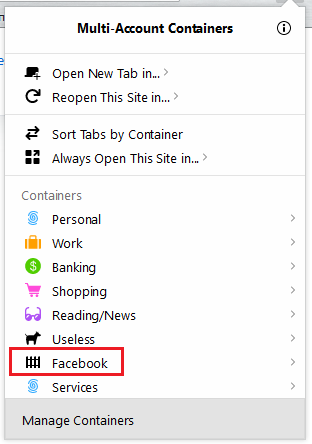
- Click on "Manage Containers" at the bottom
- Locate desired container (e.g. Facebook) that has assigned black color to it
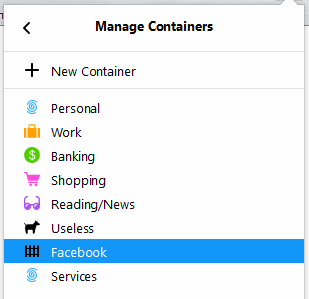
- Click on it to bring the editing panel page (e.g. you want to see what domains are assigned to this container)
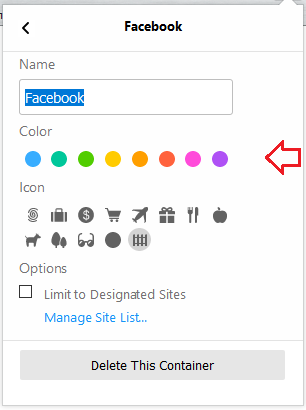
- Do not edit anything (or edit, it does not matter) and click "<" button to go back
Expected: black colour remains assigned
Actual: black is gone, it is now a blue colour instead.
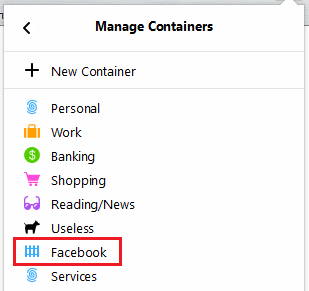
To fix it I have to change the colour via Firefox Options: about:preferences#containers
