Design: Flow testing
This is a work in progress.
Node-RED project already provides the tools for testing:
This design note focuses on realizing flow testing.
Basic requirements of this tool are as follows.
- Node-RED user can test flows without programming.
- Node-RED uesr can see the test results on the editor.
- The original flow should be tested. If the testing target is a copied flow, sync problem will happen.
- Node-RED user does regression testing for the existing flows when updating Node-RED or services that connect with Node-RED.
- Node-RED automatically runs a test on Travis CI when pull request was posted.
There are two new nodes called test-in node and test-out node. Test-in node sends a mock message on behalf of the actual input node such as http-in node, and test-out node receives a message on behalf of the actual output node such as http-response node. One test case consists of exactly one test-in node and one test-out node.
The requirements of test node are as follows.
- Do nothing when it is NOT in a testing mode.
- Appear only in a testing mode.
- Substitute input node and output node in a testing mode. (named as
shadowing)
Test-in node specifies one or more test patterns so that one test-in node can run multiple test cases. Test-in node has the following properties.
- message payload of test cases
- target node to be substituted by test-in node
- test-out node that you expect to receive a result message
Test-out node verifies whether the received message is exactly the expected value or not. Test-out node has the following properties.
- expected message payload
- target node to be substituted by test-out node
User can do the following actions on test sidebar.
- Choose test cases to run.
- Click
Runbutton to start testing. - See the result of each test case.
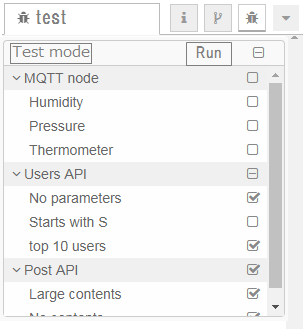
Need to consider how to store the information of test nodes. There are two options. Option 1 is to store into flow.json. Option 2 is to create a new file test.json.
- Option 1 (flow.json)
- Easy to share flow data including test data.
- Data will get larger even if a user does not need to run a test.
- Option 2 (test.json)
- Can divide production code and test code.
- Affect to storage API to load a new file.
As described in test node section, Node-RED needs to change the mode from production to testing, and vice versa.
There are several candidates where to place an interface to switch the mode.
-
Viewtab in User Settings. -
Testtab on the sidebar. - Menu
- Somewhere on the editor view.
As a user basically does not switch the mode often, Option 1 and 2 would be better than option 3 and 4.