Open Lowcode Developper Guide
Table of Content
Open Lowcode framework allows to build quickly an application. An application is made of different modules. A module is composed of coupled data objects. A data object is made of “bricks”: fields and properties.
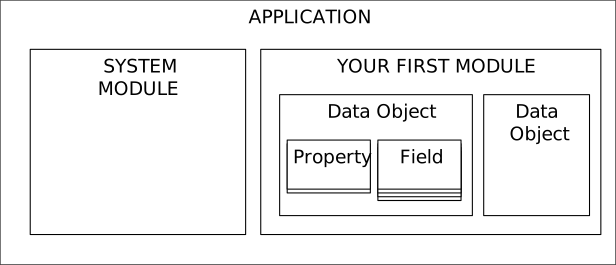
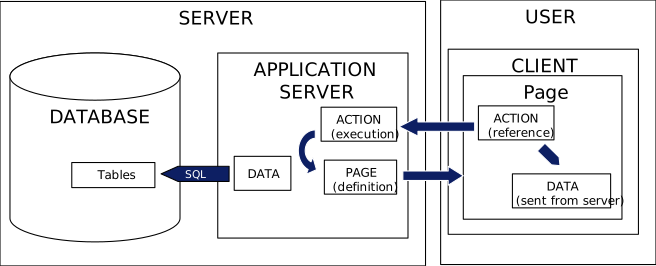
When a data object is defined, the Gallium framework will build automatically all the action and pages necessary for the application to work. Just define your data objects, and you get a working application. Gallium uses a three-tier architecture with:
- the database storing all database
- An application server managing business logic and security
- A client that displays pages from server and launches actions to the server
To develop an Open Lowcode Application, you need a java project with the following content
| Library | Jar Name | IDE | Client | Server |
|---|---|---|---|---|
| Derby database | Derby.jar | Yes (for local tests) | ||
| Server JAR | OLcServer.jar | Yes | Yes | |
| Client JAR | OLcClient.jar | Yes | Yes | Yes (for download during client upgrade procedure) |
| Javamail library | Javax.mail.jar | Yes | Yes | |
| Apache PDF Library | commons-logging.jar fontbox-2.0.7.jar pdfbox-2.0.7.jar |
Yes | Yes | Yes |
| Apache POI (to generate and read spreadsheets) | commons-collections4-4.2.jar commons-compress-1.18.jar poi-4.0.1.jar poi-ooxml-4.0.1.jar poi-ooxml-schemas-4.0.1.jar xmlbeans-3.0.2.jar |
Yes | Yes | |
| Javafx runtime | Jfxrt.jar | Yes | Yes |
In your IDE, for every application module, the following folders will be used. In the example below, the module path is defined as bugkiller.app. An application is made of:
- A model file that is written by the user. If you only assembly bricks on objects, you just have to write this file1
- Automatically Generated classes: they are built by running the generation script on the model, and contain all files necessary for the application to work.
- You may need to develop your own custom actions, custom pages and utilities if you declare some in the model file
Automatic generation is launched for a package by running the java class Module ( org.openlowcode.design.module.Module ) with as a unique argument the class of your module model (e.g. bugkiller.model.BugKiller ).
To run the Open Lowcode server, you need to deploy the compiled classes of your module on the server. There is no need to deploy the classes on the client. The diagram below showns an example of the structure of an Open Lowcode project in an IDE
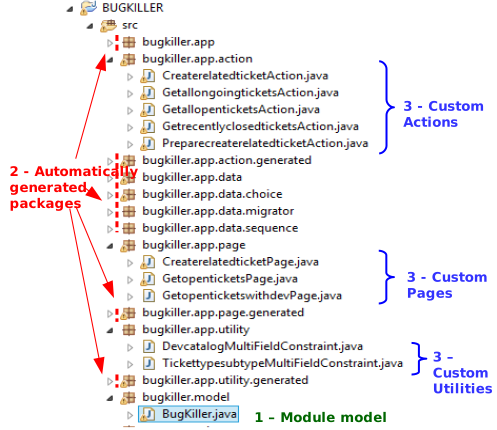
There is a risk your module model is overwritten at code generation if it is present in the core folder of your module, and has the same class name as the module (e.g. your root folder is bugkiller.app, and your module name is Bugkiller: you should not put your model in the path bugkiller.app.Bugkiller).
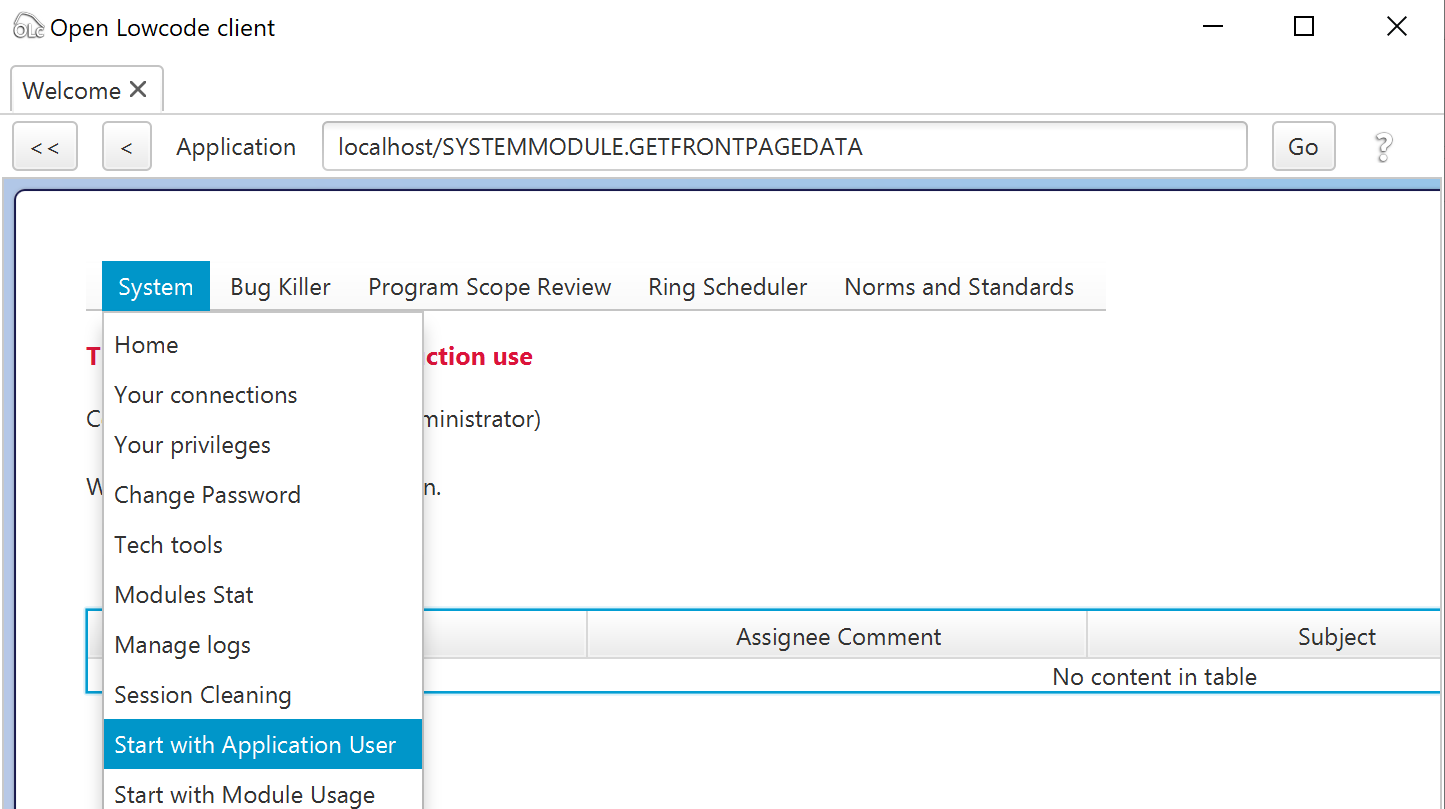
A data object is declared by a command as per the example below. The name of data object has to be unique across the different packages. It is possible to specify that the data object will appear in the menu of the module by specifying “false” to the “force hide” parameter in the last argument of the definition.
appuser = new DataObjectDefinition("appuser","Application User",this,false);When set as visible (forcehide false), the search page for the object (called 'Start With...') appears in the module menu.
A field can be added to a data object by a command as per the example below
appuser.addField(new StringField("EMAIL",
   "E-Mail",
   "e-mail at which the user can be reached. The system may send e-mails at this address",
   80,
StringField.INDEXTYPE_EASYSEARCH));| Name | Feature | Artefact Declaration |
|---|---|---|
| StringField | A text field of specified length, can be made searchable | |
| DecimalField | A field to store a decimal number | |
| TimestampField | A precise date and time | |
| EncryptedStringField | Text field that will be transported and stored encrypted | Note: can be encrypted two ways (encrypted text can be retrieved) or one-way (only possible to compare a text with the encrypted reference to check if they are equal) |
| ChoiceField | A choice field holding one value in a predefined list | Choice Fields uses a ChoiceCategory that needs to be declared and registered in the package. |
| MultipleChoiceField | A choice field holding several values in a predefined list | Choice Fields uses a ChoiceCategory that needs to be declared and registered in the package. |
| TimePeriodField | A field holding a time period (year, quarter, month...) |
Note: a LargeBinary field is also present but should not be used directly on a data object. You should use instead the FileContent or ImageContent properties.
A property provides an object with value added features. It can be added to a data object by a command as shown below
appuser.addProperty(new StoredObject());Properties can have business rules added to precise the behaviour of the property.
The following properties are available
| Name | Feature | Dependent Properties | Business Rules |
|---|---|---|---|
| StoredObject | Allows persistence in database (do not use for transient objects such as reports) | ||
| UniqueIdentified | Identifies an object, allows to update it | StoredObject | |
| CreationLog | Stores the date of creation and user who created the object | UniqueIdentified | CreationLog Change Display |
| UpdateLog | Stores the date of update and user who updated the object | UniqueIdentified | Updatelog Change Display |
| Numbered | A unique number for the object | UniqueIdentified | The number can be autogenerated by specifying an autonumbering rule |
| Named | A “title” for the object | UniqueIdentified | The name can be autogenerated by specifying an autonaming rule |
| Iterated | Records all updates of the object | UniqueIdentified | |
| ImageContent | Displays an image on the object | UniqueIdentified | |
| FileContent | Allows to store file as an attachment | UniqueIdentified | |
| ComputedDecimal | A calculated field that can use decimal fields or other computed fields on the object or linked objects | ||
| Timeslot | Manages the object as a period of time with start date and end date | ||
| Schedule | Manage a schedule as a list of objects with timeslot, with an auto-link to manage dependencies | Timeslot |
Note: the property genericlink should not be used directly.
The following properties are available in this area
| Name | Feature | Dependent Properties | Business Rules |
|---|---|---|---|
| Lifecycle | Provides a status to the object | UniqueIdentified | Roll-up lifecycle state to parent |
| TargetDate | Allows to record a target date for closing the object | Lifecycle | |
| SimpleTaskWorkflow | A one task workflow that will allow to dispatch objects to team | Lifecycle | |
| ComplexWorkflow | A multi-task workflow | Lifecycle | |
| PrintOut | A generated pdf document | Lifecycle FileContent |
| Name | Feature | Dependent Properties | Business Rules |
|---|---|---|---|
| AutoLink | Allows to link two objects of the same type. This property should be put on the object link | UniqueIdentified for link object and object linked | Symetric link allows to display links without directions Constraint on Same Parent (only allowed to link object which have the same parents) |
| LinkedToParent | Allows to specify a foreign key. This property should be used on the “child object” | UniqueIdentified for link object and parent | Subobject : a subobject does not appear in main menus, and any update of the subojbect is considered update of the parent |
| LinkObject | Allows to link two objects of a different type. This property should be put on the object link. | UniqueIdentified for link object and object linked | Constraint on Same Parent (only allowed to link object which have the same parents) UniqueFromLeft : if a second link is added, the first one is deleted, to ensure there is always one object linked from left |
Display elements of properties and fields are shown given a priority. Priority is a figure from -1000 to 1000, with the highest number being the highest priority. Data is displayed:
- by order of priority in an object display, with the highest priority fields first
- for display of tables all fields with priority higher than the watermark (the limit of priority shown in a table).
Display elements for most common properties are documented per order of priority in the table below:
| Priority | Property | Display Element | Comment |
|---|---|---|---|
| 900 | Numbered | Number | Label may change if specified |
| 850 | Versioned | Version | |
| 710 | Lifecycle | State | |
| 700 | Named | Name | Label may change if specified |
| 700 | Targetdate | Target Date | |
| 600 | Timeslot | Start and End Date | |
| 500 | - | Fields in link tables | All fields with priority greater than 500 will show in array of links |
| 100 | Computeddecimal | Decimal field | Decimal field will have the name specified by user |
| -30 | Creationlog | Create Time | Can be shown in title or bottom note |
| -50 | Iterated | Iteration | Update Note |
| -90 | Creationlog | User summary | Number, first and last name |
| -90 | Updatelog | User Summary | Number, first and last name |
| -100 | Updatelog | Update time | |
| -110 | Lifecycle | Final State time |
Specific layout allows to specify the order and tab on which different property widgets are placed. In order to do so, thefollowing can be specified:
- Tabs can be declared on an object;
- It is possible to define a widget priority to a property of an object when defining the property, as in the sample below. You can assign a widget display priority either in the default tab or in a specified alternative tab.
   // step 1 – define tabs
ticketothertab = new ObjectTab("OTHER","Miscellanous", ticket);

   // step 2 – define properties
LinkedToParent linkedtoparent = new LinkedToParent("TICKET",ticket,new WidgetDisplayPriority(100, this.ticketcommenttab));
The table below shows the properties that allow to set a WidgetDisplay
| Property | Widget | Comment |
|---|---|---|
| LinkedToParent | - | Defines where the table from parent to all children will be drawn on the parent |
| AutoLinkObject | Priorityfromleft | Defines where the table from left objects to right will show (note: this is a tree in case of non-symetric autolink) |
| AutoLinkObject | Priorityfromright | Defines where the table from right objects to left will show |
| FileContent | Attachmentwidget | The widget showing the attachment list |
| ObjectWithWorkflow ( SimpleTaskWorkflow & ComplexTaskWorkflow) | Workflowtablepriority | Table showing all workflow tasks. |
| LinkObject | Displayfromleft | Defines where to put the link table on the left object |
| LinkObject | Displayfromright | Defines where to put the link table on the right object. |
Privileges can be added on modules.
Privileges provide access to an action group for an authority under conditions. They are declared as the example below
this.addPrivilege(new ObjectStatePrivilege(ticket.getReadActionGroup(),
   external,
   new ChoiceValue[]{CLOSED}));
Privilege can be added directly on a user defined action. The syntax is generally the same as for an action group
this.addPrivilege(new ObjectDomainPrivilege(
   launchmultiyearreport,
   guestdomain));
Privilege can be added directly on some standard generated actions. This is done by using a get...AutomaticAction static method on the corresponding property (in blue below)
this.addPrivilege(new ObjectDomainPrivilege(
   Lifecycle.getChangeStateAutomaticAction(workitem),
businessadmindomain));The following action groups are defined on each object. They provide access to a group of standard actions generated by Gallium
| Action Group | Summary | Special Conditions |
|---|---|---|
| Read action Group | Allows access to visualization of all data of this object, including attachment and links | |
| Modify Action Group | Allows access to modification of all data of this object, including attachment and links (from the left) | |
| Steer Action Group | Change state and set target date | |
| Full Action Group | All automatic actions for the object | |
| Lookup Action Group | Search an object (but is not able to read detailed data) | Note: the same authority should not be assigned both the read and lookup action group |
| Create New Action Group | Create a new object or new version of an object | Create new version may be excluded by condition on Versioned property |
| Data Admin Action Group | Imports objects by file | |
| Business Admin Action Group | Reassign Tasks in workflows force change state outside of constraints (to be implemented) |
|
| Executive Review Action Group |
The next page shows the list of actions in each group, and the list of actions where user & access right can be set one by one