Open Lowcode Developper Guide
Table of Content
Open Lowcode framework allows to build quickly an application. An application is made of different modules. A module is composed of coupled data objects. A data object is made of “bricks”: fields and properties.
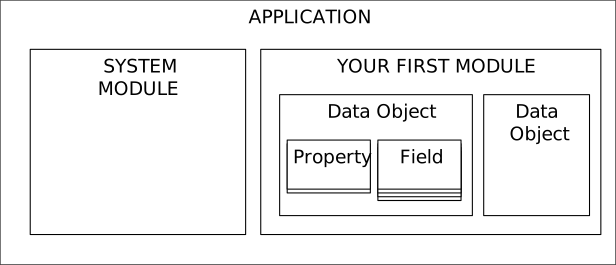
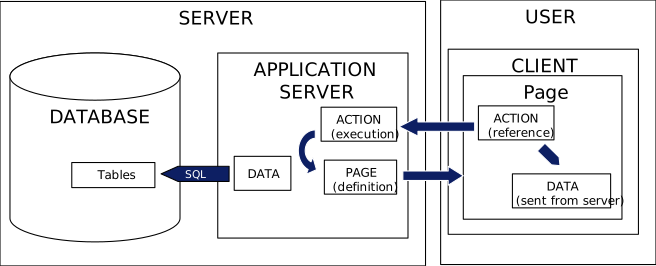
When a data object is defined, the Gallium framework will build automatically all the action and pages necessary for the application to work. Just define your data objects, and you get a working application. Gallium uses a three-tier architecture with:
- the database storing all database
- An application server managing business logic and security
- A client that displays pages from server and launches actions to the server
To develop an Open Lowcode Application, you need a java project with the following content
| Library | Jar Name | IDE | Client | Server |
|---|---|---|---|---|
| Derby database | Derby.jar | Yes (for local tests) | ||
| Server JAR | OLcServer.jar | Yes | Yes | |
| Client JAR | OLcClient.jar | Yes | Yes | Yes (for download during client upgrade procedure) |
| Javamail library | Javax.mail.jar | Yes | Yes | |
| Apache PDF Library | commons-logging.jar fontbox-2.0.7.jar pdfbox-2.0.7.jar |
Yes | Yes | Yes |
| Apache POI (to generate and read spreadsheets) | commons-collections4-4.2.jar commons-compress-1.18.jar poi-4.0.1.jar poi-ooxml-4.0.1.jar poi-ooxml-schemas-4.0.1.jar xmlbeans-3.0.2.jar |
Yes | Yes | |
| Javafx runtime | Jfxrt.jar | Yes | Yes |
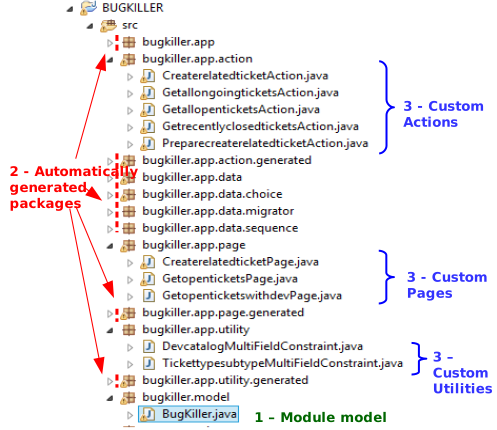
In your IDE, for every application module, the following folders will be used. In the example below, the module path is defined as bugkiller.app. An application is made of:
- A model file that is written by the user. If you only assembly bricks on objects, you just have to write this file1
- Automatically Generated classes: they are built by running the generation script on the model, and contain all files necessary for the application to work.
- You may need to develop your own custom actions, custom pages and utilities if you declare some in the model file
Automatic generation is launched for a package by running the java class Module ( org.openlowcode.design.module.Module ) with as a unique argument the class of your module model (e.g. bugkiller.model.BugKiller ).
To run the Open Lowcode server, you need to deploy the compiled classes of your module on the server. There is no need to deploy the classes on the client. The diagram below showns an example of the structure of an Open Lowcode project in an IDE
There is a risk your module model is overwritten at code generation if it is present in the core folder of your module, and has the same class name as the module (e.g. your root folder is bugkiller.app, and your module name is Bugkiller: you should not put your model in the path bugkiller.app.Bugkiller).
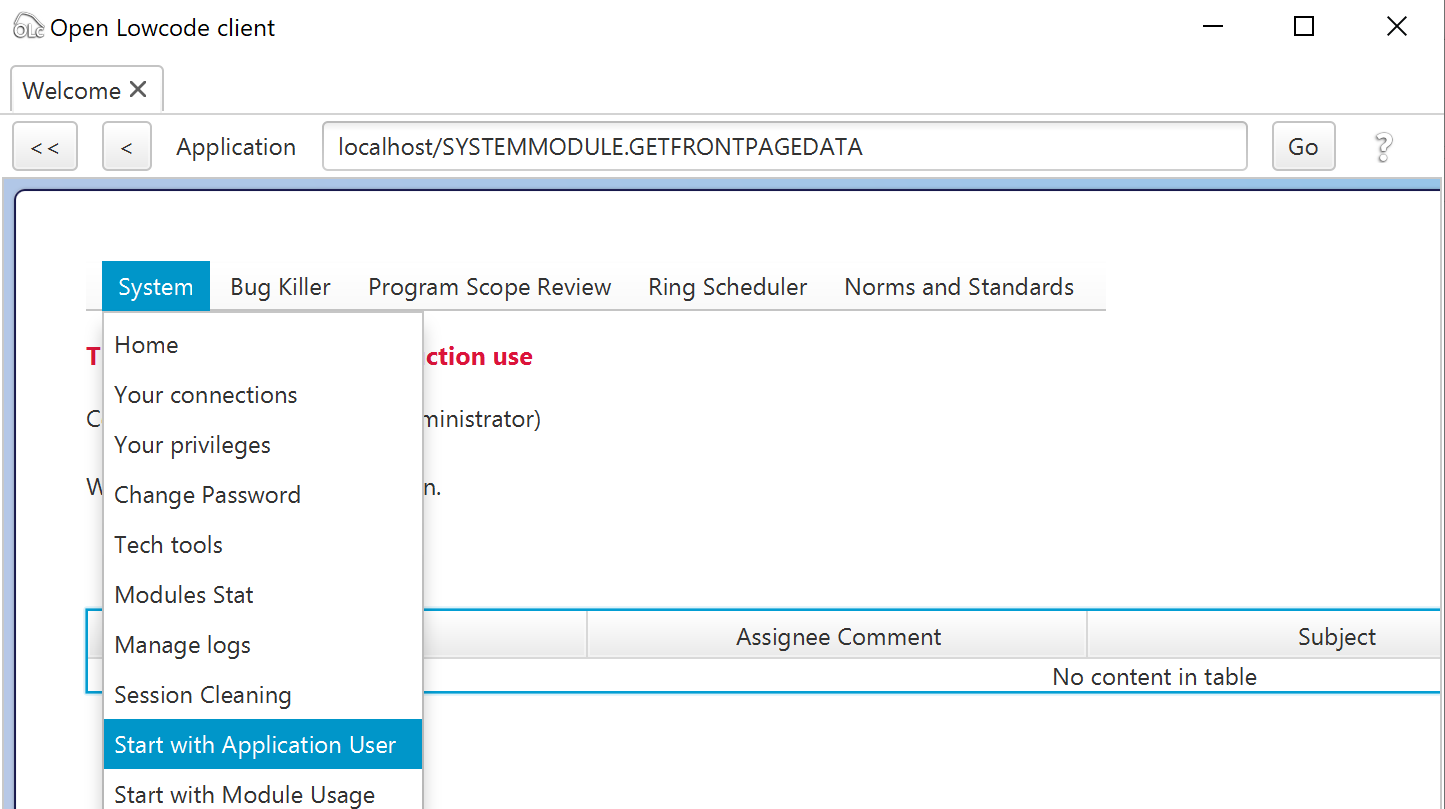
A data object is declared by a command as per the example below. The name of data object has to be unique across the different packages. It is possible to specify that the data object will appear in the menu of the module by specifying “false” to the “force hide” parameter in the last argument of the definition.
appuser = new DataObjectDefinition("appuser","Application User",this,false);When set as visible (forcehide false), the search page for the object (called 'Start With...') appears in the module menu.
A field can be added to a data object by a command as per the example below
appuser.addField(new StringField("EMAIL",
   "E-Mail",
   "e-mail at which the user can be reached. The system may send e-mails at this address",
   80,
StringField.INDEXTYPE_EASYSEARCH));| Name | Feature | Artefact Declaration |
|---|---|---|
| StringField | A text field of specified length, can be made searchable | |
| DecimalField | A field to store a decimal number | |
| TimestampField | A precise date and time | |
| EncryptedStringField | Text field that will be transported and stored encrypted | Note: can be encrypted two ways (encrypted text can be retrieved) or one-way (only possible to compare a text with the encrypted reference to check if they are equal) |
| ChoiceField | A choice field holding one value in a predefined list | Choice Fields uses a ChoiceCategory that needs to be declared and registered in the package. |
| MultipleChoiceField | A choice field holding several values in a predefined list | Choice Fields uses a ChoiceCategory that needs to be declared and registered in the package. |
| TimePeriodField | A field holding a time period (year, quarter, month...) |
Note: a LargeBinary field is also present but should not be used directly on a data object. You should use instead the FileContent or ImageContent properties.
A property provides an object with value added features. It can be added to a data object by a command as shown below
appuser.addProperty(new StoredObject());Properties can have business rules added to precise the behaviour of the property.
The following properties are available
| Name | Feature | Dependent Properties | Business Rules |
|---|---|---|---|
| StoredObject | Allows persistence in database (do not use for transient objects such as reports) | ||
| UniqueIdentified | Identifies an object, allows to update it | StoredObject |