
Replies: 5 comments 8 replies

-
|
If we had to choose one, I think I'd slightly prefer spinner |
Beta Was this translation helpful? Give feedback.

-
|
Can you help elaborate more on why the barred output looks less preferrable? Also, what would be a good UI in your mind? |
Beta Was this translation helpful? Give feedback.

-
|
I think the spinner is more subtle. If the bar were less dense like docker progress bar then maybe it might appeal. |
Beta Was this translation helpful? Give feedback.
-
|
Docker progress bar requires more horizontal space than oras CLI can offer. If we can create a new line to display the progress bar below the status, then it's doable. I can add another implementation to demo that. |
Beta Was this translation helpful? Give feedback.

-
|
I like the way you minimized the space with the bar and it is more informative, but I like the spinner because you know you have progress without being overwhelmed. |
Beta Was this translation helpful? Give feedback.
-
|
It's hard to choose a right background color for the progress bar because I don't find any suitable package to deal with terminal theming, so I just use the foreground color, which doesn't look good. |
Beta Was this translation helpful? Give feedback.

-
|
Added a new implementation which separated the output of progress bar into a newline @sajayantony @TerryHowe any feedback? |

Beta Was this translation helpful? Give feedback.
-
|
Added another implementation to show NPM-like progress bar |

Beta Was this translation helpful? Give feedback.
-
|
Even though it uses more vertical space, I like that implementation better than the tighter one. I like the npm style one less, but I just haven't done a lot of javascripting! |
Beta Was this translation helpful? Give feedback.

-
|
It might be helpful to display the time usage for uploading/downloading each blob in the progress bar. |
Beta Was this translation helpful? Give feedback.
-
|
Added, please check the demo in below: |

Beta Was this translation helpful? Give feedback.

-
|
The two-line one LGTM. It would be better if the cells for progress in size, %, and time are aligned. |
Beta Was this translation helpful? Give feedback.
-
|
Added a new implementation to align the output with instant speed indication. |

Beta Was this translation helpful? Give feedback.


Uh oh!
There was an error while loading. Please reload this page.
Uh oh!
There was an error while loading. Please reload this page.
-
Problem
As is pointed out in #940 and #893, oras commands might halt when processing data transfer tasks without any user feedback.
Solution
If ORAS user is using a terminal to run the command, we can compose an UI in the terminal and display progress status of the execution.
Goals
oras manifest fetchNon-goals
PoC
I had an implementation in my own fork based on below MVC design:
flowchart LR subgraph "oras CLI" subgraph root direction LR C[console] A[ANSI control] end subgraph progress S["Status(model)"]--rendered by-->M["Manager(view)"] M-->A M-->C end subgraph "tracker(controller)" T[Target]--manipulates-->S R[Reader]--manipulates-->S end subgraph commands push-->T attach-->T pull-->T cp-->T bf[blob fetch]-->R mf[manifest fetch]-->R bp[blob push]-->R mp[manifest push]-->R end endI cut three releases with different UI:
spinner: https://github.com/qweeah/oras/releases/tag/v1.2.0-spinner
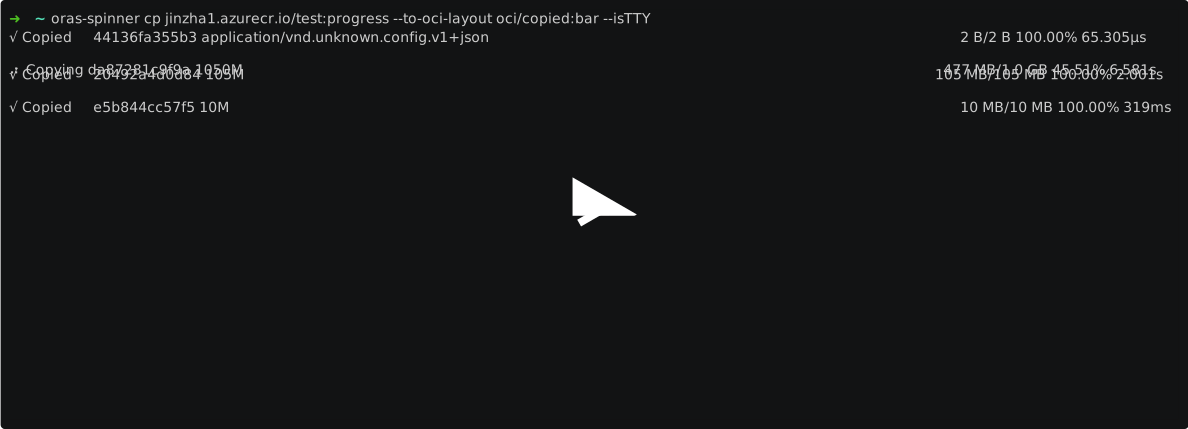
progress bar: https://github.com/qweeah/oras/releases/tag/v1.2.0-bar

two-line output with progress bar: https://github.com/qweeah/oras/releases/tag/v1.2.0-2line-bar

(This implementation breaks current output style and split output of one blob into 2 lines)
To try out more commands, you may installed via below command
Beta Was this translation helpful? Give feedback.
All reactions