 Postal
Running Postal on Raspberry Pi's and Kubernetes #1557

Replies: 3 comments 6 replies

-
|
Someone mentioned this on the slack the other day, it looks like there are ruby arm images but only in github, not dockerhub https://github.com/ruby/ruby-docker-images/pkgs/container/ruby If you have the time, knowledge, and Pi's to test on then some more information would be great. |
Beta Was this translation helpful? Give feedback.

-
|
I have created a test rig, created other pre requisite. Will be working on the image for ruby over the weekend. Thanks for the link as well. |
Beta Was this translation helpful? Give feedback.

-
|
Any luck with creating an postal image for arm64v8??? |
Beta Was this translation helpful? Give feedback.
-
|
not yet, got to work on it for few hours. I have created an image that builds on the arch. Need to iron out few things. Will let you know |
Beta Was this translation helpful? Give feedback.

-
Test Rig InfoSystem: Raspberry Pi 4, 8GB, 32GB Mem `.::///+:/-. --///+//-:``
`+oooooooooooo: `+oooooooooooo:
/oooo++//ooooo: ooooo+//+ooooo.
`+ooooooo:-:oo- +o+::/ooooooo:
`:oooooooo+`` `.oooooooo+-
`:++ooo/. :+ooo+/.` pi
...` `.----.` ``.. -------------------
.::::-``:::::::::.`-:::-` OS: Raspbian GNU/Linux 10 (buster) armv7l
-:::-` .:::::::-` `-:::- Host: Raspberry Pi 4 Model B Rev 1.4
`::. `.--.` `` `.---.``.::` Kernel: 5.10.17-v7l+
.::::::::` -::::::::` ` Uptime: 27 days, 10 hours, 58 mins
.::` .:::::::::- `::::::::::``::. Packages: 2066 (dpkg)
-:::` ::::::::::. ::::::::::.`:::- Shell: bash 5.0.3
:::: -::::::::. `-:::::::: :::: CPU: BCM2711 (4) @ 1.500GHz
-::- .-:::-.``....``.-::-. -::- Memory: 1350MiB / 7875MiB
.. `` .::::::::. `..`..
-:::-` -::::::::::` .:::::`
:::::::` -::::::::::` :::::::.
.::::::: -::::::::. ::::::::
`-:::::` ..--.` ::::::.
`...` `...--..` `...`
.::::::::::
`.-::::-`DEV:Init:
New Image DEV:
This is the current image, I am thinking about forking the repo and pushing the changes there. FROM arm32v7/ruby:2.6 AS base
SHELL ["/bin/bash", "-o", "pipefail", "-c"]
RUN apt-get update \
&& apt-get install -y --no-install-recommends \
software-properties-common \
&& apt-key adv --recv-keys --keyserver hkp://keyserver.ubuntu.com:80 0xF1656F24C74CD1D8 \
&& add-apt-repository 'deb http://security.debian.org/debian-security stretch/updates main' \
&& (curl -sS https://dl.yarnpkg.com/debian/pubkey.gpg | apt-key add -) \
&& (echo "deb https://dl.yarnpkg.com/debian/ stable main" | tee /etc/apt/sources.list.d/yarn.list) \
&& (curl -sL https://deb.nodesource.com/setup_12.x | bash -) \
&& rm -rf /var/lib/apt/lists/*
# Install main dependencies
RUN apt-get update && \
apt-get install -y --no-install-recommends \
build-essential \
netcat \
curl \
nano \
nodejs
RUN apt-get install -y libmariadbclient18 libmariadbclient-dev libcap2-bin
RUN setcap 'cap_net_bind_service=+ep' /usr/local/bin/ruby
# Configure 'postal' to work everywhere (when the binary exists
# later in this process)
ENV PATH="/opt/postal/app/bin:${PATH}"
# Setup an application
RUN useradd -r -d /opt/postal -m -s /bin/bash -u 999 postal
USER postal
RUN mkdir -p /opt/postal/app /opt/postal/config
WORKDIR /opt/postal/app
# Install bundler
RUN gem install bundler -v 2.1.4 --no-doc
# Install the latest and active gem dependencies and re-run
# the appropriate commands to handle installs.
COPY --chown=postal Gemfile Gemfile.lock ./
RUN bundle install -j 4
# Copy the application (and set permissions)
COPY ./docker/wait-for.sh /docker-entrypoint.sh
COPY --chown=postal . .
# Export the version
ARG VERSION=unspecified
RUN echo $VERSION > VERSION
# Set the path to the config
ENV POSTAL_CONFIG_ROOT=/config
# Set the CMD
ENTRYPOINT [ "/docker-entrypoint.sh" ]
CMD ["postal"]
# ci target - use --target=ci to skip asset compilation
FROM base AS ci
# prod target - default if no --target option is given
FROM base AS prod
RUN POSTAL_SKIP_CONFIG_CHECK=1 RAILS_GROUPS=assets bundle exec rake assets:precompile
RUN touch /opt/postal/app/public/assets/.prebuilt
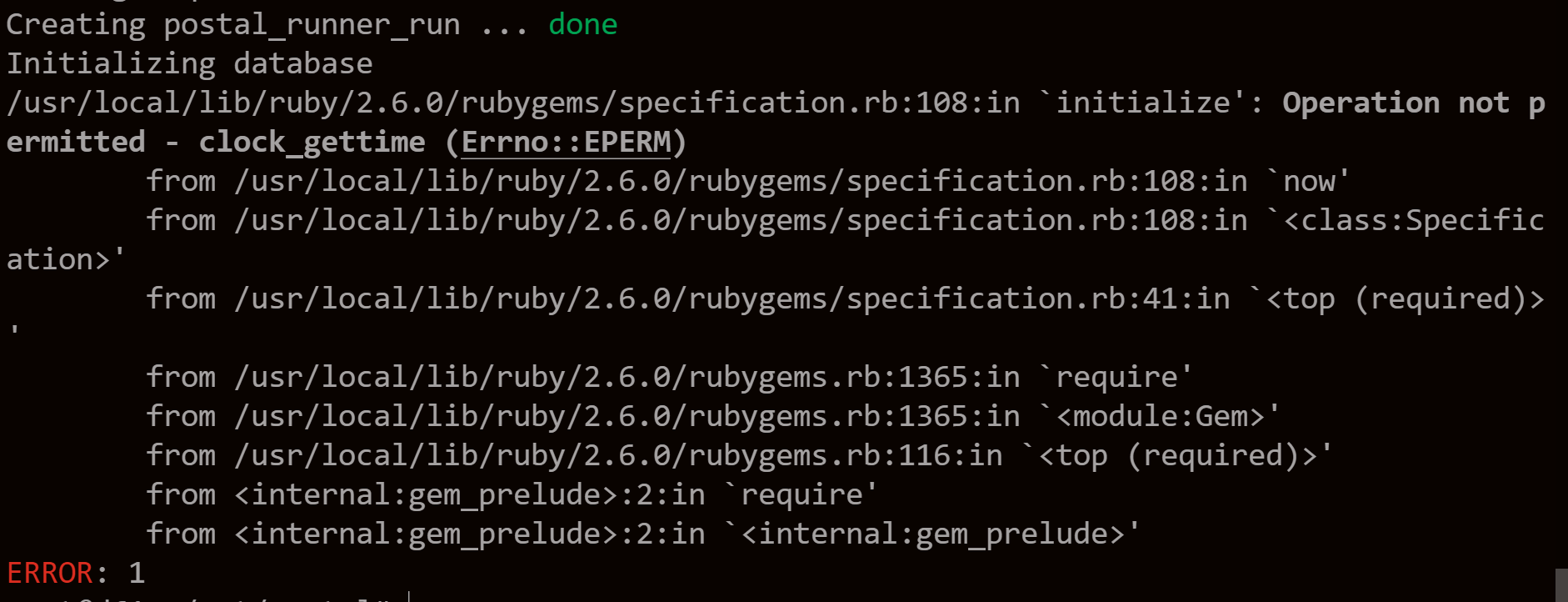
Docker image Current Status:Getting few errors while initializing, not familiar with ruby env's so will figure this out and continue to see what I can do postal initialize
If anyone knows what I can do here, please do share :). Many thinks will continue to work on this. |
Beta Was this translation helpful? Give feedback.
-
|
Hi Any luck? |
Beta Was this translation helpful? Give feedback.
-
|
Hi @blaazetech , I was able to get it running, I have pushed it to the same docker image I will post the instructions in the below comment. Please let me know if you have any issues. I will push the same to the forked repo. |
Beta Was this translation helpful? Give feedback.
-
|
Currently, this image is working in armourshield/postal:latest-arm in RaspberryPi OS (32-bit) postal status
Name Command State Ports
------------------------------------------------------------------
postal_cron_1 /docker-entrypoint.sh post ... Up
postal_requeuer_1 /docker-entrypoint.sh post ... Up
postal_smtp_1 /docker-entrypoint.sh post ... Up
postal_web_1 /docker-entrypoint.sh post ... Up
postal_worker_1 /docker-entrypoint.sh post ... UpInstruction for running in arm32v7PrerequisitesNOTE: Change credentials for security Running MySQL with the following command docker run -d --name postal-mariadb -p 3306:3306 -v /var/lib/mysql:/var/lib/mysql --restart always -e MYSQL_ROOT_PASSWORD=root yobasystems/alpine-mariadb:10.4.17docker run -d --name postal-rabbitmq -p 5672:5672 --restart always -e RABBITMQ_DEFAULT_USER=postal -e RABBITMQ_DEFAULT_PASS=root -e RABBITMQ_DEFAULT_VHOST=postal rabbitmq:3.8.10-management-alpineInstalling Postal using new ARM32v7 imageYou can follow most of the instructions from the official page (Installation Page - Postal)[https://docs.postalserver.io/install/installation] The major change will be changing the image name in docker-compose.yaml.
postal bootstrap postal.yourdomain.com
postal initialize
postal make-user
postal start
Please let me know if you find any issues. I am yet to test the complete functionality. This is currently working in my setup. If you need a build for arm64. I will push it to the same docker repository. Many thanks for your patience |
Beta Was this translation helpful? Give feedback.
-
|
The docker image is in the forked repo, it is not perfect but it still uses the same image used for amd64. Making it easy for compatibility with the main image. Not tested that yet. |
Beta Was this translation helpful? Give feedback.


Uh oh!
There was an error while loading. Please reload this page.
-
Hi Everyone,
With the requirements for Postal being satisfied by Raspberry Pi 4B 8GB RAM. It will be great to run the server out of arm7 32bit Pi OS making ideal for enthusiast and people having spare Pi's at home to have a feel for Postal.
With Kubernetes installation like K3s on arm7 system, it will be great to run this on Kubernetes as well.
But docker-compose with docker images for arm7 will be a great thing.
I am currently trying to build the postal ruby image for arm7. For other images I am using this https://hub.docker.com/r/yobasystems/alpine-mariadb for Mariadb on Pi, RabbitMq has a image for arm7.
Both Mariadb and RabbitMq works out of the box.
This will be great if it is part of the roadmap for Postal.
Beta Was this translation helpful? Give feedback.
All reactions