This simple scenario deploys a single-node HANA instance and an optional bastion host in the Azure Cloud.
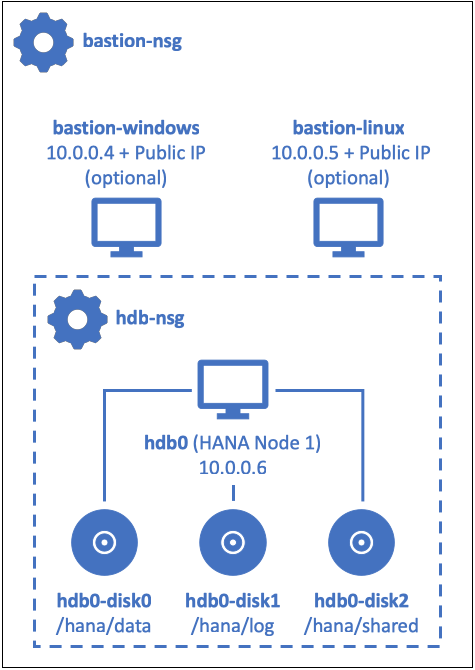
The following options can be customized in the single-node scenario:
| Option | Description | Template parameter | |||
|---|---|---|---|---|---|
| HANA version | Which version of HDB Server to install | ||||
| HANA 1.0 SPS12 (PL13 or higher) | useHana2 = false |
||||
| HANA 2.0 SPS2 or higher | useHana2 = true |
||||
| Database containers * | Whether to install HDB with single or multiple database containers (tenants) | ||||
| Single container (HANA 1.0 only) | hdb_mdc = false |
||||
| Multi-database containers (MDC) | hdb_mdc = true |
||||
| Bastion host * | Whether to deploy a bastion host ("jump box") through which the HANA VM can be accessed | ||||
| No bastion host | windows_bastion = falselinux_bastion = false |
||||
| Windows bastion host (incl. HANA Studio) | windows_bastion = true |
||||
| Linux bastion host (incl. HANA Studio) | linux_bastion = true |
||||
| SAP Applications | Which SAP applications to install on top of HANA (if any) | ||||
| XSA | install_xsa = true |
||||
| SAP HANA Cockpit (requires XSA) | install_cockpit = true |
||||
| SHINE Demo Content (requires XSA) | install_shine = true |
||||
| WebIDE (requires XSA) | install_webide = true |
||||
(Note: Features marked with an * are work in progress and not fully available yet.)
-
If you haven't already done so, please make sure you prepare your Azure Cloud Shell.
-
Next, download the required SAP packages and make them accessible.
(Note: Please review the list of SAP downloads; depending on which features and applications you would like to include in your HANA installation, you may need additional packages.)
-
In your Azure Cloud Shell, change into the directory for the HANA single-node scenario:
cd sap-hana/deploy/vm/modules/single_node_hana/ -
Create a
terraform.tfvarsfile for your deployment. You can use the provided Boilerplate template for single-node scenarios as a starting point and adjust the variables according to your requirements.
(Note: You need to rename the boilerplate template from terraform.tfvars.template to terraform.tfvars before you can use it.)
-
Now, run the deployment of your HANA single-node instance. You can verify the installation afterwards.
-
Should you wish to delete your HANA single-node instance at a later point, you can simply follow the general instructions on the overview page.