What's new? #1

Replies: 66 comments 4 replies

-
Online helpI have moved the noveltree online help to a separate website and combined it with the help pages of the plugins. The help pages are not yet complete; I intend to finish them over time.
|

Beta Was this translation helpful? Give feedback.
-
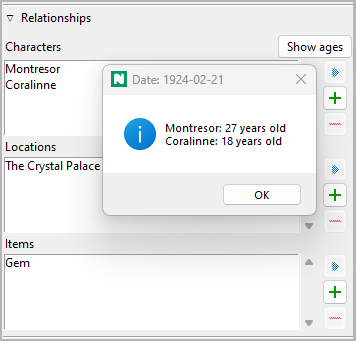
See the ages of the characters related to a sectionIf a section is dated, you can call up the ages of the related characters who have birth dates (as of version 1.7). |
Beta Was this translation helpful? Give feedback.
-
Version 1.8: Update of the plugins is recommendedUntil version 1.7 there were homepages on GitHub Pages for noveltree and all its plugins. After I moved the online help pages to a separate website, I abandoned the individual homepages and now use the GitHub repositories as landing pages. This reduces the maintenance effort and makes updates available more quickly. Since the old help page and homepage URLs are also in the program code of the plugins (e.g. as links for the plugin manager), there is now an update with revised URLs. It is recommended to update noveltree and all plugins used. |
Beta Was this translation helpful? Give feedback.
-
Version 2.0: Preparations for renaming the applicationVersion 2.0 does not bring any new features. Nevertheless, I recommend installing it; this will make it much easier to switch to the renamed application at a later date (see below). "Under the hood", the plugin mechanism is now well prepared for the things to come. The whole installation is moved from "~/.noveltree" to "~/.novx" automatically. This is why you may need to adjust your noveltree launcher on Linux, or your Windows desktop link if it doesn't work after the noveltree update. Also, Windows users should re-run the registry script add-noveltree.reg in the installation directory to keep noveltree working as the default application for .novx files. The icon for the desktop shortcut must be set again. All installed plugins must then be updated. A new name for noveltreeWhen I was looking for a new name for novelyst v5, noveltree seemed like a good one, since the application provides a tree for structuring a novel. However, a web search for "noveltree" shows many hits that lead to businesses such as cannabis distribution. Also, a large software project on GitHub is already named noveltree. I would like to have a unique name for my program, so I will change it in the near future. Some preparations are necessary for this. First, I renamed the help pages and the plugins so that "noveltree" no longer appears in their URLs. This is done with the API v1.8 and requires no further action from the user than updating noveltree and its plugins. The next step is to change the installation directory. It should no longer be called "~/.noveltree", but have a neutral name. I am thinking of "~/.novx", which refers to the file format used and is suitable for all tools that process .novx files. I suspect that the user base of my program is still very small at the moment, so I would like to take this step as soon as possible, because it requires Linux users to revise their program launcher, and Windows users to revise their shortcuts and file association. The actual relocation is to be automated with the v2.0 update. You can have a look at the progress of the changes here: #6 |
Beta Was this translation helpful? Give feedback.
-
Version 2.1: The new name is novelibre
|
Beta Was this translation helpful? Give feedback.
-
Version 3.0: New features and file format upgradeWith version 3.0, arcs have been renamed plot lines. novelibre now povides a plot grid with plot line notes for each section. This allows you to see the big picture and keep track of multiple subplots. In order to outline a novel with a plot grid right from the start, novelibre now offers the option of creating up to 20 sections at once. In return, the former section list is now only intended for export. As of version 3.3, it will contain a complete set of section metadata and thus support project export. The file format has been extended and the version of the document type definition has been increased from 1.0 to 1.1. This means that .novx files written with a novelibre version 2.7 or higher are no longer read by older program versions. The behavior when exporting documents can now be set via an options dialog. This allows you to skip confirmation requests and prevent automatic locking. The online user guide has now been enhanced and covers all program features. Version 1.x and 2.x plugins must be updated. Note: Version 2.7 was an interim release with most of the version 3 features implemented. However, some version 2.x plugins may not work because of the file format upgrade, so it is highly recommended to update the application and all its plugins to version 3. |
Beta Was this translation helpful? Give feedback.
-
Version 3.5: New features and file format upgradeWith version 3.5, you can store notes and links along with almost every element in novelibre. If you link a file that is located in the novelibre project directory or below, the path is now saved relative to the project directory. For novelibre version 3.5, the following plugins and tools must be updated to work with the version 1.2 file format: |
Beta Was this translation helpful? Give feedback.
-
Version 3.6: File format upgradeAs of version 3.6, novelibre stores links in a redundant way. This allows for auto-fixing broken links if files are moved on the disk. If you link a file, the path is now saved relative to the project directory, and additionally as an absolute path. For novelibre version 3.6, the following plugins and tools must be updated to work with the version 1.3 file format: |
Beta Was this translation helpful? Give feedback.
-
BugfixesCurrently, I 'm working on a new novel, plotting it with novelibre from scratch. Most of the functions are used here, and bugs are fixed as they show up. This could lead to an increase in updates in the near future. |
Beta Was this translation helpful? Give feedback.
-
Version 4: File format upgradeThe section "Action/Reaction/Custom" scheme is generalized and extended now, so that you can also specify non-staged sections and make customized annotations. See: All plugins must be upgraded for version 4. The novelibre plugin API has been enhanced, and the plugins' file sizes may be significantly reduced. |
Beta Was this translation helpful? Give feedback.
-
Copy and paste novelibre tree elements via the clipboard
The nv_clipboard plugin adds this feature to novelibre. |

Beta Was this translation helpful? Give feedback.

-
NoteAs of version 5.5, this feature is included in novelibre, so this plugin has become obsolete. |
Beta Was this translation helpful? Give feedback.
-
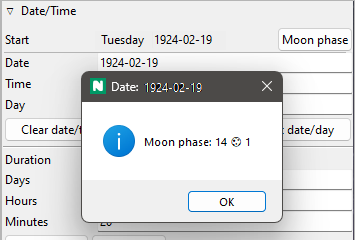
Moon phase displayWhat is the moon in the sky? Is it full tonight, even though the night was moonless yesterday? The moon phase information consists of:
The moon phase calculation is based on a ‘do it in your head’ algorithm by John Conway. |
Beta Was this translation helpful? Give feedback.
-
Self-installing distribution packagesFrom now on the releases of novelibre and all its plugins and tools will be provided as self-extracting Python archives. Many web browsers recognize the download as an executable file and offer to open it immediately. This starts the installation.
However, depending on your security settings, your browser may initially refuse to download the executable file. In this case, your confirmation or an additional action is required. If this is not possible, you have the option of downloading the zip file. |

Beta Was this translation helpful? Give feedback.
-
Modifying the look of your final documentIf you prefer simple blank lines instead of section separators, you can achieve this using "Find and replace".
This is particularly convenient with a macro that comes with the new novelibre-tools extension for LibreOffice and OpenOffice.
|


Beta Was this translation helpful? Give feedback.
-
novelibre 5.37 with a new method of defining chapter epigraphsIn my current novel project, I now preface each chapter with a fictional news flash or social media post providing background information on the latest developments in the story. This is what the epigraph feature introduced with version 5.21 is for. I have now remedied this with version 5.37. From now on, you can declare the first section of each part or chapter to be an epigraph, and it will be displayed in the manuscript document in the same way as the former epigraph, but it will be editable. There is a section on epigraphs in the online manual now. |
Beta Was this translation helpful? Give feedback.
-
novelibre 5.38: Defining new sections while writing with Writer is now even more intuitive.During extended writing sessions with Writer, you can now conveniently define new sections using third- or fourth-level subheadings. These will then appear immediately in the navigator. See the manual. |
Beta Was this translation helpful? Give feedback.
-
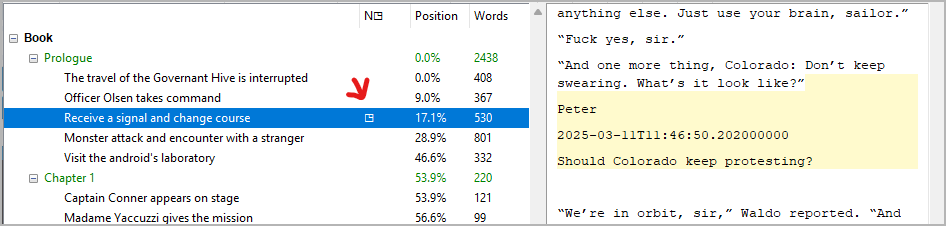
novelibre 5.39 indicating commentsSections that contain at least one comment are now marked with a “◳” symbol in the project tree. |
Beta Was this translation helpful? Give feedback.
-
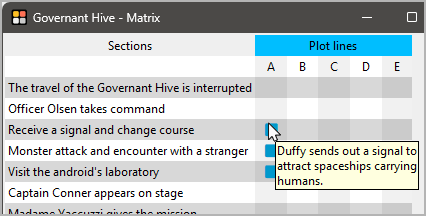
nv_matrix version 5.5 with hovertipsSome nv_matrix fields now display hovertips when you move the mouse cursor over them.
|
Beta Was this translation helpful? Give feedback.
-
novelibre 5.44 with new formatting optionsGood news for those who need more customizable paragraph styles: The ODT paragraph styles Heading 5, Heading 6, Heading 7, Heading 8, and Heading 9 are now supported and can be used within sections. Important The file format has been upgraded from version 1.8 to version 1.9. New translationsThanks to @oldstonegryzzly, there is also an Italian translation of the user interface, which is still in beta but can already be installed as a language package. The language pack repo comes with an Italian homepage and a framework for online help pages in Italian. Anyone who is interested is invited to continue working on the translation of the pages. Here is the discussion: #71 (comment) |
Beta Was this translation helpful? Give feedback.
-
TutorialsAs a supplement to the user guide, which is continuously being improved and updated, I activated the novelibre wiki for detailed tutorials and best practice suggestions. |
Beta Was this translation helpful? Give feedback.
-
novelibre 5.45: Highlighting sectionsAs of version 5.45, novelibre allows you to highlight sections in the project tree.
A new button on the toolbar lets you reset the highlighting. The toolbar also displays the current highlighting criterion. 
Important If you have set dark mode, you should update the nv_dark plugin to version 0.8+, which supports the highlighting feature. |
Beta Was this translation helpful? Give feedback.
-
novelibre 5.46: Highlighting tagged elementsTags are a proven tool for quickly and easily defining categories for sections, characters, locations, and items, and for illustrating context. 
For better orientation, I have also added more icons to the menus. 
|
Beta Was this translation helpful? Give feedback.
-
novelibre 5.47: The icons can now be replaced with user-made onesI designed the icons for the novelibre user interface with great care. If you nevertheless don't like them, you can now change them using a plugin that comes with its own icon set. As a template repository for such plugins, I'm providing nv_bw_icons, which installs the default icon set in monochrome.
|

Beta Was this translation helpful? Give feedback.
-
novelibre 5.49: Global search and replaceIf you want to change a name throughout the novel, you can now export, edit and reimport the two relevant documents: Together, these two documents contain both the novel text and the contents of unused sections or sections that have been moved to the trash, all headings, names, titles, descriptions, and other metadata texts. nv_matrix 5.6.1: Bugfix releaseUsers of the nv_matrix plugin are requested to update to version 5.6.1, as a critical bug is fixed that prevents from assigning items correctly. |
Beta Was this translation helpful? Give feedback.
-
novelibre 5.50: Outlining your story using the description documentsSimilar to the manuscript, you can now also use headings in the description documents to create new elements in the project tree. This allows you to generate and expand outlines with the help of the description documents. You can now
Note There are also updates for a variety of plugins, but these do not add any new functionality, only optimized code. |
Beta Was this translation helpful? Give feedback.
-
novelibre 5.51: Selecting highlighted elementsAs of version 5.51, novelibre offers a new button in the toolbar for selecting highlighted elements. This allows you to select sections based on tags or plot line assignments, and change their type, for example. That way, you can easily switch between different text variations. |

Beta Was this translation helpful? Give feedback.
-
nv_writer - a new plugin offering a distraction-free writing modeThere are famous and successful writers who claim to still write using DOS word processing software because it is best for their focus. If that makes sense to you, you can now check out the nv_writer plugin to get a distraction-free writing mode.
You can type scene by scene as if you were using a typewriter or a DOS word processor. This is much faster than working with OpenOffice/LibreOffice. You can only enter plain text and create new sections. There is no spell check, nor can you assign foreign languages to newly entered text. However, formatting etc. already entered with OpenOffice/LibreOffice Writer is retained. Tip Since this plugin is currently under testing and development, updates may be provided frequently. |

Beta Was this translation helpful? Give feedback.
-
novelibre 5.52 - Cloning sectionsnovelibre now allows you to quicky create "unused" copies of sections. You can use this feature to try out alternative text variations, for instance. While editing a section in the distraction-free writing mode, clones are created on demand in the background, so you can keep the current draft of the edited section and continue writing the alternate version. |
Beta Was this translation helpful? Give feedback.
-
nv_epub - a new plugin offering an EPUB e-book exportI like to read my work-in-progress novel on an e-reader from time to time. Until now, I’ve been creating EPUB files using the writer2epub extension for OpenOffice. However, since this extension is no longer officially available, I spent two workdays programming my own e-book exporter that uses a stylesheet specifically for novelibre-specific elements, such as epigraphs.
The nv_epub plugin adds an EPUB Ebook entry to the Export menu. The plugin is still in beta. Exported EPUB e-books pass the EPUB 2.0.1 validation with EPUBcheck. However, footnotes and endnotes are not yet supported. |

Beta Was this translation helpful? Give feedback.

Uh oh!
There was an error while loading. Please reload this page.
Uh oh!
There was an error while loading. Please reload this page.
-
In this thread I want to make you aware of new and special features of novelibre. To keep it clear, I have locked it for comments. If you want to make a comment on a feature, you can open a separate thread.
You can download the latest novelibre version from the project homepage. There you will also find the links to the plugins.
To learn about planned features and how development progresses, see the Features project Kanban board.
Beta Was this translation helpful? Give feedback.
All reactions