


This role installs and configures Tailscale on a Linux target.
Supported operating systems:
- Debian / Ubuntu
- CentOS / RedHat
- Rocky Linux / AlmaLinux
- Amazon Linux 2023 / Amazon Linux 2
- Fedora
- Arch Linux
- OpenSUSE
- Oracle Linux
- Raspbian
See the CI worfklow for the list of distribution versions actively tested in each pull request.

One of either tailscale_authkey or tailscale_up_skip is required.
In most cases you will use tailscale_authkey.
If you are uninstalling Tailscale (state: absent),
neither tailscale_authkey nor tailscale_up_skip is required.
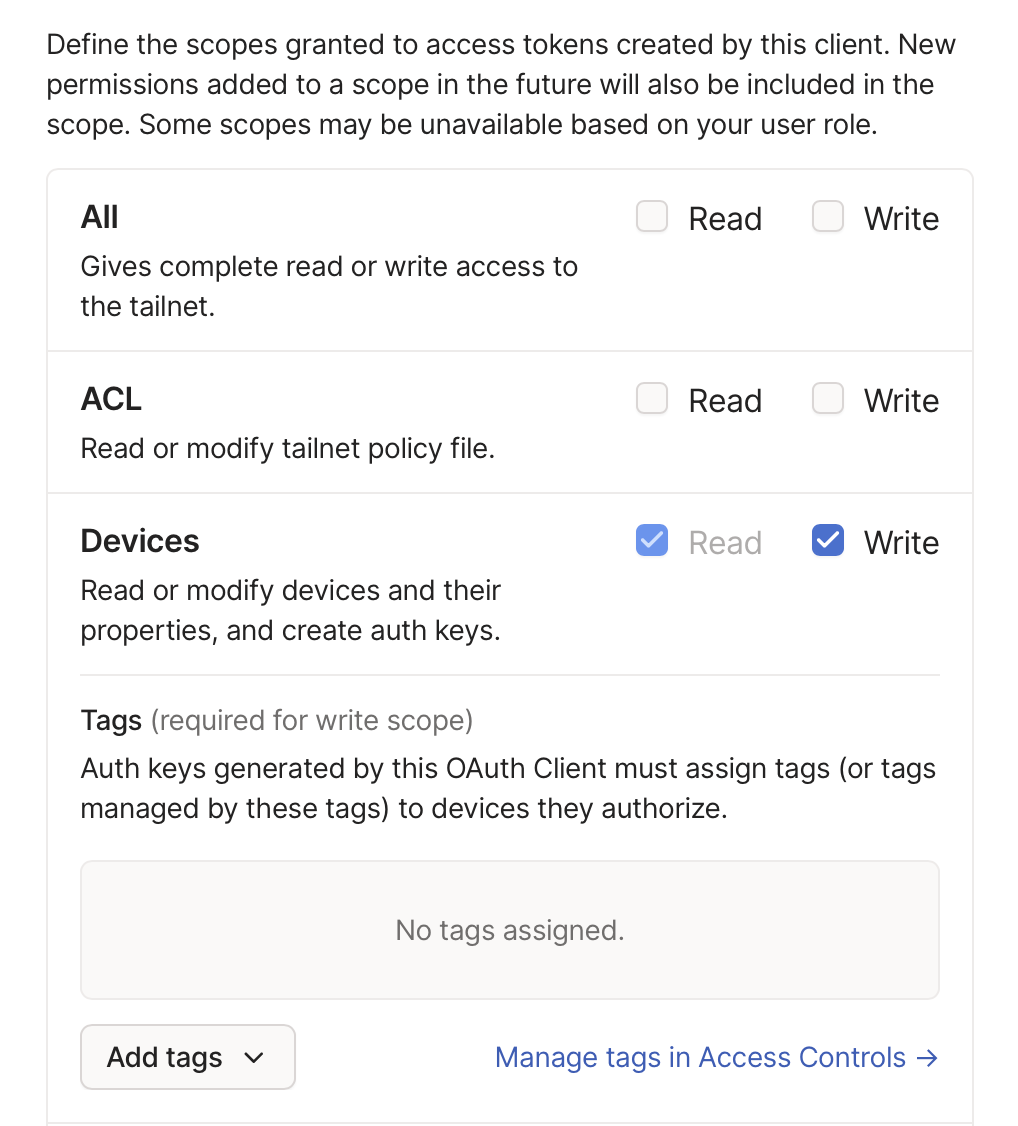
If you are authenticating with an OAuth key, you must also set tailscale_tags.
A Tailscale Node Authorization auth key.
A Node Authorization key can be generated under your Tailscale account. The role supports two type of keys:
- Auth key (
tskey-auth-XXX-YYYYY) https://login.tailscale.com/admin/authkeys - OAuth key (
tskey-client-XXX-YYYY) https://login.tailscale.com/admin/settings/oauth
Important
Entering an OAuth key additionally leverages the following role variables:
tailscale_tags (required),
tailscale_oauth_ephemeral (defaults to true),
and tailscale_oauth_preauthorized (defaults to false).
Note that Auth keys expire up to a maximum of 90 days after they are generated. OAuth keys (OAuth client secret) do not expire unless revoked, and the OAuth access token generated during playbook execution expires after 1 hour.
For more information, see Tailscale's OAuth clients page, especially Generating long-lived auth keys.
If an OAuth key is used, be sure to grant the write Devices scope to the OAuth client.
This value should be treated as a sensitive secret.
Default: latest
Whether to install or uninstall Tailscale on a Linux machine.
If defined, state must be either latest, present, or absent.
This role uses latest by default to help ensure your software remains up-to-date and incorporates the latest security and product features. For users who desire more control over configuration drift, present will not update Tailscale if it is already installed.
Changes to tailscale_args will be applied under both latest and present; this parameter only impacts the version of Tailscale installed to the target system.
If set to absent, this role will de-register the Tailscale node (if already authenticated) and remove or disable all Tailscale artifacts added to the system.
Note that neither tailscale_authkey nor tailscale_up_skip is required if state is set to absent.
Default: []
Apply supplied tags to the Tailscale nodes configured by this role (via the --advertise-tags flag to tailscale up). For more information, see What are tags?
Note
Tags are required for OAuth clients (tailscale_authkey OAuth key).
Entries should not include tag:. For example, tailscale_tags: ['worker'] translates to --advertise-tags=tag:worker.
Default: false
Whether to install and configure Tailscale as a service but skip running tailscale up. Helpful when packaging up a Tailscale installation into a build process, such as AMI creation, when the server should not yet authenticate to your Tailscale network.
Pass command-line arguments to tailscale up.
Note that the command module is used, which does not support subshell expressions ($()) or bash operations like ; and &. Only tailscale up arguments can be passed in.
Caution
Do not use this for --authkey.
Use the tailscale_authkey variable instead.
Do not use this for --advertise-tags.
Use the tailscale_tags variable instead.
Do not use this for --timeout.
Use the tailscale_up_timeout variable instead.
Any stdout/stderr output from the tailscale binary will be printed. Since the tasks move quickly in this section, a 5 second pause is introduced to grant more time for users to realize a message was printed.

Stderrs will continue to fail the role's execution. The sensitive --authkey value will be redacted by default. If you need to view the unredacted value, see insecurely_log_authkey.
Note that:
Flags are not persisted between runs; you must specify all flags each time.
...
In Tailscale v1.8 or later, if you forget to specify a flag you added before, the CLI will warn you and provide a copyable command that includes all existing flags.
Note
Used only when tailscale_authkey is an OAuth key.
Default: true
Register as an ephemeral node, if true.
Note
Used only when tailscale_authkey is an OAuth key.
Default: false
Skip manual device approval, if true.
Default: false
If set to true, the "Bring Tailscale Up" command will include the raw value of the Tailscale authkey when logging any errors encountered during tailscale up. By default, the authkey is not logged in successful task completions and is redacted in the stderr output by this role if an error occurs.

If you are encountering an error bringing Tailscale up and want the "Bring Tailscale Up" task to not redact the value of the authkey, set this variable to true.
Regardless of this variable's setting, the role will still relay Tailscale's error message on that fact if the authkey is invalid:

Default: stable
Whether to use the Tailscale stable or unstable track.
stable:
Stable releases. If you're not sure which track to use, pick this one.
unstable:
The bleeding edge. Pushed early and often. Expect rough edges!
Default: 120
Defines the timeout duration for the tailscale up command in seconds.
--timeout duration
maximum amount of time to wait for tailscaled to enter a Running state
Default: false
Whether to output additional information during role execution. Helpful for debugging and collecting information to submit in a GitHub issue on this repository.
This role provides the IP v4 and v6 addresses of the Tailscale node as well as the output of tailscale whois against the node as facts.
Several key pieces of whois information are provided directly, with the rest of the whois output stored as a JSON fact for your convenience.
Outputted facts:
tailscale_node_ipv4           (string): The IPv4 address of the Tailscale node.
tailscale_node_ipv6           (string): The IPv6 address of the Tailscale node.
tailscale_node_hostname_full  (string): The full hostname (node.domain.ts.net) of the Tailscale node.
tailscale_node_hostname_short (string): The short hostname (node) of the Tailscale node.
tailscale_node_created_at     (string): The ISO-8601 timestamp the Tailscale node was created.
tailscale_node_tags           (list):   The tags assigned to the Tailscale node.
tailscale_node_services       (list):   The discovered services running on the Tailscale node.
tailscale_node_whois          (dict):   The full output of `tailscale whois` against the Tailscale node.
This role will bubble up any stderr messages from the Tailscale binary to resolve any end-user configuration errors with tailscale up arguments.
The --authkey= value will be redacted unless insecurely_log_authkey is set to true.

- name: Servers
  hosts: all
  roles:
    - role: artis3n.tailscale.machine
      vars:
        # Example pulling the API key from the env vars on the host running Ansible
        tailscale_authkey: "{{ lookup('env', 'TAILSCALE_KEY') }}"
Enable Tailscale SSH:
- name: Servers
  hosts: all
  roles:
    - role: artis3n.tailscale.machine
      vars:
        tailscale_authkey: "{{ lookup('env', 'TAILSCALE_KEY') }}"
        tailscale_args: "--ssh"
Pass arbitrary command-line arguments:
- name: Servers
  hosts: all
  tasks:
    - name: Use Headscale
      include_role:
        name: artis3n.tailscale.machine
      vars:
        tailscale_args: "--login-server='http://localhost:8080'"
        tailscale_authkey: "{{ lookup('env', 'HEADSCALE_KEY') }}"
Get verbose output:
- name: Servers
  hosts: all
  roles:
    - role: artis3n.tailscale.machine
      vars:
        verbose: true
        tailscale_authkey: "{{ lookup('env', 'TAILSCALE_KEY') }}"
Connect using an OAuth client secret:
- name: Servers
  hosts: all
  roles:
    - role: artis3n.tailscale.machine
      vars:
        verbose: true
        tailscale_authkey: "{{ lookup('env', 'TAILSCALE_OAUTH_CLIENT_SECRET') }}"
        tailscale_tags:
          - "oauth"
        # Optionally, also include:
        tailscale_oauth_ephemeral: true
        tailscale_oauth_preauthorized: false
Install Tailscale, but don't authenticate to the network:
- name: Servers
  hosts: all
  roles:
    - role: artis3n.tailscale.machine
      vars:
        tailscale_up_skip: true
De-register and uninstall a Tailscale node:
- name: Servers
  hosts: all
  roles:
    - role: artis3n.tailscale.machine
      vars:
        state: absent