 Quarto


-
|
I want to embed a lord icon within my Quart HTML file (a revealjs presentation specifically). You're supposed to be able to paste the following code into an HTML file and have it work, but it doesn't work for me. https://lordicon.com/icons/wired/outline/1103-confetti Do I need to use the |
Beta Was this translation helpful? Give feedback.
Replies: 5 comments 6 replies

-
|
You might consider implementing this as an extension (https://quarto.org/docs/extensions/). Note that we already have a fontawesome extension (https://github.com/quarto-ext/fontawesome) that you could study as an example. In terms of including raw html yes you might want to use include-in-header. Also, raw HTML within a document is typically best enclosed in a raw HTML block like this: ```{=html}
<script src="https://cdn.lordicon.com/xdjxvujz.js"></script>
<lord-icon
src="https://cdn.lordicon.com/lupuorrc.json"
trigger="hover"
style="width:250px;height:250px">
</lord-icon>
``` |
Beta Was this translation helpful? Give feedback.

-
|
I have started working on this in jmgirard/lordicon. I think I get the required format of the repo and the lua syntax. I'm just a little confused about the dependencies. Can I just put the CDN link in the scripts field? |
Beta Was this translation helpful? Give feedback.

-
|
I'd suggest embedding it so that users don't require an internet connection. If you do want to just do the script tag to the CDN I'd just include it raw using the @dragonstyle Do |
Beta Was this translation helpful? Give feedback.
-
|
I'm having trouble with the "static" CDN anyway. I'd like to try to use the "bundle" approach: My challenge is that this is using NPM to get the JS bundles. Can I download the bundles and just include them in my extension? I'm not that familiar with NPM (or JS for that matter). |
Beta Was this translation helpful? Give feedback.

-
|
Scripts should just pass through... I'm afk right now to confirm 100% but that is what I'd expect for sure... |
Beta Was this translation helpful? Give feedback.
-
|
I don't know enough about how lordicon is deployed to say for sure. |
Beta Was this translation helpful? Give feedback.
-
|
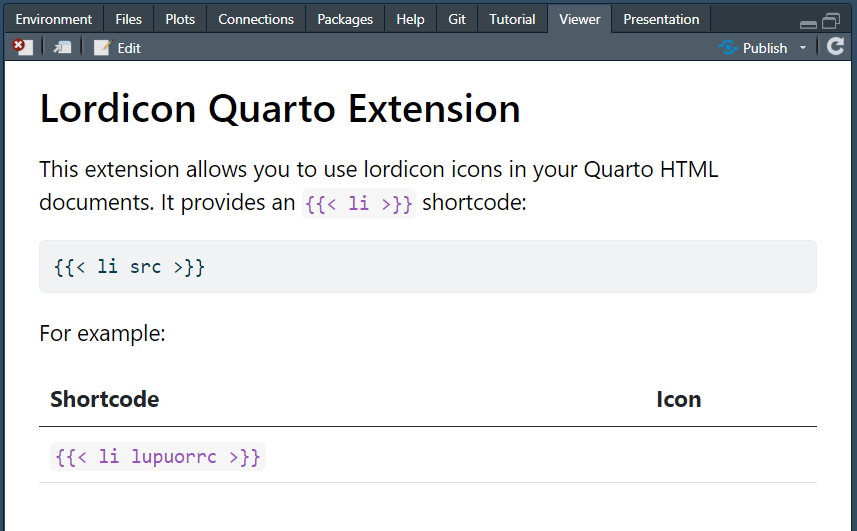
Ok, I got it to work (mostly). v0.0.1 allows embedding icons from their HTML code. But I am working on getting it to customize icons via lua and embed icons from downloaded JSON source files as well, which would enable offline use. The fontawesome extension was helpful, thanks for pointing to that. One thing that was strange is that my icons appear in the web browser but not in the RStudio Viewer. Any idea why that might be? For example, see https://jmgirard.github.io/lordicon/example.html and the screenshot below of the same file in RStudio:
|
Beta Was this translation helpful? Give feedback.
-
|
Looks fantastic!!! The problem in RStudio appears to be a JS error coming from bundle.js. It's a syntax error, so likely a result of RStudio running an older version of Chromium that doesn't support whatever syntax or JS features you are generating in the bundle. Webpack should enable you to easily target older versions of JS though so you should be able to workaround this. Note that if you right click on the Viewer pane in RStudio you'll get an "Inspect Element" menu that will get you into Chrome dev tools (and you can see the JS error in the console). |
Beta Was this translation helpful? Give feedback.
-
|
Hmm. I used babel to transcode the JS to ES2015+ ( |
Beta Was this translation helpful? Give feedback.
-
|
You might want to not minify so you can see the actual code that is causing the syntax error. |
Beta Was this translation helpful? Give feedback.
-
|
Ok, thanks. I did this but wasn't able to debug from that alone. I put a question up on RStudio Community: |
Beta Was this translation helpful? Give feedback.


Ok, I got it to work (mostly). v0.0.1 allows embedding icons from their HTML code. But I am working on getting it to customize icons via lua and embed icons from downloaded JSON source files as well, which would enable offline use. The fontawesome extension was helpful, thanks for pointing to that.
One thing that was strange is that my icons appear in the web browser but not in the RStudio Viewer. Any idea why that might be?
For example, see https://jmgirard.github.io/lordicon/example.html and the screenshot below of the same file in RStudio: