AI-powered daily health reports for your smart home.
Home Assistant Digest automatically monitors your smart home, detects anomalies, and delivers daily insights — like having a technician review your system every morning.
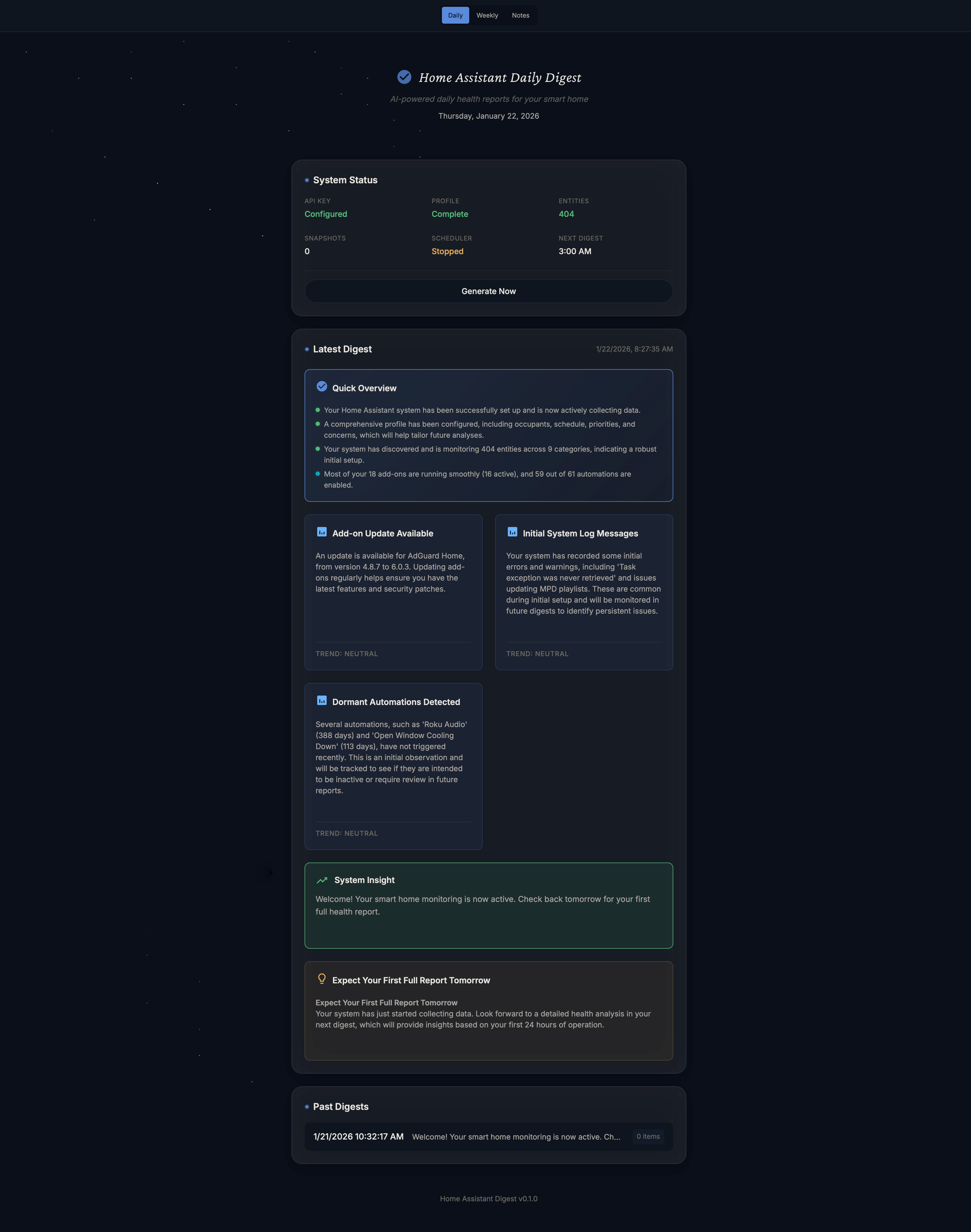
Your smart home generates thousands of data points daily, but most go unnoticed until something breaks. HA Digest changes that by:
- Finding the needle in the haystack — AI analyzes your entire system to surface what matters
- Tracking trends over time — Maintains 7 days of history (even if your HA only keeps 1 day)
- Catching issues early — Notices subtle changes before they become problems
- Learning what's normal for YOU — Understands your home's unique patterns
| Category | Examples |
|---|---|
| HVAC Issues | Fan running longer than usual, temperature not reaching setpoint, increased runtime |
| Device Health | Low batteries, sensors going offline, degraded signal strength |
| Energy Anomalies | Unexpected power spikes, devices drawing more than normal |
| Pattern Breaks | Motion sensor in a room that's usually active shows nothing all day |
| Integration Problems | Failed automations, unavailable entities, API errors |
| System Health | HA performance, add-on status, disk usage |
| Log Analysis | Errors and warnings from HA Core and Supervisor logs |
When you first install, you'll answer a few quick questions:
- How many people live here? Any pets?
- Typical schedule (work from home? 9-5 office?)
- What matters most? (Energy savings? Security? Comfort?)
This context helps the AI understand what's normal for your home.
The AI scans your entire Home Assistant and determines:
- Which sensors/devices are worth monitoring
- How to categorize each (climate, security, energy, etc.)
- Priority levels for different entity types
- Relationships between entities (what's in the same room, what controls what)
You can review and customize this monitoring profile.
Home Assistant Digest stores 7 days of history using smart compression:
| Entity Type | Storage Strategy | Example |
|---|---|---|
| Climate sensors | Hourly averages | Temp: 72°F avg for 2pm hour |
| Energy monitors | Hourly totals | Used 1.2 kWh this hour |
| Binary sensors | Daily summaries | Motion: 47 triggers, last at 11pm |
| Slow-changing | Daily snapshots | Battery: 78% as of midnight |
| Automations | Event counts | Ran 3 times, failed 0 |
This keeps storage minimal (~5-10 MB) while preserving everything needed for analysis.
Each day, the AI receives:
- Current state of all monitored entities
- Today's statistics (min/max/avg)
- 7-day trend data
- Any triggered alerts or failures
- Your home context (schedule, preferences)
It then identifies anomalies, trends, and concerns.
┌─────────────────────────────────────────────────────────┐
│                     Daily Digest                         │
├─────────────────────────────────────────────────────────┤
│  ATTENTION (1 item)                                      │
│  • HVAC fan runtime up 45% vs. 7-day average            │
│                                                          │
│  TRENDS                                                  │
│  • Living room temp variance decreased (good!)           │
│  • Garage door opened 3x more than usual                 │
│                                                          │
│  ALL GOOD                                                │
│  • All batteries above 30%                               │
│  • No offline devices                                    │
│  • Automations firing normally                           │
└─────────────────────────────────────────────────────────┘
- Free AI Analysis — Uses Google Gemini API (free tier is plenty)
- Local History — Stores 7 days of data independently of HA's recorder
- Self-Configuring — AI determines what to monitor (with optional tuning)
- Flexible Notifications — Home Assistant notifications, email, or markdown reports
- Privacy-Focused — Your data stays local; only anonymized stats go to AI
- Lightweight — Minimal resource usage, won't slow down your HA
| Digest Type | Timing | Configuration |
|---|---|---|
| Daily | Every day at configured time | DIGEST_TIME (default: 07:00) |
| Weekly | Once per week at same time | WEEKLY_DIGEST_DAY (default: sunday) |
Notifications are sent automatically after each digest is generated using your configured NOTIFICATION_SERVICE:
- Persistent notification (default) - Shows in HA sidebar
- Mobile app - Push notification to your phone
- Any HA notify service - Email, Telegram, etc.
- Home Assistant OS or Supervised installation
- Google Gemini API key (get one free here)
-
Add this repository to your Home Assistant add-on store:
https://github.com/saihgupr/ha-addons-beta -
Install the HA Digest add-on
-
Configure your Gemini API key in the add-on settings
-
Start the add-on
-
Run the initial assessment from the add-on UI

gemini_api_key: "your-api-key-here"
digest_time: "07:00"              # When to generate daily digest
notification_service: "notify.mobile_app_phone"  # HA notification target
history_days: 7                   # Days of history to maintain
snapshot_interval_minutes: 30 # How often to capture entity statesTell the AI to stop flagging known issues:
ignore_entities:
  - sensor.flaky_garage_motion    # Known to report false positives
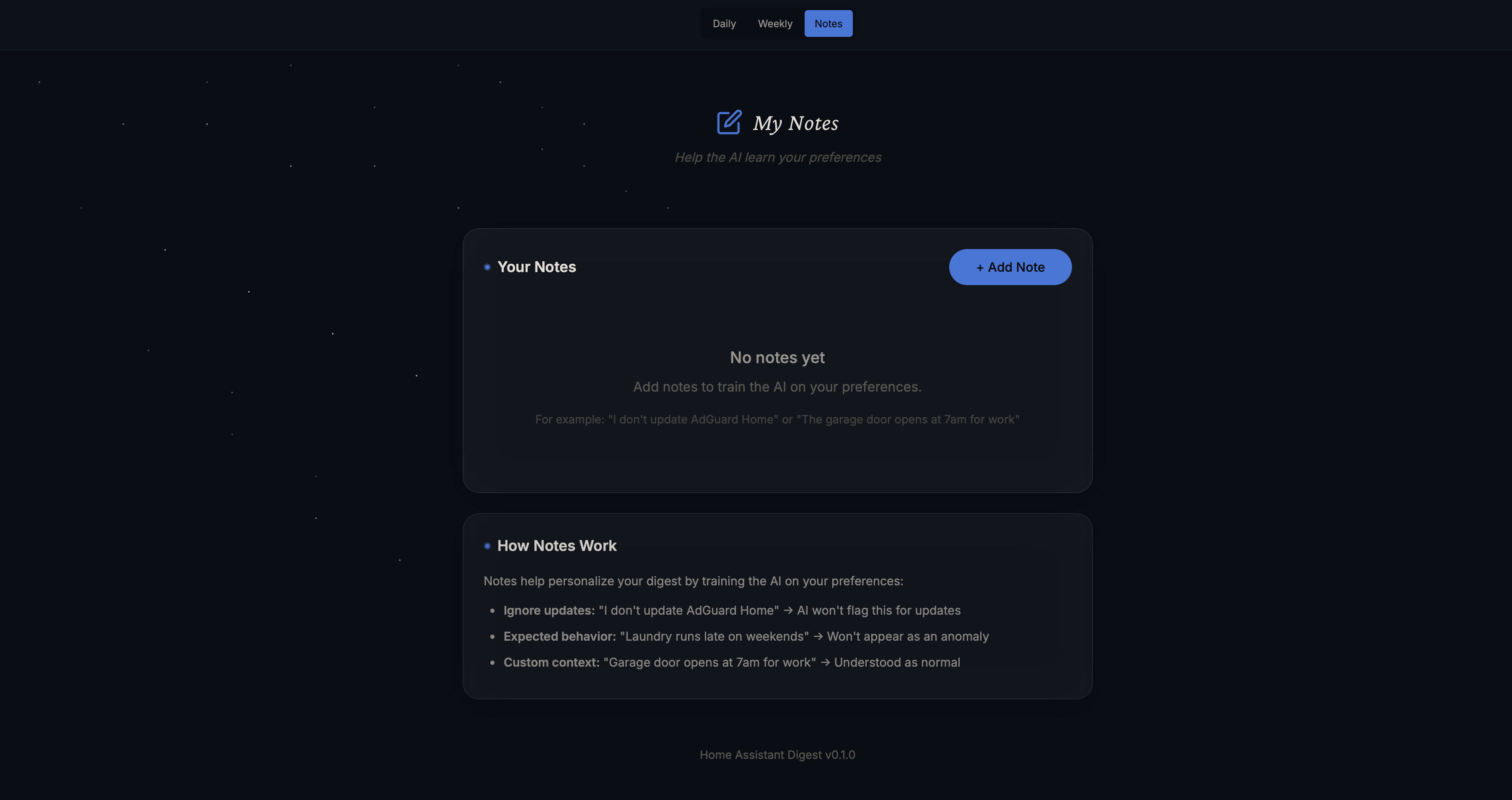
- binary_sensor.guest_room_motion # Room is unusedTrain the AI on your preferences directly from the UI. Click Note on any warning card to add context:
- "I don't update AdGuard Home" → AI stops flagging update reminders
- "Laundry running late is normal on weekends" → Won't flag as an anomaly
- "Garage door opens at 7am for work" → Understood as normal behavior
Notes are included in the AI prompt, helping it understand what's expected vs. what's actually a problem. Access all your notes from Daily → Weekly → Notes in the top navigation.
Help the AI understand sudden changes by logging events:
events:
  - date: "2024-12-01"
    note: "Replaced HVAC filter"
  - date: "2024-12-10"
    note: "Added new smart plug in kitchen"
When the AI sees "power usage jumped on Dec 10," it can correlate with your note.
Adjust what the AI considers important:
priority_overrides:
  sensor.freezer_temperature: critical   # Alert immediately if abnormal
light.decorative_lamp: ignore # Don't care about this one- Initial release with core functionality
- Web UI for viewing historical trends
- Custom monitoring rules
- Multiple digest schedules (morning/evening)
- Integration with Frigate for camera health monitoring
- Weekly/monthly summary reports with graphs
- Anomaly detection learning (auto-adjusts baselines)
- Support for OpenAI/Anthropic APIs
- Push notifications for critical issues (don't wait for daily digest)
- Natural language queries ("How did my energy usage compare to last week?")
Q: Does my data leave my network?
A: Only entity names and numerical values are sent to Gemini for analysis. No personal data, camera feeds, or sensitive information is transmitted.
Q: Will this slow down Home Assistant?
A: No. Home Assistant Digest runs as a separate add-on and only makes lightweight API calls to your HA instance.
Q: What if Gemini's free tier isn't enough?
A: The free tier allows ~1 million tokens/day. Home Assistant Digest typically uses <10,000 tokens per analysis — you'd need to run it 100+ times daily to hit limits.
Q: Can I use a different AI provider?
A: Currently Gemini-only, but OpenAI/Anthropic support is planned.
Q: What if I disagree with the AI's assessment?
A: You can add entities to the ignore list or adjust priority overrides. The AI learns from your home profile setup, so re-running the assessment with updated answers can help too.
Q: How much disk space does the history use?
A: With smart compression, expect 5-10 MB for 7 days of history. The database auto-purges data older than your configured retention period.
Q: Can I run the analysis on-demand instead of daily?
A: Yes! In addition to the scheduled daily digest, you can trigger an analysis anytime from the add-on UI.
This project is currently in BETA and under active development. We welcome all testing, bug reports, and feature requests! If you encounter any issues or have ideas for making the digest better, please open an issue.