


RoyalApps.Community.ExternalApps.WinForms provides a WinForms control for launching, selecting, and hosting windows from external processes.
Version 2.x is a managed rewrite. The package no longer depends on WinEmbed.dll; embedding is implemented in C# with Win32 interop generated via CsWin32.
Read the documentation first:
- Managed Win32 embedding with no
WinEmbed.dlldependency - Runtime window selection through
WindowSelectionRequestedinstead of static match configuration - Compatibility hints for modern or packaged desktop apps through
PrefersExternalHostingandEmbeddingCompatibilityWarning - Automatic fallback to an external session when a selected window cannot be reparented
- Existing-process reuse and discovery-only startup through
Launch.UseExistingProcess - Structured runtime options split into
Launch,Embedding, andSelection
Warning Cross-process window parenting is not a Microsoft-supported application model. Read Raymond Chen's post about cross-process parent/child windows before shipping this in production.
Install-Package RoyalApps.Community.ExternalApps.WinFormsdotnet add package RoyalApps.Community.ExternalApps.WinFormsCall ExternalApps.Initialize() once during application startup, place an ExternalAppHost on a form, subscribe to WindowSelectionRequested, and then start a session with ExternalAppOptions.
using System;
using System.Linq;
using System.Windows.Forms;
using RoyalApps.Community.ExternalApps.WinForms;
using RoyalApps.Community.ExternalApps.WinForms.Embedding;
using RoyalApps.Community.ExternalApps.WinForms.Options;

ExternalApps.Initialize();

var host = new ExternalAppHost
{
    Dock = DockStyle.Fill,
};

host.WindowSelectionRequested += (_, e) =>
{
    var candidate = e.NewlyDiscoveredCandidates
        .Concat(e.Candidates)
        .Where(window => window.IsVisible && window.IsTopLevel)
        .FirstOrDefault(window =>
            window.ProcessId == e.StartedProcessId ||
            string.Equals(
                System.IO.Path.GetFileName(window.ExecutablePath),
                System.IO.Path.GetFileName(e.RequestedExecutablePath),
                StringComparison.OrdinalIgnoreCase));

    if (candidate?.PrefersExternalHosting == true)
    {
        Console.WriteLine(candidate.EmbeddingCompatibilityWarning);
    }

    if (candidate is not null)
        e.SelectWindow(candidate);
};

host.Start(new ExternalAppOptions
{
    Launch =
    {
        Executable = @"C:\Windows\System32\notepad.exe",
        KillOnClose = true,
    },
    Embedding =
    {
        Mode = EmbedMethod.Window,
        StartEmbedded = true,
        IncludeWindowChromeDimensions = true,
    },
    Selection =
    {
        Timeout = TimeSpan.FromSeconds(10),
        PollInterval = TimeSpan.FromMilliseconds(250),
    },
});
Call ExternalApps.Cleanup() during application shutdown to release process-tracking resources.
ExternalAppOptions is split into three areas:
Launch: executable path or command name, arguments, working directory, environment variables, credential options, elevation, existing-process reuse, hidden startup, and close behavior.Embedding: whether the selected window should start embedded, whether it should be embedded as a fullWindowor as a client-areaControl, and whether title bar and frame dimensions should be accounted for during sizing.Selection: polling interval and timeout for runtime window discovery.
The host no longer performs built-in title, class, process, or command-line matching from configuration. Instead, it repeatedly raises WindowSelectionRequested with the current list of ExternalWindowCandidate values until your code selects a window or the timeout expires.
Each ExternalWindowCandidate also carries compatibility hints for modern or packaged desktop apps:
PrefersExternalHosting: indicates that the window looks like a poor candidate for Win32 reparenting.EmbeddingCompatibilityWarning: explains whyControlorWindowembedding may be unstable.WindowSelectionRequestEventArgs.RequestedExecutablePath: helps correlate windows when the original launch target hands off to another process.WindowSelectionRequestEventArgs.NewlyDiscoveredCandidates: helps prefer windows that appeared during the current start attempt, which is especially useful when multiple instances of the same app are already open.
If embedding still fails for a selected window, the library leaves the window external, logs a warning, and continues the session instead of failing startup.
If no window is selected before the timeout elapses, the process is left running externally and the session stays unattached.
ExternalAppHost.AttachmentState reports whether the current session is None, External, Detached, or Embedded.
When Launch.Executable is just a command name such as notepad.exe or pwsh, the launcher starts it shell-style when possible. If direct process creation is required, for example because credentials or custom environment variables are configured, the library resolves the executable against PATH.
Launch.Executable and Launch.WorkingDirectory also support %ENVIRONMENT_VARIABLE% expansion. Custom values from Launch.EnvironmentVariables override the current process environment during expansion.
When Launch.UseExistingProcess is enabled, the library skips process creation and only performs discovery/selection against windows that are already present.
ApplicationStarted: raised when startup completed and any initial embedding work finished.ApplicationClosed: raised when the session closes, the process exits, or startup fails.ApplicationActivated: raised when the tracked window receives focus.WindowSelectionRequested: raised while candidate discovery is running so the consumer can select a window.WindowTitleChanged: raised when the tracked window caption changes.
CloseApplication(): closes or terminates the tracked process according to the launch options.DetachApplication(): removes the tracked window from the host control.EmbedApplication(): re-embeds a detached window.FocusApplication(bool force): focuses the tracked window.MaximizeApplication(): maximizes the tracked window.SetWindowPosition(): syncs the tracked window to the host bounds.ShowSystemMenu(Point location): shows the tracked window's system menu.GetWindowScreenshot(): captures the current tracked window as a bitmap.
EmbedMethod.Control: embeds only the client area. This is often visually cleaner but some applications may not paint focus state correctly.EmbedMethod.Window: embeds the complete native window including its frame and menu. This usually preserves application chrome better, but ALT+TAB behavior can still be imperfect.
Embedding.IncludeWindowChromeDimensions controls whether the embedded window's title bar and frame dimensions are included when the library sizes the window to the host bounds. Leave it enabled when you want the hosted client area to fill the control. Disable it when the target app behaves better with direct bounds applied.
There is no dedicated External embed mode in v2. If a selected window cannot be reparented safely, the session leaves the window external and reports that through logging and session state.
ExternalAppConfigurationwas removed and replaced byExternalAppOptions.- Static matching properties such as title, class, process, and command-line match strings were removed from the library API.
- Window identification is now host-driven through
WindowSelectionRequested. WinEmbed.dlland native packaging assets were removed.- The old idea of a dedicated
EmbedMethod.Externalmode is not part of the v2 API. Reparenting failures fall back to leaving the selected window external.
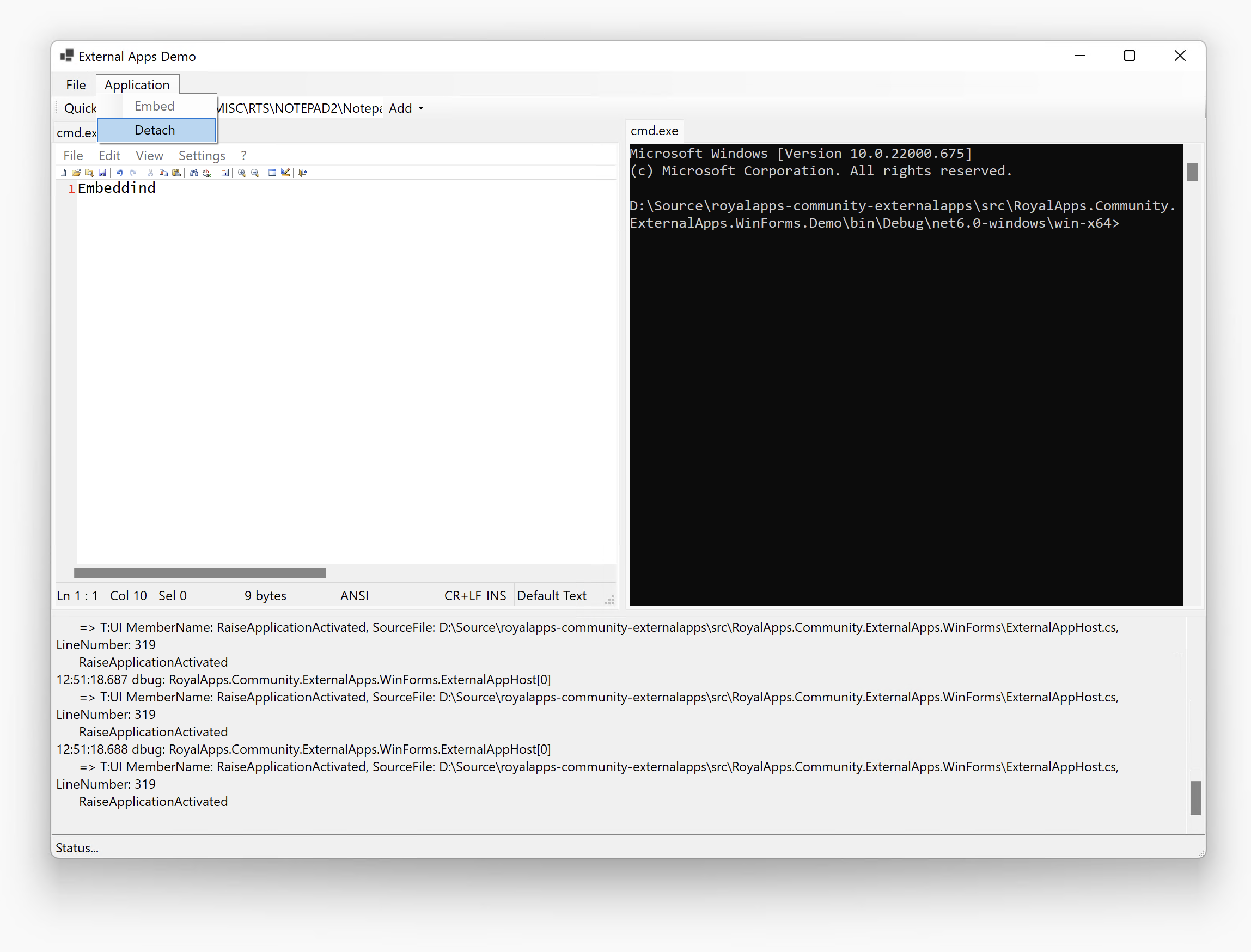
The demo app in src/RoyalApps.Community.ExternalApps.WinForms.Demo shows both embedding modes and logs selection and lifecycle events while hosting multiple external applications.
Run the unit tests with:
dotnet test src/RoyalApps.Community.ExternalApps.WinForms.Tests/RoyalApps.Community.ExternalApps.WinForms.Tests.csprojThe initial suite covers the selection loop, selection request event args, and the explicit launch/selection result types that drive session startup behavior.
The public documentation site is built with VitePress, and the API reference pages are generated from XML docs during the site build.
Source files:
docs/index.mddocs/articles/getting-started.mddocs/articles/selection-strategies.mddocs/articles/migrating-from-v1.mdscripts/generate-api-docs.mjs