The following has been extracted from AWS Docs (with added info for more clarity and context):
You can integrate SAML-based IdPs directly from your user pool.
-
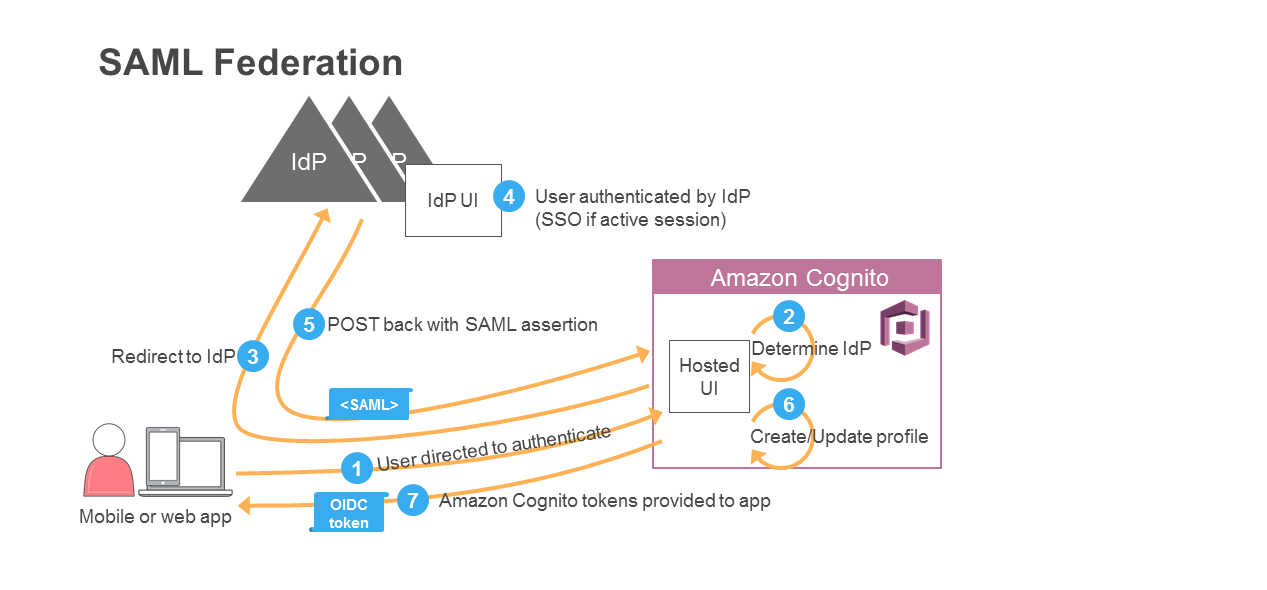
The app starts the sign-up and sign-in process by directing your user to the UI hosted by AWS. A mobile app can use web view to show the pages hosted by AWS.
-
Typically, your user pool determines the IdP for your user from that user's email address.
Alternatively, if your app gathered information before directing the user to your user pool, it can provide that information to Amazon Cognito through a query parameter.
-
Your user is redirected to the IdP.
-
The IdP authenticates the user if necessary. If the IdP recognizes that the user has an active session, the IdP skips the authentication to provide a single sign-in (SSO) experience.
-
The IdP POSTs the SAML assertion to the Amazon Cognito service.
Note Amazon Cognito cancels authentication requests that do not complete within 5 minutes, and redirects the user to the hosted UI. The page displays a Something went wrong error message.
- After verifying the SAML assertion and collecting the user attributes (claims) from the assertion, Amazon Cognito internally creates or updates the user's profile in the user pool. Amazon Cognito returns OIDC tokens to the app for the now signed-in user.
The following diagram shows the authentication flow for this process: