After installing the SigSRF SDK, this page gives example command lines and documentation for the mediaMin and mediaTest reference applications, including:
- packet streaming, both real-time and unlimited rate buffering, with packet re-ordering and packet RFCs. UDP and file packet input with full RTP packet functionality. SDP aware, recognition and filtering of a wide range of protocols, pcap/pcapng/rtp file support, encapsulated packet support, HI2/HI3 support, packet buffering, re-ordering, repair, tracing and logging
- high capacity RTP decoding and transcoding (EVS 1, AMR, G729, MELPe, H.264, H.265, etc), RFC 8108, auto-detection of RTP stream/codec type, SDP detection, and .sdp file input definitions. Session aware stream merging, unified conversations, forensic audio features
- ready-to-run applications include LI, call recording, SBC, media post-processing (e.g speech recognition), and high performance decoding to multiple L16 streams for AI speech-to-text and translation purposes
- real-time live output and bit-exact (reproducible) wav, pcap, and bitstream file output
- packet and event logging
- test and measurement, including codec audio and video quality and performance, media RFC verification, and transcoding
- application examples, including source code, showing how to use pktlib and voplib APIs (see data flow diagrams and architecture diagram on the SigSRF page)
Input and output options include network I/O, pcap file, and audio file format files (raw audio, .au, and .wav). Example command lines below use pcap, wav, and cod (compressed bitstream format) files included with the SigSRF SDK. SDK capacity is limited to four (4) concurrent transcoding streams, and four (4) concurrent instances (one instance = console window), for a total of eight (8) streams. The commercial software has no limitations for concurrency or multiuser, bare metal, VM, container, or other platform limitations.
3Q 2025
Use case improvements
- IPv6 fragmentation and reassembly support
- improved redundant packet detection and handling
- improved codec FLC
- improved event log handling during high capacity / high performance operations
- L16 (linear 16-bit) RTP codec support
- big-endian pcap and pcapng support
Errata
- fix bug in handling zero length RTP payloads
- fix AMR-WB 12650 bps RTP auto-detection. Previously this was correctly detected for pcaps generated by mediaTest for regression test and for collected in-the-wild pcaps, but some new ones turned up that needed this improvement
- improved command line error handling and reporting
2Q 2025
Use case improvements
- H.264 RTP auto-detect and elementary bitstream extraction
- improved oversized packet handling (e.g. TSO/LSO or other packets captured or inserted at software level, before the NIC)
- SSRC stream matching, duplication and reuse detection, with a command line option for dormant session handling
- detection of remote terminal connectivity loss and avoidance of impact on performance and results of long-running operations (e.g. long call recordings, regression tests, high capacity)
Errata
- fix to multi-frame EVS packet decoding
1Q 2025
Use case improvements
- improved pcapng format handling, including additional block types, unused and unknown block types
- HEVC elementary bitstream extraction from RTP packet flow
- command line examples for VLC streaming to Wireshark capture
3Q-4Q 2024
Use case improvements
- H.265 dynamic codec detection and session creation, bitstream extraction
- input data caching to improve mediaMin application thread performance
- publish interop and regression test scripts used internally for EVS and AMR testing, including (i) generated media and pcap files and (ii) "in the wild pcaps" (anonymized and content-altered)
- updated voplib documentation
- upgrade DSGetPayloadInfo() API in voplib to support detailed, fast, and generic modes of RTP payload inspection and parsing
Errata
- packet tracing and logging time improved around 50%. Helpful for very long inputs (calls or pcaps)
- fixes to EVS multi-frame payloads and codec collision avoidance handling, for example mixing AMR-WB IO mode 23.05 and 23.85 kbps payloads
- fixes to EVS hf-only format support
- fixes to mediaMin auto-detection for less often used AMR NB and WB rates. All rates verified
1Q-2Q 2024
Codecs documentation is on Github
pktlib documentation is on Github
Arm support is under development !
Use case improvements
- packet fragmentation and reassembly management, including UDP duplicate packet detection
- SDP info expanded support, including media port discovery
- pktlib now supports pcap editing and packet operations
- packet numbering and tracing for Wireshark comparison
- further improvements in RTP media type auto-detection
- codec configuration options for binary-only codecs with exit() and abort() calls, and codecs with protected sections of source not permissible to modify
- silence trim, re-sampling, and other wav file post-processing options
Errata
- codec fixes: fix bug in AMR NB decoder handling of bandwidth-efficient mode for 4750 and 5150 bitrates, fix to EVS AMR WB IO mode decoder (in compact header mode at 23850 bps)
- packet logging and tracing now handles SSRCs shared across streams
- debug mode added to codecs to help find subtle NaN and other floating-point issues in deployments on wide range of Linux and GLIBC versions
- fix EVS Player and AMR Player example/demo command lines (below). These were broken after not being retested after other improvements
- fix problem with high numbers of dynamic channels in a stream (high capacity RFC8108)
3Q-4Q 2023
Use case improvements
- call recording "time stamp match" mode for reproducible, bit-exact media output files
- .rtp and .rtpdump file format support
- improvements in low bit rate handling (e.g. EVS codec VBR mode)
- further improvements in RTP media type auto-detection
- packet filter and search APIs in pktlib
Errata
- fix bug in mediaTest NO_DATA frame handling
- fix problem in packet gap/pause handling where short, successive gaps were not handled correctly
1Q-2Q 2023
Improvements over a wide range of areas, including
- mixed SIP and RTP stream handling
- HI2 and HI3 decode
- DTMF handling
- "accelerated time" for bulk pcap handling
- return audio content type from codecs (only for codecs that support this)
Errata
- keyboard handling inside containers
- codec type auto-detection (some cases wrongly detected)
3Q-4Q 2022
-
new releases of pktlib, voplib, mediaMin, and mediaTest, including:
-
support for handsets and voice assistants found in the wild using non-compliant EVS "AMR-WB IO mode" format
-
improved jitter buffer dynamic adjust supporting ultra-deep jitter buffer depths
-
initial implementation of GPX track signal processing and road-matching library
-
"hello codec" reference app demonstrating simple, fast codec integration into user-defined apps
Complete info is in the errata and update PDF doc (note - if Github shows "unable to render rich display" click on "Download" :-)
3Q 2022 - SigSRF™ and EdgeStream™ incorporated into the RobotHPC™ Robotics Edge Platform hardware + software solution
3Q 2022 - "hello codec" minimal codec usage and integration example for codec-only users
2Q 2022 - improved ASR, including support for near-real-time operation on slower CPUs. First version of GPS track processing (used for LI software), including gpx file handling, de-noising, dynamically adjusted filter coefficients, dropout detection, and more
2Q 2022 - 15 to 20% codec performance improvement, both encode and decode
4Q 2021 - 1Q2022 - testing with wide range of Ubuntu and CentOS and g++/gcc versions. Docker containers pre-configured to run SDK and demo programs, including speech recognition from UDP/RTP streams
1Q-2Q 2021 - encapsulated stream support, tested with OpenLI pcaps containing DER encoded HI3 intercept streams, per ETSI LI and ASN.1 standards
1Q 2021 - real-time ASR option added to mediaMin command line. Kaldi ASR works on stream group outputs, after RTP decoding, RTP stream merging and other signal processing. All codecs supported (narrowband codecs are up-sampled prior to ASR)
1Q 2021 - SDP info added to mediaMin. Input can be either command line .sdp file or incoming TCP/IP packet flow. SDP info can be used to override mediaMin auto-detection, ignore specific payload types, or otherwise as needed in application-specific cases
4Q 2020 - mediaTest generates encoded pcaps from wav and other audio format files. All codecs supported
2Q 2019 - Consolidated SigSRF documentation published
Here are some new features added recently:
-
USB audio support. ALSA compatible devices are supported. As one example, there are some pics below showing the Focusrite 2i2 in action
-
Codecs now include EVS, AMR-NB, AMR-WB, AMR-WB+, G729AB, G726, G711, and MELPe (gov/mil standard for 2400, 1200, and 600 bps, also known as STANAG 4591)
-
Integration of real-time Kaldi speech recognition (Kaldi guys refer to this as "online decoding")
1Q 2019 - SigSRF software deployed in G7 country equivalent to FBI, providing single server high capacity (500+ concurrent sessions)
3Q 2018 - mediaMin joins mediaTest as a reference / example application, with published soure code. mediaMin uses a minimal set of SigSRF APIs -- push packet, pull packet, session management -- and dynamic session creation to process pcaps and UDP port data. Plug in a multistream pcap and decode all streams, handle DTX, merge streams together, generate output pcaps and wav files, and more
1Q 2018 - SigSRF and mediaTest software reached a milestone, now in use or deployed with more than 20 customers.
pktlib, voplib, and streamlib versions in the SDK demo versions are functionally limited as follows:
-
Data limit. Processing is limited to 20000 frames / payloads of data. There is no limit on data sources, which include various file types (audio, encoded, pcap), network sockets, and USB audio.
-
Concurrency limit. Maximum number of concurrent instances is two and maximum number of channels per instance is 4 (total of 8 concurrent channels).
If you need an evaluation SDK with relaxed functional limits for a trial period, contact us.
paTest Demo (Predictive Analytics)
Real-Time Streaming and Packet Flow
Decoding and Transcoding
Multiple RTP Streams (RFC8108)
SSRC Duplication and Reuse
Duplicated RTP Streams (RFC7198)
Jitter Buffer Control
DTMF / RTP Event Handling
Sessions
Dynamic Session Creation
Voice / Audio Command Line Examples
Video Command Line Examples
H.265 Video Command Line Examples
H.264 Video Command Line Examples
Inband vs Out-of-Band Parameter Sets
VLC Stream to Wireshark Setup and Procedure
Codec Auto-Detection
Static Session Configuration
User Managed Sessions
Session Endpoint Flow Diagram
SDP Support
Encapsulated Streams
HI2 and HI3 Stream and OpenLI Support
Performance
Remote Console
High Capacity
High Performance and Real-Time Performance
Bulk Pcap Performance Considerations
Audio Quality
Building High Performance Applications
Reproducibility
Bulk Processing Mode Considersations
Output Hash Sums
ASR (Automatic Speech Recognition)
Codec + Audio Mode
x86 Codec Test & Measurement
EVS
AMR
MELPe
G729
G726
High Capacity Codec Test
Fullband Audio Codec Test & Measurement
coCPU Codec Test & Measurement
Lab Audio Workstation with USB Audio
Frame Mode
Converting Pcaps to Wav and Playing Pcaps
EVS Player
AMR Player
Converting Wav to Pcaps
EVS Pcap Generation
AMR Pcap Generation
DTX Handling
Variable Ptimes
DTMF Handling
Jitter Buffer
Jitter Buffer Depth Control
Packet Repair
Multiple RTP Streams (RFC8108)
Duplicated RTP Streams (RFC7198)
Pcap and Pcapng File Support
.rtp and .rtpdump File Support
Fragmentation Support
Stream Groups
Real-Time Packet Output
Wav File Output
Stream Alignment
Audio Quality Processing
Frame Loss Concealment (FLC)
Unified Codec Interface
voplib API Interface
Verifying a Clean Event Log
Packet Log Summary
3GPP Reference Codes
Using the 3GPP Decoder
Verifying an EVS pcap
Analyzing Packet Media in Wireshark
Saving Audio to File in Wireshark
mediaMin Command Line Quick-Reference
mediaTest Command Line Quick-Reference
mediaMin Run-Time Key Commands
The mediaMin reference application runs optimized, high-capacity media packet streaming on x86 servers [1] used in bare-metal, VM, or container platforms. mediaMin reads/writes IP packet streams from/to network interfaces or pcap files (any combination of IPv4 and IPv6), processing multiple concurrent packet streams with packet handling, DTX, media decoding, stream group handling, and event and packet logging and statistics.
For core functionality, mediaMin utilizes SigSRF libraries, including pktlib (packet handling and high-capacity media/packet worker threads), voplib (voice-over-packet interface), streamlib (streaming media signal processing), and others. Pktlib includes jitter buffer, DTX, SID and media packet re-ordering and repair, packet formatting, and interface to voplib for media decoding and encoding. mediaMin also makes use of APIs exported by diaglib (diagnostics and stats, including event logging and packet logging) and derlib (encapsulated stream decoding).
To provide a simple, ready-to-use interface, mediaMin provides additional functionality. mediaMin command line options instruct pktlib to operate in "analytics mode" (when packet timestamps are missing or problematic), "telecom mode", or a hybrid mode. Typical application examples include SBC transcoding in telecom mode and lawful interception in analytics mode. Signal processing may be applied to stream groups, which can be formed on the basis of input stream grouping or arbitrarily as needed. Stream group signal processing includes RTP stream merging, interstream alignment, audio quality enhancement, stream deduplication, speech recognition, and real-time encoded RTP packet output.
In addition to providing a ready-to-use application, mediaMin source code demonstrates use of pktlib APIs [2] for session creation, packet handling and parsing, packet formatting, jitter buffer, ptime handling (transrating). Packet/media thread source code used by pktlib is also available to show use of voplib and streamlib APIs [2].
mediaMin supports dynamic session creation, recognizing "on the fly" packet streams with unique combinations of IP/port/payload, auto-detecting the codec type, and creating a session to process subsequent packet flow in the stream. Static session configuration is also supported using parameters in a session config file supplied on the command line.
1 Capacity figures are spec'ed for Xeon E5 2660 servers running Ubuntu and CentOS, with no add-in hardware. Stress testing includes concurrent session counts up to 50 per x86 core, with sustained test durations over 1400 hrs.
2 pktlib, voplib, and streamlib are SigSRF library modules, as shown in the SigSRF software architecture diagram.
SigSRF software processes streams from/to network sockets or pcap files, applying required RFCs, media options, and encoding, decoding, or transcoding in real-time (or at a specified rate). Multiple concurrent streams with arbitrary endpoints, RFCs, and media processing requirements are handled and all processing is multithreaded and designed to be scaled up to high capacity, or scaled down to IoT or Edge embedded targets (see SigSRF Overview).
Buffering ("backpressure" in data analytics terminology) is handled using an advanced jitter buffer with several user-controllable options (see Jitter Buffer).
User-defined media processing can be inserted into packet/media data flow in two (2) places:
In packet/media thread processing, after decoding, but prior to sampling rate conversion and encoding, inside packet/media thread source code
In stream group output processing, inside media domain processing source code
See User-Defined Signal Processing Insertion Points below for more information.
The mediaMin reference application decodes input packet streams in real-time (or at a specified rate) from network sockets and/or pcap files, and encodes output packet streams to network sockets stream and/or pcap files. mediaMin relies on the pktlib and streamlib library modules for transcoding and transrating, including mismatched and variable ptimes between endpoints, DTX frames, DTMF events, sampling rate conversion, time-alignment of multiple streams in the same call group, and more. Numerous RFCs are supported (see RFC List on this page), as is jitter buffer output and wav file output from decoded endpoints. A simple command line format includes I/O, operating mode and options, packet and event logging, SDP Support, and more. A static session config file is optional.
Below are some transcoding command line examples. The first command does the following:
- reads IP/UDP/RTP packets from the specified input pcap files
- listens for all UDP ports (on any network interface)
- sends transcoded packets over the network
The second command line is similar, but also does the following:
- writes each output stream to the corresponding output .pcap file given on the command line
- sends over the network any additional streams beyond the number of output files given
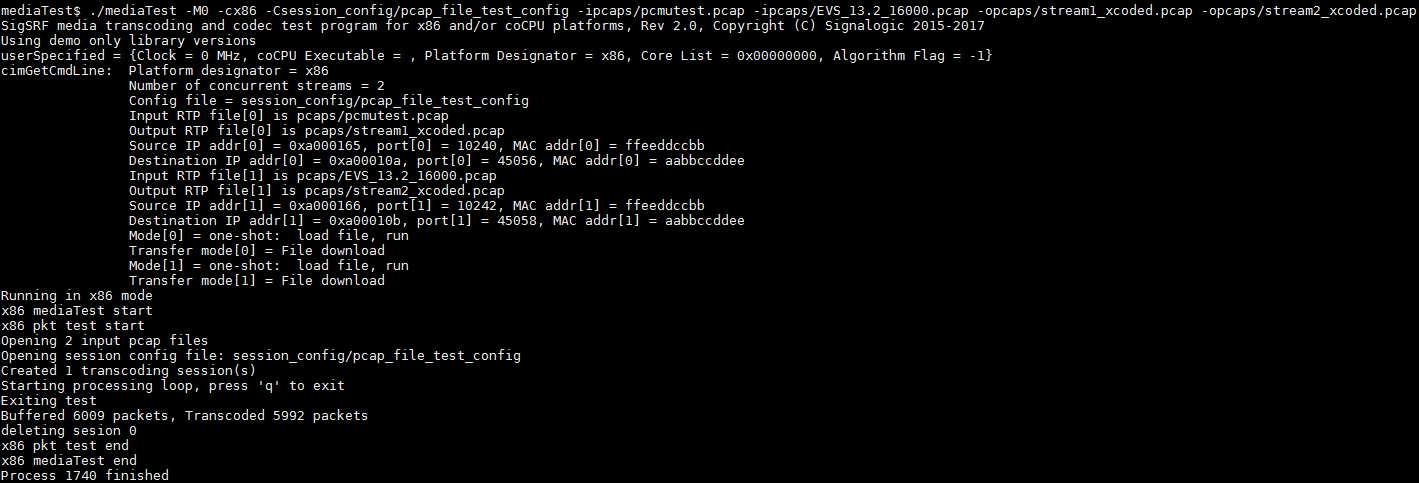
mediaMin -cx86 -i../pcaps/pcmutest.pcap -i../pcaps/EVS_16khz_13200bps_FH_IPv4.pcap -C../session_config/pcap_file_test_config -L

mediaMin -cx86 -i../pcaps/pcmutest.pcap -i../pcaps/EVS_16khz_13200bps_FH_IPv4.pcap -ostream1_xcoded.pcap -ostream2_xcoded.pcap -C../session_config/pcap_file_test_config -L
The screencap below shows mediaTest output after the second command line.
As explained in Multiple RTP Streams (RFC8108) below, pktlib implements RFC8108, which specifies multiple RTP streams within a session, created and switching based on SSRC transitions. Below are mediaMin command line examples for testing multiple RTP streams:
mediaMin -cx86 -i../pcaps/mediaplayout_multipleRFC8108withresume_3xEVS_notimestamps.pcapng -L -d0x40c01 -r20

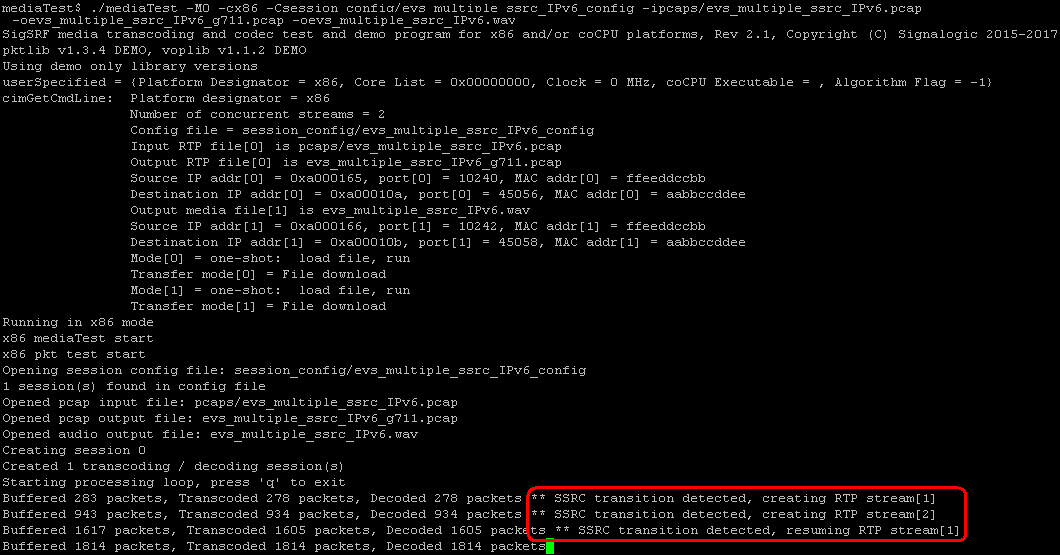
mediaMin -cx86 -i../pcaps/EVS_16khz_13200bps_CH_RFC8108_IPv6.pcap -Csession_config/evs_16khz_13200bps_CH_RFC8108_IPv6_config -L -d0x40c00
The first command line above uses dynamic session creation, analytics mode, and an -r20 command line option (see Real-Time Interval below) to specify a 20 msec packet push rate. The second command line uses static session creation, analytics mode, and a "fast as possible" push rate (i.e. no -rN value specified on the command line). Analytics mode is used in both cases because input pcap packet timestamps are incorrect.
Below is a screen capture showing output for the second command line above, with RTP stream transitions highlighted:
Packet stats and history log files produced by the above commands (mediaplayout_multipleRFC8108withresume_3xEVS_notimestamps_pkt_log_am.txt and EVS_16khz_13200bps_CH_RFC8108_IPv6_pkt_log_am.txt) show packet history grouped and collated by SSRC, ooo (out-of-order) packets re-ordered in the jitter buffer output section vs. the input section, and SID packet stats (as a result of DTX handling). For a packet log file excerpt, see Packet Log below.
pktlib packet/media worker threads recognize and handle sessions that duplicate SSRCs in other sessions and reuse their previous SSRCs, assuming there is a valid reason for interleaving the same SSRC values betweeen sessions. Duplication happens when a new session uses the same SSRC as an existing session, and reuse happens when a session reverts to its previous SSRC value. mediaMin defaults to this behavior, but also allows the ENABLE_DORMANT_SESSIONS flag in the -dN command line option to designate the original session as "dormant", implying a pause or halt in the original channel. In such cases each dormant session channel is flushed and any remaining media is cleared from its state information and jitter buffers.
To provide insight into SSRC usage and endpoint behavior, packet/media worker threads keep track of SSRC duplication and reuse, and include these stats in run-time stats. Below is a screen cap showing an SSRC duplication, where session 0, channel 4 duplicates the SSRC being used by session 1, channel 2 (highlighted in red):
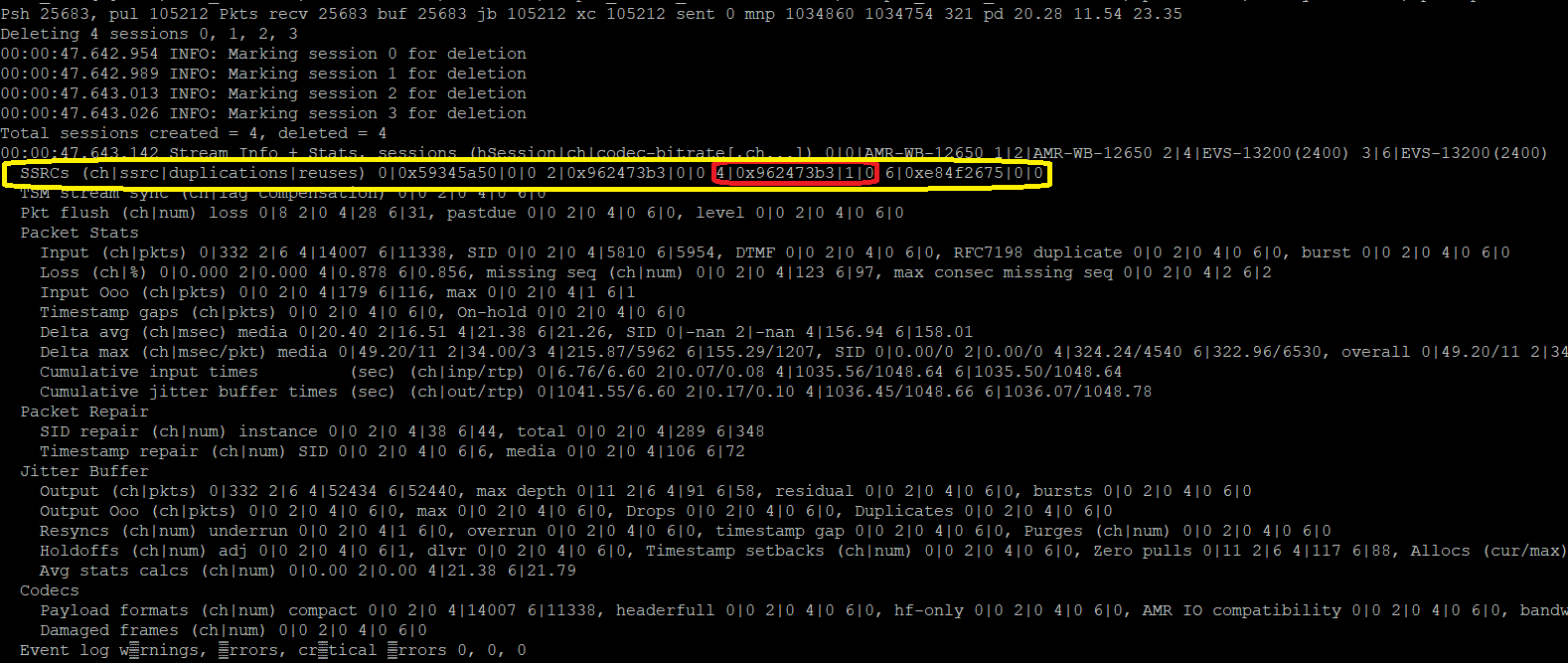
In the above case the transition is clean, and it's advisable to set the ENABLE_DORMANT_SESSIONS flag. Below is a screen cap showing numerous SSRC duplications and reuses, highlighted in red:
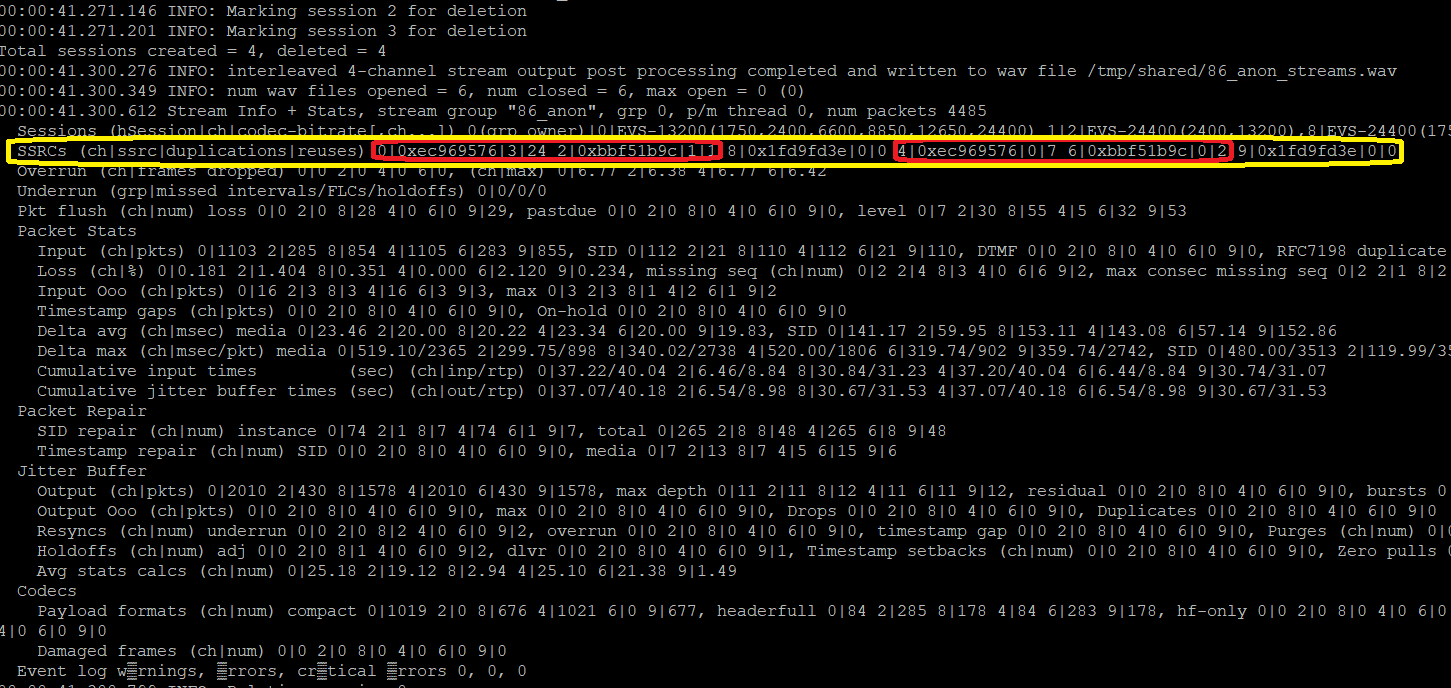
In the above case, there is frequent "flipping back and forth" between sessions using the same SSRCs, possibly due to call-waiting or other normal operation, and it's not advisable to set the ENABLE_DORMANT_SESSIONS flag, which would lead to intermittent jitter buffer flushing likely to impact audio quality and result in an unclean packet log.
To enable on per-session basis see TERM_ENABLE_DORMANT_SESSION flag in shared_include/session.h.
As explained in Duplicated RTP Streams (RFC7198) below, pktlib implements RFC7198 in order to detect and deal withstreams with packets duplicated for redundancy. Below are mediaMin command line examples included in the SigSRF SDK for RFC7198:
mediaMin -cx86 -i../pcaps/mediaplayout_RFC7198_EVS.pcapng -L -d0xc11 -r20

mediaMin -cx86 -i../pcaps/EVS_16khz_13200bps_CH_RFC7198_IPv6.pcap -oEVS_16khz_13200bps_CH_RFC7198_IPv6_g711.pcap -C../session_config/evs_16khz_13200bps_CH_RFC7198_IPv6_config -L -d0x40c00
The first command line above uses dynamic session creation, telecom mode, and an -r20 command line option (see Real-Time Interval below). Because telecom mode is specified, the packet push rate is controlled by packet arrival timestamps. The second command line uses static session creation, analytics mode, and a "fast as possible" push rate (i.e. no -rN value specified on the command line).
The default RFC7198 packet duplication "lookback" depth is one (1) packet. By specifying -lN cmd line entry, lookback depth can be increased to 8 packets, or disabled (-l0 entry). For more information, see RFC7198 Lookback Depth below.
By default mediaMin instructs pktlib packet/media worker threads to apply dynamic packet re-ordering and repair.
See Jitter Buffer below for information on underlying jitter buffer operation and functionality.
The -jN command line option can be used to control jitter buffer target and maximum depths.
By default mediaMin instructs pktlib packet/media worker threads to enable RTP Event packet handling as needed. Below are command lines that demonstrate DTMF RTP event handling using pcaps included in the Rar Packages and Docker containers:
mediaMin -cx86 -i../pcaps/dtmf_rtp_event_multiple_groups.pcapng -L -d0x00c11 -j0x2018 -r20

mediaMin -cx86 -i../pcaps/dtmf_rtp_event_multiple_groups.pcapng -L -d0x00c11 -j0x2018 -r0.5

mediaMin -cx86 -i../pcaps/DTMF_RTP_Event.pcap -oout_dtmf.pcap -C../session_config/g711_dtmfevent_config -L
In the first two examples, the -jN cmd line option (see Jitter Buffer Depth Control below) is applied because dtmf_rtp_event_multiple_groups.pcapng has a high amount of packet out-of-order (ooo). The second command line runs the same test 40 times faster (see Packet Push Rate Control, Bulk Pcap Handling, and Real-Time Interval below). The third command line is a static session configuration of a simple G711 pcap with no DTX and only a few RTP event packets, and runs with assumed -r0 entry ("as fast as possible" mode; see Real-Time Interval below).
For the first two command lines, below are excerpts from mediaMin display and the packet log generated at the conclusion of the mediaMin run.
     :
     :
Pushed pkts 912, pulled pkts 1122j 1122x 534s   Pkts recv 1039 buf 1039 jb 1400 xc 1400 sg 700 sent 1400 mnp 161 160 -1 pd 41.88 47.50 -1.00-1.00
DTMF Event packet 1 received @ pkt 1438, Event = 1, Duration = 160, Volume = 10
DTMF Event packet 2 received @ pkt 1440, Event = 1, Duration = 320, Volume = 10
DTMF Event packet 3 received @ pkt 1442, Event = 1, Duration = 480, Volume = 10
DTMF Event packet 4 received @ pkt 1444, Event = 1, Duration = 640, Volume = 10
DTMF Event packet 5 received @ pkt 1446, Event = 1, Duration = 800, Volume = 10
DTMF Event packet 6 received @ pkt 1448, Event = 1, Duration = 960, Volume = 10
DTMF Event packet 7 received @ pkt 1450, Event = 1, Duration = 1120, Volume = 10
DTMF Event packet 8 received @ pkt 1452, Event = 1, Duration = 1280, Volume = 10
DTMF Event packet 9 received @ pkt 1454, Event = 1, Duration = 1440, Volume = 10
DTMF Event packet 10 received @ pkt 1456, Event = 1, Duration = 1600, Volume = 10
DTMF Event packet 11 received @ pkt 1458, Event = 1, Duration = 1760, Volume = 10
DTMF Event packet 12 received @ pkt 1460, Event = 1, Duration = 1920, Volume = 10
DTMF Event packet 13 received @ pkt 1462, Event = 1, Duration = 2080, Volume = 10
DTMF Event packet 14 received @ pkt 1464, Event = 1, Duration = 2240, Volume = 10
DTMF Event packet 15 received @ pkt 1466, Event = 1, Duration = 2400, Volume = 10
DTMF Event packet 16 received @ pkt 1468, Event = 1, Duration = 2560, Volume = 10
DTMF Event packet 17 received @ pkt 1470, Event = 1, Duration = 2720, Volume = 10
DTMF Event packet 18 received @ pkt 1472, Event = 1, Duration = 2720, Volume = 10, End of Event
DTMF Event packet 19 received @ pkt 1474, Event = 1, Duration = 2720, Volume = 10, End of Event
DTMF Event packet 20 received @ pkt 1476, Event = 1, Duration = 2720, Volume = 10, End of Event
     :
     :
     :
     :
Seq num 684              timestamp = 196000, rtp pyld len = 7 SID
Seq num 685              timestamp = 197280, rtp pyld len = 7 SID
Seq num 686              timestamp = 198560, rtp pyld len = 32 media
Seq num 687              timestamp = 198720, rtp pyld len = 32 media
Seq num 688              timestamp = 198880, rtp pyld len = 32 media
Seq num 699 ooo 689      timestamp = 199040, rtp pyld len = 4 DTMF Event
Seq num 700 ooo 690      timestamp = 199040, rtp pyld len = 4 DTMF Event
Seq num 701 ooo 691      timestamp = 199040, rtp pyld len = 4 DTMF Event
Seq num 698 ooo 692      timestamp = 199040, rtp pyld len = 4 DTMF Event
Seq num 697 ooo 693      timestamp = 199040, rtp pyld len = 4 DTMF Event
Seq num 696 ooo 694      timestamp = 199040, rtp pyld len = 4 DTMF Event
Seq num 695              timestamp = 199040, rtp pyld len = 4 DTMF Event
Seq num 702 ooo 696      timestamp = 199040, rtp pyld len = 4 DTMF Event
Seq num 703 ooo 697      timestamp = 199040, rtp pyld len = 4 DTMF Event
Seq num 694 ooo 698      timestamp = 199040, rtp pyld len = 4 DTMF Event
Seq num 693 ooo 699      timestamp = 199040, rtp pyld len = 4 DTMF Event
Seq num 692 ooo 700      timestamp = 199040, rtp pyld len = 4 DTMF Event
Seq num 691 ooo 701      timestamp = 199040, rtp pyld len = 4 DTMF Event
Seq num 704 ooo 702      timestamp = 199040, rtp pyld len = 4 DTMF Event
Seq num 705 ooo 703      timestamp = 199040, rtp pyld len = 4 DTMF Event
Seq num 690 ooo 704      timestamp = 199040, rtp pyld len = 4 DTMF Event
Seq num 689 ooo 705      timestamp = 199040, rtp pyld len = 4 DTMF Event
Seq num 706              timestamp = 199040, rtp pyld len = 4 DTMF Event End DTMF Event
Seq num 707              timestamp = 199040, rtp pyld len = 4 DTMF Event End DTMF Event
Seq num 708              timestamp = 199040, rtp pyld len = 4 DTMF Event End DTMF Event
Seq num 709              timestamp = 201920, rtp pyld len = 32 media
Seq num 710              timestamp = 202080, rtp pyld len = 32 media
     :
     :
Note the "ooo" packets in the ingress section of the packet log, which are corrected in jitter buffer output sections. Another packet log file example showing incoming DTMF event packets and how they are translated to buffer output packets is shown in Packet Log below.
pktlib supports Pcap and Pcapng file formats, which allows user-defined applications, and reference apps mediaMin and mediaTest, to input .pcap and .pcapng files. Currently the following Link Layer types are supported:
| Link Layer Type | Pcap Header Value | Length (bytes) | Comments |
|---|---|---|---|
| LINKTYPE_ETHERNET | 1 | 14 | standard Ethernet header |
| LINKTYPE_LINUX_SLL | 113 | 16 | Linux "cooked" capture encapsulation |
| LINKTYPE_RAW | 101 | 0 | Raw IP |
| LINKTYPE_RAW | 12 | 0 | 12 seems to be an OpenBSD compatibility value for Raw IP |
| LINKTYPE_IPV4 | 228 | 0 | Raw, frame starts with IPv4 packet |
| LINKTYPE_IPV6 | 229 | 0 | Raw, frame starts with IPv6 packet |
When additional headers are needed, please let the developers know.
In addition to the above Link Layer types, pktlib supports the following Pcapng block types:
- IDB, NRB, statistics, and other known block types
- custom (unknown) block types
pktlib reads and parses these block types but does not otherwise interpret or act on their data. Below is a screencap showing interface statistics blocks (ISB) info messages:

pktlib also detects and auto-corrects:
- Link Layer length for Null/Loopback protocols
- TCP Segmentation Offload (TSO/LSO) zero lengths
pktlib will report TSO zero length fixes if the DS_READ_PCAP_REPORT_TSO_LENGTH_FIX flag is set in the DSReadPcap() API, as shown in the screen cap below:

pktlib_pcap.cpp contains source code for .pcap and .pcapng file support.
pktlib supports .rtpXXX file formats, which allows user-defined applications, and reference apps mediaMin and mediaTest, to input.rtp and .rtpdump files (command line entry is the same as with .pcap or .pcapng files). Below are mediaMin command line examples using .rtpdump files included in the Rar packages and Docker containers:
mediaMin -c x86 -i ../pcaps/evs_5900_1_hf0.rtpdump -L -d 0xc11 -r20
mediaMin -c x86 -i ../pcaps/evs_5900_1_hf1.rtpdump -L -d 0xc11 -r0.5
mediaMin -c x86 -i ../pcaps/evs_5900_2_hf0.rtpdump -L -d 0xc11 -r20
mediaMin -c x86 -i ../pcaps/evs_5900_2_hf1.rtpdump -L -d 0xc11 -r0.2
Here is a description of the above examples:
- rtp file containing EVS 5900 bps packets in compact header format
- same, but with mix of headerfull and hf-only formats, 40x real-time processing speed
- same as 1. but with mix of one and 2 frames per payload
- same as 2. but with mix of one and 2 frames per payload, 100x real-time processing speed
Currently .rtp file format seems to only support one stream, with IPv4 addresses. Also .rtp file headers may contain zero values for source or destination IP address or port values; in that case the DSReadPcapRecord() API in pktlib will use generic local IP values instead of zero. If you have an .rtp format file with multiple streams and/or IPv6 addresses, please send to Signalogic and we can take a look at expanding .rtp support.
For .rtp files with incorrect or zero packet timestamp values, you can set mediaMin options to use a queue-balancing algorithm to estimate correct packet push rate; see Packet Push Rate Control below.
pktlib_pcap.cpp contains source code for .rtpXXX file support.
pktlib supports packet fragmentation and re-assembly per RFC 791.
Here is an example of mediaMin summary stats showing packet fragmentation and reassembly:
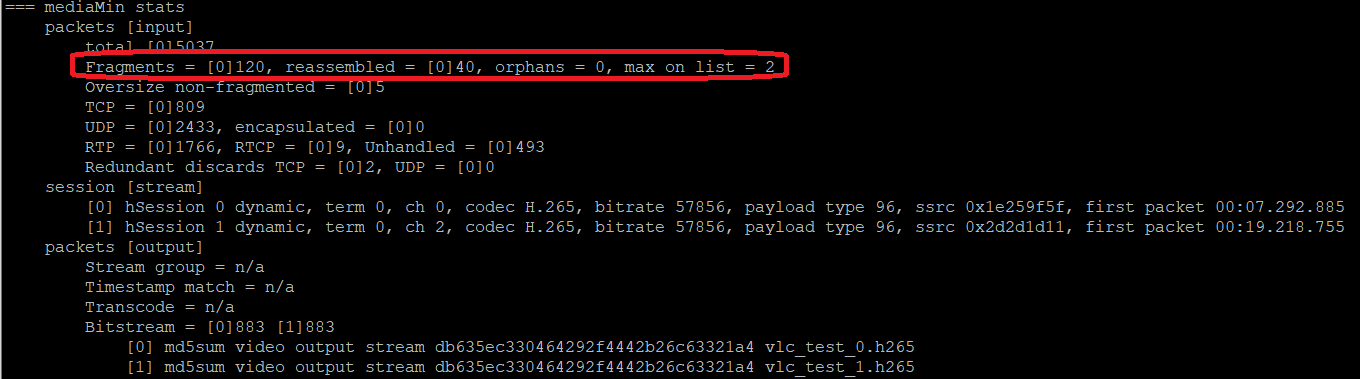
The above example was generated by the following command line:
mediaMin -c x86 -i ../pcaps/VLC_HEVC_stream_raccoons_1920x1080_anon.pcapng -o vlc_test_0.h265 -o vlc_test_1.h265 -L -d 0x0600c000c11 -r20 -g /tmp/shared --md5sum
in this case fragmented packets were sent by VLC video streaming output, which was then captured by Wireshark.
pktlib_RFC791_fragmentation.cpp contains source code for fragmentation support. Here are some implementation notes, summarized from source code comments:
- fragments are managed as per application thread linked lists; a simple mem barrier lock coordinates critical section thread access and modification of App_Thread_Info[] (defined in mediaMin.h and declared in mediaMin.cpp). This method works as long as the caller has a unique thread Id; for example, p/m threads could also call DSGetPacketInfo() with fragmented packets
- each linked list fragment entry includes 3-way tuple info (protocol, IP src addr, IP dst addr), IP header identifier (Identification field), and fragment offset. See the PKT_FRAGMENT struct in pktlib.h
- each linked list entry also includes packet info: flags, identifier, fragment offset, and saved IP header and packet data
- performance wise, the worst case is an app thread with a high number of streams each with large packets of size 4500 to 6000 bytes, in which case the thread's linked list length could grow to around N*3 or N*4, where N is number of streams
- "highest used location" (max_search_limit) is maintained to reduce search time for existing thread Ids. The search loop isn't doing much, just comparing 64-bit thread Id values
mediaMin supports dynamic and static sessions. Dynamic sessions are created "on the fly", by recognizing packet streams with unique combinations of IP/port/payload, auto-detecting the codec type, and creating pktlib sessions to process subsequent packet flow. Static sessions are created from configuration files specified on the command line that contain IP addresses and ports, codec types and bitrates, and other session info parameters.
mediaMin supports dynamic session creation, recognizing "on the fly" packet streams with unique combinations of IP/port/payload, auto-detecting the codec type, and creating sessions to process subsequent packet flow in each stream. Static session configuration is also supported using parameters in a session config file supplied on the command line. mediaMin supports both UDP and TCP/IP streams, and also auto-detects encapsulated streams, for example DER or BER encoded streams.
In cases where input streams have a definitive end, for instance one or more command line input pcaps, or a stream contains a SIP BYE message, mediaMin will automatically do session cleanup and delete.
Below are some voice and audio dynamic session command line examples:
mediaMin -cx86 -i../pcaps/mediaplayout_adelesinging_AMRWB_2xEVS.pcapng -L -d0xc11 -r20

mediaMin -cx86 -i../pcaps/announcementplayout_metronometones1sec_2xAMR.pcapng -L -d0xc11 -r20

mediaMin -cx86 -i../pcaps/mediaplayout_amazinggrace_ringtones_1malespeaker_dormantSSRC_2xEVS_3xAMRWB.pcapng -o4894.ws_xc0.pcap -o4894.ws_xc1.pcap -o4894.ws_xc2.pcap -L -d0x04000c11 -r20
The first example has one (1) AMR-WB 12650 bps stream and two (2) EVS 13200 bps streams, the second has two (2) AMR-NB 12200 bps streams and the third has two (2) EVS 13200 bps streams and three (3) AMR-WB 12650 bps streams (one of the AMR-WB streams is an RFC8108, or "child" channel). Below is a Wireshark screencap of what the first example output looks like:
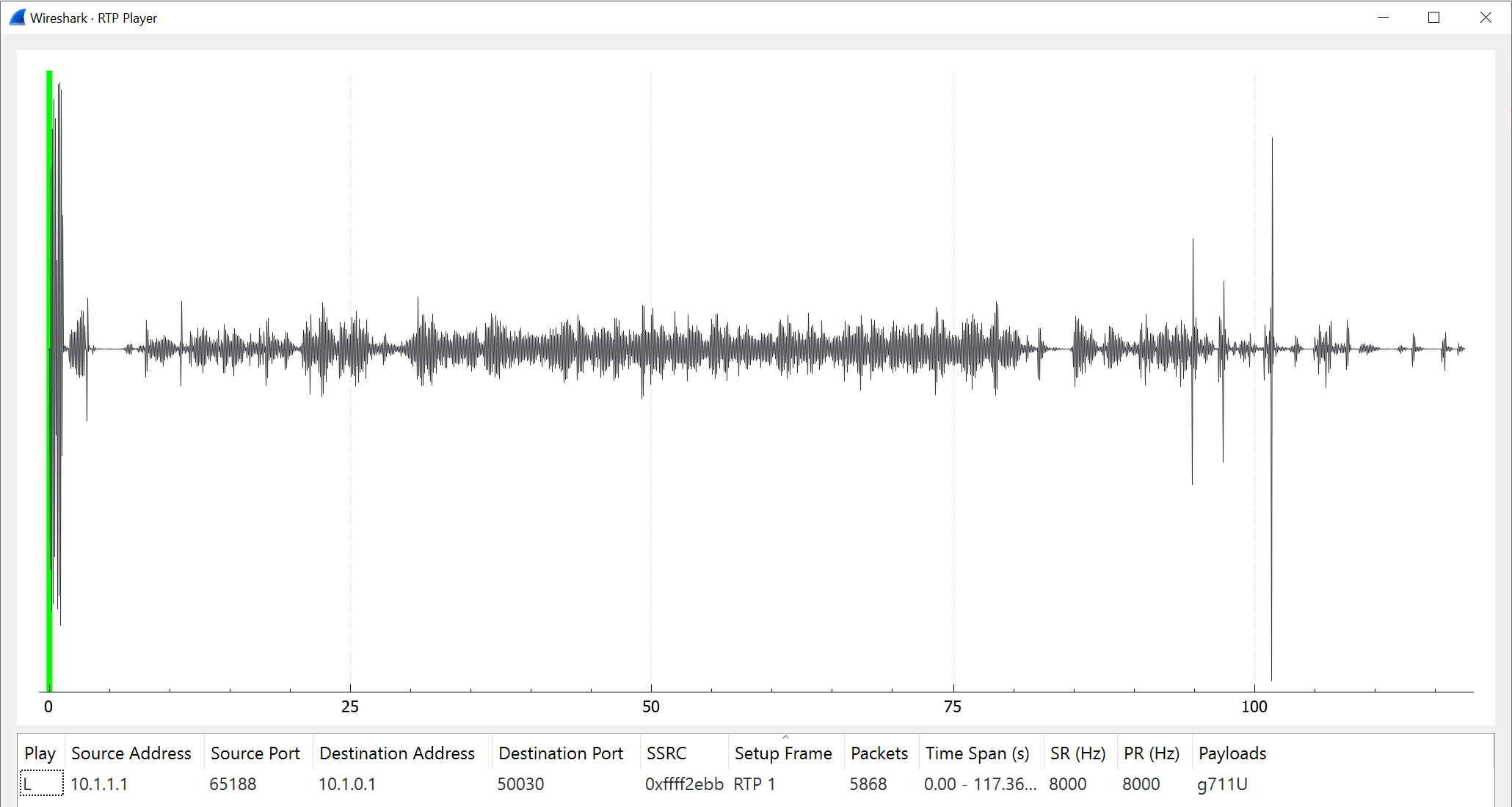
There are also several wav files generated, including individual stream, merged, and N-channel, which can be opened with Windows Media Player, Audacity, Hypersignal, etc.
Command line options and arguments in the above examples are explained in Command Line Quick-Reference.
Below are more command line examples, taken from pcaps found in the the Brno University Nesfit repository:
mediaMin -cx86 -i../test_files/codecs-amr-12.pcap -L -d0x20010000c11 -r20

mediaMin -cx86 -i../test_files/codecs3-amr-wb.pcap -L -d0x20010000c11 -r20
"codecs-amr-12" is an RTP stream with AMR 12.2 kbps in octet aligned format, around 8 min run length. "codecs3-amr-wb" is a mixed RTP + SIP message stream with AMR-WB 23.85 kbps in octet aligned format. The latter stream, although only 17 sec run length, demonstrates a few interesting things. It starts with several SIP messages followed by an 8 sec pause before RTP traffic flows, then terminates with a SIP BYE message, as shown below:
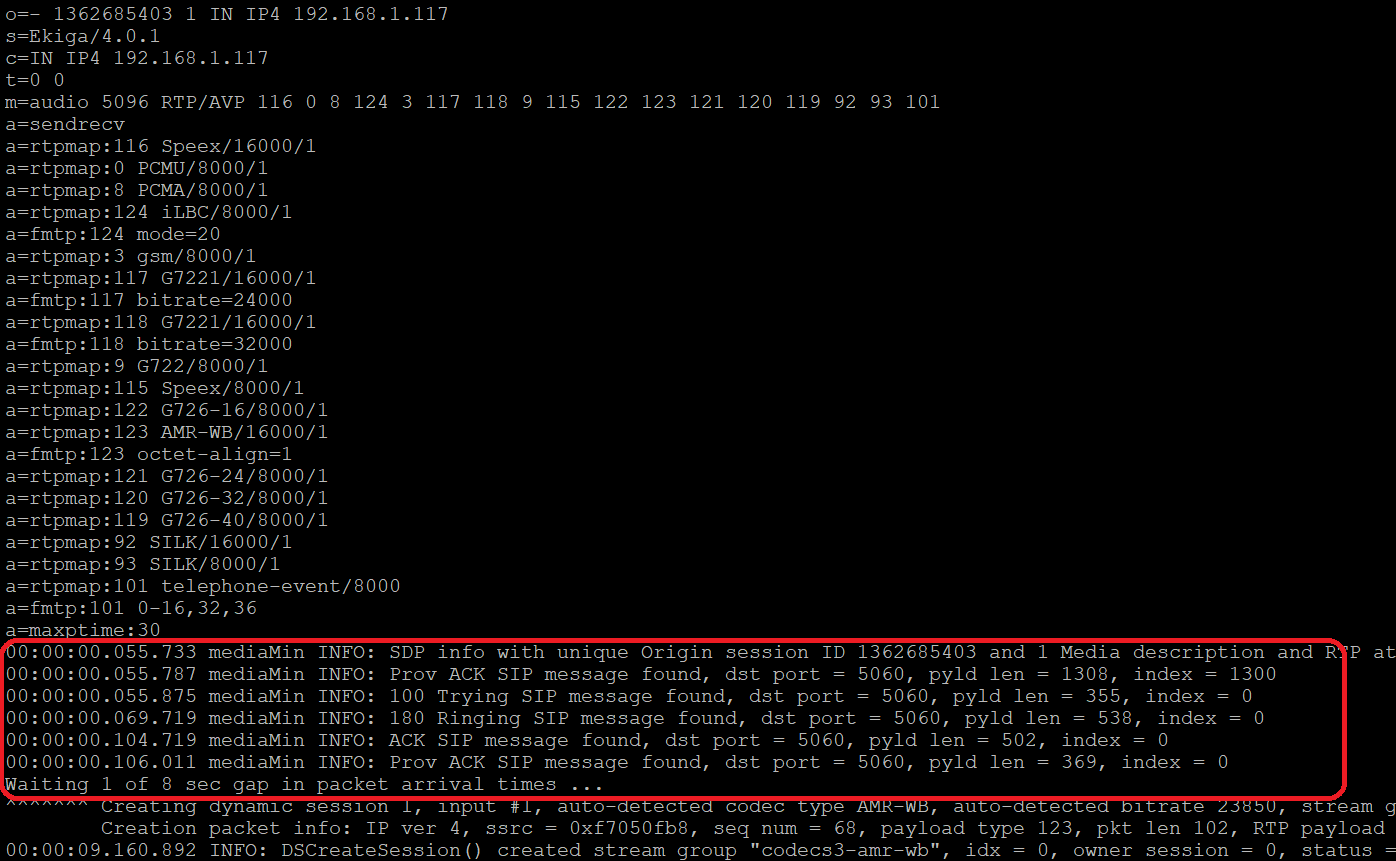
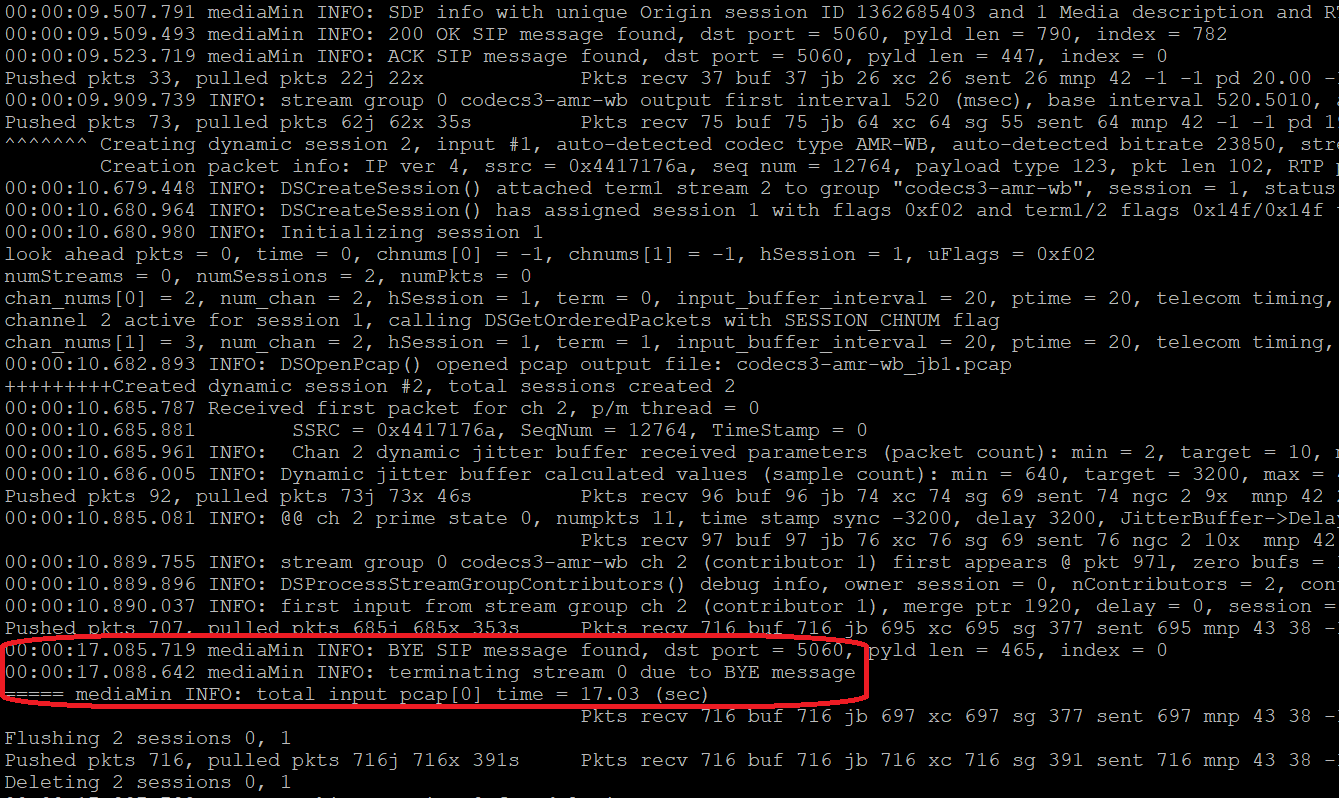
For .pcap or .pcapng files with incorrect or zero packet timestamp values (sometimes referred to as "arrival timestamps"), you can set mediaMin options to use a queue-balancing algorithm to estimate correct packet push rate; see Packet Push Rate Control below.
Below are example command lines for H.264 and H.265 auto-detection, dynamic session creation, and bitstream extraction from RTP streams.
Below is an example H.265 elementary bitstream extraction from an HEVC pcapng on the Wireshark Samples Capture page:
mediaMin -c x86 -i ../pcaps/1920x1080_H.265.pcapng -o sample_capture_test.h265 -L -d 0x06000000c11 -r20
The above command line example will auto-detect the H.265 RTP stream and create a dynamic session, as highlighted:

At stream end, mediaMin will display channel, session, jitter buffer, and other stats, along with event log warning and error message summaries (if any):
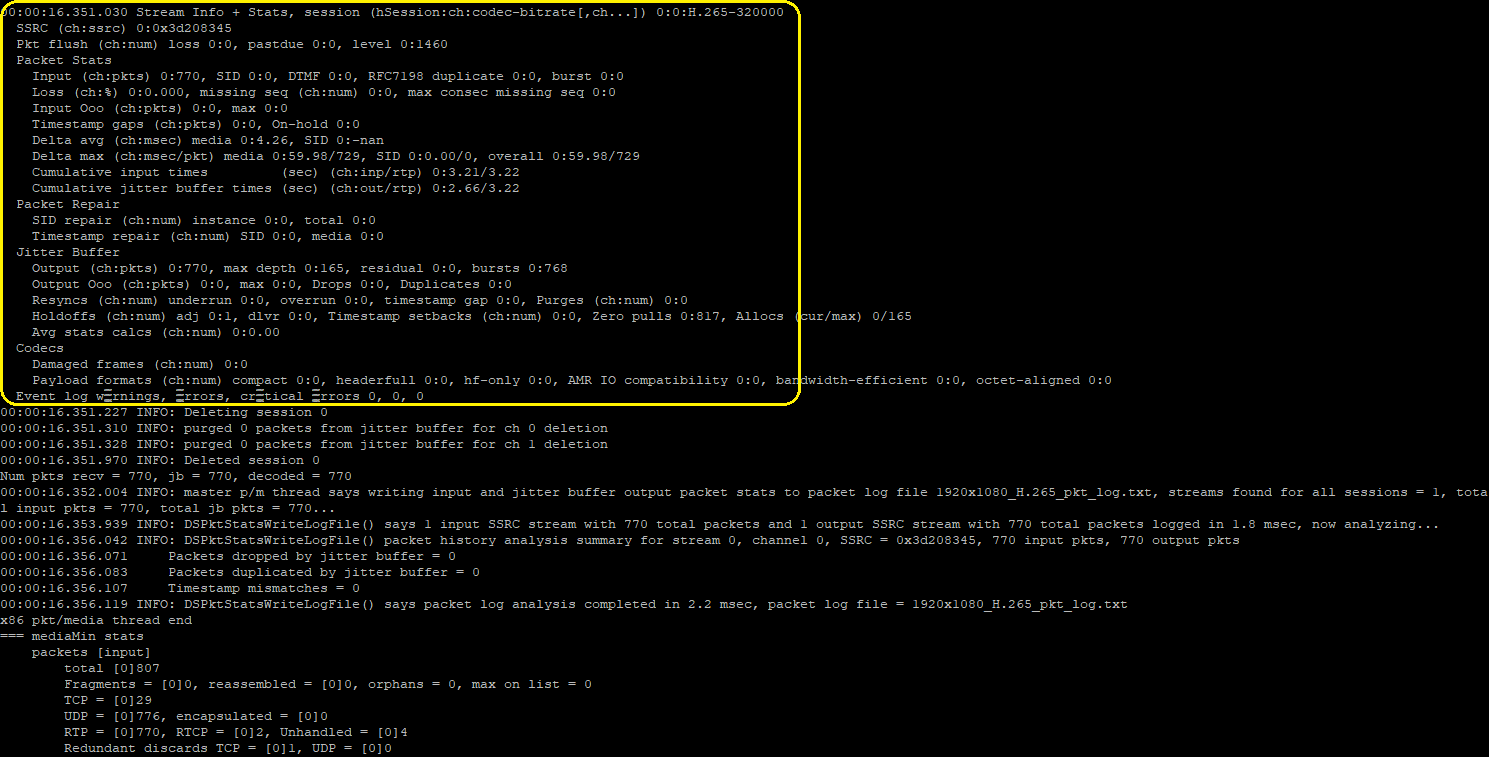
The resulting sample_capture_test.h265 file can be played in VLC, and should show a noise background as the Wireshark sample has had been anonymized with its content removed:
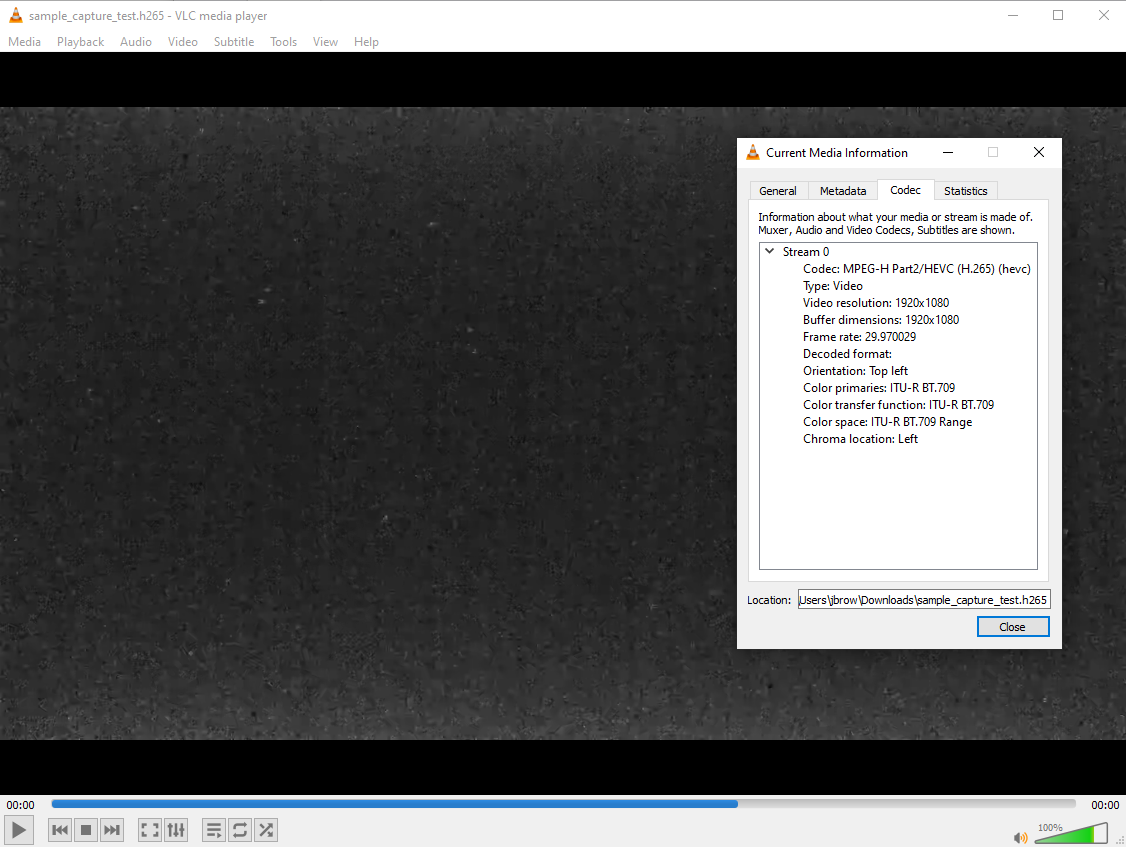
In the above screen cap VLC is displaying the "Codec Information" tab of its "Current Media Information" dialog, which shows the codec type as "MPEG-H Part2/HEVC (H.265)", resolution 1920x1080, and frame rate 30 fps. We can verify these attributes and others at the NAL unit level using the HEVC ES Browser. Below is an elementary stream graphical display of sample_capture_test.h265, including NAL unit types, parameter sets or slices, and hex values:
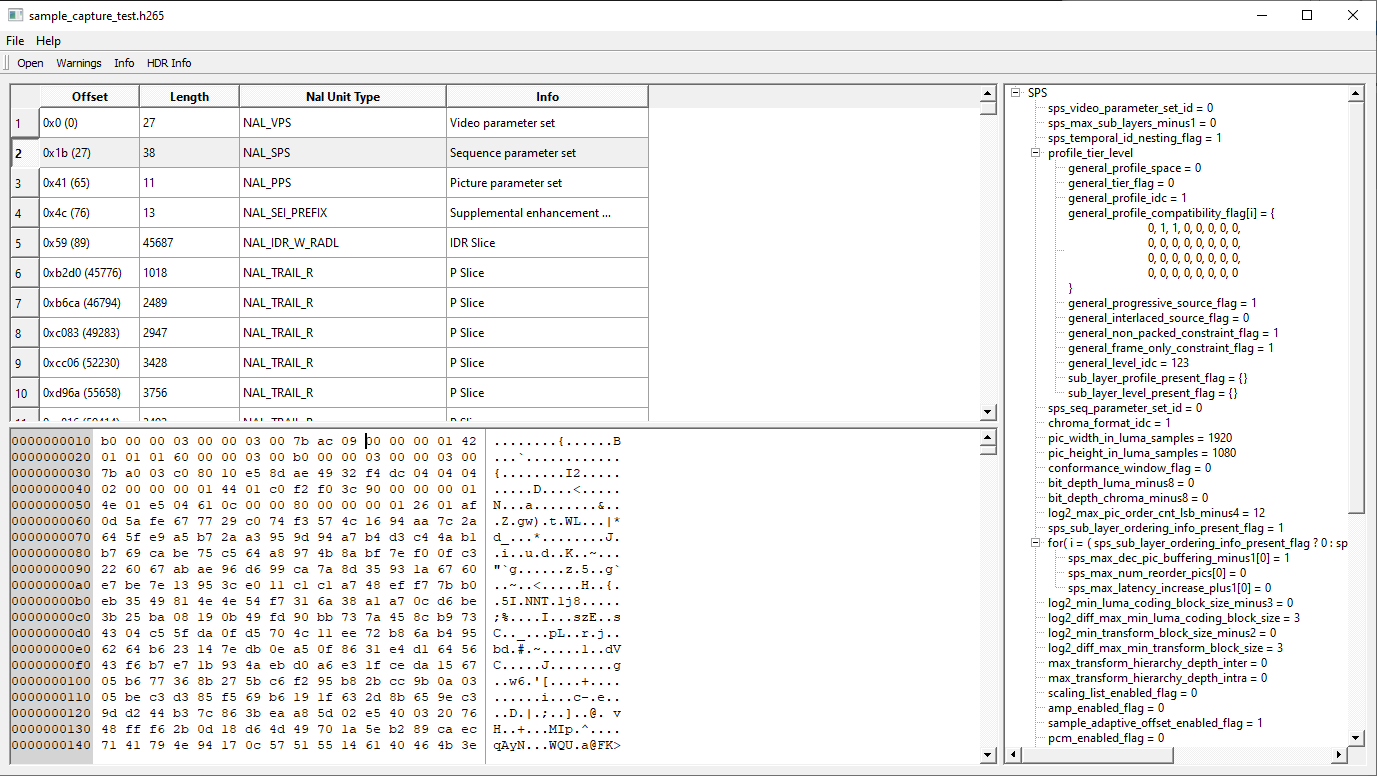
In the above HEVC ES Browser screen cap, the righthand pane is displaying the SPS (Sequence Parameter Set) unit, which shows 1920x1080 resolution and a color bit depth of 12, matching the Codec Information reported by VLC.
The next example extracts two (2) HEVC bitstreams from an RTP stream output by VLC and captured by Wireshark:
mediaMin -c x86 -i ../pcaps/VLC_HEVC_stream_raccoons_1920x1080_anon.pcapng -o vlc_test_0.h265 -o vlc_test_1.h265 -L -d 0x06000000c11 -r20
As in the first command line example, a screencap for this example shows auto-detection of H.265 RTP packets and dynamic session creation (shown in the yellow highlighted areas), but in this case destination IP address and UDP port are as specified in VLC streaming setup (shown in the pink highlighted areas):
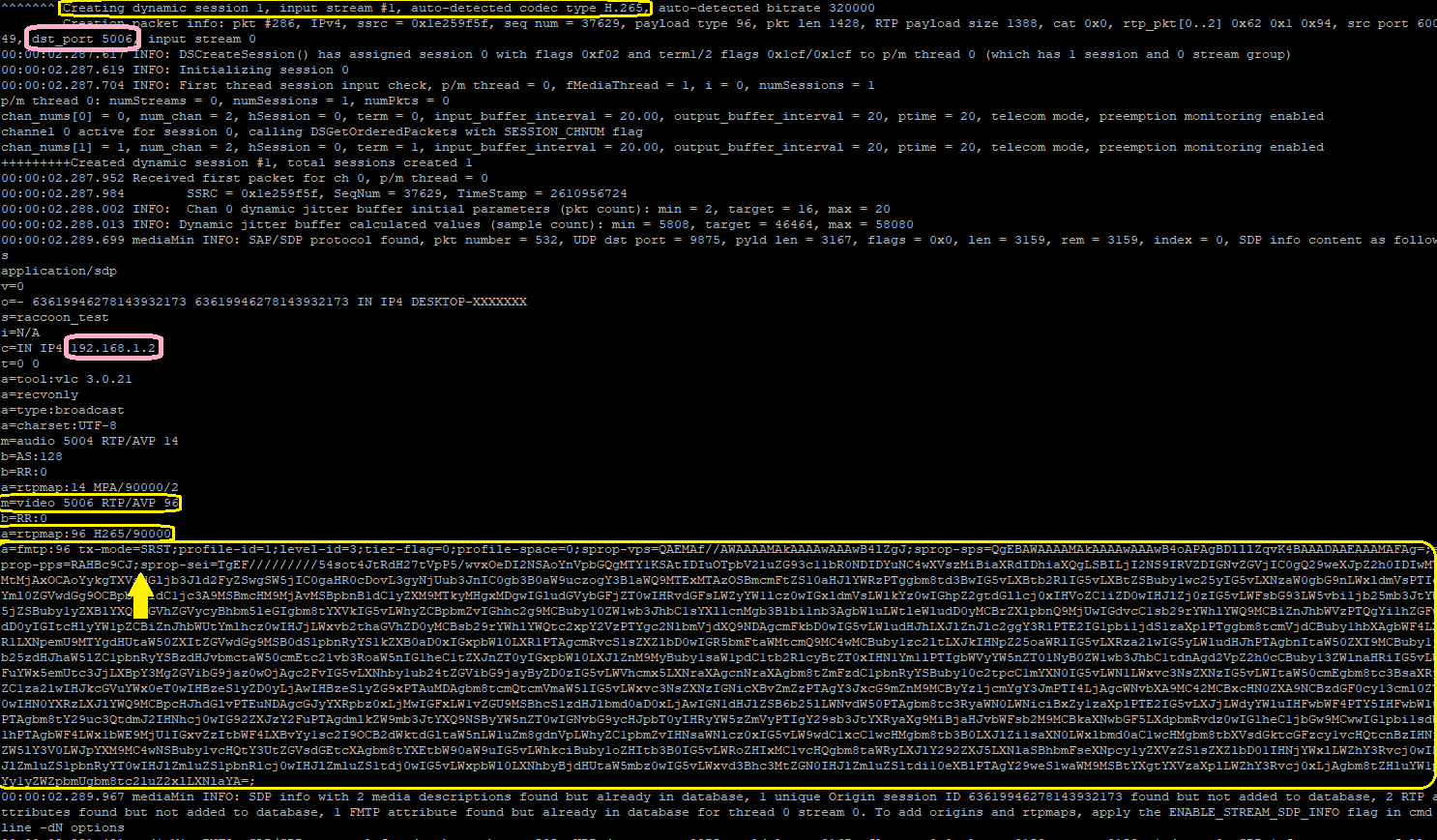
Another interesting thing to note in the above screencap is that VLC can send very large SAP/SDP packets; one of these is highlighted, the vertical arrow shows the start of an HEVC SEI parameter set (Supplemental Enhancement Information), which can be quite large, and typically consists of metadata not used directly in video decoding. Preceding the SEI are VPS, SPS, and PPS parameter sets which are sent either inband as RTP packets or out-of-band as SAP/SDP packets, but unlike SEI are necessary for correct decoding. Note also that VLC fragments outgoing packets if they exceed the network MTU size; mediaMin reassembles these and reports fragmentation stats in its run-time summary:

The resulting vlc_test_0.h265 and vlc_test_1.h265 files can be opened and played in VLC, and should show a group of raccoons caught by a security camera:
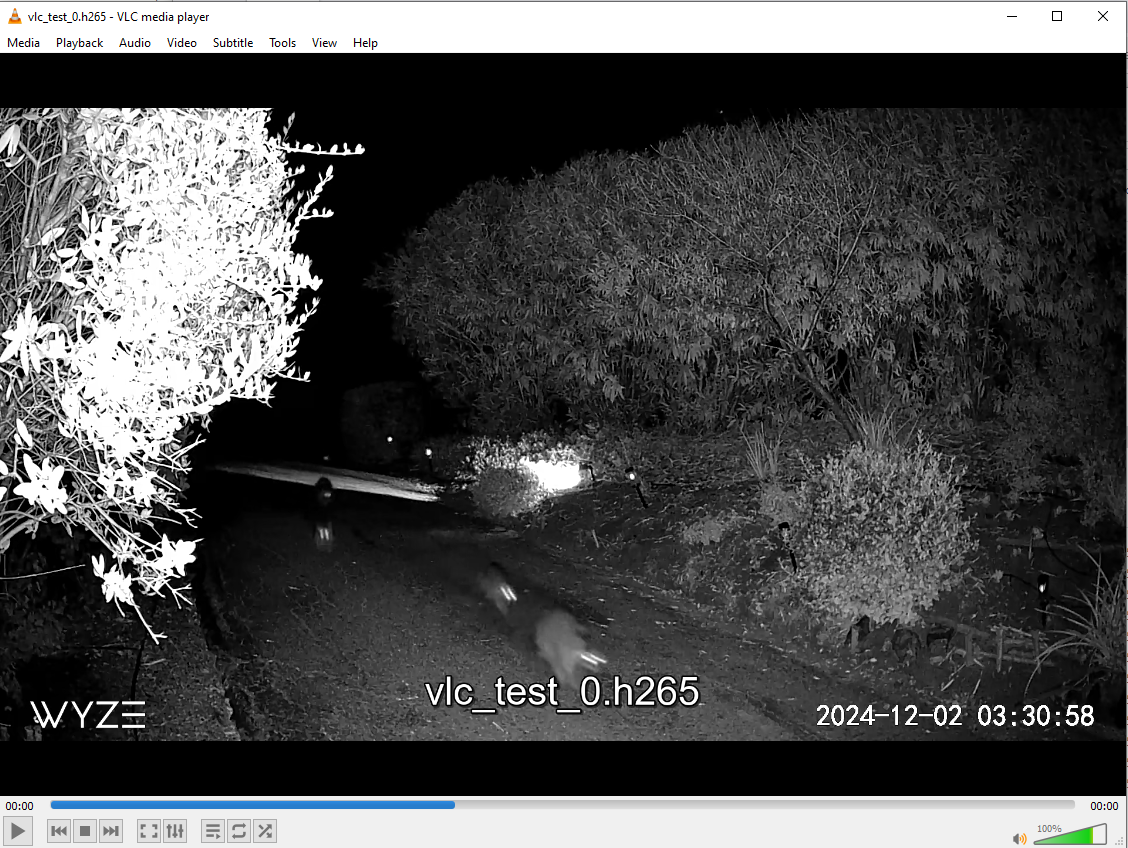
Some notes about the above example:
- VLC_HEVC_stream_raccoons_1920x1080_anon.pcapng has been fully anonymized and is included with SigSRF RAR packages and Docker containers
- the original security camera raccoons video is available on the SigSRF videos subfolder
- VLC by default sends parameter sets out-of-band, as SAP/SDP packets (i.e. not RTP packets). For more on this see Inband vs Out-of-Band Parameter Sets
A step-by-step procedure for generating RTP streams with VLC and capturing with Wireshark is given in VLC Stream to Wireshark Setup and Procedure below.
Below is an example H.264 elementary bitstream extraction from an H.264 pcap online sample:
mediaMin -c x86 -i ../pcaps/h264.pcap -o sample_capture_test.h264 -L -d 0x06000000c11 -r20 -g /tmp/shared --md5sum
The above command line example will auto-detect the H.264 RTP stream and create a dynamic session, as highlighted:

In this case, auto-detection is necessary as the pcap contains no SDP/SAP/SIP information. At stream end, mediaMin will display channel, session, jitter buffer, and other stats, along with event log warning and error message summaries (if any):
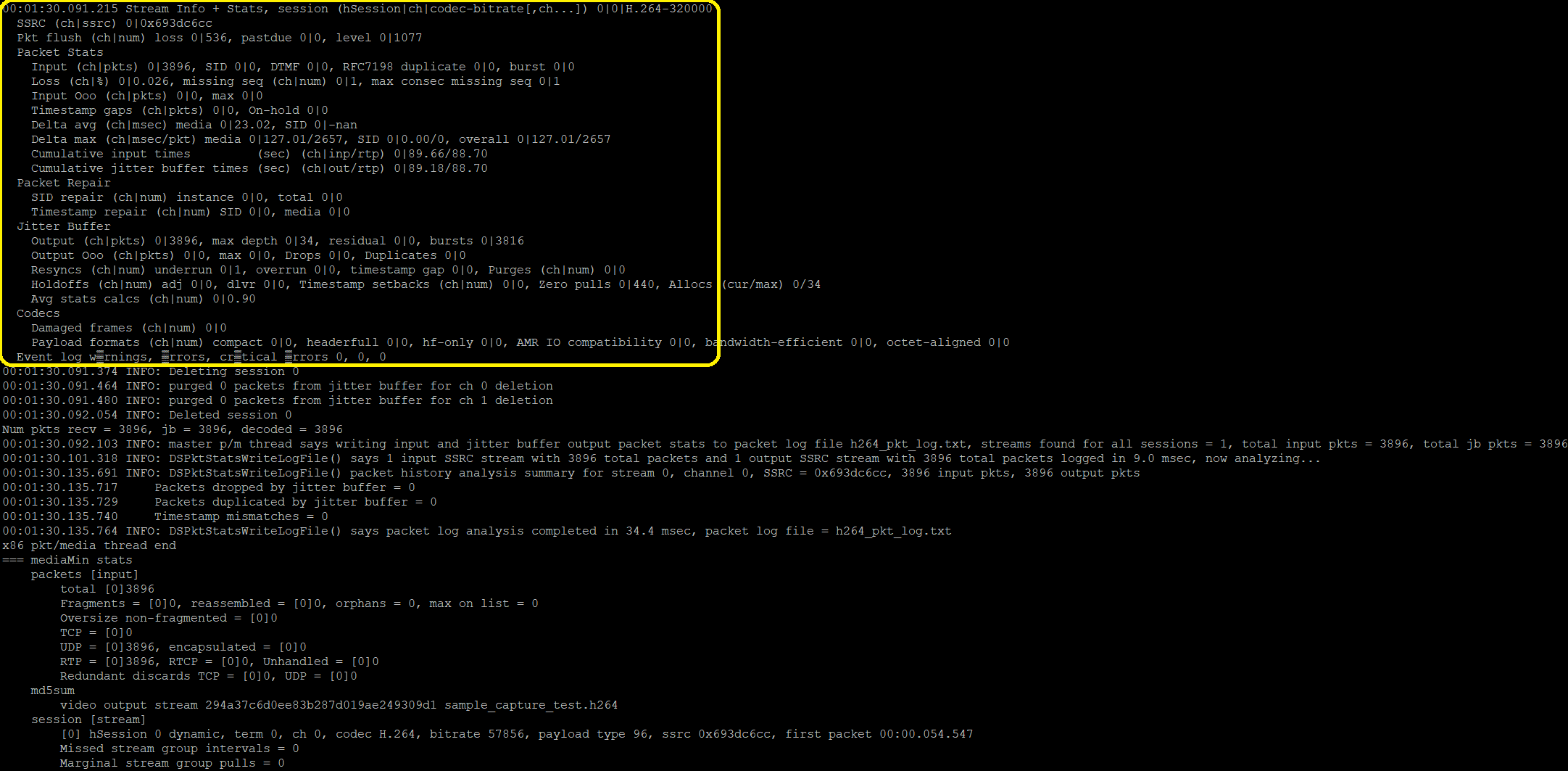
The resulting sample_capture_test.h264 file can be played in SMPlayer, and should show a security camera under setup and test:
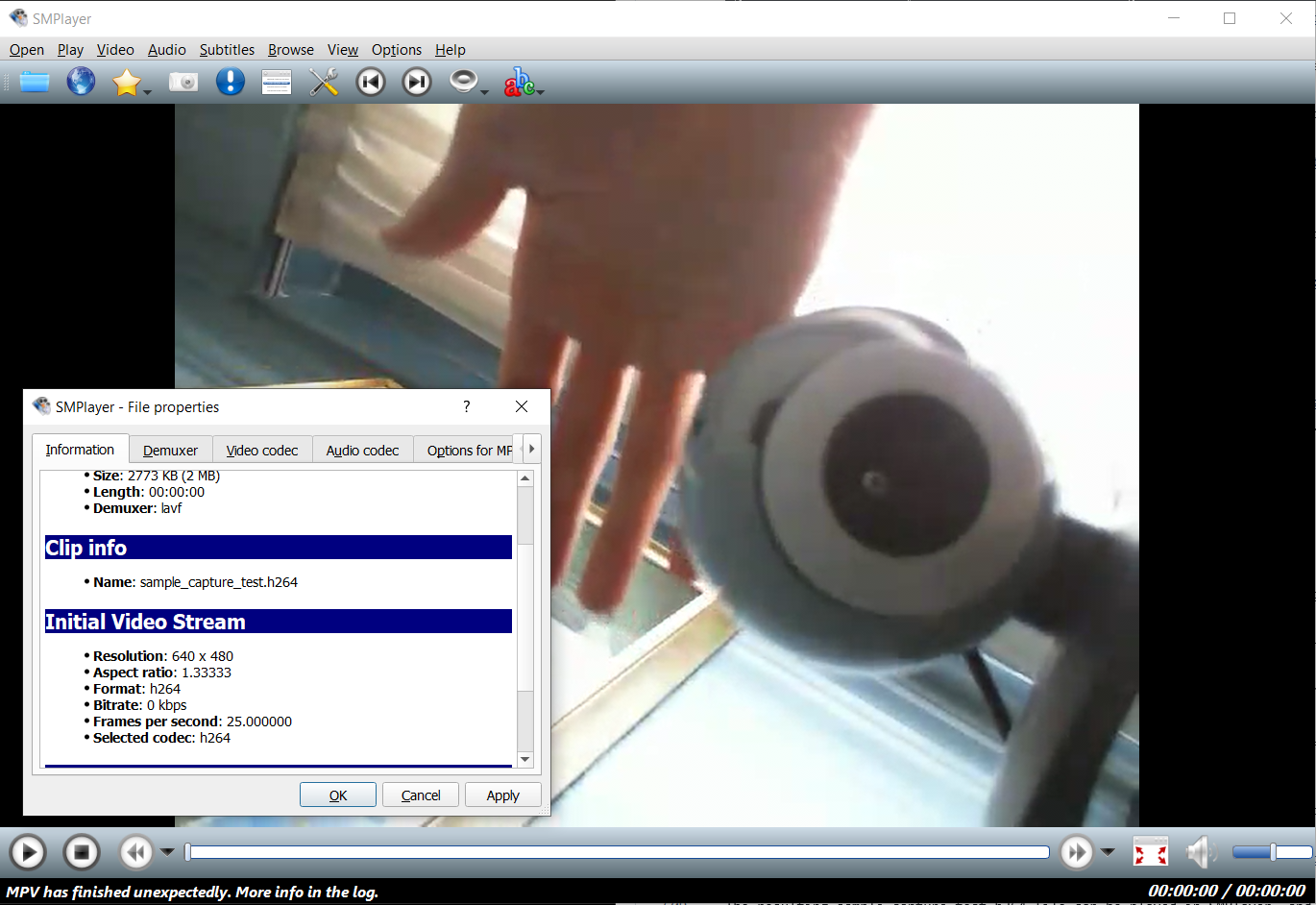
In the above screen cap SMPlayer is displaying the "Information" tab of its "Information and Properties" dialog, which shows the codec format as "H264", resolution 640x480, and frame rate 25 fps. SMPlayer is used here as .h264 bitstream files cannot be displayed in v3 VLC (this appears to be fixed in v4 VLC).
Below is a mediMin command line example that extracts H.264 elementary bitstreams from two (2) RTP streams in another H.264 pcap online sample:
mediaMin -c x86 -i ../test_files/h264-fua.pcap -o sample_capture_test2.h264 -L -o sample_capture_test3.h264 -d 0x06000000c11 -r20 -g /tmp/shared --md5sum
The resulting sample_capture_test2.h264 and sample_capture_test3.h264 files can be played in SMPlayer; the second one should show a color wave pattern:
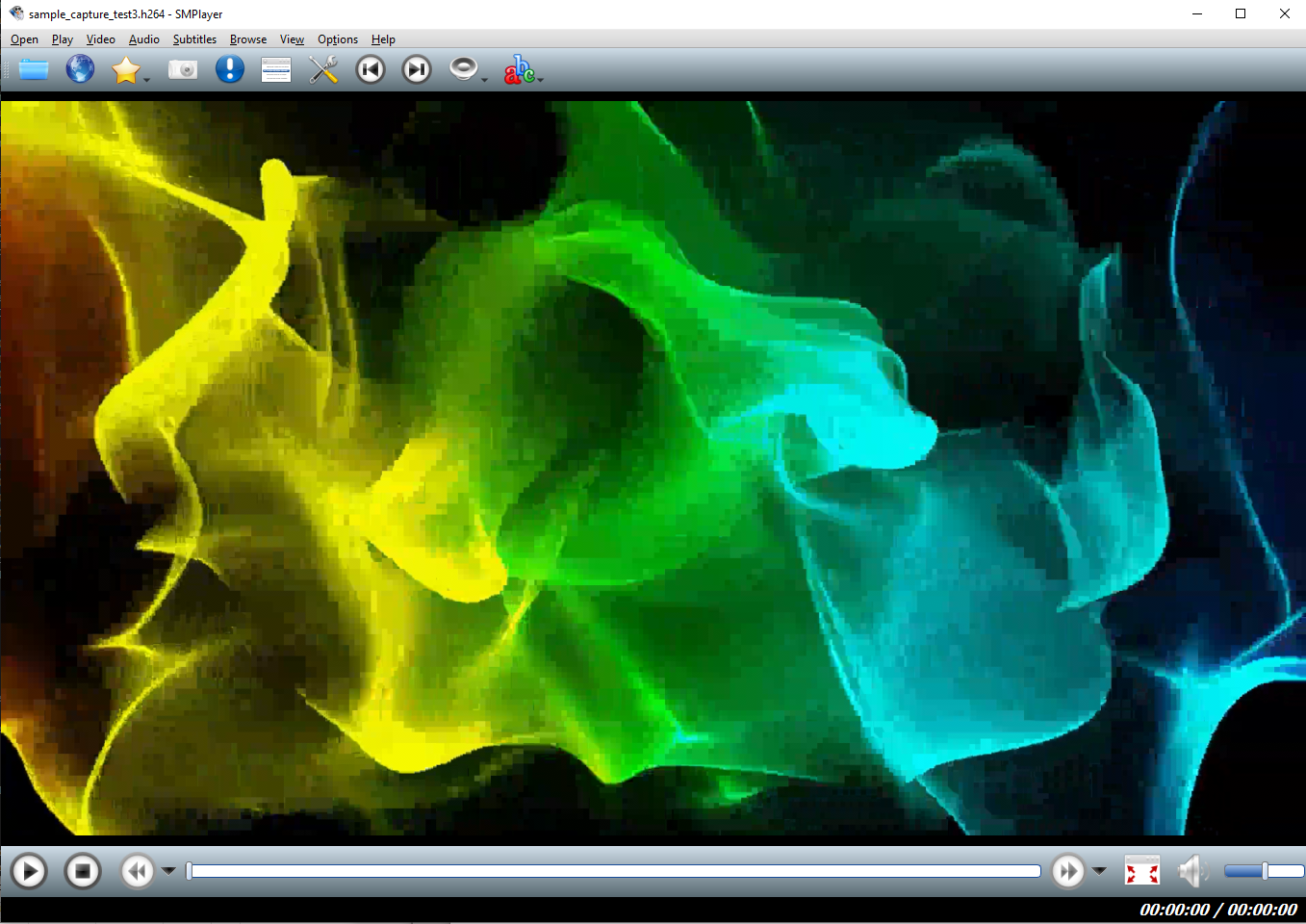
SMPlayer is used here as .h264 bitstream files cannot be displayed in v3 VLC (this appears to be fixed in v4 VLC).
In order to decode and play correctly, an H.26x elementary bitstream must contain VPS, SPS, and PPS parameter sets (video, sequence, and picture). Depending on streaming source, this information may be sent inband as NAL units in RTP packets, out-of-band in SAP/SDP packets, or both. mediaMin handles all cases, here are some notes about this:
- mediaMin detects and decodes SAP/SDP packets, adding new media descriptions ("m=video ...") and format params ("a=fmtp ...") to an internal SDP info database
- default behavior favors inband parameter sets if found in the RTP stream, but also handles cases where the streaming source is sending parameter sets out-of-band. Detailed information about how mediaMin handles this and how to control voplib behavior from applications can be found in voplib DSGetPayloadInfo() API documentation, voplib.h, and extract_rtp_video.cpp
- VLC is a good example of a streaming source that defaults to out-of-band transmission of video parameter sets. In recent years, most security cameras, webcams, and IoT video devices are increasingly likely to send parameter sets in-band to simplify the decoding process
The mediaMin screencap below shows video SDP info added as RTP stream flow is processed:
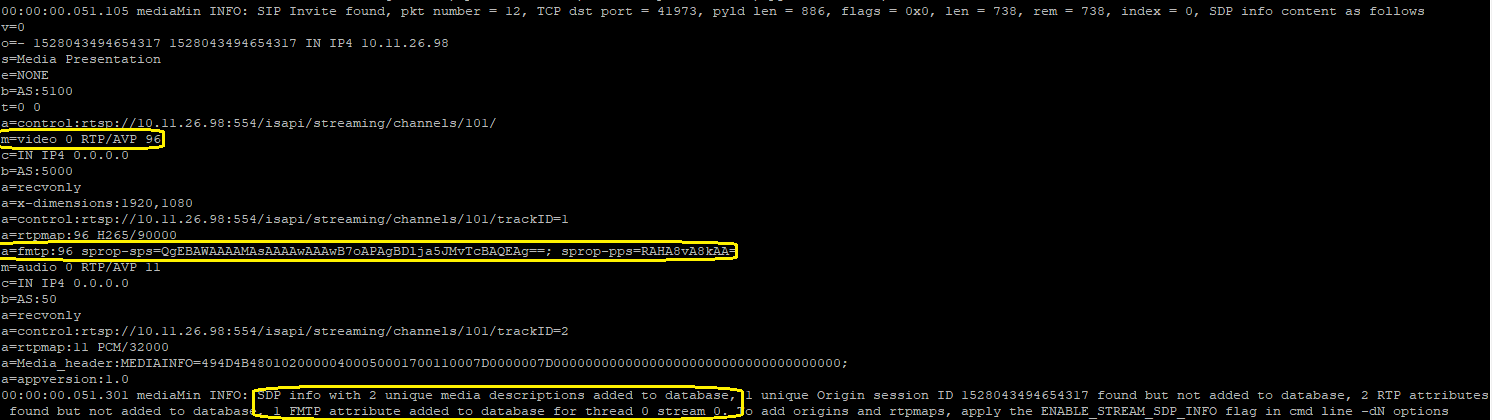
In the above screencap, highlighted items include an H.265 media description, a format attribute with base64 encoded VPS, SPS, and PPS parameters, and a summary report of SDP info internal database additions.
To create additional mediaMin test examples, or to create video RTP pcap and pcapng files in general, below is a step-by-step procedure to configure VLC and Wireshark and initiate RTP streaming and packet capture.
- First configure VLC for streaming, as shown in the dialog box sequence below:
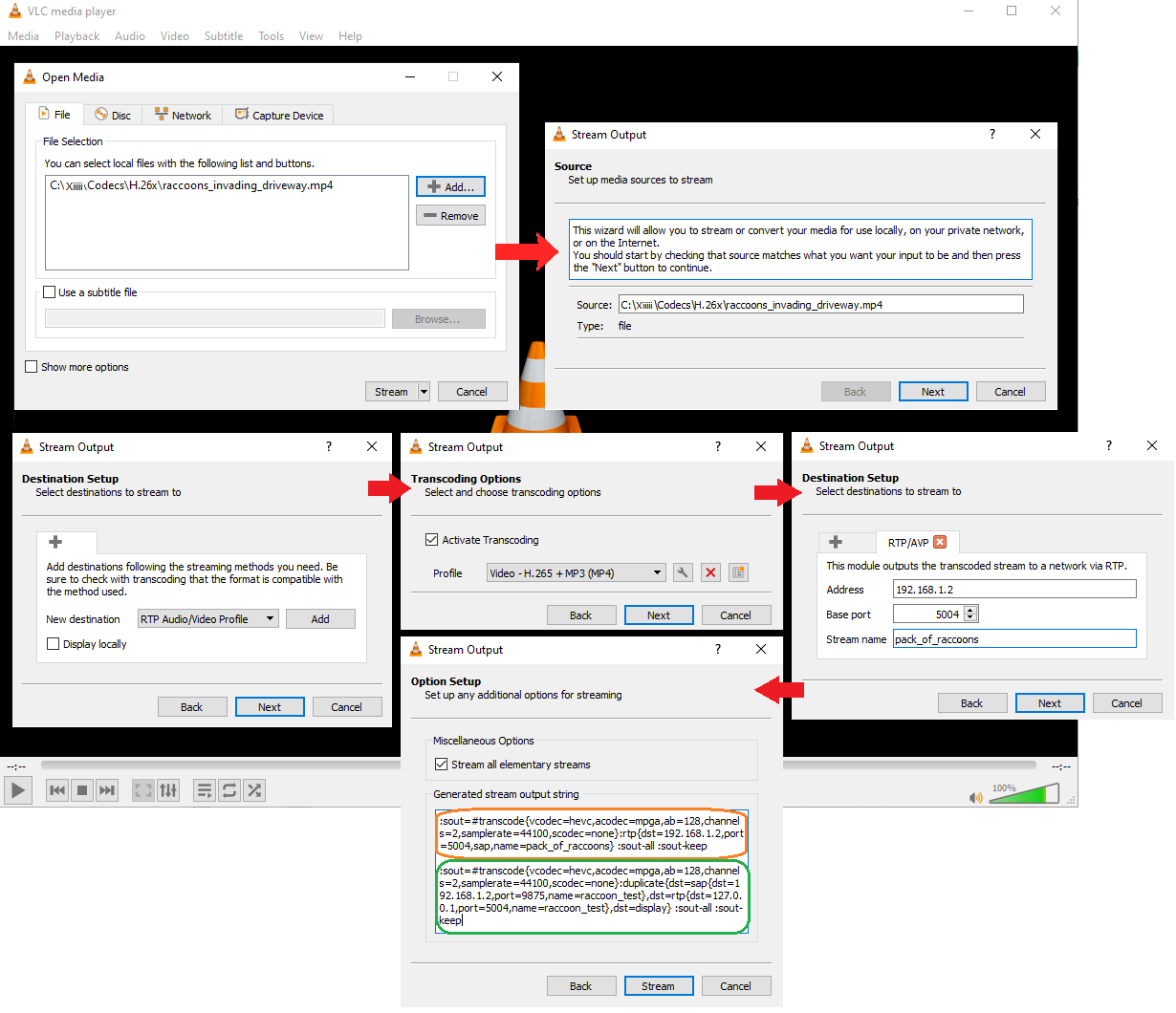
Note that in the last step, VLC's executable streaming command (starting with ":sout ...") is highlighted in orange, but the actual streaming command needed to do the job is highlighted in green. For some reason, adding a second, duplicated stream for SAP/SDP output with destination 127.0.0.1 (localhost) is necessary for VLC to output both RTP and SAP/SDP packets in the same stream, which mediaMin detects as a second session (and which you can see in the mediaMin stats and run-time summary screencap above).
- Second, on the main Wireshark toolbar under "Capture" select "Options":
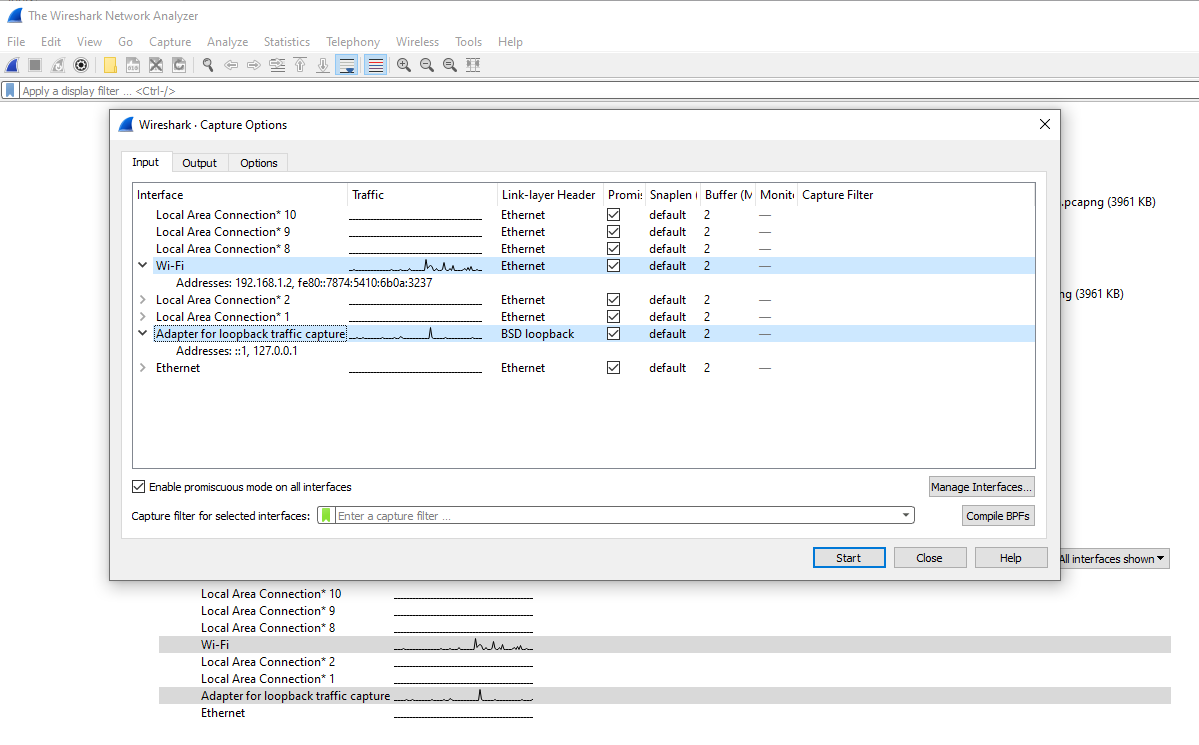
Note that both the WiFi (192.168.1.2) and localhost (127.0.0.1) interfaces are selected (multiple interfaces can be selected using shift + left click).
- Then start Wireshark capture by selecting "Start" under the "Capture" menu on the main toolbar, then immediately click "Stream" on the final VLC dialog box shown above. You should see a rapid increase in the number of packets Wireshark is capturing.
Normally SAP/SDP packets will appear in the capture first:
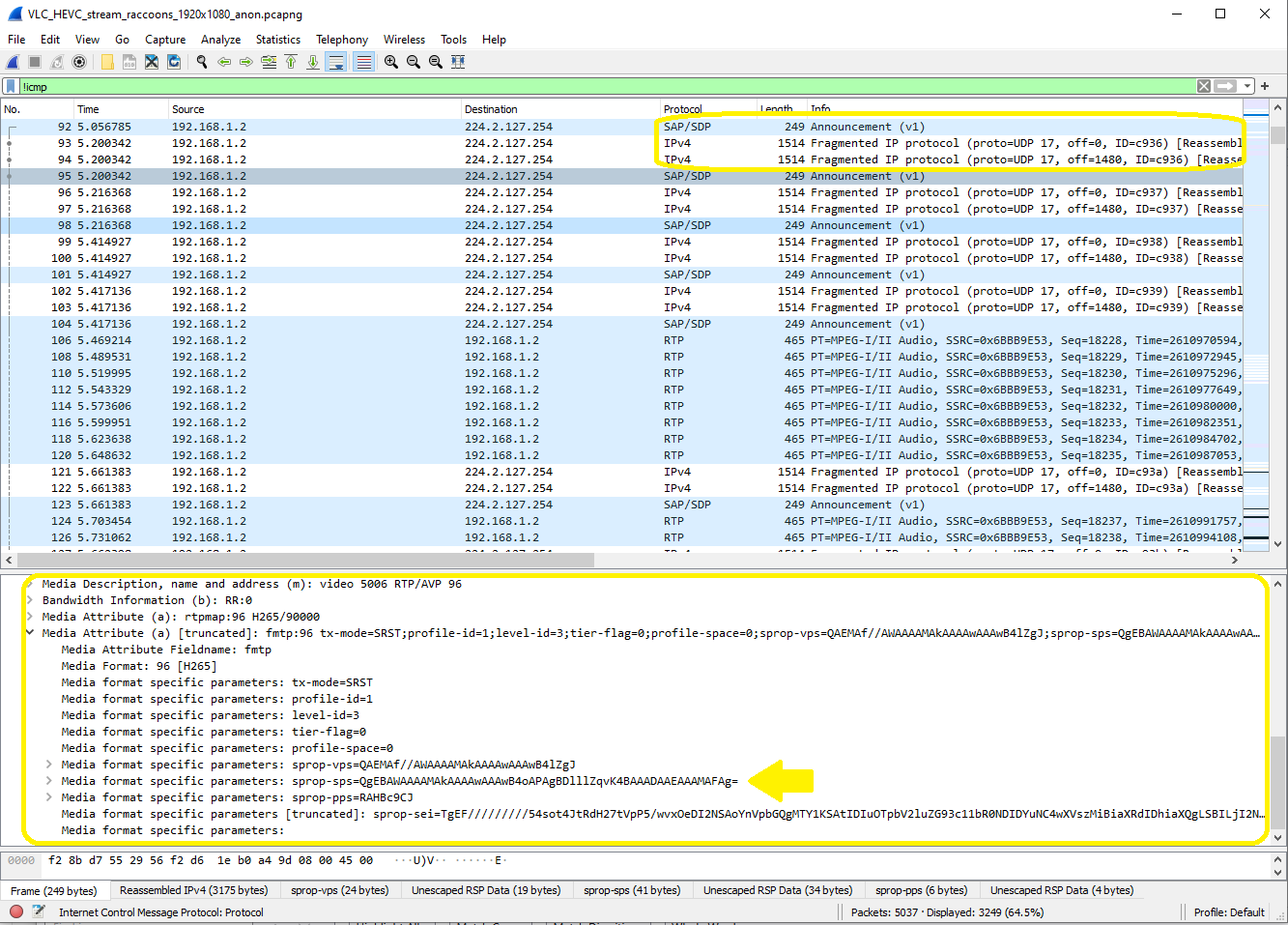
Note the large size of some SAP/SDP packets, which VLC handles with fragmentation. The SAP/SDP packet highlighted in yellow in the above screencap requires three (3) fragments. SDP info contained in the packet is highlighted in the lower half of the screencap, with an arrow indicating parameter set information necessary for correct video decoding.
Next, H.265 RTP packets should appear in the capture; the screencap below shows H.265 packets sent by VLC on the WiFi interface:
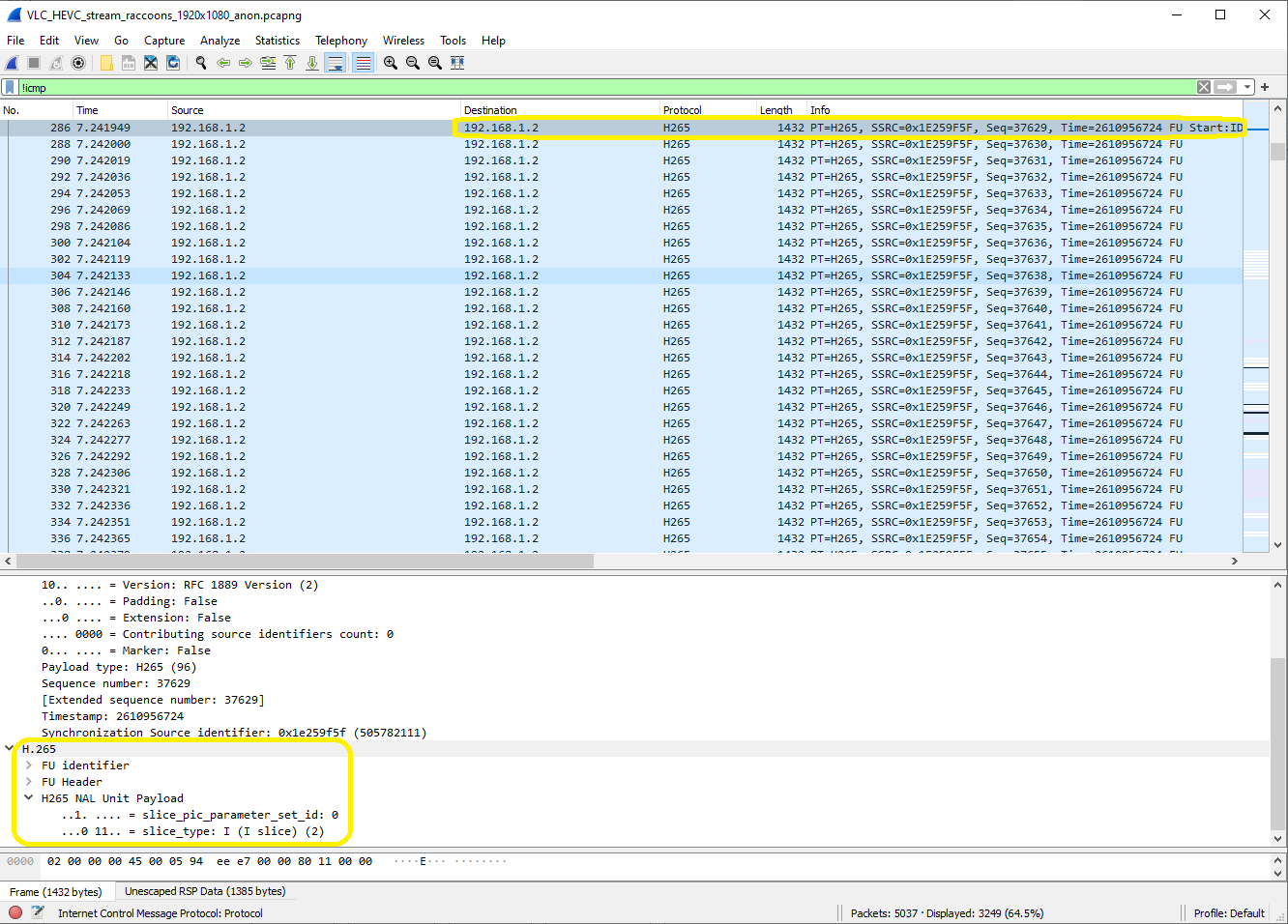
Since we configured VLC to duplicate stream output, and VLC handles duplicated outputs sequentially, later in the capture H.265 RTP packets should appear on the localhost interface:
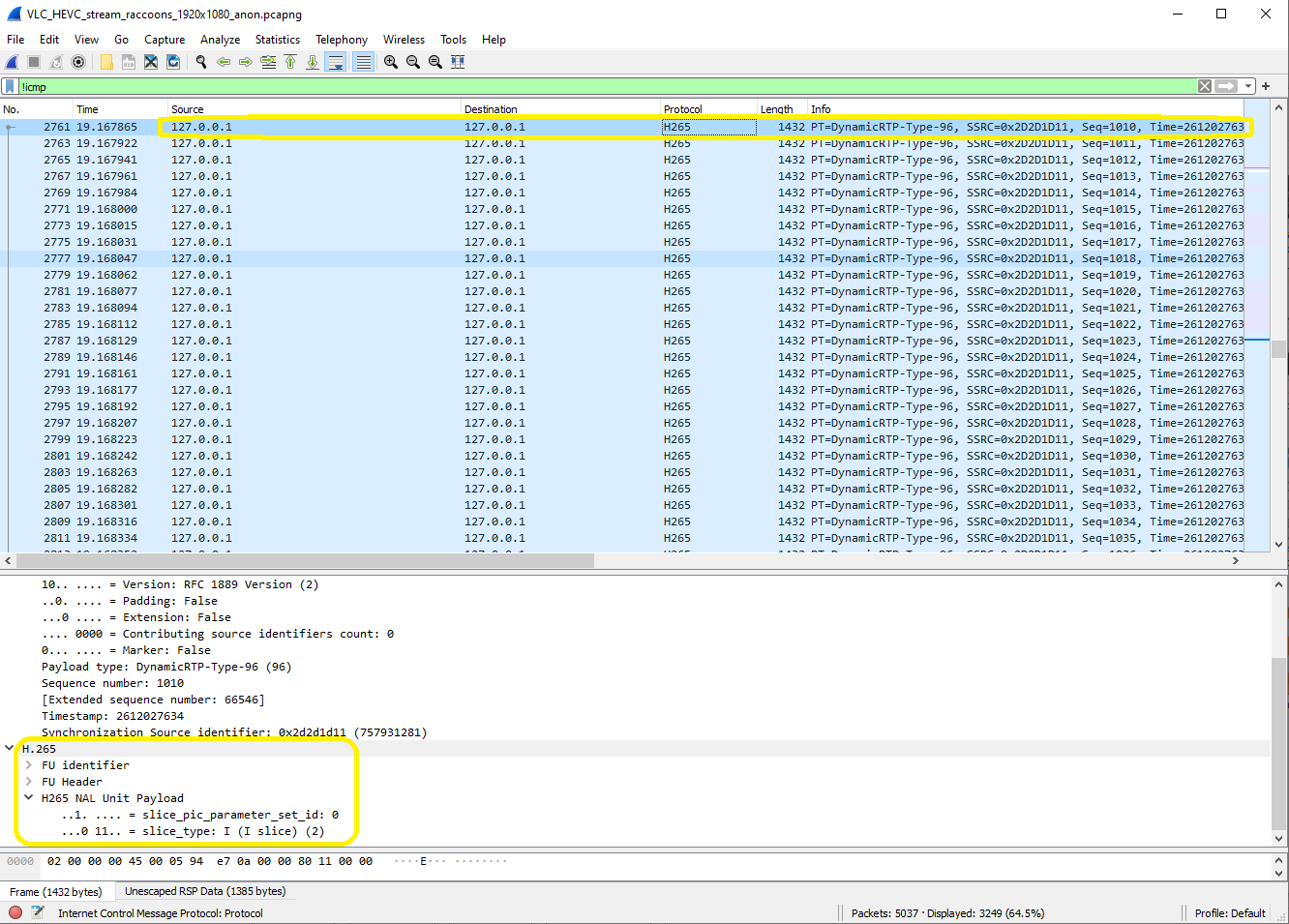
mediaMin will detect the second stream as new (because of its different IP address), and create a second dynamic session:

Note the first session is created at packet #286 (occurring around 7 sec in the capture) and the second session at packet #2761 (occurring around 19 sec in the capture).
In dynamic session mode, when mediaMin finds a new unique combination of IP address, port, and RTP payload type, it creates a new session. In that process mediaMin examines the payload type and payload header to determine the codec type and bitrate. The heuristic algorithm that does this is surprisingly accurate for dynamic payload types (tested against more than 100 pcaps with a variety of codecs) but it's still an estimate and not guaranteed to be correct. In case of a detection error, SDP information can be used to override codec auto-detection. mediaMin supports three (3) types of SDP info:
.sdp file given on the command line, for example:
-sinfo.sdp
See SDP Support below
SIP INVITE message in the input packet flow (occurring before RTP packets)
SAP/SDP protocol packet in the input packet flow
Keep in mind though, SDP info can also be incorrect. For example, sender and receiver may negotiate via SIP offer and answer a codec type and bitrate, and then for whatever reason, the sender incorrectly uses the wrong codec. In this case auto-detection can be extremely useful.
To review or modify codec auto-detection, look for detect_codec_type_and_bitrate() in mediaMin.cpp.
Static session configuration can be handled programmatically using the pktlib DSCreateSession() API, after setting elements of structs defined in shared_include/session.h, or parsing a session configuration text file to set the struct elements. The latter method is implemented by both mediaTest and mediaMin (look for ReadSessionConfig() and StaticSessionCreate() inside mediaMin.cpp). For existing sessions, the DSGetSessionInfo() and DSSetSessionInfo() APIs can be used to retrieve and modify session options.
Structs used in session related APIs are defined in shared_include/session.h, look for SESSION_DATA, TERMINATION_INFO, voice_attributes, and video_attributes.
Here is a look inside a typical session configuration file, similar to those used in the example command lines shown on this page:
# Session 1
[start_of_session_data]

term1.remote_ip = d01:5d2::11:123:5201  # IPv6 format
term1.remote_port = 6170
term1.local_ip = fd01:5d2::11:123:5222
term1.local_port = 18446
term1.media_type = "voice"
term1.codec_type = "G711_ULAW"
term1.bitrate = 64000  # in bps
term1.ptime = 20  # in msec
term1.rtp_payload_type = 0
term1.dtmf_type = "NONE"  # "RTP" = handle incoming DTMF event packets for term1 -> term2 direction, forward DTMF events for term2 -> term1 direction
term1.dtmf_payload_type = "NONE"  # A value should be given depending on the dtmf_type field
term1.sample_rate = 8000   # in Hz (note for fixed rate codecs this field is descriptive only)
## term1.dtx_handling = -1  # -1 disables DTX handling

term2.remote_ip = 192.16.0.130  # IPv4 format
term2.remote_port = 10242
term2.local_ip = 192.16.0.16
term2.local_port = 6154
term2.media_type = "voice"
term2.codec_type = "EVS"
term2.bitrate = 13200  # in bps
term2.ptime = 20  # in msec
term2.rtp_payload_type = 127
term2.dtmf_type = "NONE"  # "RTP" = handle incoming DTMF event packets for term2 -> term1 direction, forward DTMF events for term1 -> term2 direction
term2.dtmf_payload_type = "NONE"
term2.sample_rate = 16000   # in Hz
term2.header_format = 1  # Header format, applies to some codecs (EVS, AMR), 0 = CH (Compact Header), 1 = FH (Full Header)
## term2.dtx_handling = -1  # -1 disables DTX handling

[end_of_session_data]

# Session 2
[start_of_session_data]

...more session definitions ...
Note that each session typically has one or two "terminations", or endpoints (term1 and term2). A session with only term1 can accept and send streaming data with one endpoint, and perform processing on the data required by the endpoint, by the server running mediaMin, or both. A session with term1 and term2 can exchange streaming data between endpoints, and perform intermediate processing, such as transcoding, speech recognition, overlaying or adding data to the streams, etc. The number of sessions defined is limited only by the performance of the platform.
Whether sessions are created dynamically "on-the-fly" or statically from a configuration file, mediaMin manages sessions for their duration, including session creation, updating or retrieving status info, and session deletion. This approach is known as user-managed sessions. CreateDynamicSession() in mediaMin.cpp gives a detailed example of initializing SESSION_DATA and TERMINATION_INFO structs and then calling the DSCreateSession() API in pktlib.
As described in Static Session Configuration above, "remote" IP addr and UDP port values refer to stream source, and "local" values refer to stream destination, where a "stream" is a network socket or pcap. Rx traffic (i.e. received by the user application or mediaMin reference app) should have destination IP addrs matching local IP addrs and source IP addrs matching remote IP addrs. Tx traffic (i.e. outgoing, or sent by the user application or mediaMin app) will use local IP addrs for source IP addrs and remote IP addrs for destination IP addrs. Below is a visual explanation:
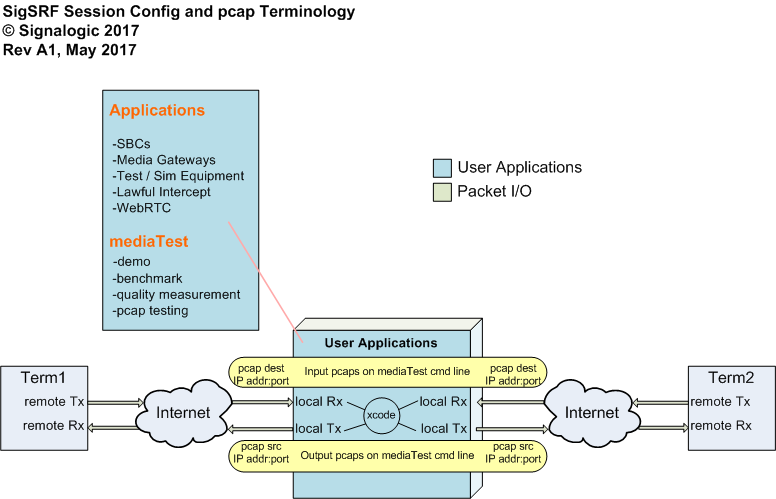
Although terminations can be defined in any order, in general term1 remote should match incoming source values, and term1 local should match incoming destination values. If an outgoing stream is simply a pcap file or a UDP port that nobody is listening to, then term2 values don't have to be anything in particular, they can point to local or non-existing IP addr:port values.
mediaMin supports SDP (Session Description Portocol) to moderate dynamic session creation, allowing applications to
- override codec auto-detection (see Codec Auto-Detection above)
- process SDP info from its containing / associated RTP stream
- ignore one or more payload types, in effect ignoring the stream
SDP input is processed by mediaMin in two (2) ways
-
As a command line option with an "-s" option, as shown in the following command line example:
mediaMin -cx86 -i../pcaps/input.pcapng -L -d0x100c0c01 -r20 -sexample.sdp
.sdp files should be basic text files, with either CR line endings (typical for Linux) or CRLF (typical for Windows).
-
As contents of SIP Invite message or other SDP info packets contained in packet flow. This also works for encapsulated streams.
Command line SDP input applies to all pcaps or UDP inputs, so the .sdp file should cover all expected payload types and configurations. Packet SDP input applies only to the input packet flow in which SIP Invite message packets are received, and should appear before input stream(s) start in order to take effect.
Below is the example.sdp file included in the SDK download:
# Example SDP file for use in mediaMin cmd line. Signalogic, Jan2021
#
# mediaMin cmd line syntax:
#
#   -sfilepath.sdp
#
# Notes:
#   1) mediaMin will show messages for payload types found in incoming packet flow when either (i) the payload type is unmatched to a supported codec, or (ii) the payload type is not specified in the SDP file
#      In both cases, one message for each payload type will be shown
#   2) Dynamic payload types must be >= 96 and <= 127, per IETF guidelines (https://tools.ietf.org/id/draft-wu-avtcore-dynamic-pt-usage-02.html). mediaMin will ignore payload type values outside this range
#   3) # can be used as comment delineator. Starting with this symbol, the line, or remainder of the line, is ignored

m=audio 41970 RTP/AVP 96 97 98 99 100
a=rtpmap:96 AMR-WB/16000
a=fmtp:96 mode-set=0,1,2; mode-change-period=2; mode-change-neighbor=1; max-red=0
a=rtpmap:97 AMR/8000
a=fmtp:97 mode-set=0,2,5,7; mode-change-period=2; mode-change-neighbor=1; max-red=0
a=rtpmap:98 AMR/8000
a=fmtp:98 mode-change-period=2; mode-change-neighbor=1; max-red=0
a=rtpmap:99 telephone-event/8000
a=rtpmap:100 telephone-event/16000

# more rtmaps, uncomment to enable

# a=rtpmap:109 EVS/16000
# a=rtpmap:112 AMR-WB/16000/1

# m=audio 49230 RTP/AVP 98
# a=rtpmap:98 L16/11025/2
Note in the above SDP file example that comments, marked by "#", are supported, although there is no widely accepted method of commenting SDP info mentioned in RFCs or other standards.
mediaMin recognizes SAP/SDP protocol, SIP Invite message, and other packets containing SDP info. If the -dN command line option includes the ENABLE_STREAM_SDP_INFO flag (see cmd_line_options_flags.h) then mediaMin will log and display SIP Invite and SDP info messages and status, add packet SDP contents to its internal SDP database, and apply to incoming streams. If the ENABLE_STREAM_SDP_INFO flag is not set then mediaMin will still log and display SIP Invite message and SDP information.
Below is an example of mediaMin display showing a SIP Invite message found in packet flow, along with other SIP messages. Note in this case the SDP description contains a unique Origin session ID.
00:00:00.051.074 mediaMin INFO: SIP Invite found, dst port = 5060, pyld len = 3377, len = 597, rem = 2043, index = 0, SDP info contents as follows
v=0
o=- 7234886132532561590 7234886132532561590 IN IP4 172.16.19.69
s=rtpengine-11-4-0-0-0-mr11-4-0-0-git-master-31da860
t=0 0
m=audio 27074 RTP/AVP 116 111
c=IN IP4 192.168.19.69
a=label:1
a=rtpmap:116 AMR-WB/16000
a=fmtp:116 mode-change-capability=2;max-red=220
a=rtpmap:111 telephone-event/16000
a=fmtp:111 0-15
a=sendonly
a=rtcp:27075
a=ptime:20
m=audio 44452 RTP/AVP 116 111
c=IN IP4 192.168.19.69
a=label:0
a=rtpmap:116 AMR-WB/16000
a=fmtp:116 mode-change-capability=2;max-red=220
a=rtpmap:111 telephone-event/16000
a=fmtp:111 0-15
a=sendonly
a=rtcp:44453
a=ptime:20
00:00:00.051.268 mediaMin INFO: SDP info with unique Origin session ID 7234886132532561590 and 2 Media descriptions and RTP attributes found but not added to database for thread 0 stream 0. To add, apply the ENABLE_STREAM_SDP_INFO flag in cmd line -dN options
00:00:00.051.313 mediaMin INFO: SIP Invite message found, dst port = 5060, pyld len = 3377, index = 1931
00:00:00.051.344 mediaMin INFO: SIP 100 Trying message found, dst port = 49761, pyld len = 486, index = 0
00:00:00.051.675 mediaMin INFO: SIP 200 Ok message found, dst port = 49761, pyld len = 1128, index = 0
00:00:00.052.596 mediaMin INFO: SIP ACK message found, dst port = 5060, pyld len = 418, index = 0
-
Both command line SDP info and packet flow SDP descriptions are added to mediaMin's internal SDP database. SDP descriptions are added only if they contain one or more non-zero, unique Origin fields
-
In all cases of packet flow containing SAP protocol, SIP Invite messages, and other forms of SDP descriptions, mediaMin automatically discovers media ports, and allows those for dynamic session creation and media packet processing. If any are in the non-dynamic UDP port range, or in SIP port range (typically 5060 through 5082), mediaMin will allow them as media ports. Also see the -pN port allow list command line option below for more information
-
The mediaMin Makefile brings in SDP source code from the apps/common/sdp folder path
In telecom mode, mediaMin assumes packet arrival timestamps are reliable and mostly accurate, and uses them to control packet push rate; i.e. the rate at which it calls the pktlib DSPushPackets() API. In addition, mediaMin reads the Real-Time Interval command line option (-rN entry, where N is in msec) to set processing intervals needed by pktlib and streamlib. For example, an -r20 cmd line entry is appropriate for RTP streams with 20 msec ptime, or multiples of 20 msec (typical for a wide variety of media codecs). Telecom mode is enabled if the -dN command line option USE_PACKET_ARRIVAL_TIMES flag is set (flag value 0x10 defined in cmd_line_options_flags.h).
In analytics mode, mediaMin assumes packet arrival timestamps are only somewhat accurate or completely invalid, and uses the Real-Time Interval to either adjust or fully control the packet push rate. In the latter case, the AUTO_ADJUST_PUSH_RATE flag (see cmd_line_options_flags.h) can be applied in cmd line -dN options, which will enable a queue balancing algorithm that generates decoded media streams with average rate matching the Real-Time Interval. As with telecom mode, analytics mode also uses the Real-Time Interval to set processing intervals needed by pktlib and streamlib. Analytics mode is enabled if the -dN command line option ANALYTICS_MODE flag is set (flag value of 0x40000 defined in cmd_line_options_flags.h).
For offline or "bulk pcap processing" purposes, mediaMin supports "faster than real-time" (FTRT) and "as fast as possible" (AFAP) modes, controlled by the Real-Time Interval command line option. The following example command lines show FTRT mode vs real-time using SDK demo pcaps:
real-time:           mediaMin -cx86 -i../pcaps/mediaplayout_adelesinging_AMRWB_2xEVS.pcapng -L -d0xc11 -r20

FTRT (28x faster):   mediaMin -cx86 -i../pcaps/mediaplayout_adelesinging_AMRWB_2xEVS.pcapng -L -d0xc11 -r0.7

real-time:           mediaMin -cx86 -i../pcaps/announcementplayout_metronometones1sec_2xAMR.pcapng -L -d0xc11 -r20

FTRT (40x faster):   mediaMin -cx86 -i../pcaps/announcementplayout_metronometones1sec_2xAMR.pcapng -L -d0xc11 -r0.5
The following command line examples show AFAP mode usage:
mediaMin -cx86 -i../pcaps/dtmf_rtp_event_multiple_groups.pcapng -L -d0x40c01 -j0x2018 -r0

mediaMin -cx86 -i../pcaps/pcmutest.pcap -i../pcaps/EVS_16khz_13200bps_FH_IPv4.pcap -C../session_config/pcap_file_test_config -L -d0x40c00 -r0

mediaMin -cx86 -i ../pcaps/AMRWB-23.85kbps-20ms_bw.pcap -L -d0x20000000040801 -r0

mediaMin -cx86 -i../pcaps/DTMF_RTP_Event.pcap -L -d0x040c01 -r0
Note in the above AFAP mode examples the ANALYTICS_MODE flag is set in the -dN command line option. AFAP mode will correctly handle packet processing (re-ordering, repair, decode) but not time alignment (sync) between streams. For the same reason, AFAP mode does not work in telecom mode as a non-zero Real-Time Interval is needed to calculate packet arrival timestamps. For more information see Bulk Pcap Handling.
In the following AFAP mode example, the input contains multiple streams so stream group processing and wav file output have been disabled:
mediaMin -cx86 -i../pcaps/mediaplayout_adelesinging_AMRWB_2xEVS.pcapng -L -d0x040001 -r0
For inputs containing only one stream, i.e. no need for time alignment between streams, stream group processing could be enabled, but DTX, packet loss gaps, or other timing variations within the stream may not be reflected accurately in wav file and pcap output.
The auto-adjust packet push rate algorithm is applied if the -dN command line option AUTO_ADJUST_PUSH_RATE flag is set. Auto-adjust packet push is useful in cases where packet arrival timestamps are zero or otherwise inaccurate. To operate correctly it must be combined with the ANALYTICS_MODE flag (AUTO_ADJUST_PUSH_RATE and ANALYTICS_MODE flag values 0x80000 and 0x40000 defined in cmd_line_options_flags.h). Below are some auto-adjust push rate algorithm command line examples:
mediaMin -cx86 -i../pcaps/announcementplayout_metronometones1sec_2xAMR.pcapng -L -d0xc0c01 -r20

mediaMin -cx86 -i../pcaps/mediaplayout_adelesinging_AMRWB_2xEVS.pcapng -L -d0xc0c01 -r20
In the various command lines above, you might notice the same media content being processed in different ways. Telecom mode should provide the highest content quality and most accurate timing in media output, but again, that assumes accurate packet arrival timestamps.
mediaMin uses a minimum number of high-level APIs to process media. In the mediaMin.cpp source example below, PushPackets() and PullPackets() call pktlib APIs DSPushPackets() and DSPullPackets() to queue and dequeue packets to/from packet/media threads that handle all packet processing (jitter buffer, DTX, etc). In turn, packet/media threads call voplib APIs for media decoding and encoding, and streamlib APIs for audio processing, RTP stream merging, speech recognition, etc.
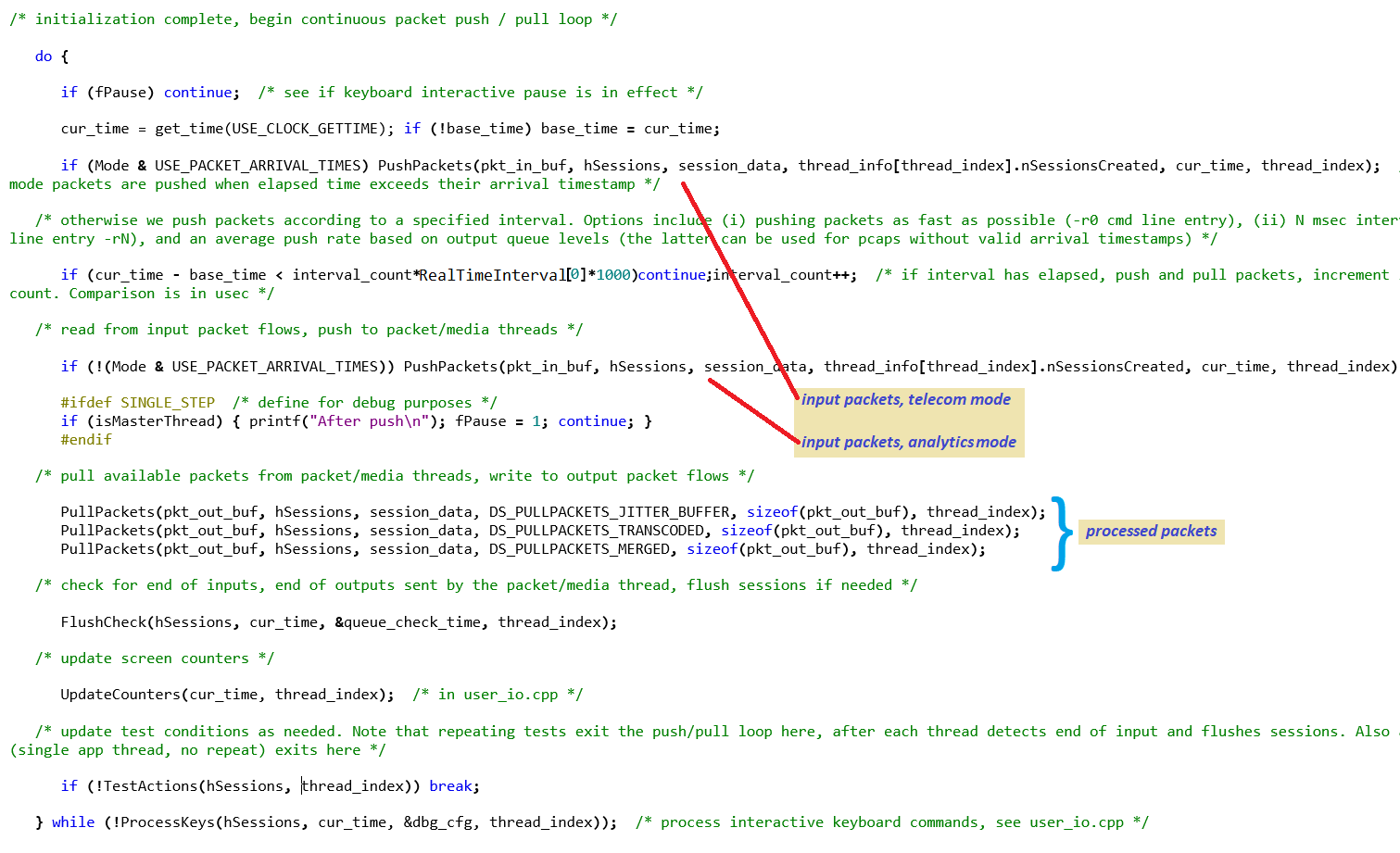
The above example:
- implements a continuous push-pull loop
- calls PushPackets() and PullPackets(), which call pktlib APIs DSPushPackets() and DSPullPackets()
- reads input packet flow from pcaps and/or UDP ports inside PushPackets()
- creates sessions dynamically inside PushPackets(), which calls pktlib API DSCreateSession()
- saves (i) re-ordered and repaired packet streams and (ii) transcoded streams to local pcap files, and writes continuous merged audio streams to pcaps or UDP ports inside PullPackets()
Stream groups are groupings of input streams, related by call participants, analytics criteria, or other association. For detailed information about how stream groups function and how streamlib operates, see Stream Groups below.
mediaMin enables stream groups with the 0x400 flag in the -dN command line option. When enabled mediaMin's default behavior is to assign all streams from the same input source (e.g. a pcap file, UDP port, etc) to a group. Other command line options can be used to modify this.
The mediaMin command below processes an input pcap containing two (2) AMR-WB 12650 bps RTP streams, of which the first stream creates three (3) additional dynamic RTP streams, for a total of five (5) RTP streams.
mediaMin -cx86 -i../pcaps/mediaplayout_music_1malespeaker_5xAMRWB_notimestamps.pcapng -L -d0xc0c01 -r20
Stream group output for the above command is
mediaplayout_music_1malespeaker_5xAMRWB_notimestamps_group0_am.pcap
In general, mediaMin uses the following naming convention for stream group output:
groupID_groupNN_TT_MM.pcap
where groupID is typically taken from the first input spec on the command line ("-i" spec), NN is the stream group index, TT is the mediaMin application thread index, and MM is the mode (none or "tm" for telecom mode, "am" for analytics mode). If only one mediaMin thread is active, then TT is omitted.
Note the above command line also enables wav file outputs for the stream group and its individual contributors the ENABLE_WAV_OUTPUT flag in the -dN command line option (defined as 0x800 in cmd_line_options_flags.h). An N-channel wav file is also created (where N is the number of group contributors).
For a large number of stream groups, the WHOLE_GROUP_THREAD_ALLOCATE flag can be set in the -dN command line option (defined as 0x8000 in cmd_line_options_flags.h), which will prevent stream groups from splitting across packet/media threads. This avoids use of spinlocks (semaphores) for the stream group and improves performance.
Screen captures below show run-time stats with stream group related information highlighted, display stream group output waveform display in Wireshark, and individual contributor wav file display in Audacity.
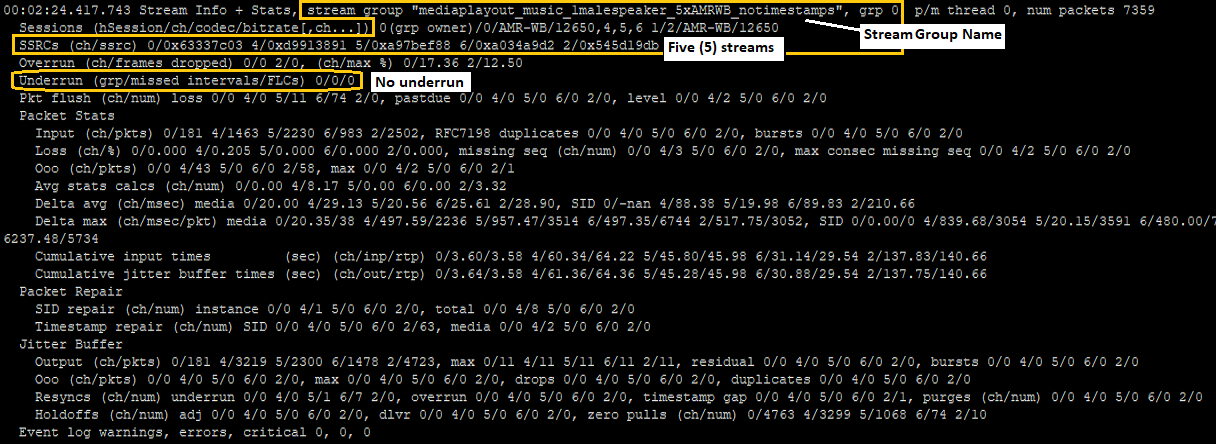
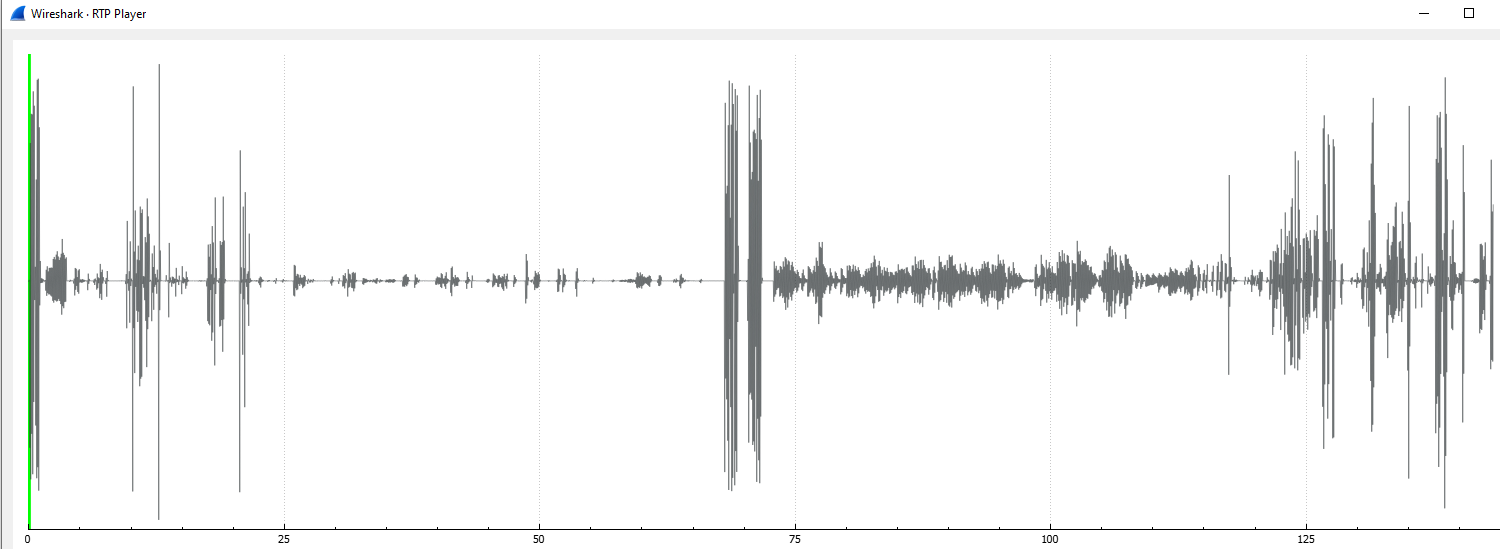
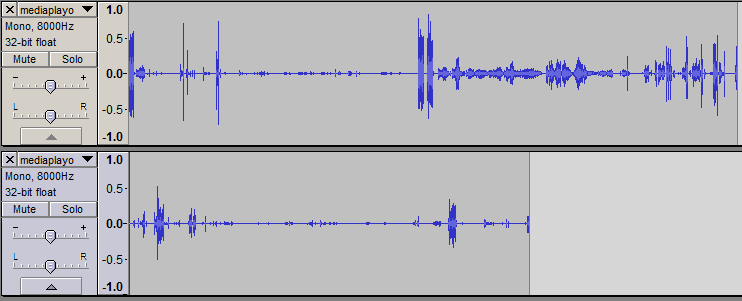
See Stream Groups below for more detailed information.
mediaMin utilizes the derlib module to support encapsulated streams, for example HI3 intercept streams with DER encoded contents formatted per ETSI LI and ASN.1 standards. DER encoding stands for Distinguished Encoding Rules, a subset of X.690. DER encoding allows a variety of information to be encapsulated within a TCP/IP stream, including fully formed UDP/IP RTP packets (in HI3 intercept streams these are referred to as CC, or Content of Communication, packets).
After downloading the SigSRF SDK (or pulling one of the available Docker containers), below are ready-to-run mediaMin examples with pcaps containing HI2 or HI3 streams, or OpenLI generated pcaps:
mediaMin -cx86 -i../pcaps/openli-voip-example.pcap -L -d0x000c1c01 -r20

mediaMin -cx86 -i../pcaps/openli-voip-example2.pcap -L -d0x000c1c01 -r20
The "openli_xxx" pcaps are included in the SDK and Docker containers, but user supplied pcaps can use the same command line. HI2, HI3, and OpenLI-generated pcaps typically contain BER or DER encapsulated streams, as described above. No ASN.1 compiler or other "preprocessing" or "batch processing" non-real-time steps are needed.
Here are some notes about the above command lines and what to look for when they run:
-
An HI interception point ID should be detected and identified, as highlighted in the screen capture below.
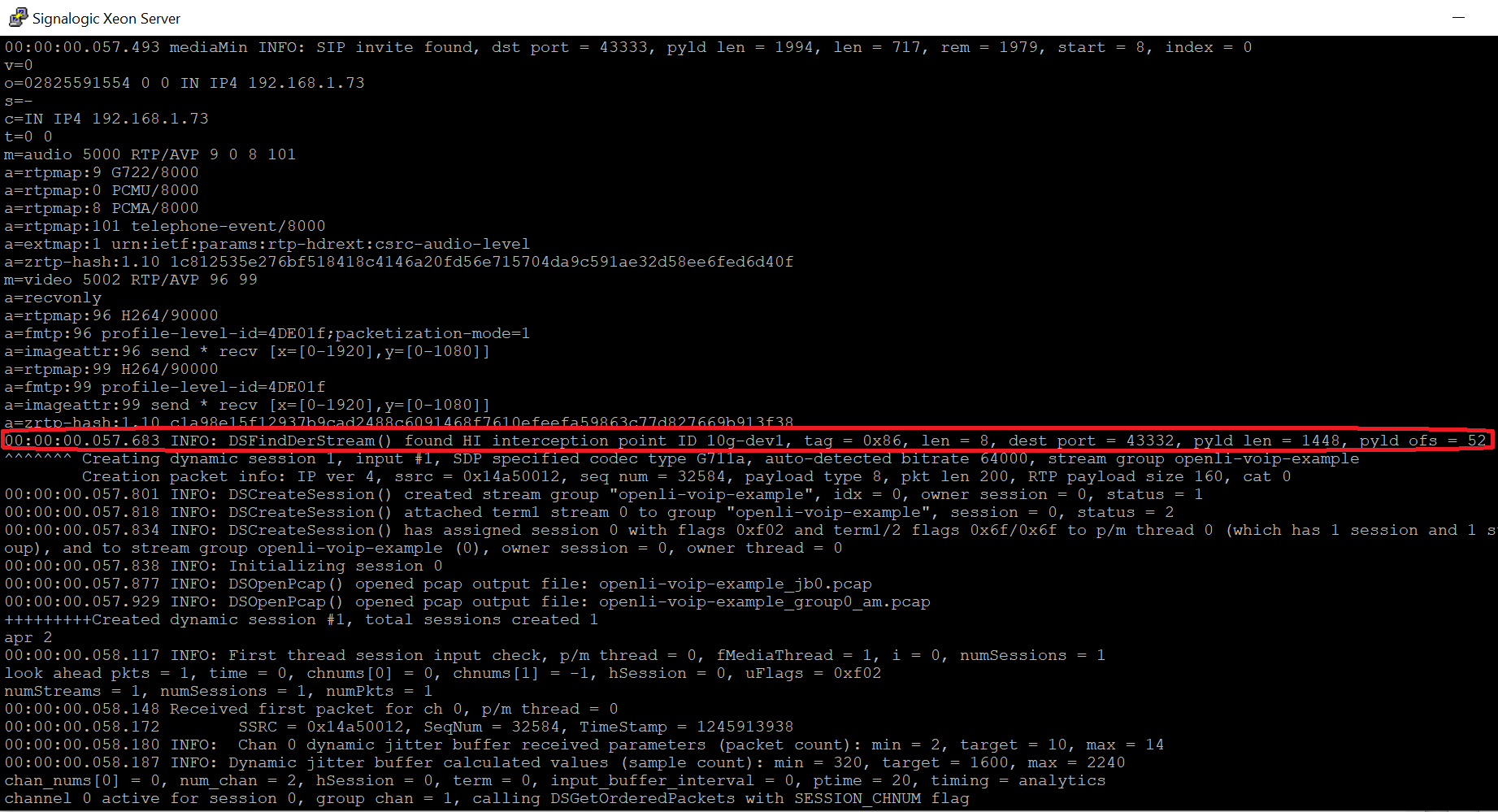
-
Both examples above contain two (2) G711a streams, but in the second example the first stream generates two (2) child streams (per RFC8108, see Multiple RTP Streams (RFC8108) below), as highlighted in red in the mediaMin run-time stats screen capture below. In the stream group output, there should be no underrun (labeled as FLC, or frame loss concealment, in the run-time stats), packet logs should be clean, and with no event log warnings or errors (highlighted in green).
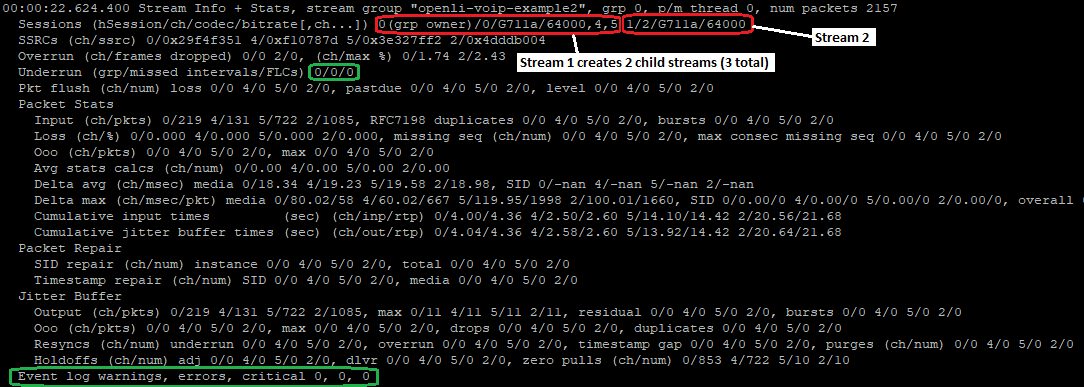
-
For the first example run-time stats should show a small amount of packet loss and repair (9 packets) in the second stream.
-
In these OpenLI examples, DER encoded packet arrival timestamps do not increment at ptime intervals, so the above mediaMin command lines enable "analytics mode" (0xc0000 flags set in the -dN command line option). In analytics mode mediaMin uses a queue balancing algorithm and command-specified ptime (the -r20 command line option in the above examples) to dynamically determine packet push rates. (Note - In both analytics and telecom modes, the pktlib and streamlib modules make use of RTP timestamps for packet repair and interstream alignment.)
-
The above mediaMin command lines enable dynamic session creation (0x1 flag in the -dN command line option) and DER stream detection (0x1000 flag in the -dN command line option). When creating sessions dynamically, or "on the fly", mediaMin looks for occurrences of unique IP/port/payload combinations, and auto-detects the codec type. HI3 DER stream detection, dynamic session creation, and codec auto-detection are highlighted in the mediaMin run-time screen captures below.
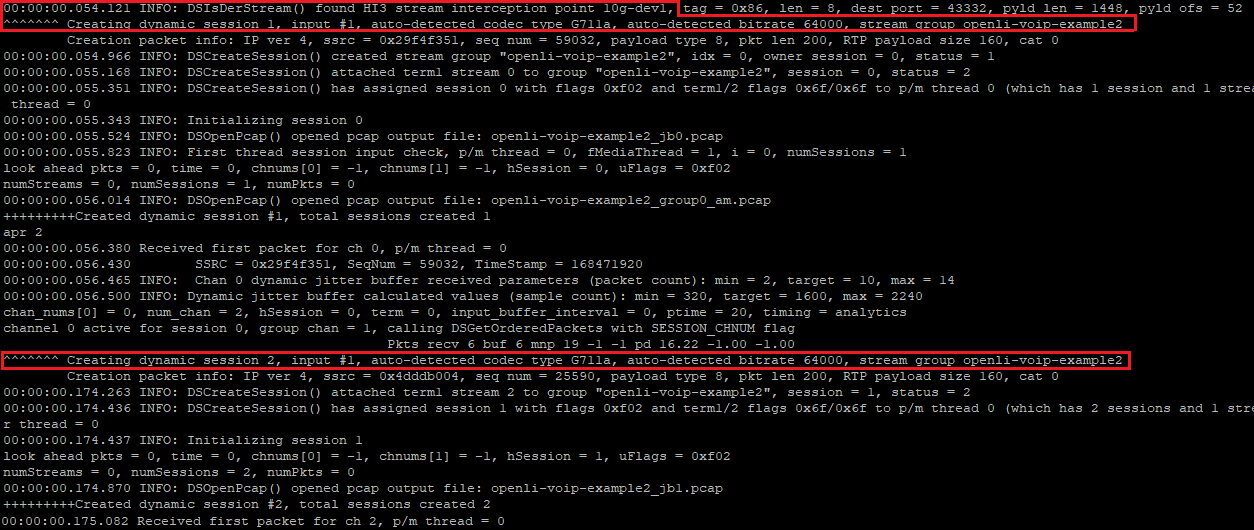
Note that static session configuration, using a session config file supplied on the command line, is also available, depending on application needs.
-
The above mediaMin command lines have stream groups enabled (0x400 flag in the -dN command line option). Stream group output is formed by combining (or "merging") all input stream contributors, correctly time-aligned, and with audio quality signal proessing applied. ASR (automatic speech recognition) can also be applied to stream group output.
After loading stream group outputs in Wireshark (openli-voip-example_group0_am.pcap and openli-voip-example2_group0_am.pcap) you should see the following waveform displays:
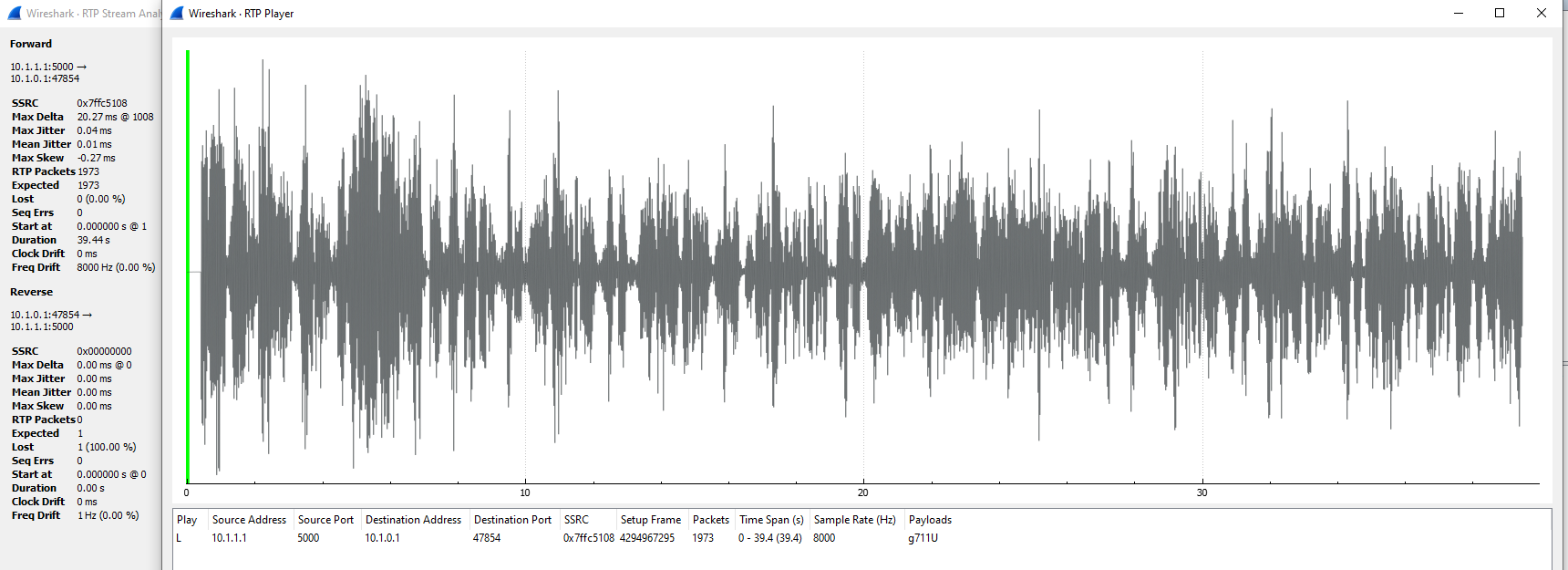
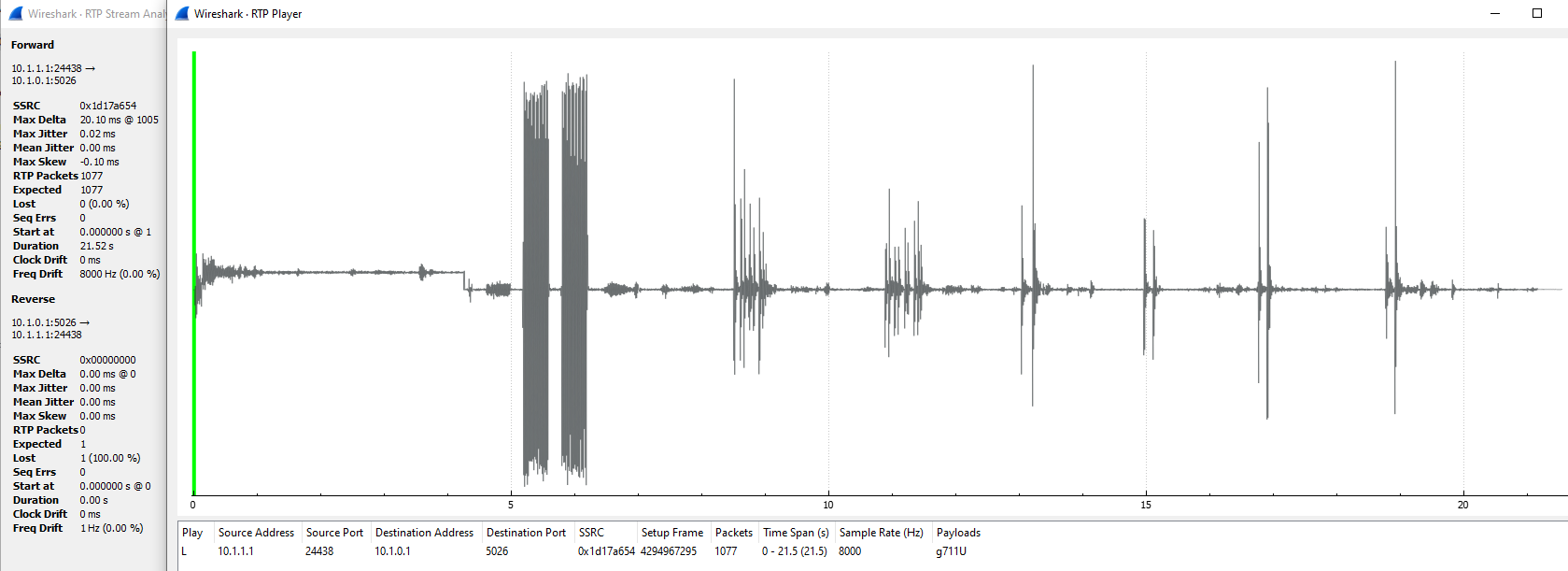
In the second example, the child streams contain early media (ring tones), which appear as "rectangular bursts" in the above waveform display. To play stream group output audio click on the
In the above displays, note the "Max Delta" stat. This is an indicator of both audio quality and real-time performance; any deviation from the specified ptime (in this case 20 msec) is problematic. SigSRF pktlib and streamlib module processing prioritize stability of this metric, as well as accurate time-alignment of individual stream contributors relative to each other. For information on using Wireshark to analyze audio quality, see Analyzing Packet Media in Wireshark.
mediaMin also generates stream group output .wav files and individual contributor .wav files, which may be needed depending on the application (but should not be used to authenticate audio quality, see Audio Quality Notes below).
The Real-Time Interval command line option allows a "faster than real-time", or FTRT mode. FTRT mode allows pcaps to be processed faster than real-time, while still maintaining correct time alignment (sync) between multiple streams in each pcap (and across pcaps, if given as multiple inputs on the mediaMin command line). Stream alignment happens in the media domain - after packets are re-ordered, repaired, and decoded - and requires a reference clock, which makes accelerated time a difficult math and signal processing problem.
FTRT mode is useful when a large number of pcaps, or continuous aggregration of pcaps, must be processed and stream group wav and/or pcap output is required but not live real-time streaming pcap or UDP port output.
Below are some command line examples, both in real-time and accelerated time:
mediaMin -cx86 -i../pcaps/announcementplayout_metronometones1sec_2xAMR.pcapng -L -d0xc11 -r20
mediaMin -cx86 -i../pcaps/announcementplayout_metronometones1sec_2xAMR.pcapng -L -d0xc11 -r0.5

mediaMin -cx86 -i../pcaps/mediaplayout_adelesinging_AMRWB_2xEVS.pcapng -L -d0xc11 -r20
mediaMin -cx86 -i../pcaps/mediaplayout_adelesinging_AMRWB_2xEVS.pcapng -L -d0xc11 -r0.7
In the first example, processing is 40 times faster, and in the second about 28 times faster. Acceleration is less in the latter example due to total number of streams, codec complexity and bitrates, and media content. Amount of acceleration is also dependent on host system CPU clock rate, number of cores, and storage configuration. Additional performance information - and how to determine maximum acceleration without media quality degradation - is given in Bulk Pcap Performance Considerations below.
In addition to FTRT mode, mediaMin also supports "as fast as possible" mode, or AFAP mode, which is enabled with -r0 Real-Time Interval command line option (i.e. a Real-Time Interval of zero). AFAP mode will correctly handle packet processing (re-ordering, repair, decode) but not time alignment (sync) between streams. For more information see Packet Push Rate Control above.
Code running in pktlib and streamlib doesn't know that time has been accelerated. For example, if you see a packet push alarm saying "stream X has pushed no packets for 15 seconds" in FTRT mode, you would see the same warning in real-time.
Concurrently specifiying AFAP mode (with a -r0 Real-Time Interval command line option) and applying the USE_PACKET_ARRIVAL_TIMES flag (see cmd_line_options_flags.h) in the -dN command line option will produce undefined behavior.
From a general performance perspective, to achieve consistent high capacity, real-time performance and audio quality, other applications and periodic Linux housekeeping operations (e.g. logging, network I/O, SQL, etc) should be limited to a minimum or even disabled during mediaMin operation. If you see mediaMin onscreen or event log warning messages indicating packet/media thread pre-emption (see examples below), and the section of non-zero thread operation shown in the message seems to move around (i.e. not consistently the same section), then other applications or Linux housekeeping may be pre-empting packet/media threads and negatively impacting performance.
From an audio quality perspective, it's important to note that mediaMin, pktlib, and streamlib all have automatic packet and audio repair facilities that activate when latencies, packet loss, rate mismatches, or other stream impairments are encountered. Auto-repairs will "see" packet/media thread pre-emption as either delayed packets or lost audio frames, and will attempt to compensate. For example, streamlib will repair up to 250 msec of missing audio in a stream (known as "frame loss compensation", or FLC). Repairs notwithstanding, frequent and sustained thread pre-emption will at some point have noticeable impacts on audio quality.
The following sections give detailed information on achieving consistent high capacity, real-time performance, and best audio quality.
When using mediaMin remotely, for example with Putty or other remote terminal utility, keep these guidelines in mind:
Application output to remote terminals, if slow or intermittent due to unreliable network and/or Internet connections, can partially or fully block the application. If slow network conditions are in effect, it may be advisable to limit screen output. mediaMin has several ways to help with this, including (i) an interactive keyboard 'o' entry which turns off most packet/media thread screen output, and (ii) source code options in LoggingSetup() (look for LOG_SCREEN_FILE, LOG_FILE_ONLY, and LOG_SCREEN_ONLY)
WinSCP file manipulation should be limited during mediaMin operation. Remote HDD or SSD activity during real-time mediaMin operation, especially if involving large file transfers or other manipulation, may impact packet/media thread read and write seek times, for example mediaMin output media files.
The High Capacity Multithreaded Operation section on the SigSRF SDK page has basic information on SigSRF high capacity, including an example htop measurement screen capture. More detailed information, specific for mediaTest and mediaMin, is given here.
In the htop screen cap on the SigSRF SDK page:
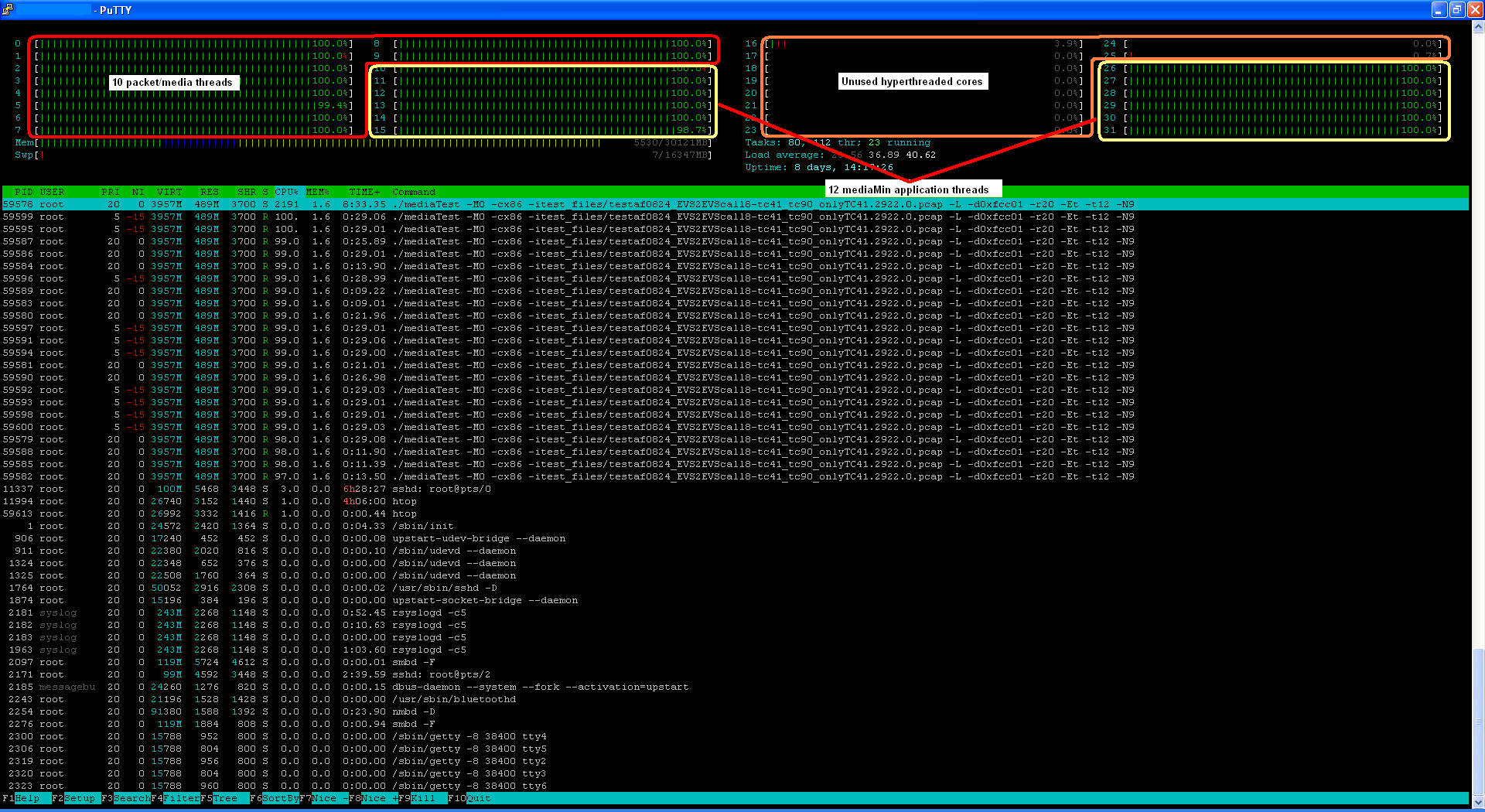
we can see 12 (twelve) mediaTest threads running. Actually these are mediaMin threads; how does this take place ? mediaTest has command line mode options 1 where it will start N mediaMin threads. In this case three key things happen:
main() inside mediaMin becomes a thread entry point, rather than a process resulting from a command line executable
mediaMin shares the mediaTest command line (of course ignoring anything not intended for it)
Unlike packet/media threads, mediaMin threads are not assigned core affinity; i.e. they are allowed to hyperthread
Hyperthreading for application threads makes sense, as they typically handle I/O, data management, and user-interface rather than the calculation/compute intensive packet and signal processing inside packet/media threads.
When mediaMin detects that it's running in thread mode, it assigns a master thread to maintain thread-related information, including thread index and number of threads (look for "isMasterThread" in mediaMin.cpp). The master thread handles thread synchronization; for example, making sure all threads wait until others are fully initialized, and the thread index is used to manage per-thread information for I/O, sessions, profiling, etc.
1 -Ex = execution mode, -tN = number of threads. Look in mediaMin.cpp source code for "thread_index" and "num_app_threads"
There are a number of complex factors involved in high performance and/or real-time performance, depending on the application. For detailed coverage see section 5, High Capacity Operation, in SigSRF Software Documentation.
Here is a summary of important points in achieving and sustaining maximum performance:
-
First and foremost, hyperthreading should be avoided and each packet/media thread should be assigned to one (1) physical core. The pktlib DSConfigMediaService() API takes appropriate measures to ensure this is the case, and the htop utility can be used to verify during run-time operation (this is fully explained in section 5, High Capacity Operation, in SigSRF Software Documentation). For DSConfigMediaService() usage see StartPacketMediaThreads() in mediaMin source code.
-
Packet/media threads should not be preempted. To safeguard against this, the following basic guidelines are recommended:
- run a clean platform. For SigSRF software running on a server, don't run other applications, even housekeeping applications, unless absolutely necessary. For SigSRF software running in containers or VMs, also consider the larger picture of what is running outside the VM or container
- run a minimal Linux. No GUI or web browser, no database, no extra applications, etc. Linux housekeeping tasks that run at regular intervals should temporarily be disabled
- network I/O should be limited to packet flow handled by pktlib and/or applications using pktlib
- avoid possibility of blocking during output file write or flush. This may be an issue for slow HDD drives, or even faster ones approaching their storage limit or in use for a long time. The output media path and event log path command line options can help with this by storing output files to a dedicated fast output file option, for example a RAM disk or high performance SSD drive
Non-deterministic OS are notorious for running what they want when they want, and Linux and its myriad of 3rd party install packages is no exception. Signalogic has seen cases where max capacity stress tests running 24/7 showed bursts of thread preemption messages repeating at intervals. In one case, on a Ubuntu system that was thought to be a minimal installation, messages appeared every 1 hour, like clockwork. It took days of sleuthing to figure out the cause; there were no obvious scheduled Linux or installed application tasks advertising a one hour interval.
To mitigate such cases, there are various methods to prioritize threads and minimize interaction with the OS, some of which SigSRF libraries utilize, and some of which are considered "out of the mainstream" and unlikely to be supported going forward. [1]
To monitor for preemption by Linux or other apps, pktlib implements a "thread preemption alarm" that issues a warning in the event log when triggered. Here is an example:
00:22:01.579.295 WARNING: p/m thread 0 has not run for 60.23 msec, may have been preempted, num sessions = 3, creation history = 0 0 0 0, deletion history = 0 0 0 0, decode time = 0.00, encode time = 0.01, ms time = 0.00 msec, prev ms time = 0.00, buffer time = 0.00, chan time = 0.00, pull time = 0.00, media processing time = 0.01 src 0xb6ef05cc
A clean log should contain no preemption warnings, regardless of how many packet/media threads are running, and how long they have been running.
Note that it's also possible an application thread or packet/media worker thread can be blocked for some time by HDD file writes, either output media file writes or event log write or flush operations. Although such extremely long HDD file write times (in the 10s of msec) are rare, they can happen in situations where the amount of media or event log output is extremely high due to (i) multiple application, packet/media worker, and media processing threads writing concurrently, and/or (ii) the HDD drive occasionally blocks due to long seeks related to block allocation and management. To avoid HDD file write blocking issues see the output media path and event log path command line options.
-
CPU performance is crucial. Atom, iN core, and other low power CPUs are unlikely to provide real-time performance for more than a few concurrent sessions. Performance specifications published for SigSRF software assume at minimum E5-2660 Xeon cores running at 2.2 GHz.
-
Stream group output packet audio should consistently show "Max Delta" results close to the expected ptime (typically 20 msec). Slow system performance can cause packet delta stats to fluctuate even though packet/media thread preemption alarms have not triggered. Max Delta is an indicator of both real-time performance and audio quality, and any deviation is considered problematic. SigSRF pktlib and streamlib module processing prioritize stability of this metric. Below is a Wireshark screen capture highlighting the Max Delta stat:
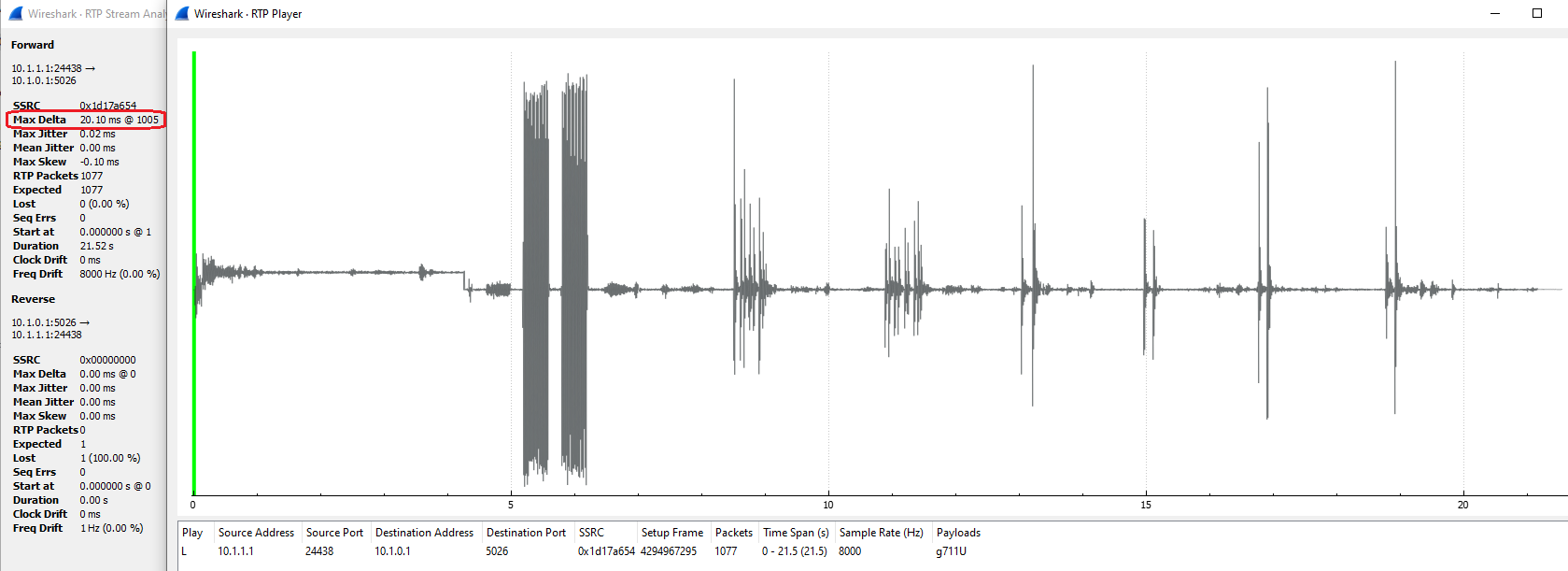
See Analyzing Packet Media in Wireshark below for step-by-step instructions to show and analyze Max Delta and other packet stats in Wireshark.
[1] Optimizing Linux apps for increased real-time performance is a gray area, pulled in different directions by large company politics and proprietary interests. At some point Linux developers will need to provide a "decentralized OS" architecture, supporting core subclasses with their own dedicated, minimal OS copy, able to run mostly normal code and handle buffered I/O, but with extremely limited central OS interaction. Such an architecture will be similar in a way to DPDK, but far more advanced, easier to use, and considered mainstream and future-proof. This will be essential to support computation intensive cores currently under development for HPC, AI and machine learning applications.
mediaMin supports bulk pcap processing with "faster than real-time" (FTRT) and "as fast as possible" (AFAP) modes, as explained in detail in Packet Push Rate Control and Bulk Pcap Handling above.
If only packet processing is required, and stream group processing (including wav and pcap file media output) is not required, then AFAP mode may be a better option than FTRT mode. In AFAP mode packets will be re-ordered, repaired, and decoded as fast as the host system allows, and command line settings will affect processing speed but not packet output correctness.
If stream group processing is required, including correct wav and pcap file media output, then FTRT mode should be used. In FTRT mode the maximum amount of acceleration is limited by:
- RTP stream amount of packet out-of-order (ooo), amount of DTX
- RTP stream media content, including codec type, codec bitrate, media content (e.g. speech, music, silence, background noise, other sounds)
- host system parameters, including CPU type and clock rate, number of cores, and storage configuration
- event log and packet log settings, other command line settings
You can apply the following guidelines to determine whether you are at the limit of FTRT mode acceleration:
- there should be no warning messages about thread pre-emption, wav file write time exceeded, or other timing-related conditions. Warning message examples are given in Output Media Path below
- the number of FLCs (Frame Loss Compensation) in stream group output should be the same or nearly the same as running the same pcap(s) in real-time. Look for "Underrun" in mediaMin Run-Time Stats
The last indicator is the most reliable. An increase in FTRT mode FLCs indicates the system does not have enough processing capacity to keep up with acceleration specified in the Real-Time Interval -rN command line option. Basically, the system is not able to maintain continuous stream group wav and pcap output without having to repair missed frames caused by lack of compute resources. As FTRT mode acceleration nears system limits, small changes in system configuration, pcap contents, and command line settings can make a difference. For example, using a RAM disk to store output media files, limiting stream group audio output to 8 kHz (narrowband), limiting screen output (e.g. reducing number of INFO messages), disabling packet logging, etc. might help.
Below are some items to keep in mind when measuring audio quality of both individual streams and stream group output. The subject is complex and extensive, partly subjective as well as quantifiable, so these are key points, not an in-depth discussion.
-
Wav files are indispensable for audio quality measurements, in particular for amplitude envelope, background noise, and intelligibility. In particular wav files allow background noise and discontinuities (spikes, glitches, audio drop-outs) to be studied with a greater resolution and bandwidth (sampling rate) than narrowband audio (e.g. G711, AMR-NB, G729, EVRC, etc). Wav files generated by mediaMin and mediaTest are typically 16-bit PCM with 16 kHz sampling rate and are thus suitable for this purpose.
-
When authenticating audio quality for a customer application in which it's important to know precisely which audio audio occurred when, wav files -- although convenient -- should not be used alone. Wav files assume a linear sampling rate and do not encode sampling points, and can thus obscure audio delays/gaps and interstream alignment issues. This is why real-time packet audio should always be included for audio quality authentication purposes. Real-time packet audio can be linear output, G711, or encoded with wideband codecs (e.g. AMR-WB, EVS) -- the key point is that sampling time is included in the analysis, preferably with a granularity of 10 to 40 msec. However, if you're using Wireshark then the codec type should be one that Wireshark "understands", which currently includes G711 u/a, AMR, and AMR-WB.
To help with time domain analysis, streamlib supports audio markers, which are inserted into stream group output at regular intervals (default of 1 sec). Below is a screen capture showing audio markers in action:
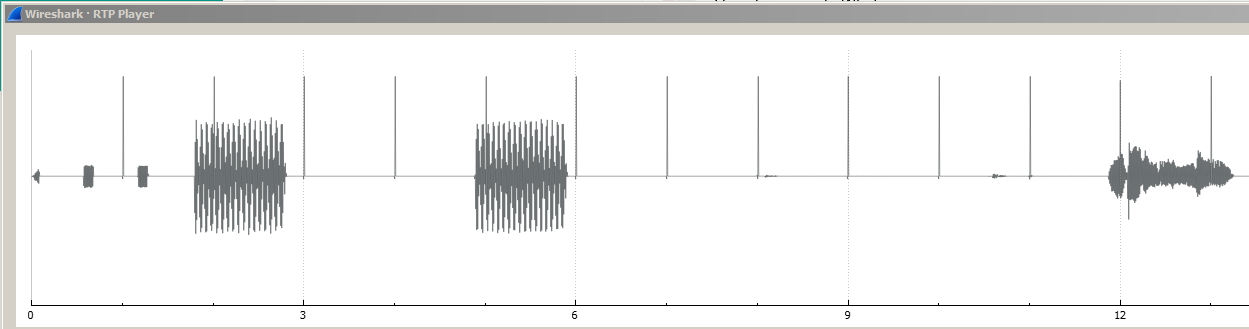
Any "flexing" in audio marker spacing indicates timing issues -- frame loss (possibly resulting from packet loss or out-of-order packets), packet rate overrun or underrun, etc.
In the mediaMin command line, audio markers can be enabled with a 0x8000000 flag in the -dN options command line option. For more information on using Wireshark to analyze audio quality, see Analyzing Packet Media in Wireshark.
-
Continuous, real-time packet repair is crucial to achieving high quality audio. Both missing (lost) SID and media packets must be repaired. Pktlib uses a variety of methods, including packet re-ordering (due to out-of-order, or ooo, packets), packet loss concealment, SID insertion, and more. To identify packet loss and ooo problems, pktlib looks at missing sequence numbers, mismatched timestamps, and packet delta (rate). When verifying / measuring audio quality, you can look at both run-time stats and packet logs for anomalies that might indicate audio quality problems. Even issues that may not be perceptible when listening can be identified this way; for example, during long periods of silence or background noise there may be packet flow issues unidentifiable by listening.
-
Audio quality measurement should also include frequency domain analysis, as shown in the examples below taken from a customer case, in which one input stream contained embedded "chime markers" with very specific timing and tonal content.
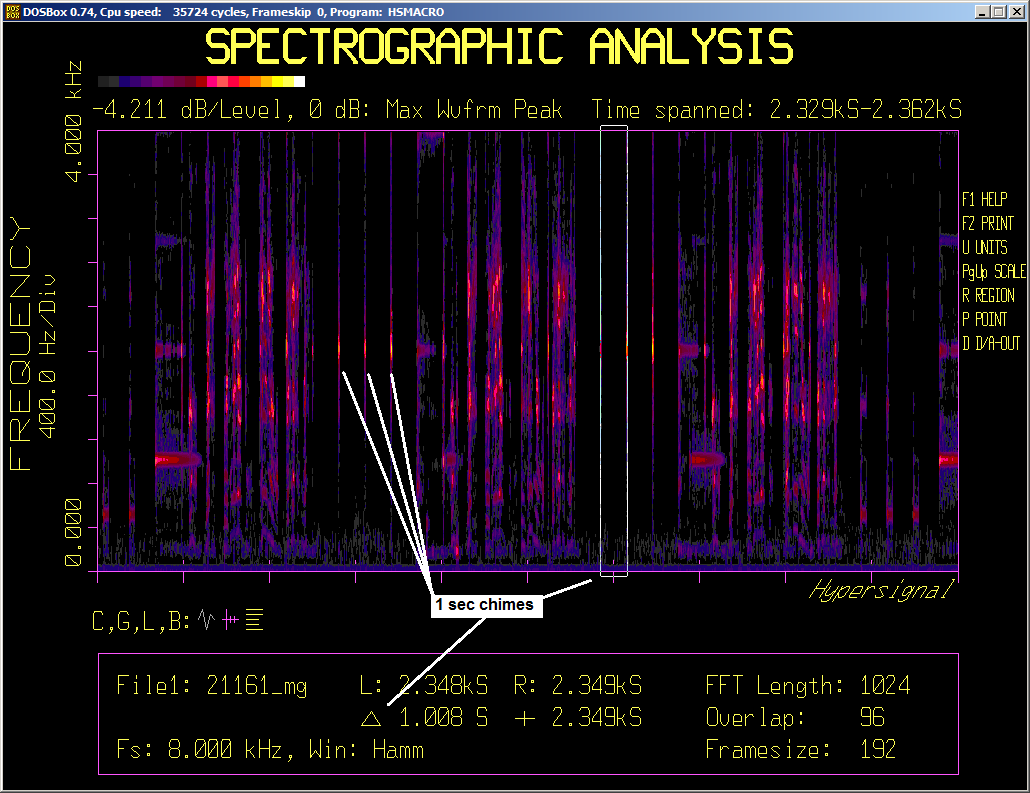
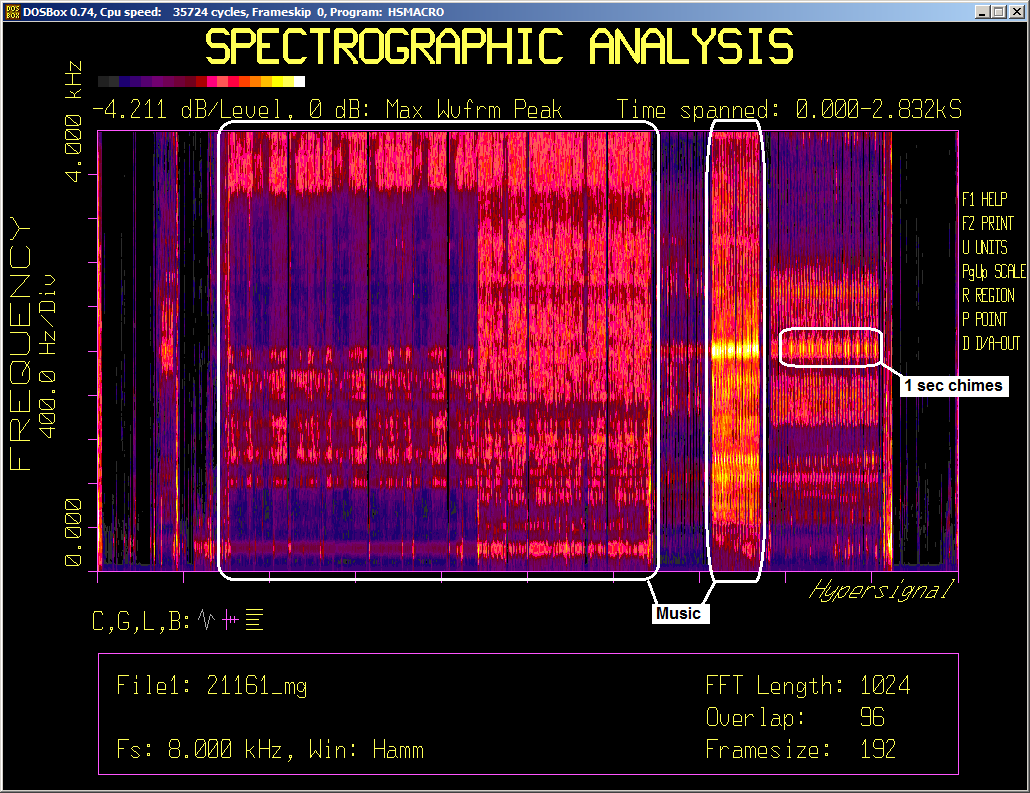
In this case customer expectations were (i) the stream with embedded chime markers would not "slip" left or right in time relative to other streams (i.e. correct time alignment between streams would be maintained) and (ii) 1 sec spacing between chimes would stay exactly regular, with no distortion. Both of these conditions had to hold notwithstanding packet loss, out-of-order packets, and other stream integrity issues.
Building reference and user applications is straightforward; the mediaMin and mediaTest Makefiles can be used as-is or as a starting point and modified as needed. These Makefiles are deliberately written with a minimum of cryptic Make syntax, in the style of simple, sequential programs to the extent possible, with descriptive variable names and numerous comments.
One area of Makefile complexity involves codecs, which need to be high performance but are sensitive to many factors, including underlying machine specs and gcc/g++ version. To achieve high performance, at compile-time codecs are built with --fast-math and -O3, and at link-time the Makefiles look at OS distribution and gcc version to decide which build version of codec libs to link, with higher build versions linked when possible. The objective is to link as high a build version as possible to take advantage of generated code optimized with vectorized math functions.
This approach enables per-system optimized performance, but unfortunately later versions of gcc (approximately v9 and higher, at least as known so far) do not always maintain vector function name compatibility with earlier versions. For example, a v11.x codec lib may not link with a v9.x application. To address this complexity the Makefiles include a chunk of code that decides which codec lib build version to link (current options include v4.6, v9.4, and v11.3). The Makefiles are tested continuously with the following combinations:
| gcc | ldd (normally same as glibc version) |
|---|---|
| 11.3 | 2.33, 2.35, 2.36 |
| 11.2 | 2.31, 2.33 |
| 9.4, 10.3 | 2.31 |
| 8.3.1-5 | 2.28 |
| 7.4.0 | 2.23 |
| 6.5.0 | 2.17, 2.23 |
| 6.2.0 | 2.17, 2.24 |
| 5.3.1, 5.5.0 | 2.17 |
| 4.6.4 | 2.15 |
If after building an application you encounter a failed link or unresolved run-time symbols you can (i) modify the Makefile CODEC_LIBS variable to include v4.6 version codec names (old and slow but never fail to link and produce accurate results), (ii) force an available codec lib version to be used, (iii) raise an issue for a Makefile fix, or (iv) contact Signalogic for a specific codec lib version.
To force a specific codec lib version to link, when building the mediaMin or mediaTest reference application (or user-defined application, assuming it incorporates reference Makefile code), you can enter:
make all codec_libs_version=N.n
where N.n can be 4.6, 9.4, or 11.3, or as needed for future codec lib versions.
Vector functions operate on arrays of floating-point data using SIMD instructions included in SSEn and AVXn CPU extensions. SIMD examples include 8x 32-bit single-precision floating-point operations calculated in a single CPU clock cycle, or 4x double-precision. Here are some additional notes about vectorized math functions:
-
vector math functions contribute to significantly faster codec performance. They appear in generated code built with --fast-math -O3 compiler options
-
normally vector math funtions link with the gnu mvec library (libmvec), which was introduced with glibc 2.22 in 2016. mediaMin and mediaTest Makefiles link with libm, which is a gnu script that pulls in libmvec depending on glibc version and whether libmvec.so is present on the system (e.g. /usr/lib64 on CentOS 8, and /usr/lib/x86_64-linux-gnu on Ubuntu 20.04)
-
for notes on performance of codecs built with different gcc versions, see High Capacity Codec Test
As noted above, the mediaTest and mediaMin Makefiles are tested with a wide range of gcc/g++ and ldd versions. Testing also includes Ubuntu, CentOS, and Debian Linux distributions from 2012 to present, as listed in the table below.
| OS Distribution | Release |
|---|---|
| Ubuntu | 12.04.1, 12.04.5, 16.04.6, 18.04.5, 20.04.2, 22.04.1 |
| CentOS (Core) | 7.2.1511, 7.9.2009, 7.6.1810, 8.2.2004 |
| Debian | 12.0 |
Note this is functional testing. Stress testing occurs on a subset of the above system OS and build combinations. For more information on systems used for stress testing, please contact Signalogic.
Below is a list of system compatibility exceptions in the Makefiles.
- For ldd versions 2.22 and 2.23, LTO (Link Time Optimization) is not applied during compilation. Further notes on this can be found in the Makefiles and the SLiM project at Cornell Univ issue list (look for the Signalogic comment).
To maintain bit-exact output reproducibility, for example call recording wav files for legal purposes, mediaMin supports a "timestamp match mode". In this mode only arrival timestamps are used to determine stream alignment in generated wav and pcap outputs, with no wall clock references. This is in contrast to the default "media domain mode", in which the amount of generated media serves as a baseline, or guardrail, for stream alignment. Media domain alignment, although resilient against timestamp errors, too-fast or too-slow packet transmission rates (e.g. announcement and media servers), incorrect codec info, and other errors -- and being suitable for real-time, live streaming output -- always contains a slight amount of jitter due to external wall clock references.
Here are command line examples with the ENABLE_TIMESTAMP_MATCH_MODE and ENABLE_WAV_OUTPUT flags applied, one at real-time rate, one at 40x faster-than-real-time (FTRT) rate:
mediaMin -cx86 -i../pcaps/announcementplayout_metronometones1sec_2xAMR.pcapng -L -d0x580000000040811 -r20 --md5sum
mediaMin -cx86 -i../pcaps/announcementplayout_metronometones1sec_2xAMR.pcapng -L -d0x580000000040811 -r0.5 --md5sum
Note that both print identical MD5 sums in mediaMin summary stats:
=== mediaMin stats
    packets [input]
        total [0]2696
        Fragments = [0]0, reassembled = [0]0, orphans = 0, max on list = 0
        TCP = [0]0
        UDP = [0]2696, encapsulated = [0]0
        RTP = [0]2686, RTCP = [0]9, Unhandled = [0]1
        Redundant discards TCP = [0]0, UDP = [0]0
    md5sum
        timestamp-match mode b16ccd08e2bd5b06c00f624c2d0012d2 /tmp/shared/announcementplayout_metronometones1sec_2xAMR_merge_tsm.wav
    arrival timing [stream]
        delta avg/max (msec) = [0]17.79/155.79 [1]18.64/28.75
        jitter avg/max (msec) = [0]16.42/135.79 [1]1.89/19.32
    session [stream]
        [0] hSession 0 dynamic, term 0, ch 0, codec AMR-NB, bitrate 12200, payload type 102, ssrc 0xb101a863, first packet 00:02.413.320
        [1] hSession 1 dynamic, term 0, ch 2, codec AMR-NB, bitrate 12200, payload type 102, ssrc 0x6057c1d6, first packet 00:02.707.160
Note also that both commands apply the ANALYTICS_MODE flag in their -dN entry to enable analytics mode and thus avoid wall clock references.
mediaMin and mediaTest support MD5, SHA1 and SHA512 hash sum command line options; see Output Hash Sums below.
- Note - for any operation involving RTP packet decode, media output hash sums are system-dependent due to use
- of media codecs. CPU type, gcc/g++ tools and GLIBC versions, host vs. container, and other factors all make a
- difference.
-
- In the above command line examples you will almost definitely see different MD5 values on your system.
Timestamp match mode goes hand-in-hand with bulk pcap processing. The idea is that if pcaps are being processed "after the fact" then two things are crucially important: (i) faster-than-real-time (FTRT) processing rates, and (ii) bit-exact reproducibility. However, when processing in bulk mode, these two benefits are not free, and there are key considerations to keep in mind:
-
processing needs must stay within per-core CPU performance limits. mediaMin uses separate application threads to push packets to a packet queue, and "worker" threads to pull packets from this queue and perform packet and media processing (e.g. packet repair, audio decode, noise and other artifact reduction, etc). If a real-time interval (-rN) entry is given on the command line that is too small then application threads will push packets at a rate that exceeds what worker threads can handle. Of course the minimum real-time interval at which this happens is largely determined by the CPU type, clock rate [1], and workload on your host, VM, or container platform
-
host system impacts must be minimized, including:
- using a RAM disc for wav and pcap output, and de-activating intermediate or unnecessary output files (e.g. jitter buffer output pcap files)
- disabling packet logging and post-analysis, which takes extra processing time. If needed these can be turned on temporarily without FTRT enabled
- minimizing or pausing threads for other applications, non-related networking, and Linux housekeeping / background
See Bulk Pcap Performance Considerations above for more information about avoiding worker thread pre-emption and warning messages that appear when it happens.
The mediaMin and mediaTest command lines accept the following output hash sum options:
--md5sum
--sha1sum
--sha512sum
which will show output media file hash sum values in console display summary stats. Output hash sum options may be combined. The examples in Reproducibility above demonstrate this option.
- Note - for any operation involving RTP packet decode, hash sum values are system-dependent due to use of media codecs
- Differences in CPU type, gcc/g++ tools and GLIBC versions, host vs. container, and more, all make a difference
[1] All performance specs on this page are given for an x86 Xeon E5-2660 CPU running at 2.2 GHz
mediaMin supports ASR processing simultaneously with packet handling, media codec, stream group, signal processing, and other options. ASR is performed on stream group output, which can be a single audio stream input or multiple audio streams after merging. Below are some command line examples showing pcap input with ASR enabled:
mediaMin -cx86 -i../pcaps/asr_test1.pcap -L -d0x10000c19 -r20
:
:
Pushed pkts 178, pulled pkts 22j 19x Pkts recv 181 buf 181 jb 179 xc 179 sent 179 mnp 19 -1 -1 pd 15.97 -1.00 -1.00
00:00:03.675.806 INFO: stream group 0 asr_test1 output first interval 520 (msec), base interval 520.5140, avail data (msec) 540, num_frames 27, min_gap 0 max_gap 0, owner session 0, woc1 1, woc2 0, group flags 0x36000009, ch 0 pastdue 0 contributor flags 0x100
Pushed pkts 366, pulled pkts 210j 207x 183sA KING ROLLED THE STAKE IN THE EARLY DAYS195 sent 360 mnp 19 -1 -1 pd 20.01 -1.00 -1.00
Pushed pkts 405, pulled pkts 249j 246x 222s     Pkts recv 405 buf 405 jb 402 xc 402 sg 237 sent 402 mnp 19 -1 -1 pd 20.01 -1.00 -1.00
:
:
Event log warnings, errors, critical 0, 0, 0
00:00:12.052.027 INFO: Deleting session 0
00:00:12.052.830 INFO: DSDeleteSession() removed term1 stream 0 from group "asr_test1", session = 0
A KING ROLLED THE STAKE IN THE EARLY DAYS WE FOUND WHEN EVENTS TAKE A BAD TURN
LOG ([5.5.183~1419-9f981]:Print():online-timing.cc:36) Timing stats: real-time factor was 1.13922 (note: this cannot be less than one.)
LOG ([5.5.183~1419-9f981]:Print():online-timing.cc:38) Average delay was 1.11378 seconds.
LOG ([5.5.183~1419-9f981]:Print():online-timing.cc:44) Longest delay was 1.11378 seconds for utterance 'asr_test1'
LOG ([5.5.183~1419-9f981]:SigOnline2WavNnet3LatgenFasterFinalize():inferlib.cpp:390) Overall likelihood per frame was 2.25388 per frame over 270 frames.
00:00:12.286.031 INFO: DSDeleteSession() deleted group "asr_test1", owner session = 0
:
:
Note that recognized speech is displayed (or written to text file) in real-time, as audio stream processing proceeds.
The above mediaMin command can be run with wideband audio pcaps included in the SDK; look under the mediaTest/pcaps subfolder for pcaps that include "EVS" and/or "AMRWB" in the filename. For basic single stream testing, additional "asr_testN.pcap" files are included in the SDK (these were generated by mediaTest from wav files using the EVS codec (for more info, see Converting Wav to Pcaps). Below is a table showing asr_testN.pcap test results, original wav files, and actual spoken speech:
| pcap file | ASR test results | original wav file | recorded speech |
|---|---|---|---|
| asr_test1 | A king rolled the stake in the early days ... we found when events take a bad turn | asr_test.wav | A king ruled the state in the early days. We frown when events take a bad turn. |
| asr_test2 | Fairy tales should be fun to write ... a large hast hot hot water types | T06.wav | Fairy tales should be fun to write. The large house had hot water taps. |
| asr_test3 | I don't know ... more than I ascend and he smiled | T18.wav | I don't know ... the vampire said, and he smiled. |
| asr_test4 | Bring your problems to the wise chief ... all sat frozen watched the screen | T07.wav | Bring your problems to the wise chief. All sat frozen and watched the screen |
The original wav files are included in the mediaTest/test_files subfolder; they are recordings from a speech corpus known as the "Harvard Sentences", prepared in the 1960s by the IEEE Subcommittee on Subjective Measurements as part of their recommended practices for speech quality measurements.
In general, to enable ASR with any arbitrary mediaMin command, including mediaMin commands documented on this page, you can set the ENABLE_STREAM_GROUP_ASR flag in the -dN command line option (-dN command line options and debug flags are documented in cmd_line_options_flags.h).
Here are some notes about ASR operation:
- Input is expected to be wideband audio (i.e. 16 kHz sampling rate); in the case of pcap input this implies wideband codecs such as AMR-WB, EVS, G711.1, or clear mode with 256 kbps data
- The SDK version of mediaMin currently supports pcap input with RTP encoded voice (e.g. VoLTE codecs). A version that also handles wav and USB audio input is expected in 1Q23. As shown in Converting Wav to Pcaps, pcaps can be generated from wav files using mediaTest commands
- Capacity with ASR enabled is substantially reduced. For more information on ASR capacity / real-time performance, see ASR Notes
RTP packet streams provide an opportunity for malware to hide payloads disguised as compressed audio. For example, an infected server might construct a valid codec bitstream with individual packet payloads containing illegal data instead of actual compressed audio. Even audio playout of such packet streams using popular tools such as Wireshark will not reveal the disguise, giving anything from static, "cyber robot" sounds, or even mostly valid audio with occasional glitches, buzzes, burps, etc. Without in-depth audio content analysis, there is no way to differentiate between ordinary bad audio and deliberately bad audio containing illegal data.
mediaMin provides an "audio content analysis" mode that writes event log messages when codec payload inconsistencies are detected that indicate deliberate manipulation of codec bitstream packet data.
mediaTest is a command line interface tool for codec testing and measurement, conversion between audio file formats and I/O (e.g USB audio), pcap generation, preparation of audio data for speech recognition training, and more. mediaTest supports a wide range of codecs, including G7xx, AMR, EVS, and MELPe.
Codec + audio mode allows testing with flexible and interchangeable audio I/O, including:
-
codecs
-
wav file acquisition, sampling rate conversion, file format conversions, etc
-
a wide range of audio I/O, including waveform file formats, compressed bitstream file types, and USB audio
Codec tests perform encode and/or decode with audio I/O and codec type specified on the command line and/or in a codec config file. The main objectives are to check for bit-exact results, measure audio quality, and measure performance. Transcoding is not performed in a single command line (although it can be done with successive commands), and pktlib APIs are not used (for real-time streaming packet flow and transcoding, see mediaMin above).
Codec + audio mode supports the following functionality:
-
for encoder tests, input can be from waveform file (several types supported) or USB audio. Output can be a "back-to-back feed" to the decoder (for example to test audio quality) or compressed bitstream file. When possible, compressed bitstream files are saved in a format compatible with 3GPP reference programs (or other reference programs as appropriate for the codec type), in order to interoperate with reference encoders/decoders and allow independent testing and validation
-
for decoder tests, input can be from encoder output, or compressed bitstream file. Output can be waveform file or USB audio
-
sampling rate, bitrate, DTX control, RF aware enable, number of channels, and other parameters can be specified in a codec configuration file entered on the command line
-
pass-thru mode (no codec) allowing raw audio file or USB audio to be converted / saved to wav file. Sampling rate, number of channels, sample bitwidth, and sample bitwise justification can be specified in the confguration file. This mode is useful for testing USB audio devices, for example some devices may have limited available sampling rates, 24-bit or 32-bit sample width, or other specs that need SNR and line amplitude testing to determine an optimum set of parameters for compatibility with 16-bit narrowband and wideband codecs
-
sampling rate conversion is applied whenever input sampling rate does not match the specified codec (or pass-thru) rate
Several mediaTest codec + audio mode command lines are given below for different codecs, showing examples of encoding, decoding, and back-to-back encode and decode. These commands run on x86 servers, with no coCPU, GPU, or other hardware required. For more codec information, see SigSRF Codec Notes below.
For encoding, if the audio input rate differs from the rate specified in the codec config file, then mediaTest will automatically perform sampling rate conversion. However, this is not always applicable, here are a couple of things to keep in mind about this:
- For raw audio input files, mediaTest doesn't know the sampling rate as raw files don't have a waveform header. For other cases, such as .wav, .au, and USB audio, mediaTest knows the sampling rate
- Advanced codecs such as EVS accept multiple sampling rates, so depending on what rate you enter in the codec config file given on the command line, mediaTest sampling rate conversion is often not needed and the codec itself performs sampling rate conversion to some intermediate "normalized" rate internal to the codec algorithm
The following command line applies the EVS encoder to a 3GPP reference audio file (WB sampling rate, 13.2 kbps), generating a compressed bitstream file:
mediaTest -cx86 -itest_files/stv16c.INP -otest_files/stv16c_13200_16kHz_mime.COD -Csession_config/evs_16kHz_13200bps_configTo compare with the relevant 3GPP reference bitstream file:
cmp reference_files/stv16c_13200_16kHz_mime_o3.COD test_files/stv16c_13200_16kHz_mime.CODThe following command line EVS encodes and then decodes a 3GPP reference audio file (WB sampling rate, 13.2 kbps), producing a .wav file you can listen to and experience EVS audio quality:
mediaTest -cx86 -itest_files/stv16c.INP -otest_files/stv16c_13200_16kHz_mime.wav The following command line EVS encodes a 3GPP reference file audio (SWB sampling rate, 13.2 kbps) to a compressed bitstream file:
mediaTest -cx86 -itest_files/stv32c.INP -otest_files/stv32c_13200_32kHz_mime.COD -Csession_config/evs_32kHz_13200bps_configTo compare with the relevant 3GPP reference bitstream file:
cmp reference_files/stv32c_13200_32kHz_mime_o3.COD test_files/stv32c_13200_32kHz_mime.CODThe following command line EVS encodes and then decodes a 3GPP reference bitstream file (SWB sampling rate, 13.2 kbps), producing a .wav file:
mediaTest -cx86 -itest_files/stv32c.INP -otest_files/stv32c_13200_32kHz_mime.wav -Csession_config/evs_32kHz_13200bps_configThe following mediaTest command line does back-to-back AMR encode/decode; i.e. audio input, audio output:
mediaTest -cx86 -itest_files/stv16c.INP -otest_files/stv16c_amr_23850_16kHz_mime.wav -Csession_config/amrwb_codec_test_configAudio input and output can be raw audio file (as shown in the above example), .wav, .au, or USB audio.
The following command lines first encode audio to .amr or .awb coded data file format, and then decode those files to audio. The examples include both bandwidth efficient and octet aligned formats:
mediaTest -cx86 -itest_files/stv16c.INP -otest_files/stv16c_amr_23850_16kHz_mime.awb -Csession_config/amrwb_codec_test_config

mediaTest -cx86 -itest_files/stv16c.INP -otest_files/stv16c_amr_23850_16kHz_mime.awb -Csession_config/amrwb_octet_aligned_codec_test_config
Here is the codec configuration file used in the above commands:
codec_type=AMR_WB
bitrate=23850
sample_rate=16000
vad=1
octet_align=1  # comment out or set to zero for bandwidth efficient format
The "codec_type" field can be set to AMR_NB or AMR for AMR narrowband (be sure to also change sample_rate to 8000), and the bitrate field set as needed.
Here are the mediaTest commands for decoding from .amr and .awb file to audio:
  mediaTest -cx86 -itest_files/stv16c_amr_23850_16kHz_mime.awb -otest_files/stv16c_amr_23850_16kHz_mime.wav -Csession_config/amrwb_codec_test_config

  mediaTest -cx86 -itest_files/stv16c_amr_23850_16kHz_mime.awb -otest_files/stv16c_amr_23850_16kHz_mime.wav -Csession_config/amrwb_octet_aligned_codec_test_config
Audio output can be raw audio file, .wav, .au, or USB audio.
For AMR coded data, it's recommended to stick with file extensions .amr and .awb. Other extensions, such as .cod (used with EVS codecs) might work for AMR command lines, as mediaTest knows the codec type due to the codec configuration file, but are not supported at this time. Theoretically .wav files can support coded data types also, although not widely used. There is some functionality supporting coded data .wav files in mediaTest; if you need that and find it's not working correctly, please create an issue on the SigSRF_SDK repository.
The following mediaTest command lines do back-to-back MELPe encode/decode; i.e. audio to audio, using different combinations of MELPe bitrates, noise pre-processing (NPP), and synthesis filter post processing:
mediaTest -cx86 -itest_files/pcm1608m.wav -ousb1 -Csession_config/melpe_codec_2400bps_54bd_npp_post_config

mediaTest -cx86 -itest_files/pcm1608m.wav -ousb1 -Csession_config/wav_test_config_48kHz_1chan

mediaTest -cx86 -itest_files/pcm1648m.wav -ousb1 -Csession_config/melpe_codec_2400bps_54bd_npp_post_config

mediaTest -cx86 -itest_files/pcm1648m.wav -omelpe_test_48kHz.wav -ousb1 -Csession_config/melpe_codec_2400bps_54bd_npp_post_config
Note in the above command lines, the first three (3) commands output to USB audio on USB port 1, and in the last command line two (2) output audio specs are given, one to .wav file and one to USB audio. Other supported output audio include .au file format, raw audio, and combinations if multiple output specs are given. Note also that mediaTest performs sampling rate conversion prior to encoding, to meet the MELPe narrowband sampling rate requirement (8 kHz).
The following mediaTest command lines encode from audio to .cod coded data file using different combinations of MELPe bitrates, noise pre-processing (NPP), and synthesis filter post processing:
mediaTest -cx86 -itest_files/bf1d.INP -obf1d_2400_56_NoNPP.cod -Csession_config/melpe_codec_2400bps_56bd_post_config

mediaTest -cx86 -itest_files/bf2d.INP -obf2d_1200_81.cod -Csession_config/melpe_codec_1200bps_81bd_npp_post_config

mediaTest -cx86 -itest_files/bf2d.INP -obf2d_600_56.cod -Csession_config/melpe_codec_600bps_56bd_post_config

mediaTest -cx86 -itest_files/bf2d.INP -obf2d_600_54.cod -Csession_config/melpe_codec_600bps_54bd_npp_post_config
In the above command lines audio input is in raw audio format and the .cod file format is used for output MELPe coded data.
The following mediaTest command line does back-to-back G729 encode/decode; i.e. audio input, audio output:
The following mediaTest command line does back-to-back G726 encode/decode; i.e. audio input, audio output:
mediaTest -cx86 -itest_files/pcm1648m.wav -og726_40kbps_out.wav -Csession_config/g726_40kbps_codec_test_configNote that in the above command line sampling rate conversion from 48 to 8 kHz is performed prior to G726 encode.
Below are mediaTest command lines that perform G726 encode to file at different bitrates:
mediaTest -cx86 -itest_files/pcm1608m.wav -og726_40kbps_out.cod -Csession_config/g726_40kbps_codec_test_config
mediaTest -cx86 -itest_files/pcm1608m.wav -og726_32kbps_out.cod -Csession_config/g726_32kbps_codec_test_config
mediaTest -cx86 -itest_files/pcm1608m.wav -og726_24kbps_out.cod -Csession_config/g726_24kbps_codec_test_config
mediaTest -cx86 -itest_files/pcm1608m.wav -og726_16kbps_out.cod -Csession_config/g726_16kbps_codec_test_config
Here is the codec configuration file used in the above commands:
codec_type=G726
bitrate=40000  # set bitrate as needed
sample_rate=8000
uncompress=0
Note the "uncompress" field should remain disabled for normal packet/media RTP usage. Mainly this field exists to allow comparison with 3GPP reference vectors, as the ITU G726 test program outputs encoded data in an uncompressed format (i.e. 360 bytes for a 10 msec frame).
The following mediaTest command line G726 decodes from file to audio:
mediaTest -cx86 -ig726_40kbps_out.cod -og726_40kbps_out.wav -Csession_config/g726_40kbps_codec_test_configTo test max codec capacity, a 21 channel .wav file is provided in the Rar packages and Docker containers. Each channel contains from 10 to 30 sec of wideband speech, music, various types of background noise, and other sounds (note that all channels are extended to 30 sec to equal the longest duration channel). The following mediaTest command line runs an EVS encode-decode data flow on all 21 channels:
mediaTest -cx86 -itest_files/Nchan21.wav -oNchan21_evs.wav -Csession_config/evs_16kHz_13200bps_config
Running the above command on a Xeon E5-2660 R0 @ 2.20GHz core, and using a gcc/g++ v11.3 build, gives display output similar to:
Running on x86 cores, no coCPU cores specified
x86 mediaTest start
x86 codec test start, debug flags = 0x0
00:00:00.000.001 INFO: DSAssignPlatform() says system clock rate 2194.618 MHz, CPU architecture supports rdtscp instruction, TSC integrity monitoring enabled
00:00:00.000.118 INFO: DSAssignPlatform() says hwlib shared mem initialized, hPlatform handle 201906926 returned
00:00:00.000.163 INFO: DSConfigVoplib() voplib and codec libs initialized, flags = 0x1
Opened audio input file test_files/Nchan21.wav
Opening codec config file: session_config/evs_16kHz_13200bps_config
Opened config file: codec = EVS, 13200 bitrate, sample rate = 16000 Hz, num channels = 1 (note: input waveform header 21 channels overrides config file value 1)
  input framesize (samples) = 320, encoder framesize (samples) = 320, decoder framesize (bytes) = 34, input Fs = 16000 Hz, output Fs = 16000 Hz, 21 channels
Opened output audio file Nchan21_evs.wav
Running encoder-decoder data flow ...
Processing frame 1467...
Run-time: 11.376301s
x86 codec test end
x86 mediaTest end
In this example, the test takes about 11.4 sec to encode and decode all 21 channels. Given the 30 sec duration of each audio channel, we can calculate a max single core capacity of around 55 channels of encode + decode to stay in real-time. On an Atom C2358 @ 2 GHz, the same command takes about 33 sec. Of course processing time varies depending on your system's core type and speed.
To make the test longer, for example to allow htop inspection of core activity and memory usage, the input waveform file can be "wrapped" using the -RN repeat command line option, for example:
mediaTest -cx86 -itest_files/Nchan21.wav -oNchan21_evs.wav -Csession_config/evs_16kHz_13200bps_config -R11
extends the test time to several minutes. Entering -R0 will repeat indefinitely until the 'q' key is pressed - although if you do that then you should keep an eye on things, as a massive output .wav file will build up quickly !
The commands below run the 21-channel wav file encode + decode test with the SigSRF AMR-WB codec:
mediaTest -cx86 -itest_files/Nchan21.wav -oNchan21_amrwb.wav -Csession_config/amrwb_codec_test_config
mediaTest -cx86 -itest_files/Nchan21.wav -oNchan21_amrwb.wav -Csession_config/amrwb_codec_test_config_no_vad
With VAD disabled, running the above command on a Xeon E5-2660 R0 @ 2.20GHz core gives display output similar to:
Running on x86 cores, no coCPU cores specified
x86 mediaTest start
x86 codec test start, debug flags = 0x0
INFO: DSAssignPlatform() system CPU architecture supports rdtscp instruction, TSC integrity monitoring enabled
INFO: DSConfigVoplib() voplib and codecs initialized, flags = 0x1d
Opened audio input file test_files/Nchan21.wav
Opening codec config file: session_config/amrwb_codec_test_config_no_vad
Opened config file: codec = AMR-WB, 23850 bitrate, sample rate = 16000 Hz, num channels = 1 (note: input waveform header 21 channels overrides config file value 1)
  input framesize (samples) = 320, encoder framesize (samples) = 320, decoder framesize (bytes) = 61, input Fs = 16000 Hz, output Fs = 16000 Hz, 21 channels
Opened output audio file Nchan21_amrwb.wav
Running encoder-decoder data flow ...
Processing frame 1467...
Run-time: 10.730760s
x86 codec test end
x86 mediaTest end
In the above example, the test takes about 10.7 sec to encode/decode all 21 channels. Given the 30 sec duration of each audio channel, we can calculate a max single core capacity of around 58 channels of encode + decode to stay in real-time. Of course processing time varies depending on your system's core type and speed.
Note that highest performance is obtained with later versions of gcc/g++ that utilize vector math functions (which require x86 with SSE and preferably with both SSE and AVX). In our tests, versions v9.4 and higher show significant performance improvements; the above examples were run with v11.3. See Building High Performance Applications for more detailed information.
To help analyze audio quality, below is a table showing what's in each channel of NChan21.wav, along with sox commands for playing individual channels.
| Channel | Content | Source .wav File |
|---|---|---|
| 1 | sine wave sweep, loud | T02.wav |
| 2 | sine wave sweep | T03.wav |
| 3 | Arabic speech (female) | T04.wav |
| 4 | Arabic speech (male) | T05.wav |
| 5 | English speech | T06.wav |
| 6 | English speech, quiet | T07.wav |
| 7 | Spanish speech | T08.wav |
| 8 | French speech | T09.wav |
| 9 | Chinese speech | T10.wav |
| 10 | Japanese speech + noise | T11.wav |
| 11 | English speech, very quiet | T12.wav |
| 12 | English speech, very quiet with bursts of noise | T13.wav |
| 13 | English speech | T14.wav |
| 14 | Spanish speech + noise | T15.wav |
| 15 | French speech + noise | T16.wav |
| 16 | English speech (male) + noise | T17.wav |
| 17 | English speech (male) | T18.wav |
| 18 | Arabic speech (child) | T19.wav |
| 19 | music, mix of languages, sounds, background noises | T20.wav |
| 20 | silence | T21.wav |
| 21 | Chinese speech (female) | T22.wav |
To play an individual channel in multichannel .wav files you can use sox commands; here are some examples using sox v14.4.2 for Win10:
sox Nchan21.wav -t waveaudio remix 19
sox Nchan21_evs.wav -t waveaudio remix 19
After entering one of the above commands, you should see sox output similar to:
 File Size: 19.7M
  Bit Rate: 5.38M
  Encoding: Signed PCM
  Channels: 21 @ 16-bit
Samplerate: 16000Hz
Replaygain: off
  Duration: 00:00:29.34
Note that sox channels start with 1, if you specify 0 then sox auto-generates a "perfect silence" output.
The source Tnn.wav files are 16 kHz 16-bit signed PCM format, originally published by ITU as part of the G.722.2 wideband codec standard. Not all of the Tnn.wav files are included in the Rar packages or Docker containers, but you can create them by splitting them out of Nchan21.wav with sox commands. If you need a copy from Signalogic please contact us and let us know.
Below is an htop screencap showing CPU core consumption during a codec max capacity test:

Note the highlighted CPU and memory usage display areas, showing 100% core usage and approx 18.6 MB memory usage for mediaTest (audio buffers etc) and 21 EVS encoder and decoder instances. To see exact codec memory usage stats, the ENABLE_MEM_STATS flag can be set in the command line debug flags option:
mediaTest -cx86 -itest_files/Nchan21.wav -oNchan21_evs.wav -Csession_config/evs_16kHz_13200bps_config -d0x100000000
For an EVS 13.2 kbps bitstream, typical per instance memory usage figures are:
encoder 177k (16 kHz sampling rate)
decoder 240k
Debug flag options are defined in cmd_line_options_flags.h) in the mediaTest source code folder.
Below is an htop screencap showing CPU core consumption during a multithreaded codec max capacity test:
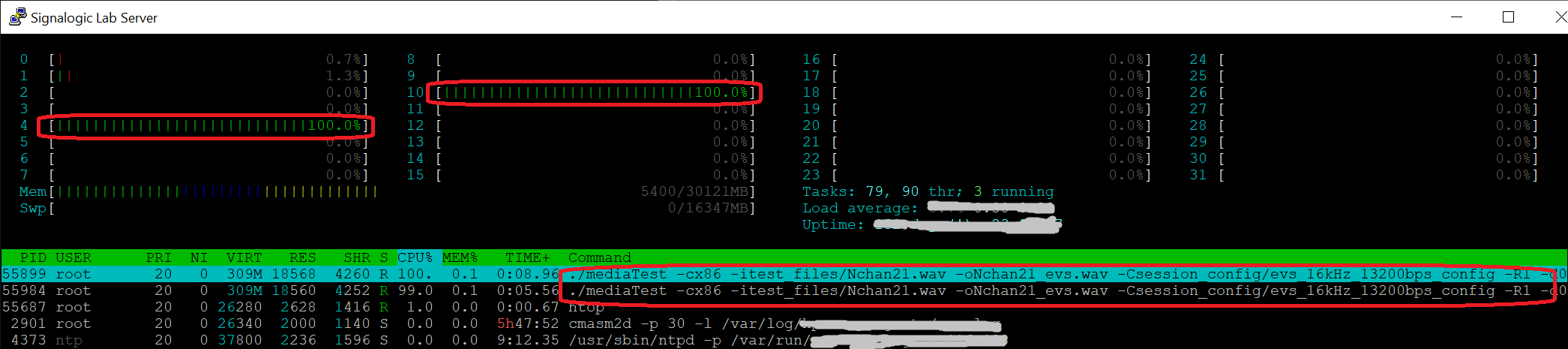
Again note the highlighted screencap areas, showing 100% core usage across two mediaTest process, for a total of 42 EVS encoder instances and 42 decoder instances. In this example, the two mediaTest process were run in two (2) separate terminal windows. By contrast, the mediaMin reference application uses one process to start multiple threads. In either case, at the shared object library (.so) level, SigSRF codecs are completely thread-safe, with no knowledge of application structure, process, thread, etc.
Newer codecs support "super wideband" and "fullband" sampling rates of 32 and 48 kHz. Below are some mediaTest command lines to test these rates with music and other high bandwidth content. In the first example a 44.1 kHz stereo music wav file is encoded and decoded with the EVS codec, producing an output stereo wav file with which we can perform frequency domain and other analysis and measurements:
mediaTest -cx86 -itest_files/music_stereo.wav -omusic_stereo_evs.wav -Csession_config/evs_48kHz_24400bps_stereo_config
Note that mediaTest performs sampling rate (Fs) conversion from 44.1 to 48 kHz prior to encode, as it knows the input Fs from the wav file header, and it knows the fullband Fs specification from the config file. In the following spectrograph we can see that EVS fullband maintains the full 22.05 kHz bandwidth of music content.
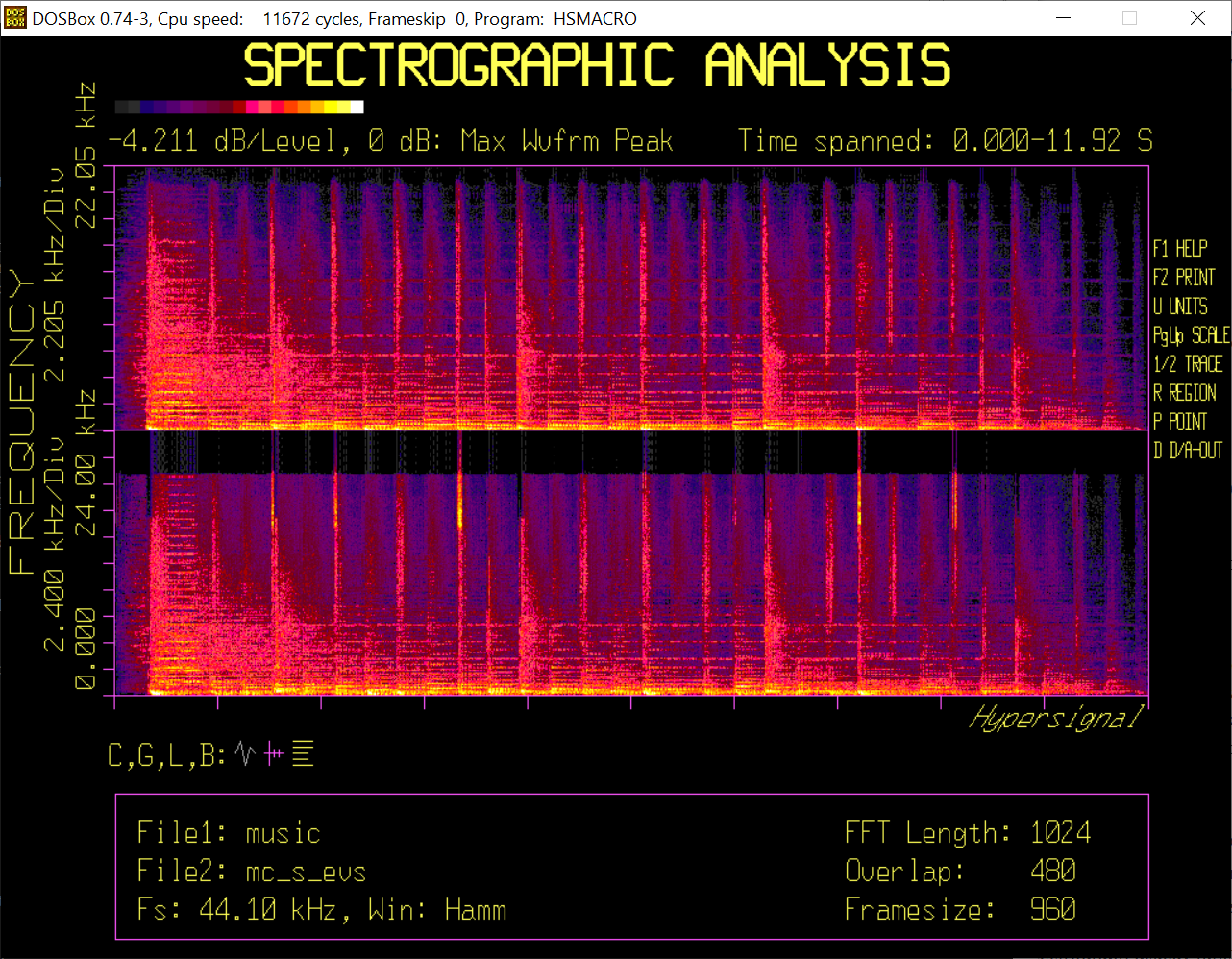
To play the output wav file you can use the following sox command:
sox music_stereo_evs.wav -t waveaudio
and to play only the left or right channel:
sox music_stereo_evs.wav -t waveaudio remix 1
sox music_stereo_evs.wav -t waveaudio remix 2
The next example uses the AMR-WB codec, which is limited to a fixed 16 kHz sampling rate (aka wideband):
mediaTest -cx86 -itest_files/music_stereo.wav -omusic_stereo_amrwb.wav -Csession_config/amrwb_23850bps_stereo_config
and in the following spectrograph we can see only 8 kHz of music content was preserved.
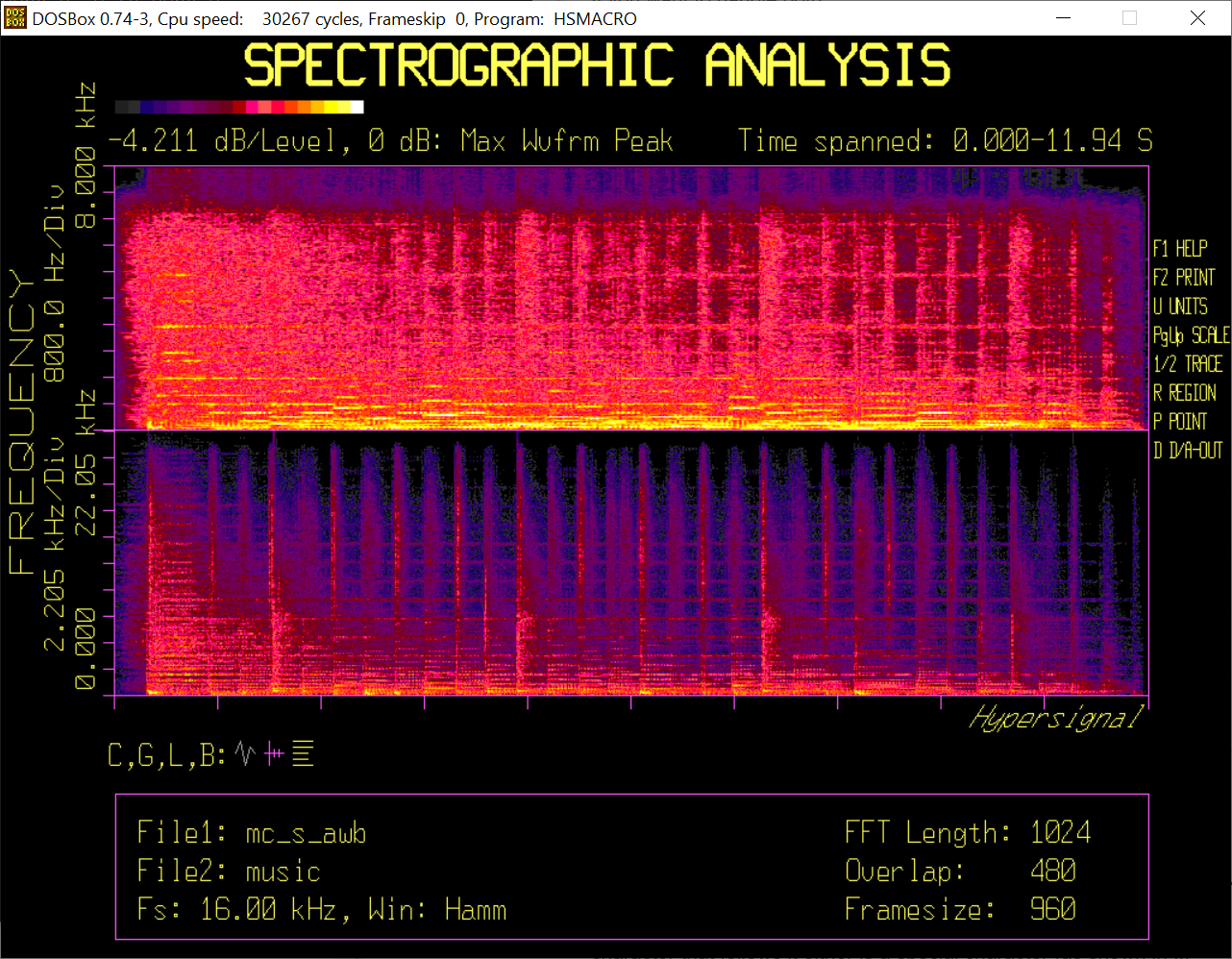
To verify sampling rate conversion by itself, we can use a command such as:
mediaTest -cx86 -itest_files/music_stereo.wav -omusic_stereo_passthru.wav -Csession_config/passthru_stereo_config
where passthru_stereo_config specifies "none" for codec type, but enforces a 48 kHz output sampling rate.
As explained on the SigSRF page, coCPU refers to Texas Instruments, FPGA, neural net, or other non x86 CPUs available in a server, typically on a PCIe card. coCPUs are typically used to (i) "front" incoming network or USB data and perform real-time, latency-sensitive processing, or (ii) accelerate computationally intensive operations (e.g. convolutions in a deep learning application).
For transcoding, coCPU cores can be used to achieve extremely high capacity per box, for example in applications where power consumption and/or box size is constrained. The following command lines specify Texas Insstruments c66x coCPU cores 1. The first one does the same EVS WB test as above, and the second one does an EVS NB test. Both produce .wav files that contain a variety of speech, music, and other sounds that demonstrate fidelity and high definition achieved by wideband EVS encoding:
mediaTest -f1000 -m0xff -cSIGC66XX-8 -ecoCPU_c66x.out -itest_files/stv16c.INP -otest_files/c6x16c_test.wav

mediaTest -f1000 -m0xff -cSIGC66XX-8 -ecoCPU_c66x.out -itest_files/stv8c.INP -otest_files/c6x8c_test.wav -Csession_config/evs_8kHz_13200bps_config
Here are screen captures for the above two mediaTest commands (with frame count and run time highlighted):
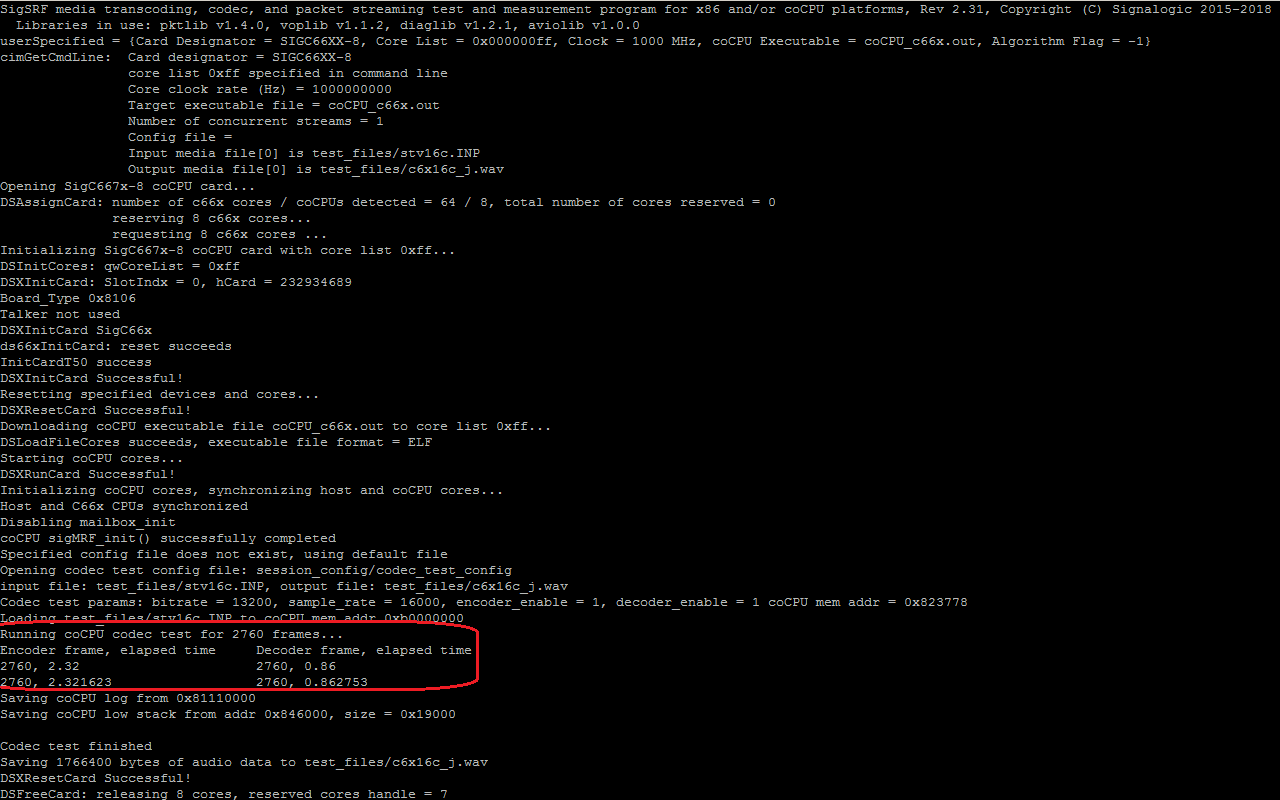
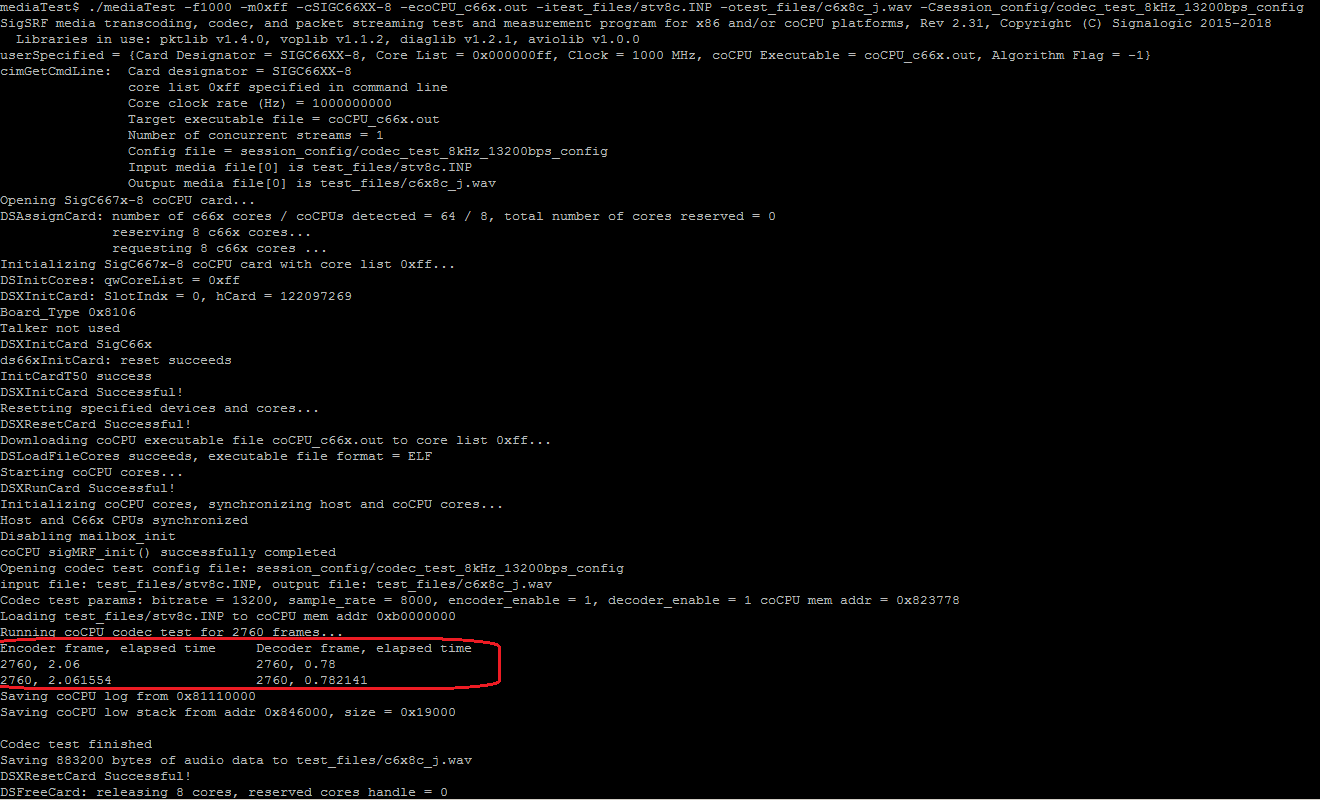
In the above command lines, eight (8) coCPU cores are specified, although the SigSRF SDK demo is limited to one coCPU core per instance. The coCPU clock rate can be set from 1 to 1.6 GHz (-f1000 to -f1600 in the command line). Depending on which coCPU card you have, up to 64 coCPU cores can be specified. Multiple instances of mediaTest can make use of more cards.
Below is a screen capture showing overlay comparison of the NB output with the 3GPP reference waveform:
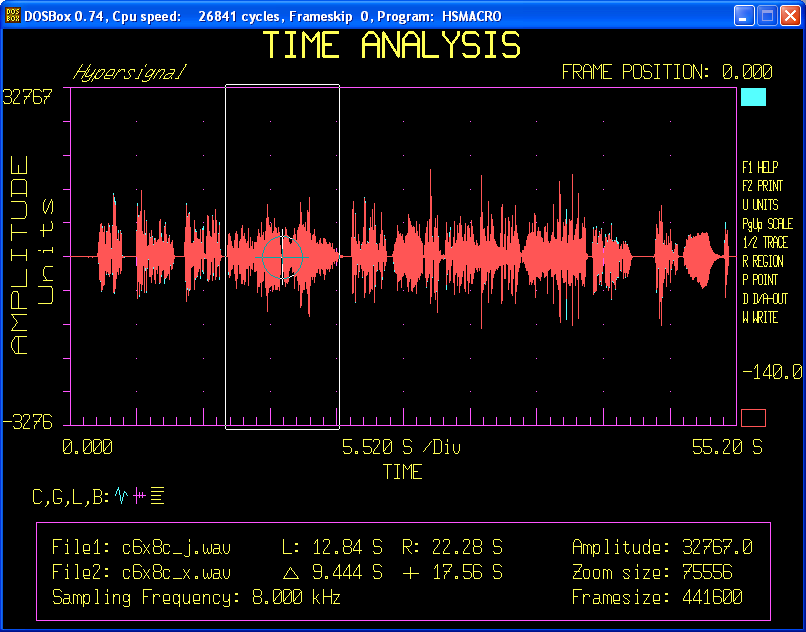
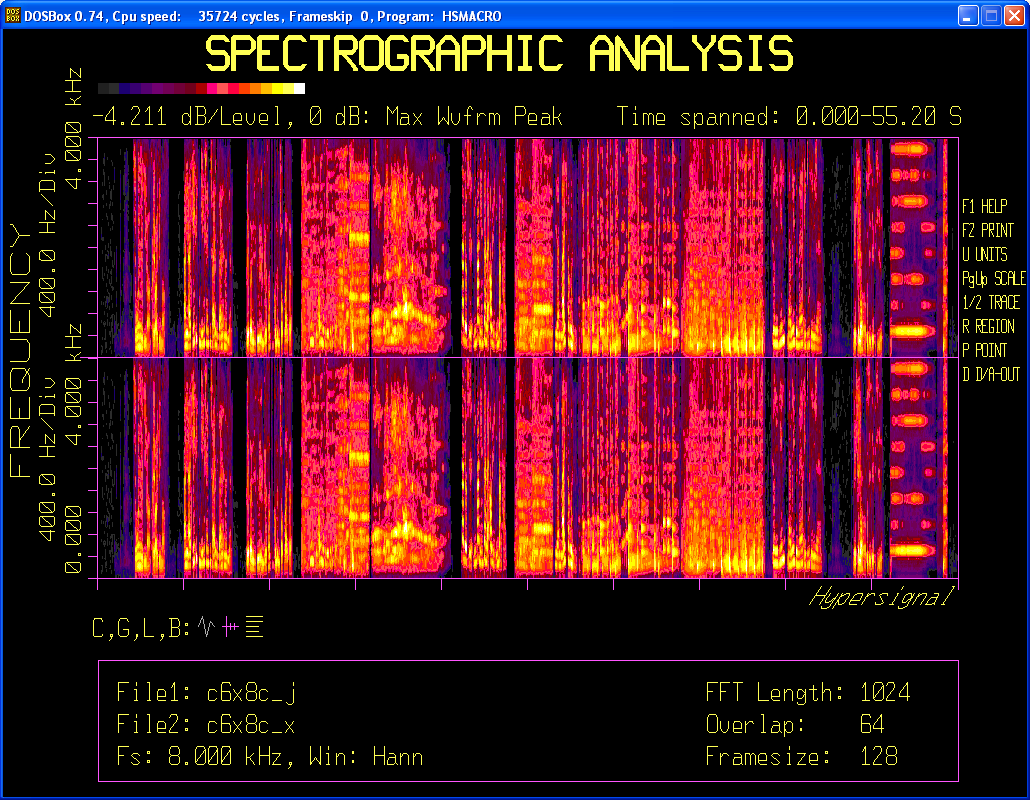
Note the small differences due to coCPU optimization for high capacity applications. These differences do not perceptually affect audio quality. Especially in the frequency domain, differences are very slight and hard to find. If you look carefully some slight differences can be found at higher frequencies.
1 For some examples of c66x PCIe cards added to Dell and HP servers, see this HPC TI wiki page.
For professional codec and audio test purposes, below is an image showing a lab audio workstation, configured with:
-
Dell R230 1U server (quad-core x86, 8 GB mem, multiple GbE and USB ports). 1U servers are notoriously noisy due to small fan size (higher rpm), but the Dell R230 series has a reputation as a very quiet -- yet high performance -- solution
-
Focusrite 2i2 USB audio unit (dual line and/or mic input, dual line out, sampling rates from 44.1 to 192 kHz, 24-bit sample width). Focusrite also makes quad I/O and other professional units with reasonable pricing
-
Ubuntu 16.04 Linux, mediaTest v2.3, and recent versions of pktlib, voplib, diaglib, and aviolib
Also shown for test and demonstration purposes is an HP 33120A function generator, providing reference waveforms and USB audio device calibration.
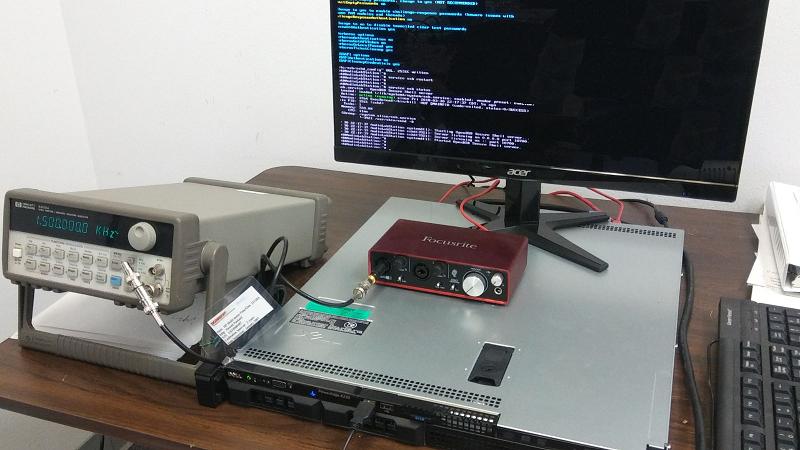
Below is a mediaTest command line testing default capabilities of the USB audio device. When no config file is specified, the device's default settings are used; for the Focusrite 2i2 this is 44.1 kHz and 2 channel input.
mediaTest -cx86 -iusb0 -ousb_codec_output.wavThe next command line includes a config file to control sampling rate and number of channels for the USB device:
mediaTest -cx86 -iusb0 -omelp_tst.wav -Csession_config/wav_test_config_melpeNote that various USB devices have different capabilities and options for sampling rate and number of channels. For example, the Focusrite 2i2 supports four (4) rates from 44.1 to 192 kHz. In codec + audio mode, mediaTest selects a device rate that is the "nearest integer multiplier" (or nearest integer divisor, or combination of multiplier and divisor) to the test rate, and performs sampling rate conversion as needed. As one typical example, when testing a narrowband codec (8 kHz sampling rate), mediaTest will select a device rate of 48 kHz, apply lowpass filtering, and then decimate by 1/6.
The mediaTest command lines below show (i) USB audio acquisition of a stereo wav file at 48 kHz, and (ii) processing USB audio with the EVS codec at 16 kHz sampling rate.
mediaTest -cx86 -iusb0 -ousb_test.wav -Csession_config/wav_test_config_48kHz_2chan

mediaTest -cx86 -iusb0 -ousb_codec_output.wav -Csession_config/evs_16kHz_13200bps_config
Below are waveform displays for a 1.5 kHz sine wave from the HP 33120A function generator, sampled by the Focusrite 2i2 at 48 kHz, downsampled to 16 kHz using an alglib API, and run through an EVS 13200 bps voplib encode API:
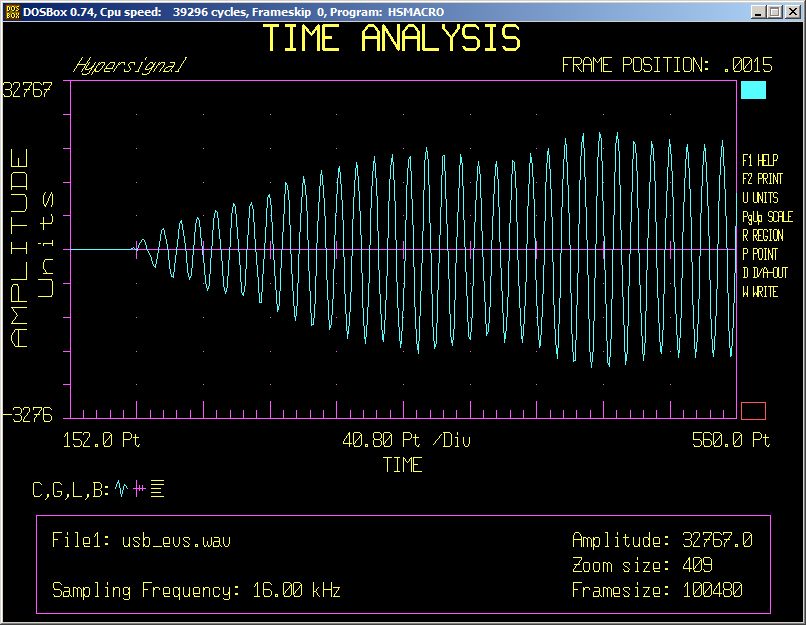
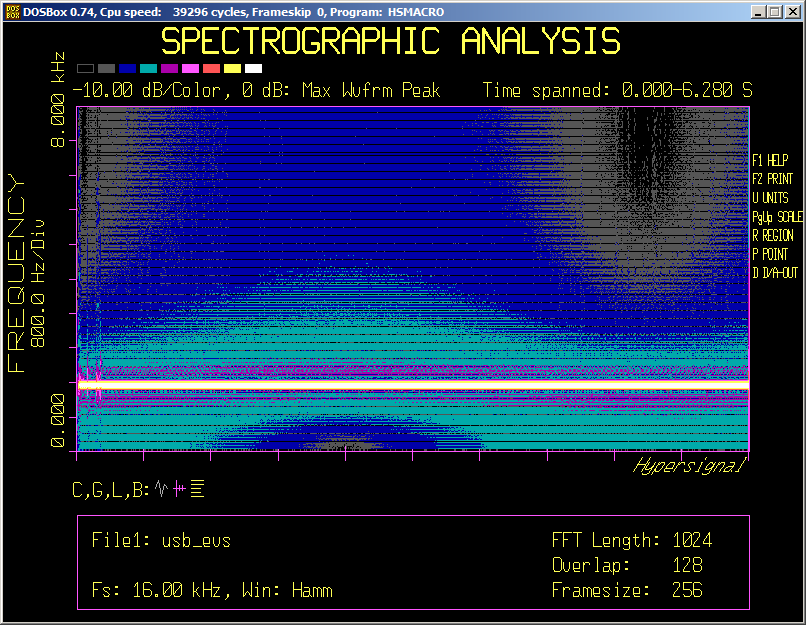
Note that EVS -- unlike older codecs that rely only on a vocal tract model -- is able to handle a pure tone input.
Frame mode performs encode, decode, or transcoding based on specifications in a "configuration file" given in the command line (see notes below). voplib APIs in mediaTest source code examples include codec instance creation, encode, and decode. The main objectives are to check for bit-exact results, measure audio quality, and measure basic transcoding performance, including sampling rate conversion. The following examples use the EVS codec.
mediaTest -cx86 -M4 -Csession_config/frame_test_config -L

mediaTest -cx86 -M4 -Csession_config/frame_test_config_wav_output -L
Below is a frame mode command line that reads a pcap file and outputs to wav file. No jitter buffering is done, so any out-of-order packets, DTX packets, or SSRC changes are not handled. The wav file sampling rate is determined from the session config file.
mediaTest -M4 -cx86 -ipcaps/EVS_16khz_13200bps_FH_IPv4.pcap -oEVS_16khz_13200bps_FH_IPv4.wav -Csession_config/pcap_file_test_config -LSimple mediaTest command lines can be used to convert pcaps containing one RTP stream to wav file, playout over USB audio, or both. This functionality is intended for testing codec functionality, audio quality, etc.
To convert pcaps containing multiple RTP streams with different codecs to wav files, see Dynamic Sessions above, which includes mediaMin examples of dynamic session creation. mediaMin generates wav files for each stream and also a "merged" stream wav file that combines all input streams. mediaMin uses pktlib packet processing APIs that handle jitter, packet loss/repair, child channels (RFC8108), etc, including very high amounts of packet ooo (out of order). Also mediaMin allows .sdp file input to override codec auto-detection and/or give specific streams to decode while ignoring others.
Although this is the mediaTest section of the Readme, some example mediaMin command lines are shown first, as they are the simplest, fastest way to convert EVS pcaps to wav files. The following two examples are included in the .rar packages and Docker containers:
mediaMin -cx86 -i../pcaps/EVS_16khz_13200bps_CH_PT127_IPv4.pcap -L -d0xc11 -r20

mediaMin -cx86 -i../pcaps/EVS_16khz_13200bps_FH_IPv4.pcap -L -d0xc11 -r20
The above command lines will work on any EVS pcap, regardless of header format, EVS primary or AMR-WB IO compatibility modes, bitrate, etc, thanks to mediaMin's RTP auto-detection and dynamic session creation capabilities. Output wav and G711 pcap files are produced on the mediaMin folder (command line options to control output file paths are given in mediaMin Command Line Quick-Reference below).
To process pcaps faster than real-time, use a slight variation:
mediaMin -cx86 -i../pcaps/EVS_16khz_13200bps_CH_PT127_IPv4.pcap -L -d0xc11 -r0.5

mediaMin -cx86 -i../pcaps/EVS_16khz_13200bps_FH_IPv4.pcap -L -d0xc11 -r0.5
The "-r0.5" command line option specifies a processing interval of 1/2 msec instead of 20 msec [1].
Going beyond mediaMin, mediaTest also can be used as a "deep dive" EVS Player. Below are mediaTest command lines using the same example EVS pcaps as above:
mediaTest -cx86 -ipcaps/EVS_16khz_13200bps_FH_IPv4.pcap -oEVS_16khz_13200bps_FH_IPv4.wav -Csession_config/evs_player_example_config -L

mediaTest -cx86 -ipcaps/EVS_16khz_13200bps_CH_PT127_IPv4.pcap -oEVS_16khz_13200bps_CH_PT127_IPv4.wav -Csession_config/evs_player_example_config2 -L
mediaTest also accepts the "-rN" command line option. If none is specified, the default is N=20 (20 msec) [1].
mediaTest offers test and measurement features not available in mediaMin, including a wider variety of I/O formats and low-level EVS encoding control, such as RF (channel aware) settings, DTX enable/disable, ptime interval, and more. For example, the following command line will play an EVS pcap over USB audio:
mediaTest -cx86 -ipcaps/EVS_16khz_13200bps_FH_IPv4.pcap -ousb0 -Csession_config/evs_player_example_config -LIn the above USB audio example, output is specified as USB port 0 (the -ousb0 cmd line option). Other USB ports can be specified, depending on what is physically connected to the server.
Combined with .cod file [2] input (described in Codec Test and Measurement above), .pcap, .pcapng, and .rtp input (or .rtpdump), this makes mediaTest a flexible "EVS player".
Unlike mediaMin, mediaTest does not perform dynamic session creation on input pcap files. Instead mediaTest expects a session configuration file, specified on the command line with the -Cconfig_file_path command line option, containing remote and local IP address and port info that match pcap file contents. Click on the small right arrow to see an example session config file for the above EVS Player examples:
Example Session Config File
# Session config file used for EVS player mediaTest demos, defining endpoints for EVS to G711 transcoding[start_of_session_data] term1.remote_ip = 192.168.0.3 # src term1.remote_port = 10242 term1.local_ip = 192.168.0.1 # dest term1.local_port = 6154 term1.media_type = voice term1.codec_type = EVS term1.bitrate = 13200 # in bps term1.ptime = 20 # in msec term1.rtp_payload_type = 127 term1.dtmf_type = NONE term1.dtmf_payload_type = NONE term1.sample_rate = 16000 # in Hz term1.header_format = 1 # for EVS, 0 = CH format, 1 = FH format # term1.dtx_handling = -1 # -1 disables DTX handling
term2.remote_ip = 192.168.0.2 term2.remote_port = 6170 term2.local_ip = 192.168.0.1 term2.local_port = 18446 term2.media_type = voice term2.codec_type = G711_ULAW term2.bitrate = 64000 # in bps term2.ptime = 20 # in msec term2.rtp_payload_type = 0 term2.dtmf_type = NONE term2.dtmf_payload_type = NONE term2.sample_rate = 8000 # in Hz # term2.dtx_handling = -1 # -1 disables DTX handling [end_of_session_data]
to see contents of the evs_player_example_config file from the example mediaTest commands above. Note fields allowing control over header format, ptime interval, RF (channel aware) settings, and DTX enable/disable and interval.
Depending on the number of sessions defined in the session config file, multiple inputs and outputs can be entered. See Static Session Configuration above for more information.
1 20 msec is the nominal real-time packet delta for many RTP media formats
2 .cod files are in MIME "full header" format, per 3GPP specs
The following mediaTest command lines convert AMR pcaps to wav files:
mediaTest -cx86 -ipcaps/AMRWB-23.85kbps-20ms_bw.pcap -oamr_WB_23850bps.wav -Csession_config/amrwb_packet_test_config_AMRWB-23.85kbps-20ms_bw -L

mediaTest -cx86 -ipcaps/AMR-12.2kbps-20ms_bw.pcap -oAMR-12.2kbps-20ms_bw.wav -Camr_packet_test_config_AMR-12.2kbps-20ms_bw -L
The following command line will play an AMR pcap over USB audio:
mediaTest -cx86 -ipcaps/AMRWB-23.85kbps-20ms_bw.pcap -ousb0 -Csession_config/amrwb_packet_test_config_AMRWB-23.85kbps-20ms_bw -LThe above command lines will work on any AMR pcap, including octet aligned and bandwidth efficient formats. Combined with the .cod file input described above, this makes mediaTest an "AMR player" that can read pcaps or .cod files (which use MIME "full header" format per 3GPP specs).
In the above USB audio example, output is specified as USB port 0 (the -ousb0 cmd line option). Other USB ports can be specified, depending on what is physically connected to the server.
Simple mediaTest command lines can be used to convert wav and other audio format files to pcap files.
The following mediaTest command line converts a wav file to EVS wideband pcap:
mediaTest -cx86 -itest_files/T018.wav -oasr_test.pcap -Csession_config/evs_16kHz_13200bps_config
A similar command line can be used with other audio format files. The config file allows EVS bitrate, header format, and other options to be specified. mediaTest automatically performs sample rate conversion if the wav file Fs is different than the sample rate specified in the config file.
The following mediaTest command line converts a wav file to AMR-WB pcap:
mediaTest -cx86 -itest_files/T018.wav -oasr_test.pcap -Csession_config/amrwb_16kHz_12650bps_configmediaTest can perform transcoding by encoding from an audio input (see list above in "Codec + Audio Mode") to a compressed bitstream file, and decoding the bitstream file to an audio output. Two command lines are required, and framesize (e.g. 20 msec, 25 msec, etc) must match between codecs.
mediaMin above describes real-time transcoding between input and output packet streams (either socket or pcap I/O).
- In mediaTest command lines above, input filenames following a naming convention where CH = Compact Header, FH = Full Header, PTnnn = Payload Type nn. Some filenames contain values indicating sampling rate and bitrate (denoted by NNkhz and NNbps). Some pcap filenames contain packets organized according to a specific RFC (denoted by RFCnnnn).
- NB = Narrowband (8 kHz sampling rate), WB = Wideband (16 kHz), SWB = Super Wideband (32 kHz)
- Comparison results are bit-exact if the cmp command gives no messages
- .wav files are stored in either 16-bit linear (PCM) format or 8-bit G711 (uLaw) format, depending on the command line specs. All generated .wav files can be played with Win Media, VLC, or other player
- Codec compressed bitstreams are stored in files in ".cod" format, with a MIME header and with FH formatted frames (i.e. every frame includes a ToC byte). This format is compatible with 3GPP reference tools, for example you can take a mediaTest generated .cod file and feed it to the 3GPP decoder, and vice versa you can take a 3GPP encoder generated .cod file and feed it to the mediaTest command line. See examples in the "Using the 3GPP Decoder" section below.
- session config files (specified by the -Cconfig_file_path command line option), contain codec, sampling rate, bitrate, DTX, ptime, and other options. They may be edited. See the Static Session Configuration above.
- Transcoding in frame mode tests is not yet supported.
For applications integrating a SigSRF codec, "hello codec" demonstrates the minimum source code needed to encode/decode media with SigSRF codecs. hello_codec.c and its Makefile are located at
/installpath/Signalogic/apps/mediaTest/hello_codec
where installpath is the path used when installing SigSRF software. For the Signalogic Docker Hub containers, this path is
/home/sigsrf_sdk_demo/Signalogic/apps/mediaTest/hello_codec
To make and run hello_codec, cd to the hello_codec folder and type
make clean; make all
The hello_codec command line accepts codec config file and debug mode options, but no input / output specs or operating mode options (to process a variety of audio file and USB I/O sources and combinations, use the mediaTest program instead). When it runs hello_codec
- reads a codec config file given on the command line to determine the codec type and any optional parameters
- fills in CODEC_PARAMS structs and creates and initializes encoder and decoder instances
- encodes and decodes a 1 kHz tone buffer frame-by-frame (using the natural frame size supported by the codec)
- deletes codec instances
- stores output in a .wav file
The .c source is commented in detail including source sections and necessary / optional header files. The Makefile has a table showing libs (i) required, (ii) required for demo (but not for licensed), and (iii) optional.
Here are some examples of running hello_codec
./hello_codec -cx86 -C../session_config/evs_16kHz_13200bps_config
./hello_codec -cx86 -C../session_config/evs_32kHz_13200bps_config -d0x80000000
./hello_codec -cx86 -C../session_config/amr_packet_test_config_AMR-12.2kbps-20ms_bw
./hello_codec -cx86 -C../session_config/amrwb_packet_test_config_AMRWB-23.85kbps-20ms_bw
Upon completion, hello_codec saves output in file codec_output_test.wav for convenient codec output audio quality testing.
Pktlib is a SigSRF library module providing high-capacity media/packet worker threads, analytics and telecom operating modes, jitter buffer, DTX (discontinuous transmission) and variable ptime handling, packet re-ordering and repair (both SID and media packets), packet formatting, and packet tracing and stats collection. Pktlib also interfaces to voplib for media decoding and encoding, and to streamlib for stream group processing.
The pktlib documentation page documents the pktlib API interface.
Source code for packet/media threads is available for reference and application purposes. This source
- is used by the mediaMin and mediaTest reference apps and can be modified to change their behavior
- demonstrates the full range of pktlib, voplib, streamlib, and diaglib APIs
- is proven in production deployments and can be incorporated by user-defined applications that need reliable high-capacity operation
DTX (Discontinuous Transmission) handling can be enabled/disabled on per session basis, and is enabled by default (see the above session config file example). When enabled, each DTX occurrence is expanded to the required duration as follows:
-
the Pktlib DSGetOrderedPackets() API reacts to SID packets emerging from the jitter buffer and inserts SID CNG (comfort noise generation) packets with adjusted timestamps and sequence numbers in the buffer output packet stream
-
the media decoder specified for the session generates comfort noise from the SID CNG packets
From this point, the media encoder specified for the session can be used normally, and outgoing packets can be formatted for transmission either with the DSFormatPacket() API or a user-defined method.
A log file example showing incoming SID packets and buffer output DTX expansion is included in Packet Log below.
DTX handling is enabled by default in pktlib packet/media work threads; user applications do not need to call APIs or make any other intervention.
Variable ptimes refers to endpoints that have unequal payload times (ptimes); for example one endpoint might be sending/receiving media every 20 msec and another endpoint every 40 msec. SigSRF SDK mediaMin reference app examples include command lines that match, or "transrate" timing between endpoints with unequal ptimes.
Here are mediaMin command lines that convert incoming pcaps with 20 msec ptime to outgoing pcaps with 40 msec ptime:
mediaMin -cx86 -C../session_config/g711_20ptime_g711_40ptime_test_config -i../pcaps/pcmutest.pcap -opcmutest_40ptime.pcap -opcmutest_40ptime.wav -LmediaMin -cx86 -C../session_config/evs_20ptime_g711_40ptime_test_config -i../pcaps/EVS_16khz_13200bps_FH_IPv4.pcap -ovptime_test1.pcap -LFor the above command lines, note in the run-time stats displayed by mediaMin, the number of transcoded frames is half of the number of buffered / pulled frames, because of the 20 to 40 msec ptime conversion.
Here is a mediaMin command line that converts an incoming pcap with 240 msec ptime to 20 msec:
mediaMin -cx86 -C../session_config/evs_240ptime_g711_20ptime_test_config -i../pcaps/EVS_16khz_16400bps_ptime240_FH_IPv4.pcap -ovptime_test2.pcap -ovptime_test2.wav -LNote however that 240 msec is a very large ptime more suited to unidirectional media streams. For a bidirectional real-time media stream, for example a 2-way voice conversation, large ptimes would cause excessive delay and intelligibility problems between endpoints.
DTMF event handling can be enabled/disabled on per session basis, and is enabled by default (see comments in the above session config file example). When enabled, DTMF events are interpreted by the pktlib DSGetOrderedPackets() API according to the format specified in RFC 4733. Applications can look at the "packet info" returned for each packet and determine if a DTMF event packet is available, and if so call the DSGetDTMFInfo() API to learn the event ID, duration, and volume. Complete DTMF handling examples are shown in packet/media thread source code.
mediaMin command line examples that process pcaps containing DTMF RTP event packets are given in DTMF / RTP Event Handling above.
Packet log file examples showing incoming DTMF event packets and how they are translated to buffer output packets are included both in DTMF / RTP Event Handling above and Packet Log below.
DTMF handling is enabled by default and DTMF RTP event groups are fully automated in pktlib packet/media worker threads; user applications do not need to call APIs or make any other intervention.
In line with SigSRF's emphasis on high performance streaming, the pktlib library module implements a jitter buffer with advanced features, including:
- Re-ordering of ooo (out-of-order) packets, including an optional automatic "holdoff" feature that dynamically adjusts jitter buffer depth to account for ooo outliers
- Accepts incoming packets in real-time, unlimited rate (i.e. as fast as possible), or user-specified rate
- Maximum buffer depth (or backpressure limit) can be specified on per-session basis
- Dynamic channel creation to support multiple RTP streams per session (see Multiple RTP Streams (RFC8108) above)
- Dynamic delay and depth adjustment control through APIs and command line options
- Statistics APIs, logging, and several options such as overrun control, probation control, flush, and bypass modes
The pktlib jitter buffer provides user control of various depth related parameters, including min, max, and target depth, dynamic adjustment, and others. Default values of target and max depth are 10 and 14 packets, respectively. However, these can be changed if necessary. mediaMin supports the -jN command line option, where N specifies depth as number of packets. For example, using the OpenLI example command line shown above, jitter buffer depth could be specified as less than default values, having max depth of 12 and target depth of 7:
mediaMin -cx86 -i../pcaps/openli-voip-example.pcap -L -d0x000c1c01 -r20 -j0x0c07
or more than default values:
mediaMin -cx86 -i../pcaps/openli-voip-example.pcap -L -d0x000c1c01 -r20 -j0x1810
Note that N is a 16-bit value accepting two (2) 8-bit values, one for max depth and one for target depth (for this reason N is normally given as a hex value, but it's not necessary).
If you see mediaMin warning messages such as:
00:01:56.159.041 WARNING (pkt): get_chan_packets() says ch 2 ssrc 0xfd3ca075 non-monotonic jitter buffer output sequence numbers 1121 1119, gap = -2, num_fill_timestamps = -17, numpkts = 4, num pkts add = 5, fPrevSID_reuse = 0, SID repair = 0
then increasing jitter buffer target and max depths should be helpful. In the above warning example, somewhere in the input RTP stream re-ordering failed by 2 packets; increasing target and max depths by 8 is a reasonable approach.
Pktlib jitter buffer default behavior is to repair both media and SID packets, unless disabled by session configuration flags. Media packets are repaired using a packet loss concealment (PLC) algorithm based on interpolation, prior stream packet input history, and other factors. SID packets are repaired using a SID re-use algorithm. In both cases packet history, RTP timestamp, and packet re-ordering are factored into repairs.
The packet history log details exactly which packets were repaired, and also provides overall repair stats, organized by channel and SSRC. Run-time stats also displays packet repair information; the screen capture below shows channel 4 (SSRC 0xd9913891) with one (1) instance of SID repair and channel 2 (SSRC 0x545d19db) with 63 timestamp repairs:
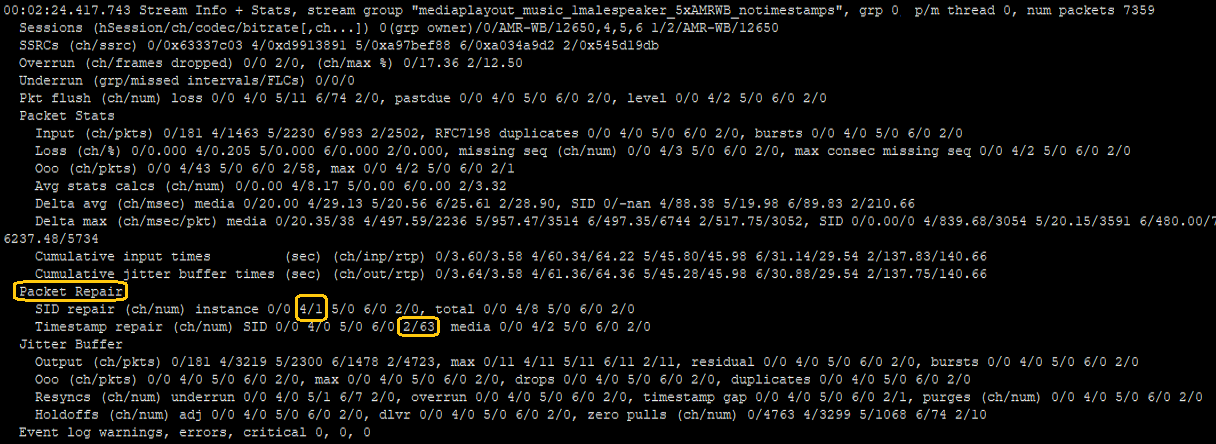
pktlib implements RFC8108, which although not yet ratified, is widely used to allow multiple RTP streams per session, based on SSRC value transitions. pktlib allows creation of new RTP streams on-the-fly (dynamically) and resumption of prior streams. When pktlib creates a new RTP stream, it also creates new media encoder and decoder instances, in order to maintain separate and contiguous content for each stream. This is particularly important for advanced codecs such as EVS, which depend heavily on prior audio history for RF channel EDAC, noise modeling, and audio classification (e.g. voice vs. music).
pktlib implements RFC7198, a method to address packet loss that does not incur unbounded delay, by duplicating packets and sending as separate redundant RTP streams. Pktlib detects and unpacks streams with packets duplicated per RFC7198. Run-time stats invoked and printed onscreen or in the event log by mediaMin or user-defined apps show duplicated packet counts in the "RFC7198 duplicates" field (under the "Packet Stats" subheading).
Streamlib is a SigSRF library module responsible for constructing, enhancing, and post-processing stream groups. Stream group construction includes:
- per-stream underrun (gap) management
- per-stream overrun management (in cases where packet rates [1] exceed expected ptime)
- alignment of individual streams in time (i.e. interstream alignment)
- sampling rate conversion for individual stream contributors (if needed)
- insertion of timing and event markers, if specified in streamlib debug / measurement options
- audio stream merging or conferencing, if specified
Stream group output enhancement includes:
- frame loss concealment (FLC)
- amplitude limiting and automatic gain control (AGC)
- digital filtering (e.g. smoothing of glitches or other discontinuities)
Stream group output post-processing includes:
- sampling rate conversion, if needed for encoding, speech recognition, or other post-processing
- encoding, if specified (e.g. G711, AMR, EVS, etc. by making voplib API calls), and formatting and queuing RTP packet output (by making pktlib API calls)
- speech recognition, if specified (by making inferlib API calls)
- stream deduplication, if specified
- user-defined signal processing
As shown in telecom and analytics mode data flow diagrams, streamlib is divided into two sub-blocks:
- stream group
- media domain processing
The second sub-block, media domain processing, includes post-processing listed above, and its source code can be modified as needed.
Note that all processing in streamlib, in both the stream group and media domain processing sub-blocks, operates on sampled audio or video data, arriving there after jitter buffer, decoding, and other packet flow in packet/media thread processing (look for DSProcessStreamGroupContributors() API call). Streamlib does no packet operations other than formatting and queuing of RTP packets for output, if needed.
[1] This is actually "frame rate", since as noted above streamlib deals in already-decoded packet data. But the root cause of overrun is higher-than-expected rate of incoming packets.
Stream groups are groupings of input streams, related by call participants, analytics criteria, or other association. Each stream group consists of up to eight (8) "contributors" that may be added and deleted from the group at any time, and for which packet flow may start and stop at any time. The SigSRF streamlib module performs the following stream group processing:
- Maintain contributor integrity (manage stream gaps and alignment)
- Group actions (merge, conference, deduplicate streams, etc)
- Improve output quality (conceal frame loss)
- Apply media domain signal processing (examples include speech recognition, FFT, sound detection)
The above processing is shown in data flow diagrams "Stream Groups" and "Media Domain Processing" blocks.
As shown in SigSRF data flow diagrams, streamlib default behavior is to generate G711 packet audio for stream group output. Other codecs can be used for encoding by customizing the SESSION_DATA struct "group_term.codec_type" element (and other related elements) in application source. To see use of SESSION_DATA, TERMINATION_INFO, and media attributes structs in the mediaMin reference app, look inside create_dynamic_session() in mediaMin source code.
Stream group wav file output can be specified in the mediaMin command line or via flags in pktlib session creation APIs. An 0x800 flag in the -dN command line option enables wav file outputs for stream groups, their individual contributors, and also an N-channel wav file (where N is the number of group contributors). Using pktlib session creation APIs, these wav file outputs can be specified separately or in combination, per application needs.
Note that streamlib handles the mechanics of wav file output, which means packet/media threads are able to generate wav file output concurrently. This provides the best possible combination of audio quality and real-time performance.
When a stream group's members have a time relationship to each other, for example different legs of a conference call, stream alignment becomes crucial. During a call one or more streams may exhibit:
underrun - gaps due to lost packets or call drop-outs
overrun - bursts or sustained rate mismatches where packets arrive faster than expected
Both underrun and overrun may substantially mis-match the expected packet rate (i.e. expected ptime interval for individual stream group contributors). In analytics mode, stream alignment may need to overcome additional problems, such as large numbers of ooo (out-of-order) packets, or encapsulated streams sent TCP/IP or inaccurate packet timestamps.
Regardless of what packet flow problems are encountered, streams must stay in time-alignment true to their origin in order to maintain overall call audio accuracy and intelligibility. The SigSRF streamlib module implements several algorithms to deal with underrun, overrun, and stream alignment, and can handle up to 20% sustained underrun and overrun conditions.
In addition to gap management and stream alignment mentioned above, streamlib continuously monitors stream group output for quality, applying FLC (frame loss concealment), amplitude wrap detection, discontinuity smoothing, etc. In part this processing is intended to produce high quality audio output, but also many applications have real-time output requirements, where packet audio must be sent to a "recorder" or real-time devices of some type that are highly sensitive to gaps or other packet problems.
FLC occurs when, after all individual stream contributor management, merging, and other processing is complete, stream group ouptut will incur a gap and be unable to meet continuous real-time output requirements. Typically this occurs due to simultaneous packet loss in all stream group inputs, but not always, it can also happen due to anomalies in alignment between inputs. When an output gap is inevitable, streamlib applies an algorithm to conceal the frame gap, based on interpolation, prior stream group output history, and other factors.
Note that FLC is similar, but not the same as PLC (Packet Loss Concealment), which is implemented by pktlib as part of packet repair, due to media or SID packet loss.
voplib is the voice-over-packet library used in SigSRF software. voplib is used by reference applications (e.g. mediaTest), other SigSRF libraries (e.g. pktlib), and user applications. The codec readme page has a software architecture diagram showing voplib's location in the SigSRF architecture.
voplib provides a unified, documented interface to all codecs, and handles all memory allocation per the XDAIS standard. voplib abstracts codec architecture variation, for example codecs may have different numbers of shared object (.so) files, depending on how their standards body source code is organized, some support on-the-fly commands, the way errors are handled varies, etc. Also, voplib supports high capacity, "stand alone", diagnostic, and other specialized builds for application specific purposes.
The voplib API interface DSCodecCreate() API supports two general types of structs, CODEC_PARAMS for user and reference applications, and TERMINATION_INFO for packet/media worker threads. See the codec readme page for detailed information.
Pktlib packet/media worker threads display run-time stats onscreen and/or in the event log by calling the DSLogRunTimeStats() pktlib API for a session or range of sessions from user-defined applications. Run-time stats are also displayed when:
- the last session of a stream group closes
- stream groups are not active and a session closes
Applications can use the default mode, or a custom mode, for packet/media threads to call DSLogRunTimeStats() (look for the API in packet/media thread source code).
Although packet/media threads wait to display run-time stats until sessions are closed, they can be displayed and/or printed to the event log at any time. It's probably not wise to do so often, as each instance takes some processing time and a chunk of log (or screen) space.
Run-time stats include the following main categories:
- Sessions (list of sessions and channels for which stats are displayed)
- SSRCs (also includes RFC8108 RTP streams)
- Overrun and Underrun (applicable when stream groups are enabled)
- Packet Stats
- Packet Repair
- Jitter Buffer
- Summary of event log warnings and errors
Below are run-time stats examples from mediaMin screen captures.
00:02:24.582.168 Stream Info + Stats, stream group "mediaplayout_music_1malespeaker_5xAMRWB_notimestamps", grp 0, p/m thread 0, num packets 7359
  Sessions (hSession:ch:codec-bitrate[,ch...]) 0(grp owner):0:AMR-WB-12650,4:AMR-WB-12650,5:AMR-WB-12650,6:AMR-WB-12650 1:2:AMR-WB-12650
  SSRCs (ch:ssrc) 0:0x63337c03 4:0xd9913891 5:0xa97bef88 6:0xa034a9d2 2:0x545d19db
  Overrun (ch:frames dropped) 0:0 2:0, (ch:max %) 0:16.41 2:12.41
  Underrun (grp:missed intervals/FLCs/holdoffs) 0:0/0/0
  Pkt flush (ch:num) loss 0:0 4:0 5:11 6:81 2:50, pastdue 0:0 4:0 5:0 6:0 2:0, level 0:0 4:2 5:0 6:0 2:0
  Packet Stats
    Input (ch:pkts) 0:181 4:1463 5:2230 6:983 2:2502, SIDs 0:0 4:365 5:17 6:96 2:480, RFC7198 duplicates 0:0 4:0 5:0 6:0 2:0, bursts 0:0 4:0 5:0 6:0 2:0
    Loss (ch:%) 0:0.000 4:0.205 5:0.000 6:0.000 2:0.000, missing seq (ch:num) 0:0 4:3 5:0 6:0 2:0, max consec missing seq 0:0 4:2 5:0 6:0 2:0
    Ooo (ch:pkts) 0:0 4:43 5:0 6:0 2:58, max 0:0 4:2 5:0 6:0 2:1
    Avg stats calcs (ch:num) 0:0.00 4:8.17 5:0.00 6:0.00 2:3.32
    Delta avg (ch:msec) media 0:20.00 4:29.14 5:20.56 6:24.09 2:27.89, SID 0:-nan 4:88.41 5:20.00 6:100.84 2:220.09
    Delta max (ch:msec/pkt) media 0:20.29/167 4:499.29/2236 5:959.28/3514 6:780.00/6565 2:519.28/3052, SID 0:0.00/0 4:840.00/3054 5:20.06/3592 6:1440.01/5750 2:46239.36/5
    Cumulative input times         (sec) (ch:inp/rtp) 0:3.60/3.58 4:60.34/64.22 5:45.80/45.98 6:31.06/29.54 2:137.76/140.66
    Cumulative jitter buffer times (sec) (ch:out/rtp) 0:3.64/3.58 4:61.36/64.36 5:45.28/45.98 6:30.82/29.54 2:137.66/140.66
  Packet Repair
    SID repair (ch:num) instance 0:0 4:1 5:0 6:0 2:0, total 0:0 4:8 5:0 6:0 2:0
    Timestamp repair (ch:num) SID 0:0 4:0 5:0 6:0 2:66, media 0:0 4:2 5:0 6:0 2:0
  Jitter Buffer
    Output (ch:pkts) 0:181 4:3219 5:2300 6:1478 2:4723, max 0:11 4:11 5:11 6:11 2:11, residual 0:0 4:0 5:0 6:0 2:0, bursts 0:0 4:0 5:0 6:0 2:0
    Ooo (ch:pkts) 0:0 4:0 5:0 6:0 2:0, max 0:0 4:0 5:0 6:0 2:0, drops 0:0 4:0 5:0 6:0 2:0, duplicates 0:0 4:0 5:0 6:0 2:0
    Resyncs (ch:num) underrun 0:0 4:0 5:1 6:10 2:3, overrun 0:0 4:0 5:0 6:0 2:0, timestamp gap 0:0 4:0 5:0 6:0 2:1, purges (ch:num) 0:0 4:0 5:0 6:0 2:0
    Holdoffs (ch:num) adj 0:0 4:0 5:0 6:0 2:1, dlvr 0:0 4:0 5:0 6:0 2:1, zero pulls (ch:num) 0:4770 4:3306 5:1075 6:91 2:59, allocs (cur/max) 0/22
  Event log warnings, errors, critical 0, 0, 0
The following example shows a high number of RFC8108 streams and wide range of bitrates.
00:00:41.319.243 Stream Info + Stats, stream group "86_anon", grp 0, p/m thread 0, num packets 4485
  Sessions (hSession:ch:codec-bitrate[,ch...]) 0(grp owner):0:EVS-13200(1750,2400,6600,8850,12650,24400) 1:2:EVS-24400(2400,13200),8:EVS-24400(1750,6600,8850,12650) 2:4:EVS-13200(1750,2400,6600,8850,12650,24400) 3:6:EVS-24400(2400,13200),9:EVS-24400(1750,6600,8850,12650)
  SSRCs (ch:ssrc) 0:0xec969576 2:0xbbf51b9c 8:0x1fd9fd3e 4:0xec969576 6:0xbbf51b9c 9:0x1fd9fd3e
  Overrun (ch:frames dropped) 0:0 2:0 4:0 6:0, (ch:max %) 0:6.90 2:6.42 4:6.90 6:6.47
  Underrun (grp:missed intervals/FLCs/holdoffs) 0:0/0/0
  Pkt flush (ch:num) loss 0:0 2:0 8:28 4:0 6:0 9:20, pastdue 0:0 2:0 8:0 4:0 6:0 9:0, level 0:7 2:30 8:4 4:5 6:32 9:2
  Packet Stats
    Input (ch:pkts) 0:1103 2:285 8:854 4:1105 6:283 9:855, SIDs 0:112 2:21 8:110 4:112 6:21 9:110, RFC7198 duplicates 0:0 2:0 8:0 4:0 6:0 9:0, bursts 0:0 2:0 8:0 4:0 6:0 9:0
    Loss (ch:%) 0:0.181 2:1.404 8:0.351 4:0.000 6:2.120 9:0.234, missing seq (ch:num) 0:2 2:4 8:3 4:0 6:6 9:2, max consec missing seq 0:2 2:4 8:3 4:0 6:6 9:2
    Ooo (ch:pkts) 0:0 2:0 8:0 4:0 6:0 9:0, max 0:0 2:0 8:0 4:0 6:0 9:0
    Avg stats calcs (ch:num) 0:0.23 2:1.80 8:0.45 4:0.00 6:2.71 9:0.30
    Delta avg (ch:msec) media 0:23.87 2:20.00 8:20.16 4:23.67 6:20.00 9:19.71, SID 0:133.39 2:59.94 8:125.34 4:135.30 6:57.14 9:126.05
    Delta max (ch:msec/pkt) media 0:539.11/2365 2:299.76/898 8:380.00/2738 4:539.11/2366 6:319.75/902, SID 0:440.02/3513 2:120.00/353 8:979.99/1817 4:420.01/3515 6:120.00/355, overall 0:539.11/2365 2:299.76/898 8:979.99/1817 4:539.11/2366 6:319.75/902
    Cumulative input times         (sec) (ch:inp/rtp) 0:37.22/40.04 2:6.46/8.84 8:30.78/31.23 4:37.20/40.04 6:6.44/8.84
    Cumulative jitter buffer times (sec) (ch:out/rtp) 0:37.01/40.18 2:6.54/8.98 8:30.61/31.53 4:37.01/40.18 6:6.54/8.98
  Packet Repair
    SID repair (ch:num) instance 0:74 2:1 8:7 4:74 6:1 9:7, total 0:265 2:8 8:48 4:265 6:8 9:48
    Timestamp repair (ch:num) SID 0:5 2:0 8:4 4:5 6:0 9:4, media 0:2 2:13 8:1 4:0 6:15 9:0
  Jitter Buffer
    Output (ch:pkts) 0:2010 2:430 8:1576 4:2010 6:430 9:1576, max 0:11 2:11 8:11 4:11 6:11 9:11, residual 0:0 2:0 8:0 4:0 6:0 9:0, bursts 0:0 2:0 8:0 4:0 6:0 9:0
    Ooo (ch:pkts) 0:0 2:0 8:0 4:0 6:0 9:0, max 0:0 2:0 8:0 4:0 6:0 9:0, drops 0:0 2:0 8:0 4:0 6:0 9:0, duplicates 0:0 2:0 8:0 4:0 6:0 9:0
    Resyncs (ch:num) underrun 0:0 2:0 8:2 4:0 6:0 9:1, overrun 0:0 2:0 8:0 4:0 6:0 9:0, timestamp gap 0:0 2:0 8:0 4:0 6:0 9:0, purges (ch:num) 0:0 2:0 8:0 4:0 6:0 9:0
    Holdoffs (ch:num) adj 0:0 2:0 8:1 4:0 6:0 9:2, dlvr 0:0 2:0 8:0 4:0 6:0 9:1, zero pulls (ch:num) 0:17 2:915 8:42 4:15 6:908 9:32, allocs (cur/max) 0/49
  Event log warnings, errors, critical 0, 0, 0
Here are some format and notational conventions used in run-time stats display:
- Session (hSession), channel (ch), and stream group owners (grp) are followed by a colon (":"). Values of each range from 0 to max allowed (depending on version of SigSRF software)
- Session information includes channel, codec type, initial bitrate (separated from codec type by a "/"), and dynamic bitrates 1 inside parentheses ("()")
- At subcategory level, stats are separated by a comma. For example the Ooo (ch/pkts) stat above shows 0:0 4:43 ..., max 0:0 4:2 ...which indicates number of ooo packets followed by one or more stats, followed by max ooo packets
- Within a single stat at subcategory level, channels are separated by one (1) space. For example the Ooo (ch/pkts) stat above shows 0:0 4:43 ... indicating channel 0 has no ooo packets, channel 4 has 43, etc
- Input vs. output jitter buffer times are vertically aligned to make comparison easier
- A time value that displays as "nan" or "-nan" indicates no instance of that stat was recorded
The screencaps below show run-time stats examples, with highlighting around the sessions summary, including channels for each session and codec type and bitrate(s) for each channel. The second screencap includes annotations for sessions summary fields.


1 Dynamic bitrates occur when a stream's bitrate changes on-the-fly, due to a codec mode request (known as a CMR) or re-negotiation by transmit and receive endpoints. Dynamic bitrates also include DTX bitrates, for example for telecom codecs (not LBR codecs like MELPe) low values such as 1750 or 2400 bps are DTX rates
In addition to run-time stats generated by packet/media worker threads, the mediaMin reference application generates summary stats. The key difference is that packet/media threads don't know about number and types of input streams, they just see sessions and channels. mediaMin, on the other hand, is aware of input stream sources. Here is a mediaMin command line example with a mixed audio and video input pcap, followed by summary stats after the pcap is processed:
mediaMin -c x86 -i ../test_files/VIDEOCALL_EVS_H265.pcapng -L -d 0x06000000c11 -r20 -g /tmp/shared -l4
Note that mediaMin includes packet fragmentation and duplication stats, if applicable:
=== mediaMin stats
    packets [input]
        total [0]57486
        Fragments = [0]26, reassembled = [0]11, orphans = 2, max on list = 4
        TCP = [0]700
        UDP = [0]41396, encapsulated = [0]0
        RTP = [0]22892, RTCP = [0]282, Unhandled = [0]0
        Redundant discards TCP = [0]683, UDP = [0]5544
    session [stream]
        [0] hSession 0 dynamic, term 0, ch 0, codec EVS, bitrate 24400, payload type 110, ssrc 0xa006b6e2, first packet 00:06.806.364
        [1] hSession 1 dynamic, term 0, ch 2, codec EVS, bitrate 24400, payload type 110, ssrc 0xa006b6e2, first packet 00:06.806.826
        [2] hSession 2 dynamic, term 0, ch 4, codec EVS, bitrate 24400, payload type 110, ssrc 0x8b9e8be3, first packet 00:06.929.918
        [3] hSession 3 dynamic, term 0, ch 6, codec EVS, bitrate 24400, payload type 110, ssrc 0x8b9e8be3, first packet 00:06.930.298
        [4] hSession 4 dynamic, term 0, ch 8, codec H.265, bitrate 57856, payload type 112, ssrc 0x6002d4b9, first packet 00:07.609.577
        [5] hSession 5 dynamic, term 0, ch 10, codec H.265, bitrate 57856, payload type 112, ssrc 0x6002d4b9, first packet 00:07.609.759
        [6] hSession 6 dynamic, term 0, ch 12, codec H.265, bitrate 57856, payload type 112, ssrc 0x1dd21290, first packet 00:07.935.556
        [7] hSession 7 dynamic, term 0, ch 14, codec H.265, bitrate 57856, payload type 112, ssrc 0x1dd21290, first packet 00:07.935.671
        Missed stream group intervals = 0
        Marginal stream group pulls = 0
The SigSRF diaglib library module provides event logging APIs, which are used by SigSRF libraries including pktlib, voplib, and streamlib, and also by mediaMin and mediaTest reference apps. All diaglib APIs are also available for user-defined applications.
Event logs are .txt files, updated continuously by packet/media threads with informational events, status, warnings, and errors, with each entry prefixed by a timestamp (different timestamp formats may be specified, including absolute and relative time). Event log filenames use the following notation:
filename_event_log_MM.txt
where filename is a user-specified name based on inputs, stream groups, or other naming convention (for the mediaMin behavior on this look for szEventLogFile in mediaMin source code), and MM is the mode of operation (none or "tm" for telecom mode, "am" for analytics mode).
Below is an example event log.
00:00:00.000.003 INFO: DSConfigPktlib() uflags = 0x7
  P/M thread capacity  max sessions = 51, max groups = 17
  Event log            path = EVS_16khz_13200bps_CH_RFC8108_IPv6_event_log_am.txt, uLogLevel = 8, uEventLogMode = 0x32, flush size = 1024, max size not set
  Debug                uDebugMode = 0x0, uPktStatsLogging = 0xd, uEnableDataObjectStats = 0x1
  Screen output        uPrintfLevel = 5, uPrintfControl = 0
  Energy saver         p/m thread energy saver inactivity time = 30000 msec, sleep time = 1000 usec
  Alarms               DSPushPackets packet cutoff alarm elapsed time not set, p/m thread preemption alarm elapsed time = 40 (msec)
00:00:00.000.207 mediaMin: packet media streaming for analytics and telecom applications on x86 and coCPU platforms, Rev 2.9.1, Copyright (C) Signalogic 2018-2021
00:00:00.000.218 mediaMin INFO: event log setup complete, log file EVS_16khz_13200bps_CH_RFC8108_IPv6_event_log_am.txt, log level = 8
00:00:00.001.080 INFO: DSConfigVoplib() voplib and codecs initialized, flags = 0x19
00:00:00.001.175 INFO: DSConfigStreamlib() stream groups initialized
00:00:00.001.358 INFO: DSAssignPlatform() system CPU architecture supports rdtscp instruction, TSC integrity monitoring enabled
00:00:00.001.788 INFO: DSOpenPcap() opened pcap input file: ../pcaps/EVS_16khz_13200bps_CH_RFC8108_IPv6.pcap
00:00:00.003.123 INFO: DSCreateSession() created stream group "", idx = -1, owner session = 0, status = 1
00:00:00.003.224 INFO: DSCreateSession() has assigned session 0 with flags 0xf02 and term1/2 flags 0x4f/0xf to p/m thread 0 (which has 1 session and 1 stream group)
00:00:00.003.446 INFO: DSOpenPcap() opened pcap output file: EVS_16khz_13200bps_CH_RFC8108_IPv6_jb0.pcap
00:00:00.003.912 INFO: first packet/media thread running, lib versions DirectCore v4.1.1 DEMO, pktlib v3.1.0 DEMO, streamlib v1.9.0 DEMO, voplib v1.3.3 DEMO, alglib v1.2.1, diaglib v1.5.0
00:00:00.003.987 INFO: DSConfigMediaService() says pthread_setaffinity_np() set core 0 affinity for pkt/media thread 0 (thread id 0x7fa148251700), num online cores found = 2, uFlags = 0x1180101, pktlib.c:8718
00:00:00.004.040 INFO: DSConfigMediaService() says setpriority() set Niceness to -15 for pkt/media thread 0
00:00:00.004.098 INFO: initializing packet/media thread 0, uFlags = 0x1180101, threadid = 0x7fa148251700, total num pkt/med threads = 1
00:00:00.004.228 INFO: Initializing session 0
00:00:00.004.342 INFO: First thread session input check, p/m thread = 0, fMediaThread = 1, i = 0, numSessions = 1
00:00:00.054.388 Received first packet for ch 0, p/m thread = 0
00:00:00.054.437 	SSRC = 0x49cc7510, SeqNum = 34881, TimeStamp = 2473967478
00:00:00.054.477 INFO:  Chan 0 dynamic jitter buffer received parameters (packet count): min = 2, target = 10, max = 14
00:00:00.054.513 INFO: Dynamic jitter buffer calculated values (sample count): min = 640, target = 3200, max = 4480
00:00:00.213.726 INFO: creating dynamic (child) channel 2 for hSession 0, parent ch 0
00:00:00.213.973 Received first packet for ch 2, p/m thread = 0
00:00:00.214.034 	SSRC = 0x35f8b4, SeqNum = 15, TimeStamp = 10672
00:00:00.214.103 INFO: (child) chan 2 dynamic jitter buffer received parameters (packet count): min = 2, target = 10, max = 14
00:00:00.214.159 INFO: Dynamic jitter buffer calculated values (sample count): min = 640, target = 3200, max = 4480
00:00:00.214.211 INFO: stream change #1 for hSession 0 ch 0 SSRC 0x49cc7510, starting RTP stream ch 2 SSRC 0x35f8b4 @ pkt 284
00:00:00.214.268 INFO: ch 2 waiting for parent ch 0 with 9 pkts remaining
00:00:00.672.029 INFO: creating dynamic (child) channel 3 for hSession 0, parent ch 0
00:00:00.672.174 Received first packet for ch 3, p/m thread = 0
00:00:00.672.209 	SSRC = 0x47686605, SeqNum = 11430, TimeStamp = 2391927402
00:00:00.672.246 INFO: (child) chan 3 dynamic jitter buffer received parameters (packet count): min = 2, target = 10, max = 14
00:00:00.672.282 INFO: Dynamic jitter buffer calculated values (sample count): min = 640, target = 3200, max = 4480
00:00:00.672.332 INFO: stream change #2 for hSession 0 ch 0 SSRC 0x35f8b4, starting RTP stream ch 3 SSRC 0x47686605 @ pkt 944
00:00:00.672.419 INFO: ch 3 waiting for sibling ch 2 with 9 pkts remaining
00:00:01.150.673 INFO: stream change #3 for hSession 0 ch 0 SSRC 0x47686605, resuming RTP stream ch 2 SSRC 0x35f8b4 @ pkt 1618
00:00:01.150.868 INFO: ch 2 waiting for sibling ch 3 with 9 pkts remaining
00:00:01.285.184 mediaMin INFO: Flushing 1 session 0
00:00:01.356.545 mediaMin INFO: Deleting 1 session [index] hSession/flush state [0] 0/3
00:00:01.356.598 INFO: Marking session 0 for deletion
        :
        :  run-time stats edited out, see [Run-Time Stats](#user-content-runtimestats_main) above
        :
00:00:01.357.337 INFO: Deleting session 0
00:00:01.357.403 INFO: DSDeleteSession() deleted group "", owner session = 0
00:00:01.357.566 INFO: purged 0 packets from jitter buffer for ch n deletion  (repeated for N [channels](#user-content-channels))
00:00:01.360.665 INFO: Deleted session 0
00:00:01.360.857 INFO: master p/m thread says writing input and jitter buffer output packet stats to packet log file EVS_16khz_13200bps_CH_RFC8108_IPv6_pkt_log_am.txt, streams found for all sessions = 3 (collate streams enabled), total input pkts = 1814, total jb pkts = 2162...
00:00:01.379.205 INFO: DSPktStatsWriteLogFile() says 3 input SSRC streams with 1814 total packets and 3 output SSRC streams with 2162 total packets logged in 17.9 msec, now analyzing...
00:00:01.381.857 INFO: DSPktStatsWriteLogFile() packet history analysis summary for stream 0, SSRC = 0x49cc7510, 283 input pkts, 283 output pkts
00:00:01.381.929     Packets dropped by jitter buffer = 0
00:00:01.381.985     Packets duplicated by jitter buffer = 0
00:00:01.382.043     Timestamp mismatches = 0
00:00:01.405.211 INFO: DSPktStatsWriteLogFile() packet history analysis summary for stream 1, SSRC = 0x35f8b4, 857 input pkts, 1172 output pkts
00:00:01.405.258     Packets dropped by jitter buffer = 0
00:00:01.405.297     Packets duplicated by jitter buffer = 0
00:00:01.405.332     Timestamp mismatches = 0
00:00:01.417.214 INFO: DSPktStatsWriteLogFile() packet history analysis summary for stream 2, SSRC = 0x47686605, 674 input pkts, 707 output pkts
00:00:01.417.261     Packets dropped by jitter buffer = 0
00:00:01.417.297     Packets duplicated by jitter buffer = 0
00:00:01.417.331     Timestamp mismatches = 0
00:00:01.417.368 INFO: DSPktStatsWriteLogFile() says packet log analysis completed in 38.2 msec, packet log file = EVS_16khz_13200bps_CH_RFC8108_IPv6_pkt_log_am.txt
00:00:01.611.148 ===== mediaMin stats
	Missed stream group intervals = 0
	Marginal stream group pulls = 0
pktlib, voplib, and streamlib event log entries follow a labeling convention:
- "INFO" indicates normal operation events, progress, and status
- "WARNING" indicates an unusual event, something that may be a problem and needs attention
- "ERROR" indicates a problem that could mean incorrect data, results, or software usage (for example API parameter issue)
- "CRITICAL" indicates a serious problem that could lead to a software stop or corrupted results
mediaMin event log entries use the above labeling convention but prefaced with "mediaMin", for example "mediaMin INFO".
To verify a clean event log, the following keywords should not appear:
alarm **
bad
critical
error
exceed
fail
invalid
overflow
preempt **
queue full
warning
wrap
** with exception of configuration info printed by the DSConfigPktlib() API, which normally appears once at event log start
Before mediaMin closes, it calls the DSPktStatsWriteLogFile() API in diaglib to write collected packet history and stats to a packet log. In addition, mediaMin specifies an option in this API to print a summary to the event log, as a convenient indicator of packet integrity separate from the detailed presentation in the packet log.
In the event log example above, here is the packet log summary section:
00:00:01.360.857 INFO: master p/m thread says writing input and jitter buffer output packet stats to packet log file EVS_16khz_13200bps_CH_RFC8108_IPv6_pkt_log_am.txt, streams found for all sessions = 3 (collate streams enabled), total input pkts = 1814, total jb pkts = 2162...
00:00:01.379.205 INFO: DSPktStatsWriteLogFile() says 3 input SSRC streams with 1814 total packets and 3 output SSRC streams with 2162 total packets logged in 17.9 msec, now analyzing...
00:00:01.381.857 INFO: DSPktStatsWriteLogFile() packet history analysis summary for stream 0, SSRC = 0x49cc7510, 283 input pkts, 283 output pkts
00:00:01.381.929     Packets dropped by jitter buffer = 0
00:00:01.381.985     Packets duplicated by jitter buffer = 0
00:00:01.382.043     Timestamp mismatches = 0
00:00:01.405.211 INFO: DSPktStatsWriteLogFile() packet history analysis summary for stream 1, SSRC = 0x35f8b4, 857 input pkts, 1172 output pkts
00:00:01.405.258     Packets dropped by jitter buffer = 0
00:00:01.405.297     Packets duplicated by jitter buffer = 0
00:00:01.405.332     Timestamp mismatches = 0
00:00:01.417.214 INFO: DSPktStatsWriteLogFile() packet history analysis summary for stream 2, SSRC = 0x47686605, 674 input pkts, 707 output pkts
00:00:01.417.261     Packets dropped by jitter buffer = 0
00:00:01.417.297     Packets duplicated by jitter buffer = 0
00:00:01.417.331     Timestamp mismatches = 0
00:00:01.417.368 INFO: DSPktStatsWriteLogFile() says packet log analysis completed in 38.2 msec, packet log file = EVS_16khz_13200bps_CH_RFC8108_IPv6_pkt_log_am.txt
Note especially the "Packets dropped" and "Timestamp mismatches" stats, which should both be zero. If not there may be packet flow integrity issues that should be addressed.
The SigSRF diaglib library module provides packet stats and history logging APIs, which are used by the mediaMin and mediaTest reference apps and also available for user-defined applications. Diaglib APIs include packet statistics and history logging for:
- incoming packets (network input, pcap file)
- jitter buffer output
- outgoing packets (network output, pcap file)
- analysis / comparison between incoming packets and jitter buffer output
In example mediaMin command lines above, the -L entry activates packet logging, with the first output filename found taken as the log filename but replaced with a ".txt" extension. If -Lxxx is given then xxx becomes the log filename.
Note: for both mediaMin and mediaTest reference applications, packet logs are generated only if the command line specifies input packet flow in some form; e.g. .pcap, .pcapng, or .rtpXXX files, UDP port(s), etc.
Packet statistics logged include packets dropped, out-of-order (ooo), missing, and duplicated. Statistics are calculated separately for each SSRC, with individual packet entries showing sequence number, timestamp, and type (bitstream payload, DTX, SID, SID CNG, DTMF Event, etc).
Below is a packet stats log file excerpt:
Packet info for SSRC = 353707 (cont), first seq num = 685, last seq num = 872 ...

Seq num 685              timestamp = 547104, pkt len = 33 media
Seq num 686              timestamp = 547424, pkt len = 33 media
Seq num 688 ooo 687      timestamp = 548064, pkt len = 33 media
Seq num 687 ooo 688      timestamp = 547744, pkt len = 33 media
Seq num 690 ooo 689      timestamp = 548704, pkt len = 33 media
Seq num 689 ooo 690      timestamp = 548384, pkt len = 33 media
Seq num 691              timestamp = 549024, pkt len = 33 media
Seq num 692              timestamp = 549344, pkt len = 6 DTX
:
:
Here is an excerpt from a stream summary:
:
:
Seq num 10001            timestamp = 451024, pkt len = 33 media
Seq num 10002            timestamp = 451344, pkt len = 6 DTX
Seq num 10003            timestamp = 453904, pkt len = 6 DTX
Seq num 10004            timestamp = 456464, pkt len = 6 DTX

Out-of-order seq numbers = 0, missing seq numbers = 22, number of DTX packets = 78

Total packets dropped = 0
Total packets duplicated = 0
As mentioned in "DTX Handling" above, here is a log file example, first showing incoming SID packets...
:
:
Seq num 22              timestamp = 107024, pkt len = 33 media
Seq num 23              timestamp = 107344, pkt len = 33 media
Seq num 24              timestamp = 107664, pkt len = 6 SID
Seq num 25              timestamp = 110224, pkt len = 6 SID
Seq num 26              timestamp = 112144, pkt len = 33 media
Seq num 27              timestamp = 112464, pkt len = 33 media
:
:
... and corresponding outgoing SID and SID comfort noise packets:
:
:
Seq num 22              timestamp = 107024, pkt len = 33 media
Seq num 23              timestamp = 107344, pkt len = 33 media
Seq num 24              timestamp = 107664, pkt len = 6 SID
Seq num 25              timestamp = 107984, pkt len = 6 SID CNG-R
Seq num 26              timestamp = 108304, pkt len = 6 SID CNG-R
Seq num 27              timestamp = 108624, pkt len = 6 SID CNG-R
Seq num 28              timestamp = 108944, pkt len = 6 SID CNG-R
Seq num 29              timestamp = 109264, pkt len = 6 SID CNG-R
Seq num 30              timestamp = 109584, pkt len = 6 SID CNG-R
Seq num 31              timestamp = 109904, pkt len = 6 SID CNG-R
Seq num 32              timestamp = 110224, pkt len = 6 SID
Seq num 33              timestamp = 110544, pkt len = 6 SID CNG-R
Seq num 34              timestamp = 110864, pkt len = 6 SID CNG-R
Seq num 35              timestamp = 111184, pkt len = 6 SID CNG-R
Seq num 36              timestamp = 111504, pkt len = 6 SID CNG-R
Seq num 37              timestamp = 111824, pkt len = 6 SID CNG-R
Seq num 38              timestamp = 112144, pkt len = 33 media
Seq num 39              timestamp = 112464, pkt len = 33 media
:
:
As mentioned in "DTMF Handling" above, here is a log file example showing incoming DTMF event packets. Note that per RFC 4733, one or more packets within the event may have duplicated sequence numbers and timestamps. The packet logging APIs included with SigSRF can optionally mark these as duplicated if needed.
:
:
Seq num 269              timestamp = 47600, pkt len = 160 media
Seq num 270              timestamp = 47760, pkt len = 4 DTMF Event
Seq num 271              timestamp = 47760, pkt len = 4 DTMF Event
Seq num 272              timestamp = 47760, pkt len = 4 DTMF Event
Seq num 273              timestamp = 47760, pkt len = 4 DTMF Event
Seq num 274              timestamp = 47760, pkt len = 4 DTMF Event
Seq num 274              timestamp = 47760, pkt len = 4 DTMF Event
Seq num 274              timestamp = 47760, pkt len = 4 DTMF Event
Seq num 275              timestamp = 48400, pkt len = 160 media
:
:
Below is an example of the Packet Stats and Analysis section of a packet log. Note the stats for packet loss (missing sequence numbers, and max consecutive missing sequence numbers), repaired media and SID packets, and timestamp mismatches.
** Packet Stats and Analysis **

Stream groups found = 1, group indexes = 0

Stream group 0, 5 streams

  Stream 0, channel 0, SSRC = 0x63337c03, 181 input pkts, 181 output pkts

    Input packets = 181, ooo packets = 0, SID packets = 0, seq numbers = 0..180, missing seq numbers = 0, max consec missing seq numbers = 0
    Input packet loss = 0.000%
    Input ooo = 0.000%, max ooo = 0

    Output packets = 181, ooo packets = 0, seq numbers = 0..180, missing seq numbers = 0, max consec missing seq numbers = 0, SID packets = 0, SID R packets = 0, repaired SID packets = 0, repaired media packets = 0
    Output packet loss = 0.000%
    Output ooo = 0.000%, max ooo = 0

    Packets dropped by jitter buffer = 0
    Packets duplicated by jitter buffer = 0
    Timestamp mismatches = 0

  Stream 1, channel 2, SSRC = 0x545d19db, 2502 input pkts, 4723 output pkts

    Input packets = 2502, ooo packets = 264, SID packets = 480, seq numbers = 86..2587, missing seq numbers = 0, max consec missing seq numbers = 0
    Input packet loss = 0.000%
    Input ooo = 5.276%, max ooo = 1

    Output packets = 4723, ooo packets = 0, seq numbers = 86..4808, missing seq numbers = 0, max consec missing seq numbers = 0, SID packets = 480, SID R packets = 2221, repaired SID packets = 0, repaired media packets = 0
    Output packet loss = 0.000%
    Output ooo = 0.000%, max ooo = 0

    Packets dropped by jitter buffer = 0
    Packets duplicated by jitter buffer = 0
    Timestamp mismatches = 0

  Stream 2, channel 4, SSRC = 0xd9913891, 1463 input pkts, 3219 output pkts

    Input packets = 1463, ooo packets = 363, SID packets = 365, seq numbers = 14..1479, missing seq numbers = 3, max consec missing seq numbers = 2
    Input packet loss = 0.205%
    Input ooo = 12.406%, max ooo = 2

    Output packets = 3219, ooo packets = 0, seq numbers = 14..3232, missing seq numbers = 0, max consec missing seq numbers = 0, SID packets = 366, SID R packets = 1753, repaired SID packets = 1, repaired media packets = 2
    Output packet loss = 0.000%
    Output ooo = 0.000%, max ooo = 0

    Packets dropped by jitter buffer = 0
    Packets duplicated by jitter buffer = 0
    Timestamp mismatches = 0

  Stream 3, channel 5, SSRC = 0xa97bef88, 2230 input pkts, 2300 output pkts

    Input packets = 2230, ooo packets = 0, SID packets = 17, seq numbers = 5524..7753, missing seq numbers = 0, max consec missing seq numbers = 0
    Input packet loss = 0.000%
    Input ooo = 0.000%, max ooo = 0

    Output packets = 2300, ooo packets = 0, seq numbers = 5524..7823, missing seq numbers = 0, max consec missing seq numbers = 0, SID packets = 17, SID R packets = 70, repaired SID packets = 0, repaired media packets = 0
    Output packet loss = 0.000%
    Output ooo = 0.000%, max ooo = 0

    Packets dropped by jitter buffer = 0
    Packets duplicated by jitter buffer = 0
    Timestamp mismatches = 0

  Stream 4, channel 6, SSRC = 0xa034a9d2, 983 input pkts, 1478 output pkts

    Input packets = 983, ooo packets = 0, SID packets = 96, seq numbers = 18630..19612, missing seq numbers = 0, max consec missing seq numbers = 0
    Input packet loss = 0.000%
    Input ooo = 0.000%, max ooo = 0

    Output packets = 1478, ooo packets = 0, seq numbers = 18630..20107, missing seq numbers = 0, max consec missing seq numbers = 0, SID packets = 96, SID R packets = 495, repaired SID packets = 0, repaired media packets = 0
    Output packet loss = 0.000%
    Output ooo = 0.000%, max ooo = 0

    Packets dropped by jitter buffer = 0
    Packets duplicated by jitter buffer = 0
    Timestamp mismatches = 0
Packet stats logging is part of the Diaglib module, which includes several flags (see the diaglib.h header file). Some of the more notable flags include:
- DS_PKTSTATS_LOG_COLLATE_STREAMS, collate and sort packet logs by RTP stream (i.e. using SSRC values)
- DS_PKTSTATS_LOG_SHOW_WRAPPED_SEQNUMS, show RTP sequence numbers with wrapping. Typically this makes it harder to do text searches for specific lost or ooo packets. The default is to show sequence numbers without wrapping, for example the sequence 65534, 65535, 0, 1 becomes 65534, 65535, 65536, 65537. For searches and spreadsheet analysis and other packet math, this can be helpful
- DS_PKTSTATS_LOG_EVENT_LOG_SUMMARY, print to event log a brief summary for each stream analyzed
Formatting and organization flags:
- DS_PKTSTATS_ORGANIZE_BY_SSRC, organize analysis and stats by SSRC
- DS_PKTSTATS_ORGANIZE_BY_CHNUM, organize analysis and stats by channel
- DS_PKTSTATS_ORGANIZE_BY_STREAMGROUP, organize analysis and stats by stream group
Debug flags:
- DS_PKTSTATS_LOG_LIST_ALL_INPUT_PKTS, list all current buffer input entries separately from analysis and stats section
- DS_PKTSTATS_LOG_LIST_ALL_OUTPUT_PKTS, list all current buffer output entries separately from analysis and stats section
Some of the RFCs supported by pktlib and voplib include:
- RFC 3550 (real-time transport protocol)
- RFC 2833 and 4733 (DTMF)
- RFC 4867 (RTP payload and file storage for AMR-NB and AMR-WB codecs)
- RFC 7198 (packet duplication)
- RFC 8108 (multiple RTP streams)
- RFC 3551, 3558, 4788, 5188, 5391, 5993, 6716
- RFC 8130 (payload format for MELPe / STANAG 4591) 1
- RFC 4566 and 8866 (session description protocol)
1 In progress, not yet in the SigSRF SDK
Pktlib and streamlib source codes in the SigSRF SDK include "user-defined code insert points" for signal processing and other algorithms to process media data, either or both (i) after extraction from ordered payloads and/or decoding, and (ii) after stream group processing. For these two (2) locations, the specific source codes are:
In packet/media thread processing, after decoding, but prior to sampling rate conversion and encoding, inside packet/media thread source code
In stream group output processing, inside media domain processing source code
The default source codes listed above include sampling rate conversion and encoding (depending on required RTP packet output), speech recognition, stream deduplication, and other processing.
Examples of possible user-defined processing include advanced speech and sound recognition, speaker identification, image analytics, and augmented reality (overlaying information on video data). Data buffers filled by SigSRF can be handed off to other processes, for instance to a Spark process for parsing / formatting of unstructured data and subsequent processing by machine learning libraries, or to a voice analytics process. The alglib library contains sampling rate conversion, FFT, convolution, correlation, and other optimized, high performance signal processing functions. Alglib supports both x86 and coCPU™ cores, and is used by the SigDL deep learning framework.
In addition to the above mentioned In SigSRF source codes, look also for the APIs DSSaveStreamData(), which saves ordered / extracted / decoded payload data, and DSGetStreamData(), which retrieves payload data. These APIs allow user-defined algorithms to control buffer timing between endpoints, depending on application objectives -- minimizing latency (real-time applications), maximizing bandwidth, matching or transrating endpoint timing, or otherwise as needed.
Below is source code example showing a basic packet processing loop with push/pull APIs. PushPackets() accepts both IP/UDP/RTP packets and TCP/IP encapsulated streams, for example HI3 intercept streams.
do {

      cur_time = get_time(USE_CLOCK_GETTIME); if (!base_time) base_time = cur_time;

   /* if specified, push packets based on arrival time (for pcaps a push happens when elapsed time exceeds the packet's arrival timestamp) */

      if (Mode & USE_PACKET_ARRIVAL_TIMES) PushPackets(pkt_in_buf, hSessions, session_data, thread_info[thread_index].nSessionsCreated, cur_time, thread_index);

   /* otherwise we push packets according to a specified interval. Options include (i) pushing packets as fast as possible (-r0 cmd line entry),
      (ii) N msec intervals (cmd line entry -rN),
      (iii) an average push rate based on output queue levels (the latter can be used with pcaps that don't have arrival timestamps) */

      if (cur_time - base_time < interval_count*RealTimeInterval[0]*1000) continue; else interval_count++;  /* if the real-time interval has elapsed, push and pull packets and increment the interval. Comparison is in usec */

   /* read packets from input flows, push to packet/media threads */

      if (!(Mode & USE_PACKET_ARRIVAL_TIMES)) PushPackets(pkt_in_buf, hSessions, session_data, thread_info[thread_index].nSessionsCreated, cur_time, thread_index);

   /* pull available packets from packet/media threads, write to output flows */

      PullPackets(pkt_out_buf, hSessions, session_data, DS_PULLPACKETS_JITTER_BUFFER, sizeof(pkt_out_buf), thread_index);
      PullPackets(pkt_out_buf, hSessions, session_data, DS_PULLPACKETS_TRANSCODED, sizeof(pkt_out_buf), thread_index);
      PullPackets(pkt_out_buf, hSessions, session_data, DS_PULLPACKETS_STREAM_GROUP, sizeof(pkt_out_buf), thread_index);

   /* check for end of input flows, end of output packet flows sent by packet/media threads, flush sessions if needed */

      FlushCheck(hSessions, cur_time, queue_check_time, thread_index);

      UpdateCounters(cur_time, thread_index);  /* update screen counters */

   } while (!ProcessKeys(hSessions, cur_time, &dbg_cfg, thread_index));  /* handle user input or other loop control */
SigSRF codecs are designed for concurrent, high capacity operation and implemented as Linux shared libs. These libs are:
- thread safe
- optimized for high performance, aimed at high cap and/or real-time applications
- compliant with the XDAIS standard for resource sharing, memory allocation, and low-level API structure
XDAIS compliance allows SigSRF codecs to be implemented on coCPU targets with minimal code porting issues. In fact, several SigSRF codecs were first implemented on Texas Instruments multicore CPU devices. When TI failed to recognize the fundamental industry shift in CPU design towards AI and deep learning and prematurely purged their DSP core competence and expertise, those codecs were then "back ported" to x86 with minimum hassle and high performance. Going forward, other vendors such as ARM clearly recognize the importance of adding low-power, small package size, high performance C code compatible cores to servers, and coCPU architecture considerations will continue to gain in importance.
Application interface to SigSRF codecs is through voplib, which provides a generic API interface for media encoding and decoding, including DSCodecCreate(), DSCodecEncode(), DSCodecDecode(), and DSCodecDelete() APIs (see the voplib.h header file). In SigSRF source code, these APIs are used by:
- mediaTest reference application (look for mediaTest_proc() in apps/mediaTest/mediaTest_proc.c)
- packet/media thread processing (packet_flow_media_proc.c), invoked indirectly by the mediaMin reference application, via the pktlib shared lib
The codec readme page has a software architecture diagram that shows the relationship between reference applications, voplib, and codecs.
Note: the examples in this section assume you have downloaded the 3GPP reference code and installed somewhere on your system.
The 3GPP decoder can be used as the "gold standard" reference for debug and comparison in several situations. Below are a few examples.
In some cases, maybe due to unintelligble audio output, questions about pcap format or capture method, SDP descriptor options used for EVS encoding, etc, you may want to simply take a pcap, extract its EVS RTP payload stream, and copy to a .cod file with MIME header suitable for 3GPP decoder input. The mediaTest command line can do this, here are two examples:
mediaTest -cx86 -ipcaps/EVS_16khz_13200bps_CH_PT127_IPv4.pcap -oEVS_pcap_extracted1.cod

mediaTest -cx86 -ipcaps/EVS_16khz_13200bps_FH_IPv4.pcap -oEVS_pcap_extracted2.cod
Next, run the 3GPP decoder:
./EVS_dec -mime -no_delay_cmp 16 EVS_pcap_extracted1.cod 3GPP_decoded_audio1.raw

./EVS_dec -mime -no_delay_cmp 16 EVS_pcap_extracted2.cod 3GPP_decoded_audio2.raw
Note the 3GPP decoder will produce only a raw audio format file, so you will need to use sox or other tool to convert to .wav file for playback. You can also decode with mediaTest directly to .wav format:
mediaTest -cx86 -iEVS_pcap_extracted1.cod -omediaTest_decoded_audio1.wav

mediaTest -cx86 -iEVS_pcap_extracted2.cod -omediaTest_decoded_audio2.wavNote -- this section applies to packet audio, and not to wav file outputs generated by mediaMin and mediaTest. See Audio Quality Notes below for additional wav file discussion.
As a quick reference, basic procedures for analyzing and playing packet audio from within Wireshark are given here.
To analyze packet media in Wirehark, follow these steps:
-
If you run mediaMin with dynamic session creation and stream groups enabled, then you can load stream group packet audio output in Wireshark. Stream group output file naming convention is explained in Stream Group Usage above. Note that stream group output packet audio is set to G711u by default (this can be modified if needed). Note - mediaMin also allows per stream transcoded packet audio outputs to be specified on the cmd line using "-o" (output) specs. These are also set to G711u by default, unless specified otherwise in a static session config file (or modified in mediaMin source code).
-
If you run mediaMin with static session configuation, make sure your session config file has:
- "termN.codec_type" set to G711 uLaw/ALaw, AMR, or other codec for which Wireshark has built-in decoding
- "termN.rtp_payload_type" field should be set to 0 (zero) for uLaw, 8 (eight) for ALaw, or a dynamic payload type for AMR
For termN, N should be 1 or 2, depending on which endpoint is the desired output. See Session Endpoint Flow Diagram above
-
If you run mediaTest to generate pcaps from input USB audio or wav or other audio file, make sure the "codec_type" field in your config file is set as noted in step 2.
-
After loading a relevant output pcap (as outlined in steps 1-3) into Wireshark, make sure Wireshark can "see" the stream in RTP format:
- Right click a packet in the stream and select "decode as"
- Under 'Current' select "RTP"
After doing this, the protocol field in the main Wireshark window for the relevant packets should display "RTP".
-
Analyzing packet streams:
- In the menu bar, go to Telephony -> RTP -> RTP Streams
- Select the relevant RTP stream in the now displayed "RTP Streams" pop-up window
- Click "Analyze" in the "RTP Streams" pop-up window
- To play RTP audio, click "Play Streams" in the "RTP Stream Analysis" pop-up window, and click the
▶️ button in the "RTP Player" pop-up window
For more detailed information on packet audio analysis and timing, see Audio Quality Notes and High Performance and Real-Time Performance below.
The procedure for saving audio to file from G711 encoded pcaps is similar to playing audio as noted above. Here are additional instructions to save audio data to .au file format, and then use the Linux "sox" program to convert to .wav format. Note that it's also possible to save to .raw file format (no file header), but that is not covered here.
-
First, follow steps 1. and 2. above in "Analyzing Packet Media in Wireshark".
-
Second, save to .au file from Wireshark:
- In the menu bar, go to Telephony > RTP > RTP Streams
- Select the relevant RTP stream in the now displayed "RTP Streams" pop-up window
- Click Analyze in the "RTP Streams" pop-up window
- Click Save > Forward Audio Stream to save (this will give .au and .raw options)
- Enter in filename and choose the location to save, then click Save
-
Last, convert the .au file to .wav format:
- Enter the following Linux command:
sox audio_file.au audio_file.wav
When .au save format is specified as shown in step 2, Wireshark performs uLaw or ALaw conversion internally (based on the payload type in the RTP packets) and writes out 16-bit linear (PCM) audio samples. If for some reason you are using .raw format, then you will have to correctly specify uLaw vs. ALaw to sox, Audacity, Hypersignal, or other conversion program. If that doesn't match the mediaMin or mediaTest session config file payload type value, then the output audio data may still be audible but incorrect (for example it may have a dc offset or incorrect amplitude scale).
Note: the above instructions apply to Wireshark version 2.2.6.
The command line quick-reference section covers all reference apps, followed by (i) a section specific to mediaMin and (ii) a section specific to mediaTest. Below are general command line notes, options, and arguments that apply to all reference apps, including mediaMin, mediaTest, and hello_codec:
- All command line option and arguments are case sensitive
- Enter ./prog -h or ./prog -? to see a list of command line options (e.g. mediaMin -h or mediaTest -?. Just ? works also). Mandatory command line options are shown with "!"
- Application modes and functionality are controlled by the -dN command line option, where N is a hex value containing up to 64 flags. These flags are defined in cmd_line_options_flags.h and referenced throughout this documentation
- Comments in cmd_line_options_flags.h start with 'm" or 'mm' to indicate which -dN flags apply to both mediaMin and mediaTest and which apply only to mediaMin
- mediaMin and mediaTest always generate an event log. The default event log filename is name_event_log.txt, where "name" is the filename (without extension) of the first command line input and the event log is stored on the current working folder. The ‑‑event_log_path command line option can be used to control event log paths; otherwise event log filenames and all other event log options can be changed programmatically (as one example, look for LOG_EVENT_SETUP in mediaMin.cpp)
Command line error reporting includes command line options
- with arguments with invalid format
- missing a required argument
- unrecognized (includes misplaced entry, spurious text, etc)
Here are some examples:


In the above examples command line option arguments with invalid format are highlighted in red, unrecognized options in yellow, and options with missing required argument in purple. Error reporting printout is shown immediately after the command line.
Below are general command line options and arguments that apply to all reference apps, including mediaMin, mediaTest, and hello_codec.
-c is a command line option specifying one or more "platform designators", for example
 -c x86
 -cx86
 -cArm
At least one platform designator is required, specifying the host platform (i.e. bare metal, VM, or container). If more than one platform designator is given, the second specifies an accelerator or coCPU card. Currently for the Github .rar packages and Docker containers this option should always be given as -cx86 or -c x86
-M specifies an optional operating mode N. -M0 is the default; currently for the Github .rar packages and Docker containers no operating mode should be given
Inputs and outputs are given by one or more "-i Input" and "-o Output" command line options, where Input and Output are file paths or UDP ports. mediaTest supports file types including .wav, .au, .pcap, .cod, .amr, and many others. mediaMin supports file types including .pcap, .pcapng, .rtpxx (.rtp, .rtpdump, etc), and .wav. Here are some input and output command line option examples:
-i sounds.wav
-omytestoutput.pcap
-o output_audio.wav
-o output_audio_bitstream.cod
-o output_video_bitstream.h265
-i192.168.1.2:52000
-i fd00:5d2::11:123:5222:52000
-imytestinput1.pcap -imytestinput2.pcap
-i mytestinput1.pcap -imytestinput2.pcap -i192.168.1.2:52000
Here are some examples of mediaTest and mediaMin command lines with input and output options:
mediaTest -cx86 -i test_files/stv16c.INP -o test_files/stv16c_amr_23850_16kHz_mime.pcap -C session_config/amrwb_codec_test_config

mediaTest -cx86 -i test_files/AAdefaultBusinessHoursGreeting.pcm -o test_files/stv16c_evs_16kHz_5900_full_header.pcap -C session_config/evs_16kHz_5900bps_full_header_config
in the above command lines, mediaTest encodes raw audio files to pcaps containing AMR-WB 23.85 kbps and EVS VBR (average bitrate 5900 bps) RTP packets.
mediaTest -c x86 -i test_files/T_mode.wav -o test_files/T_mode_48kHz_13200.wav -C session_config/evs_48kHz_input_16kHz_13200bps_full_band_config --md5sum -Ec -t2
in the above command line, mediaTest upsamples a 16 kHz .wav file to 48 kHz, encodes to EVS 13.2 kbps bitstream, then decodes and writes to an output .wav file.
mediaMin -cx86 -i ../pcaps/mediaplayout_amazinggrace_ringtones_1malespeaker_dormantSSRC_2xEVS_3xAMRWB.pcapng -o xcode0.pcap -o xcode1.pcap -o xcode2.pcap -L -d 0x04000c11 -r20
in the above example the xcodeN.pcap files contain G711 RTP packets transcoded from the first three (3) streams found within incoming packet flow from a .pcapng file. Also, because the ENABLE_STREAM_GROUPS and ENABLE_WAV_OUTPUT flags are set in the -dN command line option, .wav files for audio streams found within incoming packet flow will be generated. The latter are implied outputs.
mediaMin -c x86 -i ../pcaps/h264.pcap -o sample_capture_test.h264 -L -d 0x06000000c11 -r20 -g /tmp/shared --md5sum
in the above example sample_capture_test.h264 is an elementary bitstream file extracted from an H.264 RTP pcap.
mediaMin -c x86 -i ../test_files/audio_video.pcapng -L -d 0x06000000c11 -o es_0.h265 -o es_1.h265 -o es_2.h265 -r20 -g /tmp/shared -l4 --md5sum --sha1sum
in the above example the es_N.h265 files contain H.265 elementary bitstreams for the first three video streams found within incoming packet flow. Also, because the ENABLE_STREAM_GROUPS and ENABLE_WAV_OUTPUT flags are set in the -dN command line option, .wav files for audio streams found within incoming packet flow will be generated. The latter are implied outputs.
Both mediaTest and mediaMin require at least one input. mediaTest command lines should always contain at least one output; mediaMin command lines do not need an output option.
In addition to outputs specified on the command line, depending on the operating mode and options determined by the -dN command line option, mediaMin generates implied outputs. For example, .wav outputs and jitter buffer .pcap outputs are generated if the ENABLE_STREAM_GROUPS and ENABLE_JITTER_BUFFER_OUTPUT_PCAPS flags, respectively, are set in the -dN command line option. Some of the example command lines shown in Inputs and Outputs above have the ENABLE_STREAM_GROUPS flag set, in which case .wav files for audio streams found within incoming packet flow will be generated. Here is a list of implied outputs:
- per stream jitter buffer output pcaps if the -dN command line option contains the ENABLE_JITTER_BUFFER_OUTPUT_PCAPS flag
- per stream output wav files if the -dN command line option contains the ENABLE_STREAM_GROUPS and ENABLE_WAV_OUTPUT flags
- stream group output pcaps if the -dN command line option contains the ENABLE_STREAM_GROUPS flag
- stream group output wav files if the -dN command line option contains the ENABLE_STREAM_GROUPS and ENABLE_WAV_OUTPUT flags
These and other -dN flags are defined in cmd_line_options_flags.h
mediaTest does not generate implied outputs.
Packet history logging is controlled by the -L command line option:
- -L enables packet history logging with a default log filename of name_pkt_log.txt, where "name" is the filename (without extension) of the first command line input
- -L LogFile enables packet history logging with a filename of LogFile_pkt_log.txt
- omitting -L entry disables packet history logging
- -L-nopktlog or -L-nopacketlog disables packet history logging, functionally the same as omitting -L entry. This provides a visible way to see that packet logging is disabled, and leaves a convenient "placeholder"in the command line to re-enable packet logging as needed
Note: packet logs are generated only if the command line specifies input packet flow in some form; e.g. .pcap, .pcapng, or .rtpXXX files, UDP port(s), etc.
The -Cconfig_filepath command line option specifies codec and session and configuration files. mediaTest supports codec configuration files; mediaMin supports both codec and session configuration files. The latter is known as "static session configuration" -- normally mediaMin operates with dynamic sessions; i.e. it auto-detects and creates sessions found in packet flow. Static session configuration is supported for applications and test scenarios where session configuration must be specified in advance.
Here are some command line examples with codec or session configuration files:
mediaMin -cx86 -i ../pcaps/evs_mixed_mode_mixed_rate.pcap -L -d0x140c0c01 -r20 -C ../session_config/EVS_AMR-WB_IO_mode_payload_shift -g /tmp/shared --md5sum
in the above example the EVS_AMR-WB_IO_mode_payload_shift config file contains custom codec configuration information to handle an anomaly in EVS formats caused by a handset vendor that had a bug.
mediaTest -cx86 -i test_files/stv8c.INP -o test_files/stv8c_amr_4750_bw_8kHz_mime.pcap -C session_config/amr_8kHz_4750bps_bandwidth_efficient_config

mediaTest -cx86 -i test_files/stv8c.wav -o test_files/stv8c_amr_4750_oa_8kHz_mime.pcap -C session_config/amr_8kHz_4750bps_octet_align_config
in the above examples the amr_8kHz_4750bps_bandwidth_efficient_config and amr_8kHz_4750bps_octet_align_config files provide codec type, sampling rate, bitrate, payload format, and other instructions to mediaTest for generating AMR-NB RTP pcaps.
mediaMin -cx86 -C ../session_config/merge_testing_config_amrwb -i ../pcaps/AMRWB.pcap -i ../pcaps/pcmutest.pcap -oamr_wb_g711.pcap -L -d0x40800 -r20
in the above example the merge_testing_config_amrwb config file is used to define a session with bidirectional packet flow, transcoding, and stream group merging.
A path can be given for event logs using the following command line option:
--event_log_path <path>
where path specifies event log location, for example:
--event_log_path /tmp/shared
which stores event logs on a local RAM disk folder. The purpose of this command line option is for high capacity/performance and real-time operations, to avoid any possible blocking when writing or flushing the event log file. For example, if you see a console/log message similar to:
00:22:01.579.295 WARNING: p/m thread 0 has not run for 40.5 msec, may have been preempted, num sessions = 3, creation history = 0 0 0 0, deletion history = 0 0 0 0, decode time = 0.00, encode time = 0.01, ms time = 0.00 msec, prev ms time = 0.00, buffer time = 0.00, chan time = 0.00, pull time = 0.00, media processing time = 0.01 src 0xb6ef05cc
it's possible that an application thread or packet/media worker thread was blocked for some time by an event log write or flush operation on an HDD drive. Although such extremely long write times (in the 10s of msec) are rare, they can happen in situations where (i) the amount of event log output is very high due to multiple application and packet/media worker threads writing concurrently to the event log, or (ii) the HDD drive occasionally blocks due to long seeks related to block allocation and management. Using the --event_log_path command line option to locate the event log to a RAM disk or SSD drive (if available) can avoid this type of blocking.
For additional information about other possible thread preemption causes or other output file types, see Performance above.
The -nN command line option can be used to specify input reuse, where N indicates the number of times each stream found within input packet flow should be reused. Inputs are reused by slightly modifying UDP port and SSRC values to avoid session duplication (look for "nReuseInputs" in mediaMin.cpp). When running mediaTest for high capacity thread testing, this option can be combined with an -Emode option (see Execution Mode command line examples below).
The -RN command line option enables "repeat mode", where mediaMin or mediaTest will repeat the operation or test specified in its command line. -RN enables N number of repeats, and -R0 enables indefinite repeat. Caution -- if using indefinite repeat, output audio and pcap files can rapidly consume available disk space !
The -dN option ENABLE_DEBUG_STATUS flag (defined in cmd_line_options_flags.h) enables debug information and stats, including information and warning messages output by (i) mediaMin and mediaTest, (ii) packet/media threads, (iii) stream audio processing, and (iv) encapsulated stream decoding.
The -dN option ENABLE_MEM_STATS flag (defined in cmd_line_options_flags.h) enables memory usage stats.
Output media file bit-exactness can be verified with the --md5sum command line option, which will include output media file md5 sum[s] in mediaMin summary stats. The following output hash sum command line options are accepted by mediaMin and mediaTest:
--md5sum
--sha1sum
--sha512sum
Multiple options can be combined.
The mode in which console output is written to stdout by mediaMin and mediaTest can be set using the following command line option:
--stdout_mode N
where N can be 0 to set stdout to non-blocking, 1 to to poll stdout before writing, and 2 for no action (i.e. leave stdout as-is). The default mode is non-blocking; however if this causes any problems with other applications or processes running on the same server, modes 1 or 2 may be helpful.
The purpose of non-blocking stdout (mode 0) is to avoid blocking application and/or packet/media worker threads when they write to console output. stdout blocking can especially be a problem for remote terminals, for example when network connectivity is inconsistent or temporarily unavailable. For mediaMin real-time, performance sensitive, or bit-exact operations blocked threads can cause incorrect output. Blocked threads are detected and logged with preemption messages, as described above in High Performance and Real-Time Performance.
In mode 1 stdout is polled to determine whether it's currently blocked. For polling timeouts, for example due to context switching delays, a limited number of retries are attemtped. The maximum number of retries is determined by profiling the host system on-the-fly to account for variations in CPU type, clock rate, system I/O capacity, etc.
In the event stdout doesn't output some messages due to connectivity blocking, you may see a message similar to the following when mediaMin or mediaTest finishes:
Console output may be incomplete due to stdout blocking (0x), errors (12x), or timeouts (0x); please consult event log xxx_event_log.txt for complete stats and message history
where "xxx" is the the leading part of the event log path and filename.
Version information for SigSRF applications can be obtained with the command line option:
--version
Note that if this option appears on the command line, in any position, the application will not run and will only display version information.
Below is "quick-reference" mediaMin command line documentation:
The -dN command line option specifies options and flags. Here are some key flags, including the flag name, a brief description, and -dN value given in ():
DYNAMIC_SESSIONS (0x01) - enable dynamic sessions
ENABLE_STREAM_GROUP_ASR (0x08) - apply ASR to stream group output
USE_PACKET_ARRIVAL_TIMES (0x10) - use packet arrival timestamps. Omit if input packets (e.g. pcap file) have incorrect (or no) arrival timestamps
ENABLE_STREAM_GROUPS (0x400) - enable stream groups
ENABLE_WAV_OUTPUT (0x800) - enable wav output when either ENABLE_STREAM_GROUPS or ENABLE_TIMESTAMP_MATCH_MODE is active
ENABLE_DER_STREAM_DECODE (0x1000) - enable DER stream decode. Enables decoding of encapsulated streams (e.g. UDP/RTP encapsulated in TCP/IP)
ENABLE_SSRC_STREAM_JOINING (0x2000) - enable SSRC stream joining, which allows streams with different IP addrs/ports to be joined with an existing stream if their SSRCs match. This flag should only be applied when DYNAMIC_SESSIONS is enabled
ANALYTICS_MODE (0x40000) - operate in analytics mode. Telecom mode is the default
ENABLE_AUTO_ADJUST_PUSH_RATE (0x80000) - use a queue balancing algorithm for packet push rate. Typically applied when packet arrival timestamps can't be used
ENABLE_DORMANT_SESSIONS (0x4000000) - enable dormant sessions. Dormant sessions are defined as a session with a channel SSRC that is duplicated by another session / channel, implying a pause or halt in the original channel. In such cases the dormant session channel is flushed and any remaining media is cleared from its state information and jitter buffers. Without this flag set, mediaMin default behavior is to allow multiple sessions to duplicate an SSRC in sessions with different endpoints, assuming correct interleaving of the same SSRC. Examples might include interception or call recording of the same stream at different points during its transmission. To enable on per-session basis see TERM_ENABLE_DORMANT_SESSION flag in shared_include/session.h. For more information see Dormant Sessions below
ENABLE_JITTER_BUFFER_OUTPUT_PCAPS (0x8000000) - enable per-stream jitter buffer output pcaps if they should be needed for media quality analysis or other packet inspection. If enabled mediaMin will write out xxx_jbN.pcap files as shown in Jitter Buffer Outputs. Otherwise the default is disabled to avoid unnecessary file space usage
ENABLE_TIMESTAMP_MATCH_MODE (0x100000000000000) - enable timestamp-match mode, which depends only on input stream arrival and RTP timestamps, with no wall clock reference. This is useful for reprocibility / repeatability reasons, for example in bulk pcap processing modes. Note however that any timestamp inaccuracies -- such as clock drift, post-gap restart, wrong packet rates -- may cause incorrect output timing and lack of synchronization between streams
SHOW_PACKET_ARRIVAL_STATS (0x400000000000000) - show packet arrival stats in mediaMin summary stats display, including average interval between packets and average packet jitter vs stream ptime. These stats differ somewhat from Wireshark, as they apply only to media packets and exclude SID and DTMF packets
Note that many use cases require flags to be combined together. All flags are documented in cmd_line_options_flags.h.
The -rN command line option specifies a "real-time interval" that mediaMin uses for a target packet push rate and pktlib uses to control overall timing in media/packet threads. For example, -r20 specifies 20 msec, which is appropriate for RTP packets encoded with codecs that use 20 msec RTP ptime (packet interval). Additional notes:
- -r0 specifies no intervals, or "as fast as possible" (AFAP) mode, where mediaMin will push and process packets as fast as possible without regard to media domain processing that require a nominal timing reference, such as stream alignment
- no entry is the same as -r0
- -rN entry of 0 < N < 1 specifies "faster than real-time" (FTRT) mode, or 1/N faster than a nominal 10-20 msec ptime interval. Accurate timing for media domain processing, including stream alignment, is maintained depending on stream content, codec types, bitrates, and system / server CPU clockrate and number of cores. See Bulk Pcap Handling for information and examples
- entering a session configuration file on the command line that contains a "ptime" value, along with no -rN entry, will use the session config ptime value instead (see Static Session Configuration above)
If the ENABLE_DORMANT_SESSIONS flag is set in the -dN command line option (flag value of 0x4000000 defined in cmd_line_options_flags.h), sessions that duplicate an SSRC in another session cause the session that was duplicated to be designated as dormant, and its remaining media cleared from session state information and jitter buffers. Doing this assumes a valid reason for the original session to pause or halt its use of the SSRC value, for example call-waiting or other normal operation. In this example with the ENABLE_DORMANT_SESSIONS flag set in the -dN command line option:
mediaMin -cx86 -i ../pcaps/mediaplayout_amazinggrace_ringtones_1malespeaker_dormantSSRC_2xEVS_3xAMRWB.pcapng -L -d 0x04000c11 -r20
run-time stats show session 4, channel 6 duplicating the SSRC value in session 0, channel 0, which is then flushed and considered dormant, as shown in the following screen cap (highlighted in red):

For more information and run-time stats screen capture examples, see SSRC Duplication and Reuse.
If the ENABLE_JITTER_BUFFER_OUTPUT_PCAPS flag is set in the -dN command line option (flag value of 0x8000000 defined in cmd_line_options_flags.h), jitter buffer output streams -- including all re-ordering, RFC 8108 SSRC changes, DTX expansion, and packet loss / timestamp repairs -- will be written to pcap files. For example, in this command line:
mediaMin -cx86 -i ../pcaps/mediaplayout_amazinggrace_ringtones_1malespeaker_dormantSSRC_2xEVS_3xAMRWB.pcapng -L -d 0x08000c11 -r20
the files:
mediaplayout_amazinggrace_ringtones_1malespeaker_dormantSSRC_2xEVS_3xAMRWB_jb0.pcap
:
mediaplayout_amazinggrace_ringtones_1malespeaker_dormantSSRC_2xEVS_3xAMRWB_jb3.pcap
will be generated by adding a "_jbN.pcap" suffix to the first input command line option. Note that depending on the number of input commamd line inputs, and streams per input, there could be many pcap files generated.
Here is an explanation of each flag in the above example command line:
dynamic session creation
packet arrival timestamps are valid and should be used
stream groups and wav file output are enabled jitter buffer output stream pcaps are enabled
stream group output wav file seek time alarm set to 10 msec
The -lN (lower case L) command line option specifies RTP packet de-duplication lookback depth. No entry sets N to 1, the default for compliance with RFC7198 temporal duplication. Additional notes:
- -l0 disables packet de-duplication
- -lN entry of N > 1 instructs pktlib to look further back in packet flow for "non-consecutive" duplicate RTP packets. N can be specified up to 8
mediaMin warning sequences like this:
WARNING: get_chan_packets() says ch 0 ssrc 0x56882470 output timestamp 3752987229 will equal or exceed min timestamp 3752987229 still in jitter buffer
WARNING (pkt): get_chan_packets() says ch 0 ssrc 0x56882470 jitter buffer output duplicated sequence number 34032, last jb output seq num = 34032, SID repair = 0
indicate non-consecutive packet duplication, which can be confirmed by examining the packet history log. Below is a packet log excerpt showing an example of non-consecutive packet duplication:
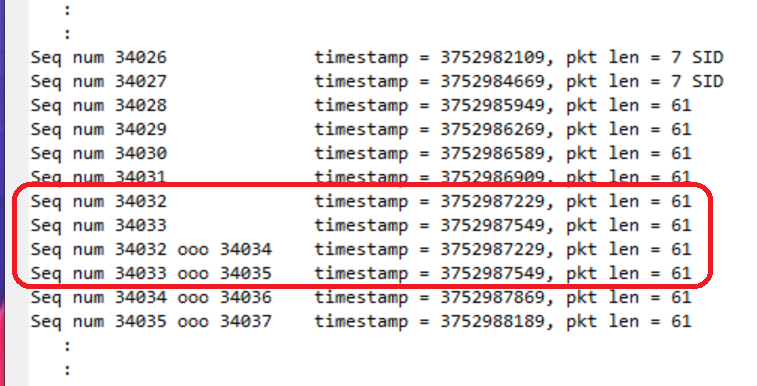
-l2 cmd line entry would correct this, removing the mediaMin warnings and ooo (out-of-order) in the packet log caused by duplication.
The -jN command line option controls jitter buffer target and maximum depth. Several command line examples are given in Jitter Buffer Depth Control above. Note that N should be given as a hex value, as it contains multiple fields and hex format make these fields easier to see.
The -pN command line option specifies a UDP port to add to the "port allow list", a list of non-dynamic UDP ports (from 1 to 4095; see NON_DYNAMIC_UDP_PORT_RANGE definition in pktlib.h) that are normally treated as non-RTP ports by mediaMin when processing media streams. You can enter one or more ports to allow, for example:
-p 1234
-p3258 -p1019 -p2233
Note that mediaMin will automatically discover media ports in SDP info and SIP Invite message packets, and if they are in the non-dynamic UDP port range, or in SIP port range (typically 5060 through 5082; see SIP_PORT_RANGE_LOWER and SIP_PORT_RANGE_UPPER definitions in pktlib.h), add them to the port allow list.
The -dN command line option INCLUDE_PAUSES_IN_WAV_OUTPUT flag (defined in cmd_line_options_flags.h) includes input pauses as silence in stream group and individual (mono) wav outputs. This applies when input of one or more streams in the group pauses, for example call-on-hold, packet push pause, etc. Input pauses are always accurately reflected in stream group RTP streaming output, but for wav output it's an option as pauses can become very large and increase file storage requirements. Notes:
- an "input pause" is formally defined as a packet gap where sequence numbers pause and then resume; i.e. no packets are lost. Lost packet gaps (i.e. missing sequence numbers) are handled by pktlib (packet repair, jitter buffer resync, etc) prior to streamlib processing. Lost packet gaps that can't be repaired by pktlib are handled in streamlib by FLC (Frame Loss Compensation), but only up to a limit (nominally around 180 msec)
- silence zeros are written to wav output only when input resumes. In other words, silence is not added to an input that has stopped permanently
- the INCLUDE_PAUSES_IN_WAV_OUTPUT flag has no affect on real-time output RTP streaming. Live output RTP streaming pauses for the duration of large pauses
- for large input pauses exceeding FLC limits, streamlib keeps track of pause size/duration, resuming merged outputs, live streaming output, and individual mono wav outputs (if enabled), always accurately reflecting input stream timing
The -dN command line option ENABLE_FLC_HOLDOFFS flag (defined in cmd_line_options_flags.h) will enable FLC Holdoffs, which make the FLC (Frame Loss Compensation] algorithm in streamlib less conservative and may slightly improve audio quality in some cases. Normally the FLC algorithm acts immediately on any indication of late or missing audio output, with objectives (i) maintain continuous live streaming output and (ii) spread out any media impairments over a wide range of frames.
When FLC Holdoffs are enabled streamlib will defer (hold off) action when it detects a marginally late frame in live real-time streaming output. This may or may not be effective, as there is no way to tell if at some point "down the line" frame gaps will get worse and the prior holdoff will cause either (i) a slight discontinuity between two (2) output frames or (ii) two (2) consecutive frames to need repair.
In the best case the number of FLCs will be reduced or even eliminated, yielding the best possible live streaming output audio quality, in the worst case live streaming output may contain slightly detectable discontinuities where one or more extra FLCs were performed.
The -dN command line option ALLOW_OUTOFSPEC_RTP_PADDING flag (defined in cmd_line_options_flags.h) can be set to suppress error messages for RTP packets with unused trailing payload bytes not declared with the padding bit in the RTP packet header. See comments in CreateDynamicSession() in mediaMin.cpp.
By default mediaMin stores stream group output pcaps (for example, merged streams) on the mediaMin subfolder. For flexibility and possible performance improvement, a path can be specified instead using the cmd line option:
--group_pcap_path <path>
where path is the desired stream group output pcap path. Upon stream group completion, the pcap is copied to the mediaMin subfolder for convenience during analysis and measurement. Performance improvement might be obtained by specifying a path on a fast SSD drive or RAM disk.
Also the cmd line option:
--group_pcap_path_nocopy <path>
can be given to avoid the final copy.
Note that these options are separate from output media path below.
By default pktlib applies codec FLC (Frame Loss Concealment) when repairing packet loss and timestamp gaps. Codec FLC can be disabled with the command line option:
--disable_codec_flc
By default mediaMin reports packet info messages it receives from pktlib APIs DSReadPcap(), DSPushPackets() and others, such as oversized packets, TSO/LSO packet length fixes, non-packet info blocks in pcapng files, and more. These can be suppressed using the command line option:
--suppress_packet_info_messsages <int>
Currently a value of 1 will suppress oversize packet info messages.
Applying the ENABLE_TIMESTAMP_MATCH_MODE flag enables a timestamp match mode designed for reproducible wav and pcap output results from run-to-run, regardless of Real-Time Interval. This mode relies wholly on arrival timestamps, regardless of amount of wav audio data generated, and with no wall clock references.
To verify bit-exact reproducibility the --md5sum command line option will include output file md5 sum[s] in mediaMin summary stats. The following output hash sum command line options are accepted by mediaMin and mediaTest:
--md5sum
--sha1sum
--sha512sum
Output hash sum command line options can be combined.
General guidelines and recommendations for high capacity and real-time performance are given in Performance above. Below are command line options that may improve mediaMin and user application performance, in particular real-time performance and audio quality.
The -g command line option specifies a path for output media files, including both stream group and timestamp matching mode output wav files and also including individual streams and merged streams. Because packet/media threads write media files on-the-fly, this option may help in improving packet/media thread performance, and in turn overall application performance, especially for systems with HDD (rotating) drives. In general, for HDD media output, any reduction in seek times can significantly improve overall thread performance, and specifically for Linux ext4 filesystems, an HDD operating at near full capacity over long time periods may fragment files during writes (i.e. files with some sectors separated by a long physical distance on the disk platter), thus resulting in longer seek times.
If mediaMin display output and event log shows pre-emption warning messages such as:
WARNING: p/m thread 0 has not run for 45.39 msec, may have been preempted, num sessions = 3, creation history = 0 0 0 0, deletion history = 0 0 0 0, decode time = 0.02, encode time = 0.04, ms time = 0.00 msec, prev ms time = 0.00, buffer time = 0.00, chan time = 0.00, pull time = 0.00, media processing time = 45.38
this can indicate seek times for output media files are negatively impacting performance. The key text is "media processing time" -- in the above example, this is showing 45 msec spent while other thread processing sections show minimal or no time spent. In such a case we can enable the ENABLE_WAV_OUT_SEEK_TIME_ALARM flag (defined in cmd_line_options_flags.h) in mediaMin cmd line -dN options to further investigate:
-d0x20000000c11
the above -dN entry specifies dynamic session creation, packet arrival timestamps are valid and should be applied, and output media file seek time alarm set to 10 msec. If mediaMin display output and event log shows a warning message such as:
WARNING: streamlib says mono wav file write time 16 exceeds 10 msec, write (0) open(1) = 0, merge_data_len = 320, filepos[0][1] = 499224
then it's clear that media file write seek times are an issue. To change the write time alarm threshold, look for uStreamGroupOutputWavFileSeekTimeAlarmThreshold in mediaMin.cpp (a member of the DEBUG_CONFIG struct defined in shared_include/config.h).
Note that additional example of event log pre-emption warning messages are given in High Performance and Real-Time Performance above.
Below are some examples of -g entry, including ramdisk and dedicated media folder. If a ramdisk exists, then the mediaMin command line might contain:
-g /mnt/ramdisk

-g /tmp/ramdisk

-g /tmp/shared
or as appropriate depending on the system's configuration (look in /etc/fstab to see if a ramdisk is active and if so its path). For a folder dedicated to media file output, such as a separate SSD drive, then the mediaMin command line might contain something like:
-g /ssd/mediamin/streamgroupmedia
If -g is not entered, then media files are generated on the mediaMin app subfolder.
Note that -g does not apply to N-channel wav files, which are post-processed after a stream group closes (all streams in the group are finished). Wav file output can be turned off altogether by not including the ENABLE_WAV_OUTPUT flag in the -dN command line option (flags are defined in cmd_line_options_flags.h).
Below are command line options supported only by mediaTest (and not mediaMin).
The -Emode command line option specifies an execution mode, where mode can be one of the following single characters:
a, application. This is the default mode for all testing other than codec tests
c, command line
t, multiple application thread
p, process. This mode is reserved and currently not used
Below are command line examples:
mediaTest -cx86 -ipcaps/EVS_16khz_13200bps_FH_IPv4.pcap -oEVS_16khz_13200bps_FH_IPv4.wav -Csession_config/evs_player_example_config -L -Ea

mediaTest -cx86 -ipcaps/EVS_16khz_13200bps_CH_PT127_IPv4.pcap -oEVS_16khz_13200bps_CH_PT127_IPv4.wav -Csession_config/evs_player_example_config2 -L -Ea
in the above examples, mediaTest reads EVS RTP pcaps, decodes, and writes to output .wav files. Since application mode is the default, the "-Ea" option can be omitted for these command lines.
mediaTest -c x86 -i test_files/T_mode.wav -o test_files/T_mode_48kHz_13200.wav -C session_config/evs_48kHz_input_16kHz_13200bps_full_band_config --md5sum -Ec -t2
in the above example, mediaTest combines the command line execution mode and number of application threads option to start two (2) concurrent threads that upsample a 16 kHz .wav file to 48 kHz, encode to EVS 13.2 kbps bitstream, then decode and write to output .wav files. In this mode mediaTest adds "_N" suffixes to output filenames to denote which thread.
mediaTest -cx86 -itest_files/testaf0824_EVS2EVScall8-tc41_tc90_onlyTC41.2922.0.pcap -L -d0x6cc11 -r20 -Et -t12 -n13 -R0
in the above example, mediaTest combines the multiple application thread execution mode, number of threads option, and input reuse option to run a mediaMin capacity test. In this case mediaTest starts 12 mediaMin application threads (hyperthreaded) with 42 sessions each (3 sessions in the input pcap multiplied by 14), for a total of 504 concurrent sessions. As a side note, mediaMin starts 10 packet/media worker threads (non-hyperthreaded) to handle this (look for StartPacketMediaThreads() in mediaMin.cpp).
The -tN command lilne option can be used to specify a number of application threads. This option should be combined with an -Emode option (see Execution Mode command line examples above).
mediaMin supports run-time keyboard input. Here is a list of key commands:
| Key | Description |
|---|---|
| q | Quit |
| d | Display debug output, including application threads, packet/media threads, and overall. See screen cap example below |
| o | Disable packet/media thread display output. This command can be useful for remote terminal testing when slow network transmission affects application performance. Pressing again re-enables |
| p | Pause processing. Pressing again resumes |
| t | Display debug output for the current packet/media thread index (which by default starts with 0) |
| s | Stop gracefully. Unlike the Quit command, which stops all packet/media and application threads immediately, a graceful stop waits for each application thread to finish processing inputs and flush sessions. Any remaining repeats specified on the command line are ignored |
The following key commands set or change application and packet/media thread indexes:
| Key | Description |
|---|---|
| 0-9 | Set the current packet/media thread index |
| +, - | Change the current application thread index |
The thread index commands do not change the current display before a subsequent 'd' or 't' command. All commands happen independently of ongoing processing. All key commands are case-insensitive.
Below is a screen cap showing 'd' key debug display.
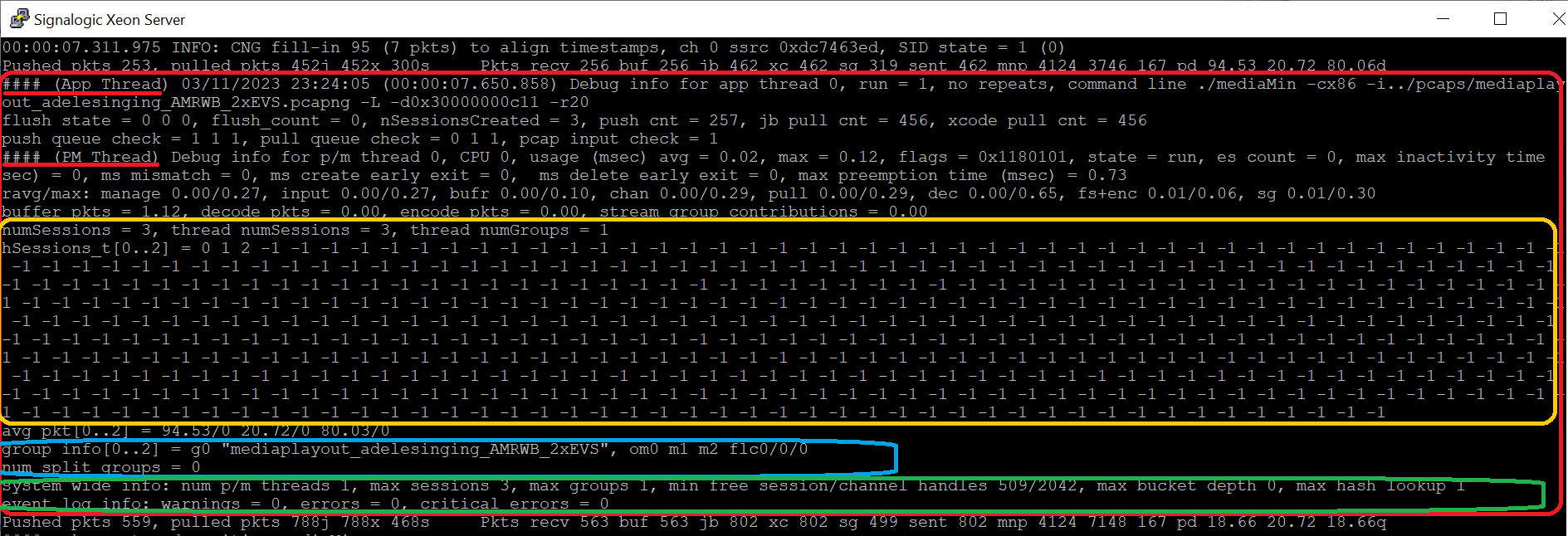
Debug output is highlighted in red. Individual highlighted areas are described below:
| Highlight | Description |
|---|---|
| Red underline | 1st #### application thread, 2nd #### packet/media thread. Packet/media thread "usage" figures are profiling measurements (in msec) |
| Yellow | Session information, including values of all possible session handles. -1 indicates not used |
| Blue | Stream group information. gN indicates group index, mN indicates group member index, o indicates group owner, flc indicates frame loss concealment, and "num split groups" indicates number of stream groups split across packet/media threads (see WHOLE_GROUP_THREAD_ALLOCATE flag usage in Stream Group Usage above) |
| Green | System wide information, including number of active packet/media threads, maximum number of sessions and stream groups allocated, free handles, and current warnings, errors, and critical errors (if any) |