| title | sidebar_position |
|---|---|
Service Virtualization |
2 |
import yaml from "js-yaml"; import {JsonDisplay, YamlDisplay} from "../../src/components/JsonYamlDisplay"; import {V3SpecmaticJsonYamlTabs} from "../../src/components/V2V3SpecmaticConfigTabs"; import Tabs from '@theme/Tabs'; import TabItem from '@theme/TabItem'; import CodeBlock from '@theme/CodeBlock'; import { VERSIONS } from '@site/src/constants/versions';

- Create a directory named
specmaticin your home directory. - Make sure you have installed Specmatic from Download page.
-
Create a file named
employees.yamlin thespecmaticdirectory with the following contents.<YamlDisplay object={yaml.load(require('./includes/service-virtualization/employees.yaml?raw'))} title='employees.yaml' />
-
In the same directory, create a file named
specmatic.yaml(orspecmatic.json) with the following contents:<V3SpecmaticJsonYamlTabs v3Object={yaml.load(require('./includes/service-virtualization/specmatic.yaml?raw'))} />
-
Change into the
```shell java -jar specmatic.jar mock ```specmaticdirectory in your terminal, and start the Specmatic mock server with the following command:<TabItem value="npm" label="npm"> ```shell npx specmatic mock ``` </TabItem> <TabItem value="docker" label="Docker (linux/macOS)"> ```shell docker run --network host -v "$(pwd):/usr/src/app" specmatic/specmatic mock ``` </TabItem> <TabItem value="docker-windows" label="Docker (windows)"> ```powershell docker run -p 9000:9000 -v "${PWD}:/usr/src/app" specmatic/specmatic mock ``` </TabItem> -
In a new tab, run the following curl command:
curl -X POST -H 'Content-Type: application/json' -d '{"name": "Jill Doe", "department": "Engineering", "designation": "Director"}' http://localhost:9000/employees
-
You should get the following response back:
{ "id": 10 } -
Specmatic ties the named example
CREATE_EMPLOYEE_SUCCESSlisted under the request parameters and the response sections of the OpenAPI spec to create a test. -
Here's a detailed breakdown of the contract test:
- Request: Specmatic uses the request body in the request example named
CREATE_EMPLOYEE_SUCCESSto match the incoming HTTP request. - Response: Once matched, Specmatic looks for an example with same name (
CREATE_EMPLOYEE_SUCCESS) under responses. In this case the response code happens to be 200, so that is the response that Specmatic will return.
- Request: Specmatic uses the request body in the request example named
In addition to handling responses with a defined body, Specmatic also supports configuring inline examples for responses with no body. This is particularly useful in scenarios where an HTTP response is expected to return only a status code without any associated payload.
To configure a request that expects a response without a body, you can define an inline example within the requestBody of your OpenAPI specification without associating it with any specific response. Specmatic automatically ties such examples to responses with no body.
Consider the following addition to the employees.yaml file, where we define an example for a request that triggers a response with no body:
<YamlDisplay object={yaml.load(require('./includes/service-virtualization/employees-no-response-body.yaml?raw'))} title='employees.yaml' />
In this example:
- Request Example: We have defined an inline example named
DELETE_EMPLOYEE_SUCCESSunder therequestBodysection for theDELETE /employeesoperation. - Response: Since the response for this operation has no body (indicated by the
204 No Contentstatus code) and the inline exampleDELETE_EMPLOYEE_SUCCESSis not associated with any response, Specmatic will automatically tie this inline example to the response with no body.
If there are multiple such examples defined for a particular path, all of them will be tied to the corresponding response with no body. This allows you to cover various test scenarios, even for responses that do not return any payload.
- No Response Body Association: If an inline example is defined without associating it with a specific response, Specmatic assumes it to be relevant for responses with no body.
- Automatic Binding: Specmatic will bind all such inline examples to the response with no body for the respective request.
- Multiple Examples: When multiple such examples are defined, each will be considered for the response with no body, allowing comprehensive testing.
This capability enhances the flexibility and coverage of contract testing by ensuring that even scenarios involving responses with no body are thoroughly validated.
:::info This feature is deprecated, it is recommended that you use Specmatic Studio to manage and generate examples instead. :::
It may not always be possible to add examples inline in the OpenAPI specifications. And sometimes certain examples may not belong in the API specification. In such cases, we can add examples outside the spec in the form of JSON files.
Let's see how this is done.
-
Run the
examplescommand:docker run -v "$(pwd):/usr/src/app" specmatic/enterprise examples generate employees.yaml -
It generates a request-response mapping JSON file in the
employees_examplesdirectory containing an example of the API in the spec.- The directory name follows the format
<spec file name without extension>_examples. - The example file name as generated indicates the operation it was generated from. In fact, the name is not limited to any format. You can choose a name that is meaningful to you.
- The directory name follows the format
-
Open the file, and you'll see this:
{ "http-request": { "path": "/employees", "method": "POST", "headers": { "Content-Type": "application/json" }, "body": { "name": "Jill Doe", "department": "Engineering", "designation": "Director" } }, "http-response": { "status": 201, "body": { "id": 479 }, "status-text": "Created", "headers": { "Content-Type": "application/json" } } } -
Specmatic mock recognizes the
_examplesdirectory naming convention, and loads files in this directory automatically on startup.
Note that when the mock starts, it will log the count of examples loaded for a spec and any errors found. If you want to see the actual paths of the example files that were loaded, use the --debug flag.
-
Now let's update the request section to suit our needs, by modifying the value of
nameto "Jack Sprat", and the value ofdepartmentto "Sales". And in the response, let us modify the value ofidto 20, like so:{ "http-request": { "path": "/employees", "method": "POST", "headers": { "Content-Type": "application/json" }, "body": { "name": "Jack Sprat", "department": "Sales", "designation": "Director" } }, "http-response": { "status": 201, "body": { "id": 20 }, "headers": { "Content-Type": "application/json" }, "status-text": "Created" } } -
Kill the mock (
Ctrl+C) if it is running, and start it again.- You will see that file name is mentioned in the startup logs.
-
In a new tab, run the following curl command:
curl -X POST -H 'Content-Type: application/json' -d '{"name": "Jack Sprat", "department": "Sales", "designation": "Director"}' http://localhost:9000/employees
-
Specmatic mock will response with this payload:
{
  "id": 20
}
Specmatic also supports externalizing examples for APIs that return no response body. To handle this:
- Create an example file with the
http-requestsection, but omit thehttp-responsebody. - Specmatic will automatically associate this example with the corresponding response that has no body.
For example:
{
    "http-request": {
        "path": "/employees",
        "method": "DELETE",
        "headers": {
            "Content-Type": "application/json"
        },
        "body": {
            "id": 10
        }
    },
    "http-response": {
        "status": 204,
        "status-text": "No Content",
        "headers": {
            "Content-Type": "application/json"
        }
    }
}
When this file is placed in the employees_examples directory and the mock is restarted, the Specmatic mock will respond appropriately to the DELETE request with a 204 No Content status, confirming that the externalized example is correctly tied to a response with no body.
Note: You may add more example files into the employees_examples directory. There is no limit to the number of example files that can be added.
An important and unique feature of Specmatic is that it constantly validates both inline and external examples against the specification to make sure they are always aligned.
Let's try this feature out.
Create a file named out-of-sync.json with the following contents:
{
  "http-request": {
    "path": "/employees",
    "method": "POST",

    "headers": {
      "Content-Type": "application/json"
    },

    "body": {
      "name": "Janet",
      "department": "Sales",
      "designation": "Director"
    }
  },
  "http-response": {
    "status": 201,

    "body": {
      "id": "abc123"
    },

    "headers": {
      "Content-Type": "application/json"
    },

    "status-text": "Created"
  }
}-
Note: the value of
idin the response is a string in the example, but an integer in the specification. -
Now when you start the mock server, you'll see the following error message in the log:
In scenario ". Response: Employee Created Response" API: POST /employees -> 201 >> REQUEST.BODY.department Contract expected string but mock contained 10 (number) -
Specmatic's mock rejected the example because of the mismatch. Let us ascertain the same by running the following curl command:
curl -X POST -H 'Content-Type: application/json' -d '{"name": "Janet", "department": "Sales", "designation": "Director"}' http://localhost:9000/employees
-
You'll get this response:
{ "id": 783 } -
As you can see the response contains a generated value for the id, rather than "abc123", which was in the invalid example.
-
Since the invalid example was rejected by Specmatic mock, the response is a value generated based on the response in the specification.
Suppose you do not wish Specmatic to return an auto-generated response when there are no matching examples. You can run Specmatic mock server in strict mode.
Let's try this out.
-
Start Specmatic mock with the
```shell java -jar specmatic.jar mock --strict ``` ```shell npx specmatic mock --strict ```--strictflag, using the following command:<TabItem value="docker" label="Docker (Linux/macOS)"> ```shell docker run --network host -v "$(pwd):/usr/src/app" specmatic/specmatic mock --strict ``` </TabItem> <TabItem value="docker-psh" label="Docker (Powershell)"> ```powershell docker run -p 9000:9000 -v "${PWD}:/usr/src/app" specmatic/specmatic mock --strict ``` </TabItem> -
Now run the following curl command:
curl -X POST -H 'Content-Type: application/json' -d '{"name": "Janet", "department": "Sales", "designation": "Director"}' http://localhost:9000/employees
-
Specmatic will return a 400, with a detailed error message.
To recap, in strict mode, Specmatic will only respond to requests that have matching examples, inline or external.
You can enable strict mode using configuration as described here.
Sometimes the exact value may not be that important in an example.
For example, suppose that in the request we expect, the important values to be matched against department and designation. name must be present, but we don't particularly care about the exact value.
Let's see how we can formulate an example that meets these requirements.
-
Create a new file in the
employees_examplesdirectory namedany_name.jsonwith the following contents:{ "http-request": { "path": "/employees", "method": "POST", "headers": { "Content-Type": "application/json" }, "body": { "name": "(string)", "department": "Sales", "designation": "Director" } }, "http-response": { "status": 201, "body": { "id": 30 }, "headers": { "Content-Type": "application/json" }, "status-text": "Created" } } -
Start the Specmatic mock and execute the following command, which has the
name"Janet":curl -X POST -H 'Content-Type: application/json' -d '{"name": "Janet", "department": "Engineering", "designation": "Director"}' http://localhost:9000/employees
-
You'll get this response:
{ "id": 30 } -
Modify the
nameto "Justin", or any other name, and you'll get the same response.- This is because Specmatic just checks that the
namein your curl request is a string. It doesn't care about the exact value.
- This is because Specmatic just checks that the
-
But modify the value of
departmentin the curl command to "Facilities".- This time round, the request does not match the example, because the values of
departmentin the example and the request are different ("Sales" and "Engineering" respectively). - Since no example available matches the incoming request, a response is generated based on the specification and returned.
- This time round, the request does not match the example, because the values of
For specifications where the request body is a string, you may find it helpful to use a regular expression in the example.
Let's try this out.
-
Create a new specification file named
phonebook.yaml. This defines a PhoneBook API with a single POST/searchendpoint that accepts a plain-text name string in the request body and returns a200 OKJSON array of results, each containing requirednameandnumberfields.<YamlDisplay object={yaml.load(require('./includes/service-virtualization/phonebook/phonebook.yaml?raw'))} title='phonebook.yaml' />
-
Now, create a file named
phonebook_examples/search_john.jsonwith the following contents:<JsonDisplay object={require('./includes/service-virtualization/phonebook/phonebook_examples/search_john.json')} title={'phonebook_examples/search_john.json'}/>
-
Add
phonebook.yamlas a dependency inspecmatic.yaml, like so:<V3SpecmaticJsonYamlTabs v3Object={yaml.load(require('./includes/service-virtualization/phonebook/specmatic.yaml?raw'))}/>
-
Run the following curl command:
curl -X POST -H "Content-Type: text/plain" -d "John" http://localhost:9000/search
-
You'll get this response:
[ { "name": "John Doe", "number": "123-456-7890" }, { "name": "John Smith", "number": "987-654-3210" }, { "name": "John Johnson", "number": "555-555-5555" } ] -
If the
bodyRegexmatches the incoming request body, that example is utilized. Otherwise, a random response is generated. -
Try modifying the last name in the curl request. As long as the request begins with
Johncase-insensitive, you will receive the same response as defined by the regex in thebodyRegexin the example.
Sometimes, your application may require the request and response to be coordinated coherently. This coordination may take two different forms which we shall explore below.
In preparation, let's update our employees.yaml specification with the following content:
openapi: 3.0.0
info:
  title: Employees
  version: '1.0'
servers: []
paths:
  /employees:
    patch:
      requestBody:
        content:
          application/json:
            schema:
              $ref: '#/components/schemas/Employee'
      responses:
        '200':
          description: Employee Updated Response
          content:
            application/json:
              schema:
                $ref: '#/components/schemas/EmployeeResponse'
components:
  schemas:
    Employee:
      type: object
      required:
        - employeeCode
      properties:
        employeeCode:
          type: string
        name:
          type: string
        department:
          type: string
        designation:
          type: string
    EmployeeResponse:
      allOf:
        - $ref: '#/components/schemas/Employee'
        - type: object
          required:
            - id
            - employeeCode
          properties:
            id:
              type: integer
            employeeCode:
              type: string
Since we have changed the spec, remove all the examples in employees_examples, as they will now be invalid.
-
In the
employees_examplesdirectory, add a file nameddirect_substitution.jsonwith the following content:{ "http-request": { "method": "PATCH", "path": "/employees", "body": { "name": "Jake", "employeeCode": "(EMPLOYEE_CODE:string)" } }, "http-response": { "status": 200, "body": { "id": 10, "name": "Jake", "employeeCode": "$(EMPLOYEE_CODE)", "department": "Sales", "designation": "Associate" } } } -
Execute the following
curlcommand:curl -X PATCH -H 'Content-Type: application/json' -d '{"name": "Jake", "employeeCode": "abc123"}' http://localhost:9000/employees
-
You'll get this response:
{ "id": 10, "name": "Jake", "employeeCode": "abc123", "department": "Sales", "designation": "Associate" } -
Here's what's happening.
- The value of
employeeCodein the incoming curl request is stored to a variable namedEMPLOYEE_CODE, due to"employeeCode": "(EMPLOYEE_CODE:string)". - Then the value stored in
EMPLOYEE_CODEis used as the value ofemployeeCodein the response, due to"employeeCode": "$(EMPLOYEE_CODE)".
- The value of
-
Try the same curl command again, but change the
employeeCode. You'll find that anyemployeeCodesent in the request will be reflected in the response.
Sometimes, the values of multiple response keys which have very different values need to be coordinated with a single request value, and for this the data look feature is quite useful.
Let's try this out.
-
Add a new file into the
employees_examplesdirectory nameddata_lookup.jsonwith the following contents:{ "http-request": { "method": "PATCH", "path": "/employees", "body": { "employeeCode": "(EMPLOYEE_CODE:string)", "department": "(DEPARTMENT:string)" } }, "http-response": { "status": 200, "body": { "id": 10, "employeeCode": "$(EMPLOYEE_CODE)", "name": "Jack", "department": "$(DEPARTMENT)", "designation": "$(dataLookup.departments[DEPARTMENT].desig)" } }, "dataLookup": { "departments": { "Sales": { "desig": "Associate" }, "Engineering": { "desig": "Manager" } } } } -
Observe the value of
designationin the response. Specmatic will resolve this expression at runtime on receiving a request that matches the request in this example. -
First let's see it in action. Execute this curl command:
curl -X PATCH -H 'Content-Type: application/json' -d '{"department": "Sales", "employeeCode": "abc123"}' http://localhost:9000/employees
-
You'll get the following response, in which the value of
designationis "Associate", as per the lookup.{ "id": 10, "name": "Jack", "employeeCode": "abc123", "department": "Sales", "designation": "Associate" } -
Note: The curl request matched the example request, so Specmatic loaded the corresponding response in the example, evaluated the expression
$(dataLookup.departments[DEPARTMENT].desig)to get value ofdesignation(which turned out to be "Associate"), evaluated the direct substitution expressions to get the values ofemployeeCodeanddepartment, and returned this response to the caller. -
Specmatic evaluates the expression
$(dataLookup.departments[DEPARTMENT].desig)from the example response using the following steps:- Access the
dataLookupobject (you'll find it in the example JSON). - Retrieve the
departmentscollection from thedataLookupobject. - Select the department corresponding to the value of the variable
DEPARTMENTfrom the departments collection.- In this case, the value of
DEPARTMENTis set to "Sales" (see the section on Direct Substitution above if you don't understand how that came about).
- In this case, the value of
- Access the
desigproperty of the selected department.
- Access the
-
It's the value of the
desigproperty that gets used as the value ofdesignationin the response. -
The format of these expressions is fixed:
top-level-object.collection[LOOKUP_VARIABLE_NAME].property- The names themselves, such as
dataLookup,departments,desigare not restricted to any format. You may use names that are meaningful to you.
- The names themselves, such as
-
Next execute this curl command:
curl -X PATCH -H 'Content-Type: application/json' -d '{"department": "Engineering"}' http://localhost:9000/employees
-
You will get the following response, in which the value of
designationis "Manager", as per the lookup.{ "id": 10, "name": "Jack", "employeeCode": "abc123", "department": "Engineering", "designation": "Manager" } -
You can use as many collections and properties as you like in the
dataLookupdata object.
This feature lets you focus on the keys that need, allowing Specmatic to fill in the missing details.
For example, suppose I want to set up a response for all requests with name set to "George". I don't care about the specific values of name, employeeCode (which is mandatory), department or designation in the request.
-
Create a file in
employees_examplesnamed partial.json, with the following contents:{ "partial": { "http-request": { "method": "PATCH", "path": "/employees", "body": { "name": "George" } }, "http-response": { "status": 200, "body": { "id": 10, "employeeCode": "abc123", "name": "George", "department": "Sales", "designation": "Manager" } } } } -
Note: In the request, the example only contains
name. But because this is apartialexample, Specmatic knows thatemployeeCodeis mandatory and will validate the incoming request accordingly, despite it being missing in the example. -
Start the mock, and execute the following curl command:
curl -X PATCH -H 'Content-Type: application/json' -d '{"name": "George", "employeeCode": "abc12dd3"}' http://localhost:9000/employees
-
You'll get this response:
{ "id": 10, "employeeCode": "abc123", "name": "George", "department": "Sales", "designation": "Manager" } -
Try the same but vary status code. As long as the
nameis "George", you will get the above response.
The same idea extends to the response.
-
Replace the content of
employees_examples/partial.jsonwith the following contents:{ "partial": { "http-request": { "method": "PATCH", "path": "/employees", "body": { "name": "George" } }, "http-response": { "status": 200, "body": { "name": "George", "department": "Sales", "designation": "Manager" } } } } -
Note that the two mandatory keys in the response named
idandemployeeCodeare omitted from the example. -
But because it's a partial example, when you execute the previous curl command, Specmatic will autogenerate values for
idandemployeeCodefrom their schemas in the specification.
When Specmatic's mock receives a request and finds no matching examples for it, Specmatic returns a response generated from the response schema in the API specification. While the generated response is schema-valid, it will not have meaningful values drawn from the context of your business domain. So in order to get domain-relevant responses when there examples, you can provide a dictionary of sample values to Specmatic. Specmatic will look up this dictionary when it needs to generate domain-relevant examples.
Refer to Dictionary with service virtualization for more details.
Specmatic allows granular control over simulating a slow response for certain requests.
Let us create an expectation file in the products-api_examples folder and call it expectation-with-delay.json with below content.
{
  "http-request": {
    "method": "GET",
    "path": "/products/11"
  },
  "http-response": {
    "status": 200,
    "body": {
      "name": "Slow Soap",
      "sku": "slow1234"
    }
  },
  "delay-in-milliseconds": 3000
}
We have set the delay to 3 seconds here. Once the Specmatic mock server has loaded this expectation, time the request for product id 11, and you should see a 3-second delay.
% time curl http://localhost:9000/products/11
{
    "name": "Slow Soap",
    "sku": "slow1234"
}

curl http://localhost:9000/products/11  0.01s user 0.01s system 0% cpu 3.082 total
All other requests, other than the specific request (product id 11) where a delay has been set up, will have either no delay or fallback to global delay.
A Global delay can be applied to all requests handled by service virtualization. By configuring the delayInMilliseconds parameter in Specmatic Config,
you can simulate response times with the specified delay in milliseconds.
<V3SpecmaticJsonYamlTabs v3Object={require('../references/configuration/includes/mock-configuration/v3/simple-with-mock-virtualization-delay/specmatic.json')}/>
Note: If the delay is specified in the example file, it will be used to simulate response times for that specific example.
Otherwise, the global delay will be applied.
There are multiple ways to run the Specmatic Mock with SSL.
This is the quickest approach.
```shell java -jar specmatic.jar mock --httpsKeyStoreDir=path/to/keystore-dir --port=443 product-api.yaml ``` ```shell npx specmatic mock --httpsKeyStoreDir=path/to/keystore-dir --port=443 product-api.yaml ``` ```shell docker run -p 443:443 -v "${PWD}:/usr/src/app" specmatic/specmatic mock --httpsKeyStoreDir=path/to/keystore-dir --port=443 product-api.yaml ```This will create a specmatic.jks file in the dir that you mentioned above, and you can now access the mock over https.
If you already have a keystore and self-signed certificate you can pass it to Specmatic through below command options.
% specmatic mock --help
...
      --httpsKeyStore=<keyStoreFile>
                             Run the proxy on https using a key in this store
      --httpsKeyStorePassword=<keyStorePassword>
                             Run the proxy on https, password for pre-existing
                               key store
      --httpsPassword=<keyPassword>
                             Key password if any
Dynamic Expectations (a.k.a. Dynamic Mocking Or Mocking) - Setting Expectations Over Specmatic Http Api
It is not always possible to know ahead of time what expectation data needs to be setup. Example: Consider below scenario
- Let us say our system under test needs to look up the SKU value from another service (over which we do not have control or cannot mock) before creating products
- In this scenario we will be unable to create the expectation json file with any specific value of SKU since we will only know this at test runtime / dynamically
Dynamic Mocks are helpful in such scenarios which involve a work flow with multiple steps where the input of a step depends on output of its previous step.
Specmatic mock server can accept expectation json through below http endpoint.
http://localhost:9000/_specmatic/expectationsPlease see postman collection for reference.
Specmatic will verify these expectations against the OpenAPI Specifications and will only return a 2xx response if they are as per API Specifications. Specmatic returns 4xx response if the expectation json is not as per the OpenAPI Specifications.
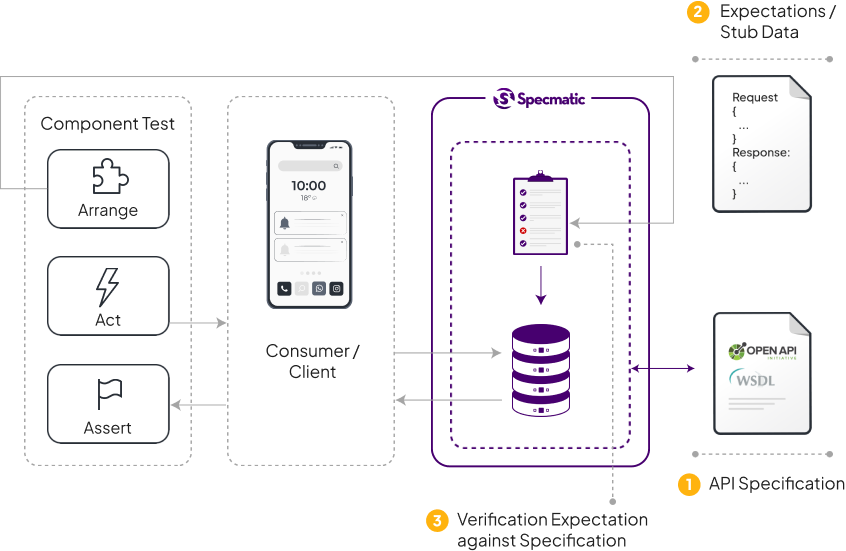
Please see this video for reference.
The above image shows how Specmatic Smart Mocking fits into your Component Test. A good component test isolates the system / component under test from its dependencies. Here Specmatic is emulating the dependencies of the mobile application thereby isolating it.
API Tests are just Component Tests where the System Under Test is a Service / API. Here is an example of how you can leverage Specmatic dynamic mocking in an API Test. Below are the pieces involved.
- System Under Test - Find Available Products Service - Invokes products API to get all products and filters out products where inventory is zero.
- Dependency - Products API mocked by Specmatic. Specmatic is set up to leverage OpenAPI Specification of Products API in the central contract repo through specmatic.yaml configuration.
Let us analyse each phase of this API test.
- Arrange - In this step, we set up Specmatic mock server with expectation json through Specmatic http endpoint to emulate the Products API to return expected response. We also verify that Specmatic has accepted this expectation data by asserting that the response code is 2xx. This confirms that are our expectation data is in line with the OpenAPI Specification of Products OpenAPI Specification.
- Act - Here the test invokes System Under Test to exercise the functionality we need to test. This inturn results in the System Under Test invoking its dependency (Products Service) which is being emulated by Specmatic. Specmatic returns the response we have set up in the previous step to the System Under Test. System Under Test processes this data and responds to API Test.
- Assert - We now verify the response from System Under Test to ascertain if it has returned the correct response.
Add specmatic-core jar dependency with scope set to test since this need not be shipped as part of your production deliverable.
Now you can import the utility to create the mock server. Below code snippets are in Kotlin. However, the overall concept is the same across all JVM languages such as Clojure, Scala or plain Java.
This utility can now be used in your test setup / beforeAll method to start the mock server. Specmatic automatically looks for your Specmatic configuration file in project root directory / classpath to locate your API Specification files that need to run as part of the mock server.
<CodeBlock title='com/example/YourTest.kt' language='kotlin'>
  {require('./includes/service-virtualization/programatic-service-virtualization/YourTest.kt?raw')}
</CodeBlock>
We can now programmatically set dynamic expectations on the mock with the setExpectation(expectedJson) method where expecationJson is in the same format as seen here
mock.setExpectation(expectationJson);If you have several such JSON expectation files that you would like to set up at once, you can pass a list of files or dir containing these expectation JSON files while creating the mock.
httpMock = createStub(listOf("./src/test/resources"))The above createStub() function creates your Specmatic HTTP mock with default host, port, etc. Below is an example with all values being passed in
private val mock: ContractStub
@BeforeAll
@JvmStatic
fun setUp() {
    mock = createStub(listOf("./src/test/resources"), "localhost", 8090, strict = true)
}
The last parameter (strict = true), enables strict mode where Specmatic HTTP mock will only respond to requests where expectations have been set. For any other requests, 400 Bad Request is returned.
And subsequently once your tests are done, you can shut down the mock server as part of your teardown / afterAll method.
@AfterAll
@JvmStatic
fun tearDown() {
    service?.stop()
    mock.close()
}
Here is a complete example of Specmatic Contract Tests that leverages the above technique.
Please note that this is only a utility for the purpose of convenience in Java projects. Other programming languages can simply run the Specmatic standalone executable just as easily. If you do happen to write a thin wrapper and would like to contribute the same to the project, please refer to our contribution guidelines.
If your tests are written in Python, you can start and stop the mock server within your tests programmatically.-
Install the Specmatic Python library: Use pip, a package installer for Python, to install the Specmatic library.
pip install specmatic
-
Run Tests with a mock: If you want to run the tests with a mock, you can do so like this:
import os
from specmatic.core.specmatic import Specmatic
from your_project import app
PROJECT_ROOT_DIR = os.path.dirname(os.path.abspath(__file__))
app_host = "127.0.0.1"
app_port = 5000
stub_host = "127.0.0.1"
stub_port = 5000
expectation_json_file = PROJECT_ROOT_DIR + '/test/data/expectation.json'

Specmatic() \
    .with_project_root(PROJECT_ROOT_DIR) \
    .with_stub(stub_host, stub_port, [expectation_json_file]) \
    .with_wsgi_app(app, app_host, app_port) \
    .test(TestContract) \
    .run()
In this example, we are passing an instance of wsgi app like flask.
stub_host,stub_port, andexpectation_json_fileare the host and port for the mock server, and the path to a JSON file containing expectations for the mock, respectively. Replaceappwith your Flask application object.Here are complete example of Specmatic mock server usage in Python.
A transient mock becomes unavailable immediately after it has been exercised.
For example, create this mock file for products-api.yaml contract:
{
  "http-stub-id": "123",
  "http-request": {
    "method": "GET",
    "path": "/storestatus",
  },
  "http-response": {
    "status": 200,
    "body": "open"
  }
}
Send a GET request to http://localhost:9000/storestatus. The response will be "open".
Now try the same request again. The response is a randomized string.
This is useful particularly when there are no distinguishing features of the request like in the above example, and we need to simulate a succession of calls to that API giving different responses.
If the test fails and you need to start a new run of the test, you may need to clear all the transient mocks so that the two tests do not step on each other's toes.
To do that, send a DELETE request to /_specmatic/http-stub/${http-stub-token}.
To clear the transient mock in the above example, you would call http://localhost:9000/_specmatic/http-stub/123 with the DELETE verb.
Specmatic provides powerful matchers that offer dynamic, fine-grained control over how your mock server responds to incoming requests, enabling you to simulate complex and evolving scenarios.
:::note Requests are validated against the specification first, before any matchers in examples are evaluated. :::
Syntax: $neq(<exact-value>)
Use this matcher to ensure that a field value in incoming requests is not equal to a specific value.
For example, the following example matches only requests where status is not equal to Pending:
{
  "http-request": {
    "method": "POST",
    "path": "/verifyUser",
    "body": {
      "status": "$neq(Pending)"
    }
  },
  "http-response": {
    "status": 200,
    "status-text": "OK"
  }
}Syntax: $match(exact: <exact-value>, dataType: <specmatic-datatype>, times: <number>, value: each|any)
This matcher provides flexible options to control how request fields match example data and how many times a particular example can be used.
Consider the following transient example:
{
  "transient": true,
  "http-request": {
    "method": "POST",
    "path": "/greet",
    "body": {
      "message": "$match(exact: hello, times: 2)"
    }
  },
  "http-response": {
    "status": 200,
    "body": {
      "reply": "Hi there!"
    }
  }
}
This matcher will respond to two requests where message is exactly hello. After two successful matches, the matcher becomes exhausted, and subsequent requests with {"message": "hello"} will no longer match this example.
Example:
-
Request 1 payload:
{ "message": "hello" } -
Request 2 payload:
{
  "message": "hello"
}
After these two requests, the matcher becomes exhausted, and this transient example will not match further requests such as:
-
Request 3 payload:
{
  "message": "hello"
}
If there are multiple matchers in an example, the example remains active until all of its matchers are exhausted.
Consider the following transient example:
{
  "transient": true,
  "http-request": {
    "method": "POST",
    "path": "/echo",
    "body": {
      "text": "$match(dataType: string, value: each, times: 2)"
    }
  },
  "http-response": {
    "status": 200,
    "body": {
      "echoedText": "$(text)"
    }
  }
}
Each unique value for text can be matched twice. For example:
Request 1 payload: {"text": "hello" }
Request 2 payload: {"text": "hello" }
After these two requests, the matcher for text with value hello becomes exhausted.
Request 3 payload: {"text": "world" }
The value "world" has never been seen before, and hence this matcher will be active for "world", and will match it twice before getting exhausted.
If there are multiple matchers in an example, the example remains active until all of its matchers are exhausted.
Consider this transient example:
{
  "transient": true,
  "http-request": {
    "method": "POST",
    "path": "/echo",
    "body": {
      "text": "$match(dataType: string, value: any, times: 2)"
    }
  },
  "http-response": {
    "status": 200,
    "body": {
      "echoedText": "$(text)"
    }
  }
}
Here, the matcher can match any value twice, regardless of what it is. After two matches, it becomes exhausted, and the example will no longer be used.
Specmatic actually tracks the usage of each unique combination of matcher values in the presence of value: each. This can be better understood with an example which has multiple matching having value: each.
Consider this transient example where both id and details use value: each with times: 1.
{
  "transient": true,
  "http-request": {
    "method": "PATCH",
    "path": "/order/10",
    "body": {
      "id": "$match(dataType: integer, times: 1, value: each)",
      "details": "$match(dataType: string, times: 1, value: each)"
    }
  },
  "http-response": {
    "status": 200,
    "body": {
      "status": "Order updated"
    }
  }
}
Let's walk through a sequence of requests.
Initial state:
idmatcher: Active.detailsmatcher: Active.
Request 1 payload:
{
  "id": 10,
  "details": "packed"
}
This is the first time the mock sees id: 10 together with details: "packed", so it matches.
Matcher state after Request 1:
idmatcher with value10givendetails: "packed": used/(Exhausted)detailsmatcher with valuepackedgivenid: 0: used/(Exhausted)
Request 2 payload
{
  "id": 10,
  "details": "packed"
}
This is the exact same pair as Request 1.
Matcher state after Request 2:
- Pair
id: 10,details: "packed"is already 1/1 (Exhausted) → this request will not match this example.
Request 3 payload
{
  "id": 10,
  "details": "shipped"
}
This is a new pair: id: 10 with details: "shipped".
Matcher state after Request 3:
idmatcher with value10givendetails: "packed": used/(Exhausted)idmatcher with value10givendetails: "shipped": used/(Exhausted)detailsmatcher with valuepackedgivenid: 10: used/(Exhausted)detailsmatcher with valueshippedgivenid: 10: used/(Exhausted)
Even though id = 10 was seen before, this request worked because this exact combination (10 + "shipped") had not been used previously. But with times: 1, this combination is now exhausted.
Request 4 payload:
{
  "id": 10,
  "details": "shipped"
}
This reuses the pair from Request 3. But given that these values have already been used together once, this request will not match.
Matcher state after Request 4:
idmatcher with value10givendetails: "packed": used/(Exhausted)idmatcher with value10givendetails: "shipped": used/(Exhausted)detailsmatcher with valuepackedgivenid: 10: used/(Exhausted)detailsmatcher with valueshippedgivenid: 10: used/(Exhausted)
Request 5 payload
{
  "id": 20,
  "details": "packed"
}
Now we have a new pair: id: 20 with details: "packed".
Matcher state after Request 5:
idmatcher with value10givendetails: "packed": used/(Exhausted)idmatcher with value10givendetails: "shipped": used/(Exhausted)idmatcher with value20givendetails: "packed": used/(Exhausted)detailsmatcher with valuepackedgivenid: 10: used/(Exhausted)detailsmatcher with valueshippedgivenid: 10: used/(Exhausted)detailsmatcher with valuepackedgivenid: 20: used/(Exhausted)
This request matches because, although "packed" was seen earlier with id = 10, the combination id: 20, details: "packed" is new.
In summary:
- The mock accepts each unique
id+detailscombination exactly once. - Reusing the same pair again will not match the example.
- Reusing either
idordetailswith a new partner is allowed until that new combination has also been used once.
- An example will continue to match incoming requests as long as at least one of its matchers is not exhausted for the given request values.
- When all matchers in a transient example are exhausted for the incoming request, the example itself is considered exhausted and will not return match success, even though the actual values in the request align with the data in the example.
Let's bring this together with a practical example.
One of the most valuable applications of matchers is resilience testing, for example, by utilizing the delay-in-seconds feature within Specmatic stubs, you can verify that your API implementation enforces strict timeouts when downstream services become unresponsive or slow.
Scenario: Your API depends on a payment service. You need to verify that your implementation does not wait indefinitely for a slow downstream response, which could lead to thread pool exhaustion or hung connections. Instead, your API should detect the latency, abort the connection early, and return a 429 (Too Many Requests) or appropriate failure status to the client.
The mock introduces a 5-second delay before responding. The goal is to prove that your implementation does not wait the full 5 seconds.
It should ideally timeout earlier (e.g., at 2 seconds) and release the connection.
{
  "transient": true,
  "delay-in-seconds": 5,
  "http-request": {
    "method": "POST",
    "path": "/payments",
    "body": {
      "amount": "$repeat(times: 2, value: any)"
    }
  },
  "http-response": {
    "status": 200,
    "body": {
      "status": "delayed_success",
      "transactionId": "txn-12345"
    },
  }
}
Transient requests take priority over others. So this example will be matched first for the first 2 requests with any amount value.
Once the first example gets exhausted (after 2 requests), it will match no more requests. Then the next example kicks in.
We'd also have an example available that simulates the downstream service recovering its performance, allowing your implementation to process requests normally.
{
  "http-request": {
    "method": "POST",
    "path": "/payments"
  },
  "http-response": {
    "status": 200,
    "body": {
      "status": "success",
      "transactionId": "txn-12345"
    }
  }
}
How this works:
- Requests 1-2: The mock receives the request and delays response by 5 seconds
- Verification: Your API implementation, configured with a shorter timeout (e.g., 2000ms), should throw a TimeoutException or equivalent before the mock responds.
- Resource Management: Instead of holding the connection open, your API catches the timeout, aborts the downstream call, and returns HTTP 429 to the client
- Requests 3+: The first matcher is exhausted. So when the consumer retries, the second example responds immediately with a 200 OK, thus showing how the system returns to a healthy state once the downstream service recovers
Specmatic can assist you in testing this scenario during contract testing. In the case of a 429 (Too Many Requests) response, Specmatic will retry the request, adhering to the delay specified in the Retry-After header. For additional details, please refer to the Smart Resiliency Orchestration section.
There may be circumstances where we need to compute the response or part of it based on the request in the expectation. Here is an example.
<YamlDisplay object={yaml.load(require('./includes/service-virtualization/externalised-response-generation/spec.yaml?raw'))} />
This OpenAPI specification expects given input to be multiplied by three. It may not be possible to create expectation for each individual number. In this can we can create an expectation that can call an external command to which it can pass the incoming request and then return the value generated by that external command.
{
    "http-request": {
        "method": "GET",
        "path": "/triple/(value:number)"
    },
    "http-response": {
        "status": 200,
        "body": "10",
        "externalisedResponseCommand": "./path/to/response.sh"
    }
}
In the above expectation file since we are providing the externalisedResponseCommand, Specmatic will ignore the data inside http-reponse body. Instead, it calls the command (response.sh) that is mentioned in externalisedResponseCommand and pass the incoming request as an environment variable SPECMATIC_REQUEST.
#!/bin/bash

value=${SPECMATIC_REQUEST:20:1}

cat << EOF
{
    "status": 200,
    "body": $((value * 3)),
    "status-text": "OK",
    "headers": {
        "X-Specmatic-Result": "success",
        "Content-Type": "text/plain"
    }
}
EOF
The above shell script is just an example, the external command can be any executable / script / program which can read an environment variable. The example shell script here is reading the path parameter and multiplying it by three. The response of this script / command is returned as the response to the request.
Sometimes the consumer sends a few parameters extra that the API doesn't handle directly, for example due to an API gateway. In such cases, the consumer's view of the API is slightly but meaningfully different from the actual API implementation. Hence the consumer needs to apply minor adaptations to the API specification at runtime, to be able to mock it out. This can be done using Overlays, an OpenAPI standard format for declaring modifications to other specifications. Read more about Specmatic's support for Overlays here.
Specmatic also supports adapters for runtime request/response transformation. Read more about them here.
There are now several ways in which to provide expectations.
- Transient expectations
- Dynamic expectations
- Expectations from externalized examples
- Expectations from examples in the specification
They are resolved in the order in which they appear above.
This means, if a request matches an example in the specification, but also matches a dynamic expectation, the response will be served from the dynamic expectations. Put differently, dynamic expectations override expectations from examples.
You can use the /actuator/health endpoint to verify if the mock server is operational. To do this, send a GET request to this endpoint using Postman or a curl command.
The response will provide the current health status of the mock server, indicating whether it is ready to handle requests. This allows you to confirm that the mock server is up before routing any traffic through it.
curl -X GET http://<stub_server_url>/actuator/health
# Example successful response:
# {
#   "status": "UP"
# }
Here's the OpenAPI specification describing the /actuator/health endpoint.
<V3SpecmaticJsonYamlTabs v3Object={yaml.load(require('./includes/service-virtualization/health-check-api/health-check-api.yaml?raw'))}/>
You can use the /_specmatic/messages endpoint to retrieve the list of all messages served by the mock server. This is useful for debugging, verifying interactions, and asserting that specific traffic actually hit the mock.
If you call the endpoint without any query parameters, it will return everything that the mock server has served so far.
You can also apply one or more filters by passing query parameters in the form key=value, Each query parameter acts as an equality check,
A filter key is a path-like selector that points to a value inside the each message.
REQUEST.PATH(URL path)REQUEST.METHODREQUEST.PARAMETERS.PATH.<paramName>REQUEST.PARAMETERS.QUERY.<paramName>REQUEST.PARAMETERS.HEADER.<paramName>REQUEST.BODY.<pointerToField>
RESPONSE.STATUSRESPONSE.HEADER.<paramName>RESPONSE.BODY.<pointerToField>
Note: When the target is inside an array, use
[index]Example:RESPONSE.BODY[1].details[0][1].name
Fetch ALL served messages:
curl -X GET http://<stub_server_url>/_specmatic/messagesFetch only messages where the request method is GET:
curl -G -X GET "http://<stub_server_url>/_specmatic/messages" --data-urlencode "REQUEST.METHOD=GET"Fetch only messages where response status is 200:
curl -G -X GET "http://<stub_server_url>/_specmatic/messages" --data-urlencode "RESPONSE.STATUS=200"Fetch only messages where a request header matches:
curl -G -X GET "http://<stub_server_url>/_specmatic/messages" --data-urlencode "REQUEST.HEADER.Accept=application/json"Fetch only messages where a nested response body field matches:
curl -G -X GET "http://<stub_server_url>/_specmatic/messages" --data-urlencode "RESPONSE.BODY[1].details[0][1].name=John"Provide multiple filters (N query params). All filters apply together:
curl -G -X GET "http://<stub_server_url>/_specmatic/messages" \
  --data-urlencode "REQUEST.METHOD=POST" \
--data-urlencode "RESPONSE.STATUS=201"By default, Specmatic mock servers run on http://0.0.0.0:9000
However, you can customize the endpoint by specifying the host, port or baseUrl, according to your requirements in the Specmatic Config.
- Specifying only
hostorportwill autofill missing parts from the default base URL. - If
baseUrlis specified, it will be used directly.
With the following configuration, the mock server will run on 127.0.0.1 rather than the default host 0.0.0.0
<V3SpecmaticJsonYamlTabs v3Object={yaml.load(require('./includes/service-virtualization/specify-host/specmatic.yaml?raw'))}/>
With the following configuration, the mock server will run on port 5000 (http://0.0.0.0:5000) rather than the default port 9000
<V3SpecmaticJsonYamlTabs v3Object={yaml.load(require('./includes/service-virtualization/specify-port/specmatic.yaml?raw'))}/>
With the following configuration, the mock server will run on http://localhost:1234/api/v2 rather than the default url http://0.0.0.0:9000
<V3SpecmaticJsonYamlTabs v3Object={yaml.load(require('./includes/service-virtualization/specify-base-url/specmatic.yaml?raw'))}/>
Note: You can either provide a
baseUrlor specify one of or a combination ofhost,port, andbasePath. They are mutually exclusive and cannot be used together for the same mock configuration.
The default base URL can also be customized:
- Through command-line arguments using
--hostand--portarguments
This setup demonstrates how to run Specmatic stubs on different host/port combinations This allows serving different APIs on their respective baseURLs while keeping their examples specific to each specification.
Note: This is not limited to baseUrl but can be extended to host, port, and basePath as well.
<V3SpecmaticJsonYamlTabs v3Object={yaml.load(require('./includes/service-virtualization/specify-multiple-host-port-combinations/specmatic.yaml?raw'))}/>
The above configuration sets up two stubs:
- The first stub serves the
employeeSpecspecification on port5000(final endpoint: http://0.0.0.0:5000) - The second stub serves the
payrollSpecspecification with the completebaseUrlhttp://localhost:8081/payroll
- BaseURL-based segregation: Each spec runs on a dedicated baseURL, ensuring clear separation.
- Spec-specific examples: Requests return expected responses per specification.
- Flexibility: Allows hosting multiple versions or separate APIs without conflict.
This setup enables serving and testing multiple specifications efficiently using Specmatic.
Specmatic mock server monitors your specification files and examples for changes. When a file is modified, the mock server automatically restarts to reflect the changes without requiring manual intervention.
However, you may need to switch off this at times. For example, in some higher environment where the mock runs, the number of files being watched may exceed the value of /proc/sys/fs/inotify/max_user_watches, and you may not have access to the environment's config/setup to change this value. In such a case, the ability to disable hot-reload provides a pragmatic path forward.
You can use a command-line switch: java -jar specmatic.jar mock --hot-reload=disabled <your-spec.yaml>.
You can also disable it via the following configuration in specmatic.yaml:
<V3SpecmaticJsonYamlTabs v3Object={yaml.load(require('./includes/service-virtualization/disable-hot-reload/specmatic.yaml?raw'))}/>
Specmatic can be asked to use a branch of the central repo with the same name as the branch that is locally checked out.
This feature may be switched on in the following ways:
- On the commandline, use
--match-branch, e.g.specmatic test --match-branch, orspecmatic mock --match-branch. - Set an environment variable or system property named
MATCH_BRANCHtotrue. - Set
matchBranch: trueinspecmatic.yaml
<V3SpecmaticJsonYamlTabs v3Object={yaml.load(require('./includes/service-virtualization/match-branch/specmatic.yaml?raw'))}/>
To understand where this may be useful, consider the following scenario. Let's say there's a branch in the central contract repo named product-discount with changes to the product API specification. Then to develop the feature, the API developer creates a branch named product-discount in the API repo and makes changes to the API implementation to support the new feature.
With this setup, the API developer can run specmatic test --match-branch with the product-discount branch checked out in the API repository, and since there is a branch on the central repo with the same name, specifications from the product-discount branch on the central repo will be used to run tests.
The same is true for the consumer of the API, who can run specmatic mock --match-branch.
Not all features though require specification changes. So if there is no matching branch in the central repository, specmatic test --match-branch will simply create a new local branch off the default branch and run tests from it.