AdvancedTopicTutorial
- High speed tour from beginner to expert in 7 steps
- Core concept of Vim: Two important role in editing.
- Operator modifier
- Advanced concept
- persistent-selection
- preset-occurrence
- When occurrence is exists, target is re-selected before applying operator to target.
- Useful operator and target(Motion, TextObject) used with ocurrence.
- Motion
- TextObject
- Excersise.
To attract your attention, I'll first try to lift up your Vim level with only 7 steps!
- You know visual-mode
- Use TextObject
- Use better Operator
- Combine opertor with text-object
- Modify operator's behevior by
oto make it operate on occurrence - Use preset-occurrence
- Use persistent-selection
This is 1st paragraph text.
2nd line also include text text text.
3rd line include text text text

This is 2nd paragraph text.
2nd line also include text text text.
3rd line include text text text
4th text
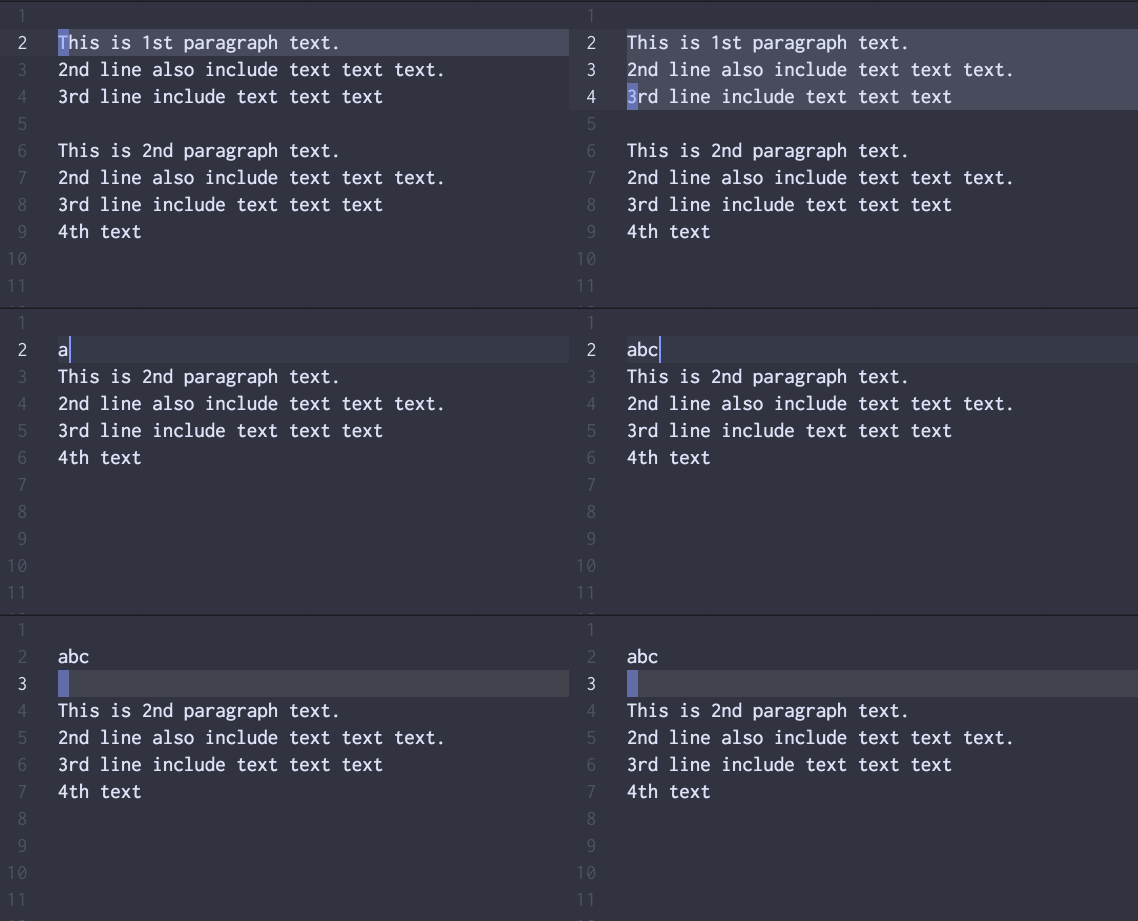
You want to replace 1st whole paragraph to abc.
You select text of paragraph using visual-mode.
-
v j j $orV j j -
dto delete selected text -
ito startinsert-mode. - Type
abcthenescape.
DONE. well done.
You can do it better by using TextObject
You can select whole paragraph by i p(inner-paragraph).
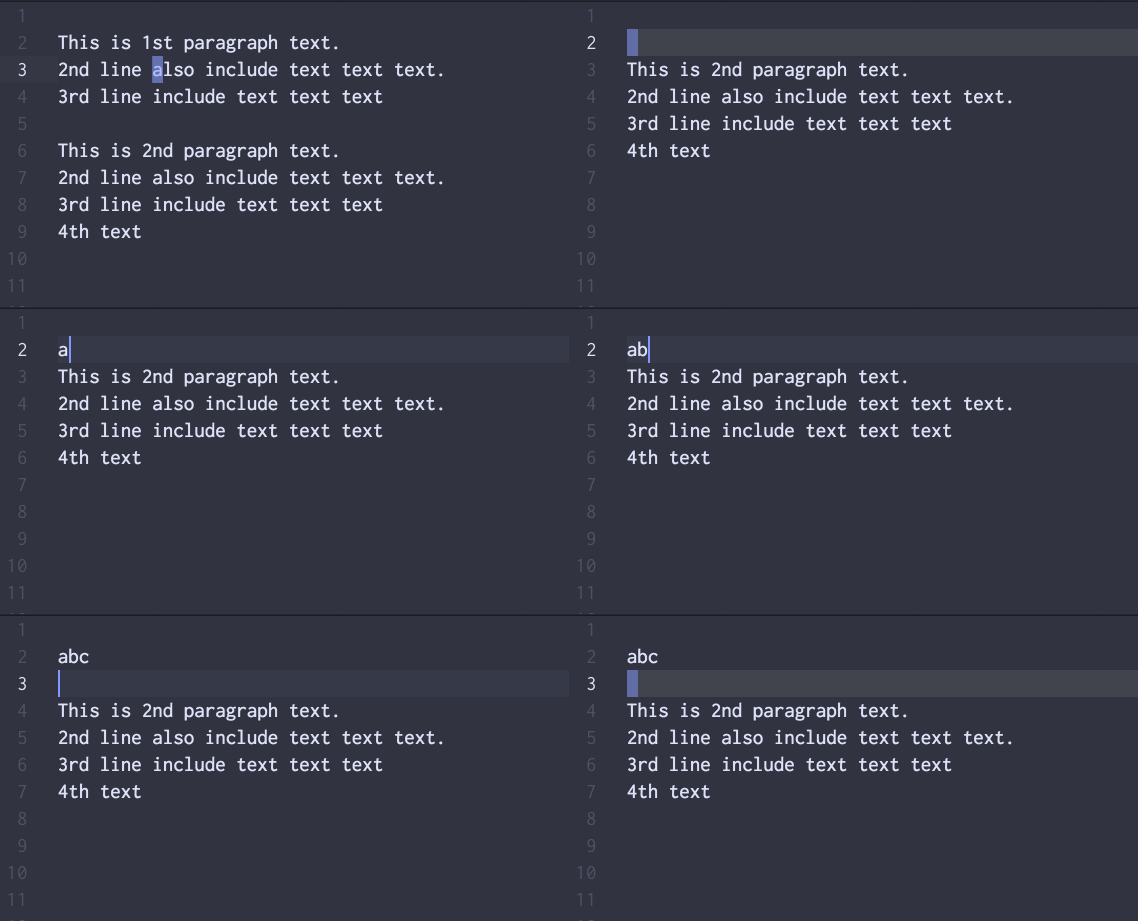
v i p-
dto delete selected text -
ito startinsert-mode. - Type
abcthenescape.
DONE. much better.
You can do it better by using Operator
Instead of delete text then start insert-mode by i, you can do it both at once by change operator.
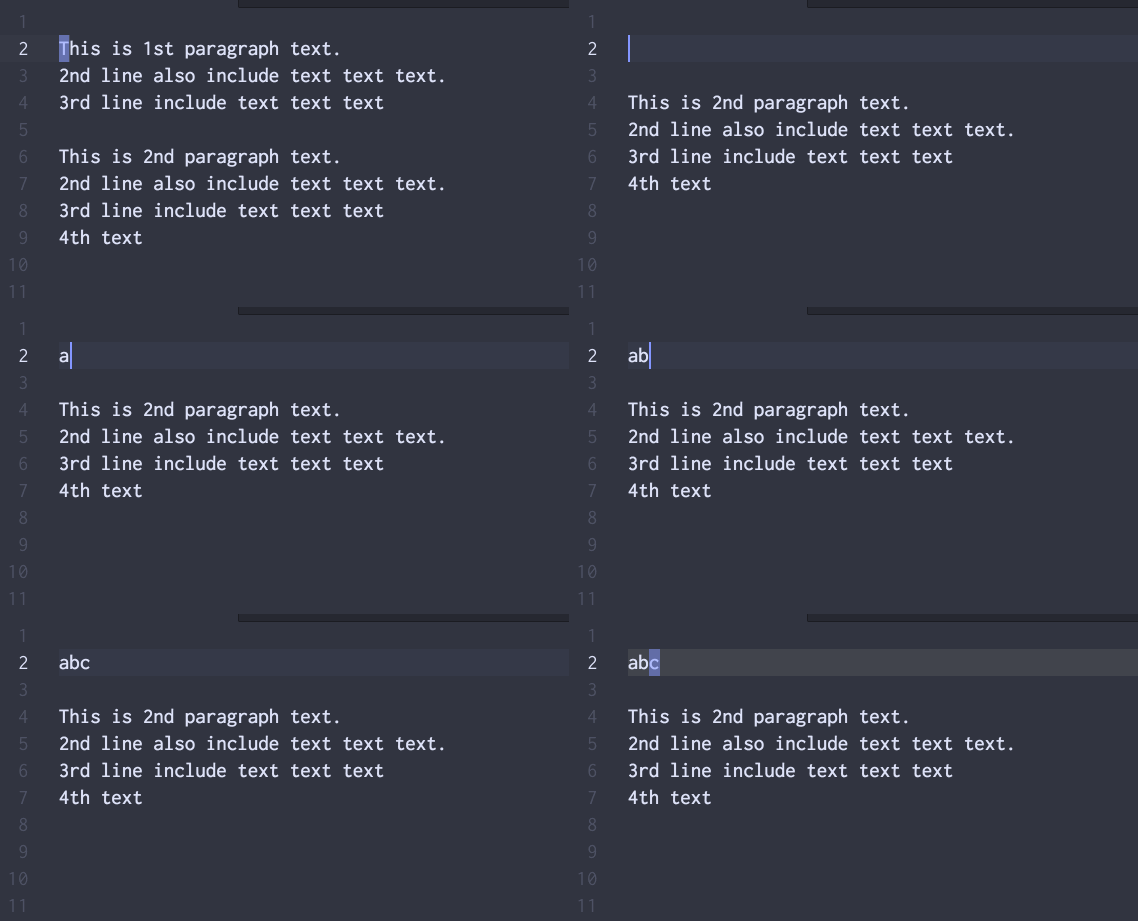
v i p-
ctochangetext. Whole paragraph wasdeletedand you are now ininsert-mode. - Type
abcthenescape.
DONE. much much better.
You can do it better by not using visual-mode
What't the benefit?
You don't have to type v or V to start visual-mode, saved one keystroke.
You edit more declaratively than imperatively.
Instead of saying "select then mutate this selection", you can say "mutate this target".
The more you get familiar with this flow(operator first then target), the less you use visual-mode.
One bonus, by telling operator first, your operation become repeatable by ..
By repeating you can apply same editing transaction to different place(different paragraph in this example).

-
c i ptochangeinner-paragraph. Operator first, then target(TextObject). - Type
abcthenescape.
DONE. Wow, the number of keystrokes reduced drastically!
And you can now apply same edit to next paragaph, move cursor to next paragraph then try . to repeat!
New requirement.
Instead of changing whole paragraph to abc, you want to replace text appears in 1st pargraph to abc
Here o operator-modifier comes in play!
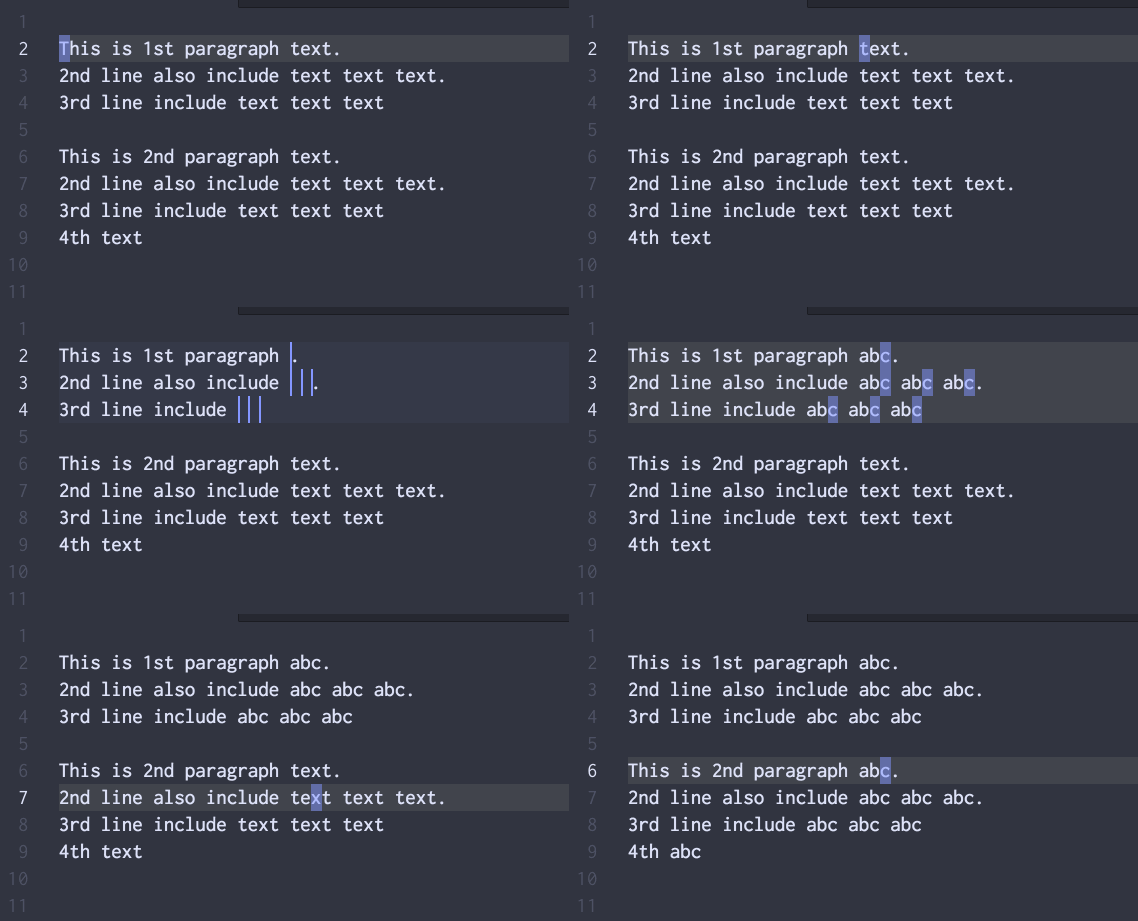
- Move cursor to
textin 1st paragraph. -
c o i p, orc o p. - Type
abcthenescape
DONE. What happened?
The o is operator-modifier, which modify operator's behavior.
The effect of o is it re-select keyword under-cursor from target area(1st paragraph in this case) under the hood.
When you use operator with occurrence, it easier to undersand by thinking in following way.
Instead of saying "Do operation on this target", you can say "Apply this operator to this target".
In this example case "Apply change operator to this paragraph" instead of saying "Change this paragraph"
When occurrence is involved, the sentence become "Apply change operator to ocurrences in this paragraph"
And off course you can repeat same edit-unit on 2nd paragraph, confirm it by . on 2nd paragraph.
New requirement.
You also want to change text and line keyword in 1st paragraph to abc.
Now you have to replace two keyword.
You can do it by using preset-occurrence.
Instead of typing o in the middle of operation, you can pre-set occurrence by g o.

- Move cursor to
textin 1st paragraph. -
g otopreset-occurrencefortextkeywrod. - Move to 2nd line
linekeywrod theng o. -
c i porc p - Type
abcthenescape
DONE. Since you pre-set occurrence keyword, your operator is applied to text and line keywrod.
The benefit is that you can choose operator after you decided occurrence keywrod.
New requirement.
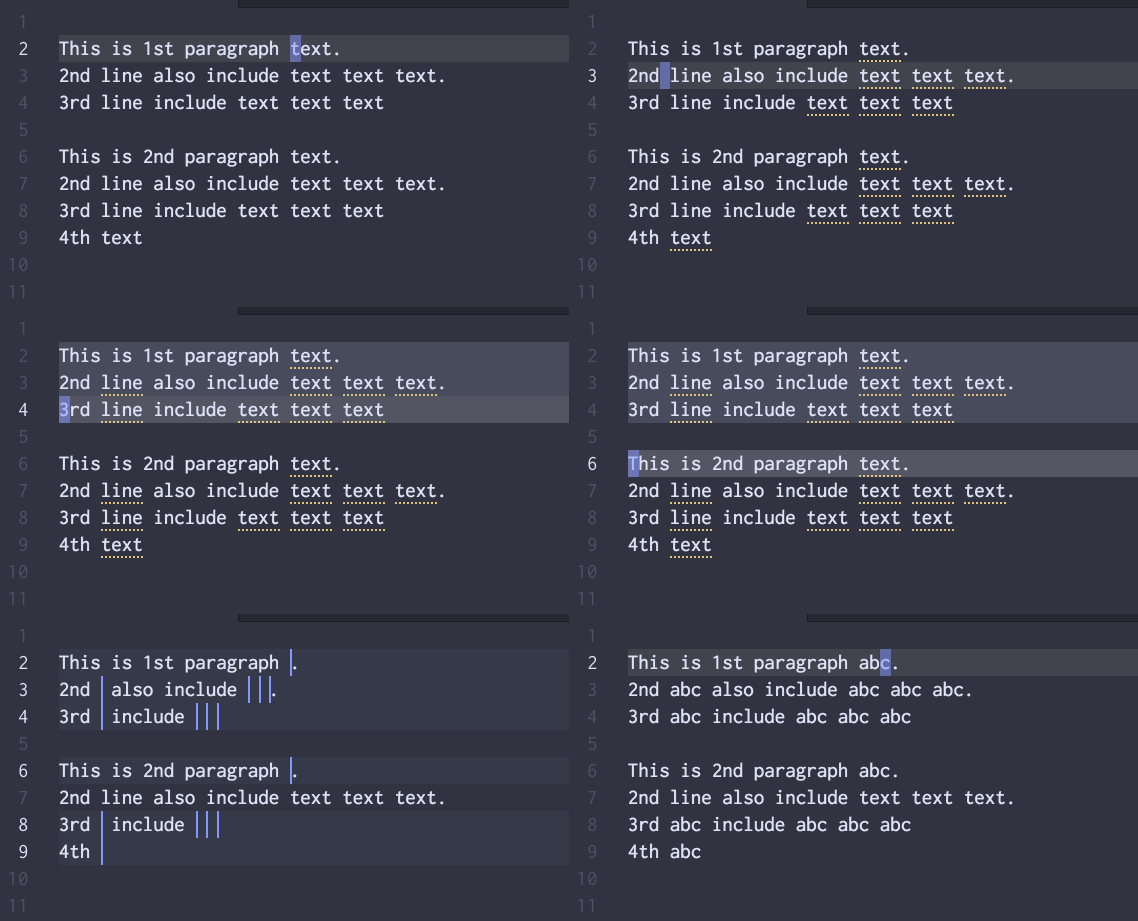
You want replace line and text in 1st paragraph and 2nd paragraph.
But you want to exclude 2nd line of 2nd pargraph, so you can not use . repeat power!!
In this case, persistent-selection helps you.
- Create
preset-occurrencefortextandlinekeyword byg o. -
v i pto select 1st pargraph thenenter. Real selection becomepersistent-selection - Move to first line of 2nd pargraph.
-
V enterto make selection persist. - Move to 3rd line of 2nd paragaph(Yes! you skipped 2nd line of paragraph-2).
-
V jto select 3rd and 4th line of paragraph-2 -
cto changepreset-occurrencekeywrod within selection(which includespersistent-selection). - Type
abc.
DONE. Well DONE.
You're now super Vimmer!!
- The Operator is verb of operation.
- The TextObject is object of operation.
- Operation is sentence in text editing in Vim.
Do practice with different verb(Operator) and different object(Motion or TextObject)!!
Train your finger, muscle memory untill you can type without thinking, untill you can transform text with minimum keystroke!!.
To compliment your understanding, I strongly recommend you to read operator, the true power of Vim by kana.
To understand advanced topic like occurrence-modifier, preset-occurrence, persistent-selection without difficulty.
You must understand very basic conept which consists the-editing-in-the-vim-world.
So please be patient to read following short conceptual explanation.
In Vim editing, there is two very important key roles which composes whole your editing. That two key roles are Operator and Target.
- Operator: Specify what to do. The verb. The verbe requiring object.
- Target: Specify where, which to do. target of operator. The object for verb.
So whole Vim editing is continuously telling vim to "Do what to which target".
- Do what is expressed by Operator
- Which target is expressed by Motion or TextObject
- Operator require target
- If operator could not get satisfied with target, it enter
operator-pendingmode to get target from user. In other words,operator-pendingmode istarget-waitingmode. - Some operator is pre-targeted so it don't have to get target from user(won't enter
operator-pending. e.gDis pre-targeted with$motion. soDis short hand ofd $. - Pre-targeted operator is good for less keystrokes but bad for flexibility, since it doesn't allow you to specify arbitrary target you want to mutate.
- Target is range of text determined by
MotionorTextObject. -
TextObjectdefines target range(startandendposition). -
Motionis essentially used to move cursor, so it only define final-target-position(destination to move). - When
Motionis used as target, current-cursor-position(here) is used asstart, you can think motion-as-target like text-object which range is from here-to-destination. -
visual-modeis special, When you type operator invisual-mode, it immediately mutatecurrent-selection, In other words all operator used invisual-modeis pre-targeted(preset-target) tocurrent-selection.
To use operator-modifier, you insert keystroke between operator and target.
Following text illustrate where or when you have to type operator-modifier.
# delete from-here-to-next-row in linewise
d  j
 ^ here

# delete from here-to-next-word in characterwise
d  w
 ^ here

# change inner-paragraph mutate whole paragraph
c i p
 ^ here
In vmp, currently three operator-modifiers are available.(ctrl-v modifier is not yet supported.)
-
v: Force target range tocharacterwiserange. -
V: Force target range tolinewiserange. -
o: Reselect occurrences of keyword within target range before applying operator.
# delete from-here-to-next-row in characterwise.(characterwise range, not whole two lines).
d v j
  ^ characterwise modifier is used.

# delete from here-to-next-word in linewise.(whole current line).
d V  w
  ^ linewise V modifier is used, target range become linewise.

# change all occurrence of keyword under-cursor appears in parapgraph.
c o i p
  ^ o modifier pick cursor-word as occurrence, re-select it appearing in paragraph.
For o modifier, OccurrenceModifier
Before starting explanation. Here is some fancy GIFs to motivate you to learn these new way of editing.


From v0.58.0.
- Allow user to set target BEFORE operator.
- Used as implicit target of operator. As like selection in
visual-modeis used as implict target. - Config:
autoSelectPersistentSelectionOnOperate(default=true) control to disable implicit targeting. - Keymap: In
visual,entertocreate-persistent-selection. - If you map
c stochange-surround, I recommend you to change it, also change other keymaps starting withc. Otherwise, you have to wait timeout after typingcwhere you can immediately mutate persistent-selection. - Following two operation do the same thing, but former target is normal selection, later target is
persistent-selection.-
V j j c: change two three line. -
V j j enter c: change three line.
-
- Work on multiple target without using mouse: set multiple target by
persistent-selectionthen mutate. - Narrow target range to include particular set of
occurrence.
From v0.58.0.
- Allow user to set occurrence BEFORE operator.
- Keymap: In
normal,visual,g ototoggle-preset-occurrence.- It add/remove
preset-occurrenceat cursor position. - When removing, it remove one by one, not all.
- It add/remove
- Keymap: In incsearch input,
cmd-otoadd-occurrence-pattern-from-search- It add
preset-occurrenceby search-pattern.
- It add
- Following two operation do the same thing, but former is
operator-modifier, later ispreset-occurrence(g o).-
c o $: change cursor-word till end-of-line. -
g o c $: change cursor-word till end-of-line.
-
- I recommend user also try to enable
stayOnTransformString,stayOnDeletefeature, it fit well withoccurrenceediting.
- preset-occurrence: Used to specify occurrence preliminarily. Instead of using
oin the middle of operator, user can presetoccurrence. - persistent-selection: Used to specify target preliminarrily. As like in
visual-mode, when you specify opearator, operator immediately apply mutation onpersistent-selectionrange.
- occurrences is now new target, not original target range like paragpraph itself.
- Instead of mutate(by
delete,change) whole paragraph, it mutate occurrences only. - As long as start or end pointion of occurrence is intersecting with target-range, vmp treat it as "target".
- This inclusive tolerance allow user to apply selected set of occurrence using
visual-modeorpersistent-selectionvery roughly.
- Operator just works on target
- Don't care if it was occurrence-reselected-target or was-normal-target
- Just mutate target-range. That's it.
Although all operator, motion, text-object is used with occurrence and preset-occurrence.
Following table list frequently used operator and target used with occurrence.
The more you familiar with these target, the more you can use occurrence naturally, fluently.
So train your finger until you can type without thinking, untill you type from your muscle memory!!
| Key | Command | Description |
|---|---|---|
C |
change-to-last-character-of-line |
Change occurr from here to EOL |
D |
delete-line |
Delete occurr from here to EOL |
| Key | Command | Description |
|---|---|---|
$ |
move-to-last-character-of-line |
Same as D, But used with o modifier |
^ |
move-to-first-character-of-line |
Opposite of $, here to HOL(Head of line) |
G |
move-to-last-line |
Here to bottom of buffer |
r |
replace |
Used with preset-occurrence and visual or persistent-selection
|
g g |
move-to-first-line |
From here to top of buffer. |
H |
move-to-top-of-screen |
From here to visible top. Top row of screen. |
L |
move-to-bottom-of-screen |
From here to visible bottom. Bottom row of screen. |
M |
move-to-middle-of-screen |
From here to visible middle. Middle row of screen. |
[ |
move-up-to-edge |
From here to upper edge |
] |
move-down-to-edge |
From here to down edge |
/ |
search |
From here to next search match. |
? |
search-backwards |
From here to previous search match. |
* |
search-current-word |
From here to next cursor-word match. |
# |
search-current-word-backwards |
From here to previous cursor-word match. |
} |
move-to-next-paragraph |
From here to next blank row. |
{ |
move-to-previous-paragraph |
From here to previous blank row. |
| Key | Command | Description |
|---|---|---|
i v |
inner-visible-area |
Visible screen are. Whole rows you can see in current screen view. |
a v |
a-visible-area |
Same as i v. No behavior diff. |
i e |
inner-entire |
Entire buffer. |
a e |
a-entire |
Same as a e. No behavior diff. |
i p |
inner-paragraph |
Consecutive non-blank rows. |
i i |
inner-indentation |
Consecuvive non-blank and equal or deeper indent level rows. |
a i |
a-indentation |
Consecutive equal or deeper indent level rows includes blank-row. |
i f |
inner-function |
Inner fucntion area, not include first row(where parameter comes) |
a f |
a-function |
Include whole function, better than i f to mutate occurrence
|
i l |
inner-current-line |
Current line text excluding leading and trailing spaces. |
i z |
inner-fold |
Inner fold, nearest enclosed fold are, not include first row. |
a z |
a-fold |
Same as i z but include first row. |
I'll explain basic usage of preset-occurrence by useing follwing simple text.
This text have 3 instance of 'text' in the whole text
This text have 3 instance of 'text' in the whole text

- Place cursor on first "text" occurrence.
-
g oto mark it aspreset-occurrence. - Try with different operator with different target. by
undoing byuon each try.
-
C:change, three 'text' occurrences on 1st line. -
d d:delete, three 'text' occurrences on 1st. -
D: alsodelete, three 'text' occurrences on 1st. -
c j:change, six 'text' occurrences on 1st line and 2nd line. -
d j:delete, six 'text' occurrences on 1st line and 2nd line. -
I jthen typegreat-:insertat start of six 'text' occurrences. six 'text' become 'great-text'. -
A jthen type-editor:insertat end of six 'text' occurrences. six 'text' become 'text-editor'.

- Move to
'text'in the middle of 1st line. -
g oto mark it aspreset-occurrence. - Try with different operator with different target. by
undoing byuon each try.
-
C:change, two 'text' occurrences appears from here to EOL on 1st line. -
c ^:change, two 'text' occurrences appears from here to HOL(head of line) on 1st line. -
v j d:delete, four 'text' occurrences with exception of first and last 'text' occurrence.

- Select
tchar invisual-mode. -
g oto set thattchar as occurrence -
d jdelete alltchar from two lines.
- This feature, preset-occurrence-by-search-pattern is available only when you enabled
incrementalSearchfrom setting view.

- Start incremental-search with
/ - Seach
\bt\w+which is pattern for word starting withtcharacter. -
cmd-o, setpreset-occurrenceto pattern-matched text. -
d jdelete everytstarting word from two line.

- Place cursor on to that parameter name.
- Mark that parameter name with
g o - Do whatever from following
-
c forc a fto change same parameter name appears in current-function in bulk. -
I forI a fto insert start-of-each occurrence, which is useful when you want to prefix it. -
A forA a fto insert start-of-each occurrence, which is useful when you want to suffix it.
When you want to consolidate some messy code which always calling similar set of method in sequence, that mean you move some code into object's method.
Let's say you want to move logic that use mutation.getPoint(xxx), mutation.getMarker(xxx) in sequence to Mutation class's method to consolidate logic.

- Copy & paste under the new method definition of
Mutationclass - Then select
mutation. -
g oto createpreset-occurrence. for textmutation. -
c forc a fto change wholemutation.occurrences in function -
this.thenescape. - Now all
mutation.is now replaced tothis.getPoint(xxx),this.getMarker(xxx)to work inthisnew context.
You want to remove line which include console.log.
- Search(
/) - Input pattern:
^.*console\.log*\n. -
cmd-osetpreset-occurrenceto line includeconsole.log -
d Gdelete every-console-log-line-from-here-to-end-of-buffer.
The point is 2nd step, use regex pattern to match whole line.(use ^ and \n)
cmd-d is mapped to find-and-replace:select-next.
Which select next occurrences of cursor-word one by one.
cmd-k cmd-d skips current occurrence then select next, which is good to skip one occurrence, but not good when you want skip more.
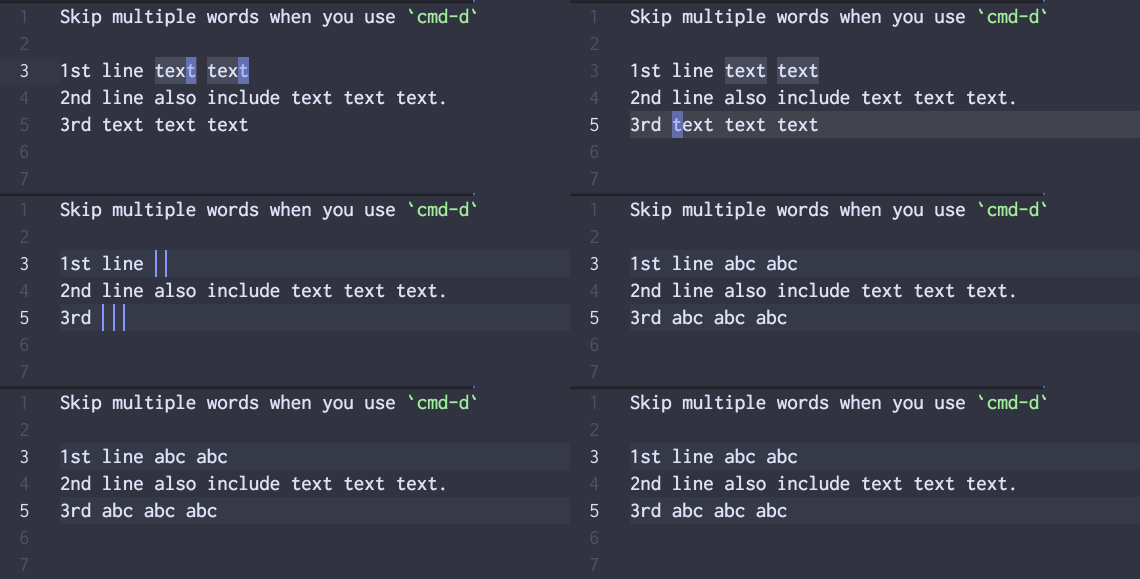
Using persistent-selection, skipping words become very easy.
1st line text text
2nd line also include text text text.
3rd text text text
- Place cursor to first
textin 1st line -
cmd-dtwice to select nexttextin 1st line, but you want to skip 2nd line'stextoccurrence. - Instead of type
cmd-k cmd-dthree times, typeenter, which convert real selection topersistent-selection - Move to 3rd line by
2 j 0thencmd-dthree times to select threetextin 3rd line. - Then do whatever you want.
persistent-selectionis treated like a real selection. Operator operate onpersistent-selectionif it exists in buffer.
-
cto changetextexcepttextin 2nd line. -
dto deletetextexcepttextin 2nd line. -
g Uto upcasetextexcepttextin 2nd line. -
s (to to maketextto(text)by surround(keymap is just an example when you mapstosurround).